PowerDesigner表名、列名大小写转换
PowerDesigner 版本号为15.2.0.3042
方法一:不编写vbs
PowerDesigner大小写转换,不用写vbscript,直接利用软件提供的功能即可完成转换,只需要选择
转换表名:菜单——Tools\Model Options...\Naming Convertion\Table下

转换字段:菜单——Tools\Model Options...\Naming convertion\Column下
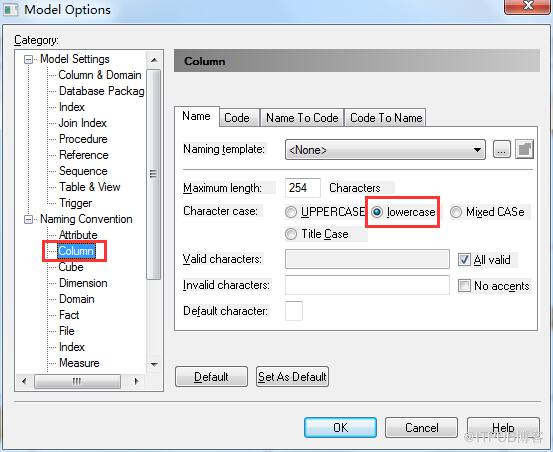
方法二:编写vbs
在PowerDesigner中PowerDesigner->Tools->Execute Commands->Edit/Run Scripts(Ctrl Shift X),然后将下面的脚本粘贴进去,并运行,即可。
点击(此处)折叠或打开
-
'大小写转换,目标为大写
-
Option Explicit
-
ValidationMode = True
-
InteractiveMode = im_Batch
-
Dim mdl ' the current model
-
'取得当前Model
-
Set mdl = ActiveModel
-
If (mdl Is Nothing) Then
-
MsgBox "There is no current Model"
-
ElseIf Not mdl.IsKindOf(PdPDM.cls_Model) Then
-
MsgBox "The current model is not an Physical Data model."
-
Else
-
ProcessFolder mdl
-
End If
-
-
Private sub ProcessFolder(folder)
-
'处理表
-
Dim Tab
-
for each Tab in folder.tables
-
tab.code = UCase(tab.code)
-
'修改字段名
-
Dim col
-
for each col in tab.columns
-
col.code= UCase(col.code)
-
next
-
'修改索引名
-
Dim idx
-
for each idx in tab.indexes
-
idx.code= UCase(idx.code)
-
next
-
'修改主键名
-
Dim key
-
for each key in tab.keys
-
key.code= UCase(key.code)
-
next
-
next
-
' 同理处理视图
-
' Dim view
-
' for each view in folder.Views
-
' if not view.isShortcut then
-
' view.code = view.name
-
' end if
-
' next
-
' go into the sub-packages
-
Dim f ' running folder
-
For Each f In folder.Packages
-
if not f.IsShortcut then
-
ProcessFolder f
-
end if
-
Next
- end sub
来自 “ ITPUB博客 ” ,链接:https://blog.itpub.net/29439655/viewspace-2103119/ ,如需转载,请注明出处,否则将追究法律责任。

请登录后发表评论
登录
全部评论
