RMAN异机恢复
实验将192.168.1.1 Master主机的一个Rman备份传输到192.168.1.2 SlaveOne主机进行恢复
模拟迁移数据库 或者 遇到极端的问题需要异机恢复的场景
1.备份192.168.1.1 Master原库
[oracle@master ~]$ rman target /
Recovery Manager: Release 11.2.0.3.0 - Production on Wed Oct 15 11:37:29 2014
Copyright (c) 1982, 2011, Oracle and/or its affiliates. All rights reserved.
connected to target database: ORCL (DBID=1388624007)
RMAN> backup database;
Starting backup at 15-OCT-14
using target database control file instead of recovery catalog
allocated channel: ORA_DISK_1
channel ORA_DISK_1: SID=14 device type=DISK
channel ORA_DISK_1: starting full datafile backup set
channel ORA_DISK_1: specifying datafile(s) in backup set
input datafile file number=00004 name=/home/oracle/app/oracle/oradata/orcl/users01.dbf
input datafile file number=00001 name=/home/oracle/app/oracle/oradata/orcl/system01.dbf
input datafile file number=00002 name=/home/oracle/app/oracle/oradata/orcl/sysaux01.dbf
input datafile file number=00005 name=/home/oracle/app/oracle/oradata/orcl/example01.dbf
input datafile file number=00003 name=/home/oracle/app/oracle/oradata/orcl/undotbs01.dbf
channel ORA_DISK_1: starting piece 1 at 15-OCT-14
channel ORA_DISK_1: finished piece 1 at 15-OCT-14
piece handle=/home/oracle/app/oracle/fast_recovery_area/ORCL/backupset/2014_10_15/o1_mf_nnndf_TAG20141015T113733_b3vv0b34_.bkp tag=TAG20141015T113733 comment=NONE
channel ORA_DISK_1: backup set complete, elapsed time: 00:01:25
channel ORA_DISK_1: starting full datafile backup set
channel ORA_DISK_1: specifying datafile(s) in backup set
including current control file in backup set
including current SPFILE in backup set
channel ORA_DISK_1: starting piece 1 at 15-OCT-14
channel ORA_DISK_1: finished piece 1 at 15-OCT-14
piece handle=/home/oracle/app/oracle/fast_recovery_area/ORCL/backupset/2014_10_15/o1_mf_ncsnf_TAG20141015T113733_b3vv2o0l_.bkp tag=TAG20141015T113733 comment=NONE
channel ORA_DISK_1: backup set complete, elapsed time: 00:00:02
Finished backup at 15-OCT-14
2.将192.168.1.1 Master原库的备份传输到192.168.1.2 SlaveOne目标数据库
[oracle@master backupset]$ scp -r 2014_10_15/ oracle@192.168.1.2:/tmp
3.在192.168.1.2 SlaveOne目标数据库恢复spfile
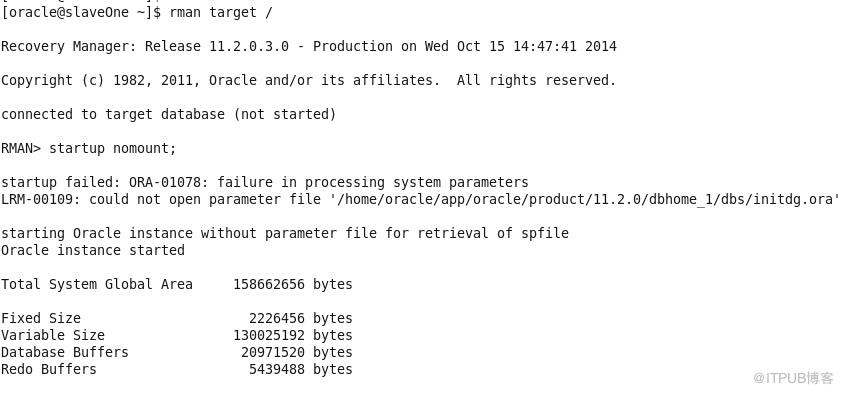
首先,使用Rman挂载数据库到nomount状态
Rman在没有参数文件的情况下,也可以启动一个dummy实例用于恢复.
在SlaveOne目标数据库查看备份文件
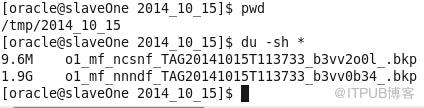
可以看到
9.6M的o1_mf_ncsnf_TAG20141015T113733_b3vv2o0l_.bkp文件应该是备份的控制文件和spfile
1.9G的o1_mf_nnndf_TAG20141015T113733_b3vv0b34_.bkp文件应该是备份的数据文件。
其中192.168.1.2 SlaveOne目标数据库仅安装了数据库软件而没有创建任何的实例。
设置SlaveOne的SID和原库一致
将spfile恢复到$ORACLE_HOME/dbs
[oracle@slaveOne 2014_10_15]$ rman target /
Recovery Manager: Release 11.2.0.3.0 - Production on Wed Oct 15 15:07:30 2014
Copyright (c) 1982, 2011, Oracle and/or its affiliates. All rights reserved.
connected to target database: DUMMY (not mounted)
RMAN> restore spfile to '/home/oracle/app/oracle/product/11.2.0/dbhome_1/dbs/spfileorcl.ora' from '/tmp/2014_10_15/o1_mf_ncsnf_TAG20141015T113733_b3vv2o0l_.bkp';
Starting restore at 15-OCT-14
using target database control file instead of recovery catalog
allocated channel: ORA_DISK_1
channel ORA_DISK_1: SID=429 device type=DISK
channel ORA_DISK_1: restoring spfile from AUTOBACKUP /tmp/2014_10_15/o1_mf_ncsnf_TAG20141015T113733_b3vv2o0l_.bkp
channel ORA_DISK_1: SPFILE restore from AUTOBACKUP complete
Finished restore at 15-OCT-14
4.根据spfile创建相应的目录
先停止dummy实例,然后使用恢复的spfileorcl.ora参数文件启动实例
然后创建pfile
SQL> create pfile='/tmp/pfileorcl.ora' from spfile;
Starting restore at 15-OCT-14
using target database control file instead of recovery catalog
allocated channel: ORA_DISK_1
channel ORA_DISK_1: SID=63 device type=DISK
channel ORA_DISK_1: restoring control file
channel ORA_DISK_1: restore complete, elapsed time: 00:00:01
output file name=/home/oracle/app/oracle/oradata/orcl/control01.ctl
output file name=/home/oracle/app/oracle/fast_recovery_area/orcl/control02.ctl
Finished restore at 15-OCT-14
控制文件已经恢复到了参数文件中记录的位置。
6.注册catalog,还原数据库
因为控制文件已经恢复,数据库已经可以启动到mount状态
RMAN> alter database mount;
database mounted
released channel: ORA_DISK_1
注册catalog,路径/tmp/2014_10_15/最后的/分隔符一定要有
RMAN> catalog start with '/tmp/2014_10_15/';
searching for all files that match the pattern /tmp/2014_10_15/
List of Files Unknown to the Database
=====================================
File Name: /tmp/2014_10_15/o1_mf_nnndf_TAG20141015T113733_b3vv0b34_.bkp
File Name: /tmp/2014_10_15/o1_mf_ncsnf_TAG20141015T113733_b3vv2o0l_.bkp
Do you really want to catalog the above files (enter YES or NO)? yes
cataloging files...
cataloging done
List of Cataloged Files
=======================
File Name: /tmp/2014_10_15/o1_mf_nnndf_TAG20141015T113733_b3vv0b34_.bkp
File Name: /tmp/2014_10_15/o1_mf_ncsnf_TAG20141015T113733_b3vv2o0l_.bkp
最后还原数据库
RMAN> restore database;
Starting restore at 15-OCT-14
using channel ORA_DISK_1
channel ORA_DISK_1: starting datafile backup set restore
channel ORA_DISK_1: specifying datafile(s) to restore from backup set
channel ORA_DISK_1: restoring datafile 00001 to /home/oracle/app/oracle/oradata/orcl/system01.dbf
channel ORA_DISK_1: restoring datafile 00002 to /home/oracle/app/oracle/oradata/orcl/sysaux01.dbf
channel ORA_DISK_1: restoring datafile 00003 to /home/oracle/app/oracle/oradata/orcl/undotbs01.dbf
channel ORA_DISK_1: restoring datafile 00004 to /home/oracle/app/oracle/oradata/orcl/users01.dbf
channel ORA_DISK_1: restoring datafile 00005 to /home/oracle/app/oracle/oradata/orcl/example01.dbf
channel ORA_DISK_1: reading from backup piece /tmp/2014_10_15/o1_mf_nnndf_TAG20141015T113733_b3vv0b34_.bkp
channel ORA_DISK_1: piece handle=/tmp/2014_10_15/o1_mf_nnndf_TAG20141015T113733_b3vv0b34_.bkp tag=TAG20141015T113733
channel ORA_DISK_1: restored backup piece 1
channel ORA_DISK_1: restore complete, elapsed time: 00:01:45
Finished restore at 15-OCT-14
恢复数据库,因为根本就没有redolog所以报错
RMAN> recover database;
Starting recover at 15-OCT-14
using target database control file instead of recovery catalog
allocated channel: ORA_DISK_1
channel ORA_DISK_1: SID=63 device type=DISK
starting media recovery
unable to find archived log
archived log thread=1 sequence=41
RMAN-00571: ===========================================================
RMAN-00569: =============== ERROR MESSAGE STACK FOLLOWS ===============
RMAN-00571: ===========================================================
RMAN-03002: failure of recover command at 10/15/2014 15:30:45
RMAN-06054: media recovery requesting unknown archived log for thread 1 with sequence 41 and starting SCN of 1194390
最后使用resetlogs方式打开数据库
SQL> startup mount;
ORACLE instance started.
Total System Global Area 784998400 bytes
Fixed Size 2232472 bytes
Variable Size 473960296 bytes
Database Buffers 301989888 bytes
Redo Buffers 6815744 bytes
Database mounted.
SQL> alter database open resetlogs;
Database altered.
RMAN异机恢复完成。
参考:
http://jiujian.blog.51cto.com/444665/1085478
实验将192.168.1.1 Master主机的一个Rman备份传输到192.168.1.2 SlaveOne主机进行恢复
模拟迁移数据库 或者 遇到极端的问题需要异机恢复的场景
1.备份192.168.1.1 Master原库
[oracle@master ~]$ rman target /
Recovery Manager: Release 11.2.0.3.0 - Production on Wed Oct 15 11:37:29 2014
Copyright (c) 1982, 2011, Oracle and/or its affiliates. All rights reserved.
connected to target database: ORCL (DBID=1388624007)
RMAN> backup database;
Starting backup at 15-OCT-14
using target database control file instead of recovery catalog
allocated channel: ORA_DISK_1
channel ORA_DISK_1: SID=14 device type=DISK
channel ORA_DISK_1: starting full datafile backup set
channel ORA_DISK_1: specifying datafile(s) in backup set
input datafile file number=00004 name=/home/oracle/app/oracle/oradata/orcl/users01.dbf
input datafile file number=00001 name=/home/oracle/app/oracle/oradata/orcl/system01.dbf
input datafile file number=00002 name=/home/oracle/app/oracle/oradata/orcl/sysaux01.dbf
input datafile file number=00005 name=/home/oracle/app/oracle/oradata/orcl/example01.dbf
input datafile file number=00003 name=/home/oracle/app/oracle/oradata/orcl/undotbs01.dbf
channel ORA_DISK_1: starting piece 1 at 15-OCT-14
channel ORA_DISK_1: finished piece 1 at 15-OCT-14
piece handle=/home/oracle/app/oracle/fast_recovery_area/ORCL/backupset/2014_10_15/o1_mf_nnndf_TAG20141015T113733_b3vv0b34_.bkp tag=TAG20141015T113733 comment=NONE
channel ORA_DISK_1: backup set complete, elapsed time: 00:01:25
channel ORA_DISK_1: starting full datafile backup set
channel ORA_DISK_1: specifying datafile(s) in backup set
including current control file in backup set
including current SPFILE in backup set
channel ORA_DISK_1: starting piece 1 at 15-OCT-14
channel ORA_DISK_1: finished piece 1 at 15-OCT-14
piece handle=/home/oracle/app/oracle/fast_recovery_area/ORCL/backupset/2014_10_15/o1_mf_ncsnf_TAG20141015T113733_b3vv2o0l_.bkp tag=TAG20141015T113733 comment=NONE
channel ORA_DISK_1: backup set complete, elapsed time: 00:00:02
Finished backup at 15-OCT-14
2.将192.168.1.1 Master原库的备份传输到192.168.1.2 SlaveOne目标数据库
[oracle@master backupset]$ scp -r 2014_10_15/ oracle@192.168.1.2:/tmp
3.在192.168.1.2 SlaveOne目标数据库恢复spfile
首先,使用Rman挂载数据库到nomount状态
Rman在没有参数文件的情况下,也可以启动一个dummy实例用于恢复.
在SlaveOne目标数据库查看备份文件
可以看到
9.6M的o1_mf_ncsnf_TAG20141015T113733_b3vv2o0l_.bkp文件应该是备份的控制文件和spfile
1.9G的o1_mf_nnndf_TAG20141015T113733_b3vv0b34_.bkp文件应该是备份的数据文件。
其中192.168.1.2 SlaveOne目标数据库仅安装了数据库软件而没有创建任何的实例。
设置SlaveOne的SID和原库一致
将spfile恢复到$ORACLE_HOME/dbs
[oracle@slaveOne 2014_10_15]$ rman target /
Recovery Manager: Release 11.2.0.3.0 - Production on Wed Oct 15 15:07:30 2014
Copyright (c) 1982, 2011, Oracle and/or its affiliates. All rights reserved.
connected to target database: DUMMY (not mounted)
RMAN> restore spfile to '/home/oracle/app/oracle/product/11.2.0/dbhome_1/dbs/spfileorcl.ora' from '/tmp/2014_10_15/o1_mf_ncsnf_TAG20141015T113733_b3vv2o0l_.bkp';
Starting restore at 15-OCT-14
using target database control file instead of recovery catalog
allocated channel: ORA_DISK_1
channel ORA_DISK_1: SID=429 device type=DISK
channel ORA_DISK_1: restoring spfile from AUTOBACKUP /tmp/2014_10_15/o1_mf_ncsnf_TAG20141015T113733_b3vv2o0l_.bkp
channel ORA_DISK_1: SPFILE restore from AUTOBACKUP complete
Finished restore at 15-OCT-14
先停止dummy实例,然后使用恢复的spfileorcl.ora参数文件启动实例
然后创建pfile
SQL> create pfile='/tmp/pfileorcl.ora' from spfile;
查看pfile内容
orcl.__db_cache_size=301989888
orcl.__java_pool_size=4194304
orcl.__large_pool_size=4194304
orcl.__oracle_base='/home/oracle/app/oracle'#ORACLE_BASE set from environment
orcl.__pga_aggregate_target=318767104
orcl.__sga_target=469762048
orcl.__shared_io_pool_size=0
orcl.__shared_pool_size=146800640
orcl.__streams_pool_size=0
*.audit_file_dest='/home/oracle/app/oracle/admin/orcl/adump'
*.audit_trail='db'
*.compatible='11.2.0.0.0'
*.control_files='/home/oracle/app/oracle/oradata/orcl/control01.ctl','/home/oracle/app/oracle/fast_recovery_area/orcl/control02.ctl'
*.db_block_size=8192
*.db_domain=''
*.db_name='orcl'
*.db_recovery_file_dest='/home/oracle/app/oracle/fast_recovery_area'
*.db_recovery_file_dest_size=4322230272
*.diagnostic_dest='/home/oracle/app/oracle'
*.dispatchers='(PROTOCOL=TCP) (SERVICE=orclXDB)'
*.log_archive_format='%t_%s_%r.dbf'
*.log_checkpoints_to_alert=TRUE
*.memory_target=786432000
*.open_cursors=300
*.processes=150
*.remote_login_passwordfile='EXCLUSIVE'
*.undo_tablespace='UNDOTBS1'
在pfile中出现的目录路径都需要创建(或者修改pfile)
mkdir -p /home/oracle/app/oracle/admin/orcl/adump
mkdir -p /home/oracle/app/oracle/oradata/orcl/
mkdir -p /home/oracle/app/oracle/fast_recovery_area/orcl/
5.恢复控制文件
RMAN> restore controlfile from '/tmp/2014_10_15/o1_mf_ncsnf_TAG20141015T113733_b3vv2o0l_.bkp';orcl.__db_cache_size=301989888
orcl.__java_pool_size=4194304
orcl.__large_pool_size=4194304
orcl.__oracle_base='/home/oracle/app/oracle'#ORACLE_BASE set from environment
orcl.__pga_aggregate_target=318767104
orcl.__sga_target=469762048
orcl.__shared_io_pool_size=0
orcl.__shared_pool_size=146800640
orcl.__streams_pool_size=0
*.audit_file_dest='/home/oracle/app/oracle/admin/orcl/adump'
*.audit_trail='db'
*.compatible='11.2.0.0.0'
*.control_files='/home/oracle/app/oracle/oradata/orcl/control01.ctl','/home/oracle/app/oracle/fast_recovery_area/orcl/control02.ctl'
*.db_block_size=8192
*.db_domain=''
*.db_name='orcl'
*.db_recovery_file_dest='/home/oracle/app/oracle/fast_recovery_area'
*.db_recovery_file_dest_size=4322230272
*.diagnostic_dest='/home/oracle/app/oracle'
*.dispatchers='(PROTOCOL=TCP) (SERVICE=orclXDB)'
*.log_archive_format='%t_%s_%r.dbf'
*.log_checkpoints_to_alert=TRUE
*.memory_target=786432000
*.open_cursors=300
*.processes=150
*.remote_login_passwordfile='EXCLUSIVE'
*.undo_tablespace='UNDOTBS1'
mkdir -p /home/oracle/app/oracle/admin/orcl/adump
mkdir -p /home/oracle/app/oracle/oradata/orcl/
mkdir -p /home/oracle/app/oracle/fast_recovery_area/orcl/
5.恢复控制文件
Starting restore at 15-OCT-14
using target database control file instead of recovery catalog
allocated channel: ORA_DISK_1
channel ORA_DISK_1: SID=63 device type=DISK
channel ORA_DISK_1: restoring control file
channel ORA_DISK_1: restore complete, elapsed time: 00:00:01
output file name=/home/oracle/app/oracle/oradata/orcl/control01.ctl
output file name=/home/oracle/app/oracle/fast_recovery_area/orcl/control02.ctl
Finished restore at 15-OCT-14
控制文件已经恢复到了参数文件中记录的位置。
6.注册catalog,还原数据库
因为控制文件已经恢复,数据库已经可以启动到mount状态
RMAN> alter database mount;
database mounted
released channel: ORA_DISK_1
注册catalog,路径/tmp/2014_10_15/最后的/分隔符一定要有
RMAN> catalog start with '/tmp/2014_10_15/';
searching for all files that match the pattern /tmp/2014_10_15/
List of Files Unknown to the Database
=====================================
File Name: /tmp/2014_10_15/o1_mf_nnndf_TAG20141015T113733_b3vv0b34_.bkp
File Name: /tmp/2014_10_15/o1_mf_ncsnf_TAG20141015T113733_b3vv2o0l_.bkp
Do you really want to catalog the above files (enter YES or NO)? yes
cataloging files...
cataloging done
List of Cataloged Files
=======================
File Name: /tmp/2014_10_15/o1_mf_nnndf_TAG20141015T113733_b3vv0b34_.bkp
File Name: /tmp/2014_10_15/o1_mf_ncsnf_TAG20141015T113733_b3vv2o0l_.bkp
RMAN> restore database;
Starting restore at 15-OCT-14
using channel ORA_DISK_1
channel ORA_DISK_1: starting datafile backup set restore
channel ORA_DISK_1: specifying datafile(s) to restore from backup set
channel ORA_DISK_1: restoring datafile 00001 to /home/oracle/app/oracle/oradata/orcl/system01.dbf
channel ORA_DISK_1: restoring datafile 00002 to /home/oracle/app/oracle/oradata/orcl/sysaux01.dbf
channel ORA_DISK_1: restoring datafile 00003 to /home/oracle/app/oracle/oradata/orcl/undotbs01.dbf
channel ORA_DISK_1: restoring datafile 00004 to /home/oracle/app/oracle/oradata/orcl/users01.dbf
channel ORA_DISK_1: restoring datafile 00005 to /home/oracle/app/oracle/oradata/orcl/example01.dbf
channel ORA_DISK_1: reading from backup piece /tmp/2014_10_15/o1_mf_nnndf_TAG20141015T113733_b3vv0b34_.bkp
channel ORA_DISK_1: piece handle=/tmp/2014_10_15/o1_mf_nnndf_TAG20141015T113733_b3vv0b34_.bkp tag=TAG20141015T113733
channel ORA_DISK_1: restored backup piece 1
channel ORA_DISK_1: restore complete, elapsed time: 00:01:45
Finished restore at 15-OCT-14
恢复数据库,因为根本就没有redolog所以报错
RMAN> recover database;
Starting recover at 15-OCT-14
using target database control file instead of recovery catalog
allocated channel: ORA_DISK_1
channel ORA_DISK_1: SID=63 device type=DISK
starting media recovery
unable to find archived log
archived log thread=1 sequence=41
RMAN-00571: ===========================================================
RMAN-00569: =============== ERROR MESSAGE STACK FOLLOWS ===============
RMAN-00571: ===========================================================
RMAN-03002: failure of recover command at 10/15/2014 15:30:45
RMAN-06054: media recovery requesting unknown archived log for thread 1 with sequence 41 and starting SCN of 1194390
SQL> startup mount;
ORACLE instance started.
Total System Global Area 784998400 bytes
Fixed Size 2232472 bytes
Variable Size 473960296 bytes
Database Buffers 301989888 bytes
Redo Buffers 6815744 bytes
Database mounted.
SQL> alter database open resetlogs;
Database altered.
参考:
http://jiujian.blog.51cto.com/444665/1085478
来自 “ ITPUB博客 ” ,链接:https://blog.itpub.net/29254281/viewspace-1299619/ ,如需转载,请注明出处,否则将追究法律责任。
上一篇:
Oracle 查询权限角色
下一篇:
使用ORA_ROWSCN实现乐观锁定

请登录后发表评论
登录
全部评论
