Oracle DBA-08_Oracle 19c RAC升级RU从19.3升级到19.12(包含OJVM升级)安装配置指导书
Oracle 19c RAC升级RU从19.3升级到19.12(包含OJVM升级)安装配置指导书(opatchauto滚动升级方式)1 升级说明2 具体升级过程2.1 当前环境2.2 检查OPatch版本及升级2.2.1 检查OPatch2.2.1.1 grid用户检查2.2.1.2 oracle用户检查2.2.2 升级OPatch2.2.2.1 grid用户升级OPatch2.2.2.2 oracle用户升级OPatch2.3 验证Oracle Inventory的有效性2.3.1 grid用户2.3.2 oracle用户2.4 下载并上传19.12的RU2.5 检查Patch是否冲突2.5.1 grid用户检查Patch2.5.2 oracle用户检查Patch2.6 检查系统空间2.6.1 grid用户检查2.6.1.1 创建/tmp/patch_list_gihome.txt 文件2.6.1.2 运行opatch命令检查GI HOME下是否有足够的空间2.6.2 oracle用户检查2.6.2.1 创建文件/tmp/patch_list_dbhome.txt2.6.2.2 运行opatch命令检查DB HOME下是否有足够的空间2.7 安装前分析2.8 执行opatchauto工具应用RU2.8.1 打GI的RU补丁2.8.1.1 先在节点1打GI的RU补丁2.8.1.2 再在节点2打GI的RU补丁2.8.2 打DB的RU补丁2.8.2.1 先在节点1打DB的RU补丁2.8.2.2 再在节点2打DB的RU补丁2.9 打OJVM补丁2.9.1 检查OJVM Patch是否有冲突2.9.1.1 节点1的oracle用户检查2.9.1.2 节点2的oracle用户检查2.9.2 打OJVM补丁2.9.2.1 先在节点1打OJVM补丁2.9.2.2 再在节点2打OJVM补丁2.9.3 检查OJVM补丁是否安装成功2.9.3.1 节点1检查2.9.3.2 节点2检查2.9.4 加载修改SQL文件到数据库2.10 验证升级版本2.10.1 节点1验证2.10.1.1 grid用户验证2.10.1.2 oracle用户验证2.10.2 节点2验证2.10.2.1 grid用户验证2.10.2.2 oracle用户验证2.11 小结说明
1 升级说明
从MOS上我们可以看到19.12的RU有GI和DB 2个版本,但从GI Patch的readme上看,GI的Patch已经包含了DB HOME和GI HOME的补丁,只需要用root用户执行opatchauto命令打GI的补丁即可。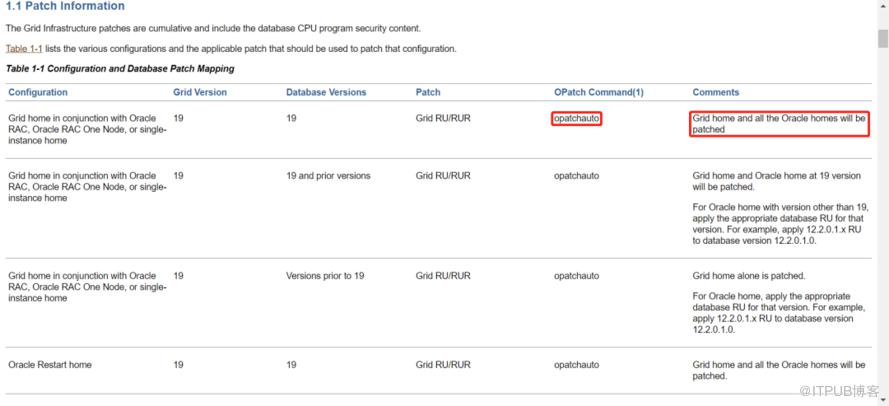
根据官方手册的说明,对于RU的升级,可以采用滚动升级的方式进行。依次在每个节点执行,不能同时在2个节点执行。
2 具体升级过程
2.1 当前环境
注意:两节点都操作,以节点1为例。
[root@jsmxdb01 ~]# su - grid
上一次登录:二 8月 24 09:20:18 CST 2021pts/1 上
[grid@jsmxdb01 ~]$
[grid@jsmxdb01 ~]$ crsctl query crs softwareversion
Oracle Clusterware version on node [jsmxdb01] is [19.0.0.0.0]
[grid@jsmxdb01 ~]$
[grid@jsmxdb01 ~]$ crsctl query crs releaseversion
Oracle High Availability Services release version on the local node is [19.0.0.0.0]
[grid@jsmxdb01 ~]$
[grid@jsmxdb01 ~]$ crsctl check crs
CRS-4638: Oracle High Availability Services is online
CRS-4537: Cluster Ready Services is online
CRS-4529: Cluster Synchronization Services is online
CRS-4533: Event Manager is online
[grid@jsmxdb01 ~]$
[grid@jsmxdb01 ~]$ $ORACLE_HOME/OPatch/opatch lspatches
29585399;OCW RELEASE UPDATE 19.3.0.0.0 (29585399)
29517247;ACFS RELEASE UPDATE 19.3.0.0.0 (29517247)
29517242;Database Release Update : 19.3.0.0.190416 (29517242)
29401763;TOMCAT RELEASE UPDATE 19.0.0.0.0 (29401763)

OPatch succeeded.
[grid@jsmxdb01 ~]$
2.2 检查OPatch版本及升级
安装19.12的RU,OPatch的版本必须大于12.2.0.1.25。最新版本的Opatch可以从MOS 6880880上下载。
注意:两节点都操作,以节点1为例。
2.2.1 检查OPatch
2.2.1.1 grid用户检查
[grid@jsmxdb01 ~]$ $ORACLE_HOME/OPatch/opatch version
OPatch Version: 12.2.0.1.17

OPatch succeeded.
[grid@jsmxdb01 ~]$
2.2.1.2 oracle用户检查
[oracle@jsmxdb01 ~]$ $ORACLE_HOME/OPatch/opatch version
OPatch Version: 12.2.0.1.17

OPatch succeeded.
[oracle@jsmxdb01 ~]$
2.2.2 升级OPatch
因为opatch低版本打补丁的时候有bug,所以我这里直接将OPatch升级到最新的12.2.0.1.25。
说明:分别在两个节点更新grid及oracle用户的OPatch版本。
2.2.2.1 grid用户升级OPatch
更新OPatch版本,OPatch直接解压缩替换就可以了。
root用户将grid用户下的原OPatch目录改名;
[root@jsmxdb01 ~]# mv /grid/app/product/19.3/grid/OPatch /grid/app/product/19.3/grid/OPatch_bak
[root@jsmxdb01 ~]#
修改grid用户的$ORACLE_HOME属主为grid;
[root@jsmxdb01 ~]# ll /grid/app/product/19.3/
总用量 4
drwxr-xr-x 87 root oinstall 4096 8月  24 10:12 grid
[root@jsmxdb01 ~]#
[root@jsmxdb01 ~]# chown grid:oinstall /grid/app/product/19.3/grid
[root@jsmxdb01 ~]#
[root@jsmxdb01 ~]# ll /grid/app/product/19.3/
总用量 4
drwxr-xr-x 87 grid oinstall 4096 8月  24 10:12 grid
[root@jsmxdb01 ~]#
上传p6880880_190000_Linux-x86-64.zip到grid用户的$ORACLE_HOME目录下,解压替换;
[root@jsmxdb01 ~]# su - grid
上一次登录:二 8月 24 09:55:58 CST 2021
[grid@jsmxdb01 ~]$
[grid@jsmxdb01 ~]$ cd $ORACLE_HOME
[grid@jsmxdb01 grid]$
[grid@jsmxdb01 grid]$ ll p6880880_190000_Linux-x86-64.zip
-rw-r----- 1 grid oinstall 121981878 Aug 23 09:55 p6880880_190000_Linux-x86-64.zip
[grid@jsmxdb01 grid]$
[grid@jsmxdb01 grid]$ unzip p6880880_190000_Linux-x86-64.zip
...........
  inflating: OPatch/modules/thirdparty/features/jackson-annotations.jar
  inflating: OPatch/modules/thirdparty/features/jackson-core_2.10.2.0.0.jar
  inflating: OPatch/modules/thirdparty/features/xercesimpl_2.11.0.0.0.jar
  inflating: OPatch/modules/thirdparty/jackson-core-2.10.2.jar
  inflating: OPatch/modules/thirdparty/jackson-annotations-2.10.2.jar
  inflating: OPatch/modules/thirdparty/xercesImpl-2.11.0.jar
  inflating: OPatch/modules/com.oracle.glcm.patch.opatch-common-api-schema_13.9.5.0.jar
  inflating: OPatch/modules/com.sun.xml.bind.jaxb-xjc.jar
  inflating: OPatch/modules/com.oracle.glcm.patch.opatch-common-api-interfaces_13.9.5.0.jar
[grid@jsmxdb01 grid]$
grid用户OPatch检查
[grid@jsmxdb01 ~]$ $ORACLE_HOME/OPatch/opatch version
OPatch Version: 12.2.0.1.25

OPatch succeeded.
[grid@jsmxdb01 ~]$
2.2.2.2 oracle用户升级OPatch
更新OPatch版本,OPatch直接解压缩替换就可以了。
root用户将oracle用户下的原OPatch目录改名;
[root@jsmxdb01 ~]# mv /oracle/app/oracle/product/19.3/db/OPatch /oracle/app/oracle/product/19.3/db/OPatch_bak
[root@jsmxdb01 ~]#
上传p6880880_190000_Linux-x86-64.zip到oracle用户的$ORACLE_HOME目录下,解压替换;
[root@jsmxdb01 ~]# su - oracle
上一次登录:二 8月 24 15:42:28 CST 2021pts/1 上
[oracle@jsmxdb01 ~]$
[oracle@jsmxdb01 ~]$ cd $ORACLE_HOME
[oracle@jsmxdb01 db]$
[oracle@jsmxdb01 db]$ ll p6880880_190000_Linux-x86-64.zip
-rw-r----- 1 oracle oinstall 121981878 Aug 23 09:56 p6880880_190000_Linux-x86-64.zip
[oracle@jsmxdb01 db]$
[oracle@jsmxdb01 db]$ unzip p6880880_190000_Linux-x86-64.zip
...........
  inflating: OPatch/modules/thirdparty/features/jackson-annotations.jar
  inflating: OPatch/modules/thirdparty/features/jackson-core_2.10.2.0.0.jar
  inflating: OPatch/modules/thirdparty/features/xercesimpl_2.11.0.0.0.jar
  inflating: OPatch/modules/thirdparty/jackson-core-2.10.2.jar
  inflating: OPatch/modules/thirdparty/jackson-annotations-2.10.2.jar
  inflating: OPatch/modules/thirdparty/xercesImpl-2.11.0.jar
  inflating: OPatch/modules/com.oracle.glcm.patch.opatch-common-api-schema_13.9.5.0.jar
  inflating: OPatch/modules/com.sun.xml.bind.jaxb-xjc.jar
  inflating: OPatch/modules/com.oracle.glcm.patch.opatch-common-api-interfaces_13.9.5.0.jar
[oracle@jsmxdb01 db]$
oracle用户OPatch检查
[oracle@jsmxdb01 db]$ $ORACLE_HOME/OPatch/opatch version
OPatch Version: 12.2.0.1.25

OPatch succeeded.
[oracle@jsmxdb01 db]$
2.3 验证Oracle Inventory的有效性
注意:两节点都操作,以节点1为例。
GI HOME 和DB HOME 都需要验证,分别使用grid和oracle用户执行如下命令,确保返回SUCCESS。
2.3.1 grid用户
[root@jsmxdb01 ~]# su - grid
上一次登录:二 8月 24 15:51:21 CST 2021pts/1 上
[grid@jsmxdb01 ~]$
[grid@jsmxdb01 ~]$ $ORACLE_HOME/OPatch/opatch lsinventory -detail -oh $ORACLE_HOME
Oracle Interim Patch Installer version 12.2.0.1.25
Copyright (c) 2021, Oracle Corporation.  All rights reserved.


Oracle Home       : /grid/app/product/19.3/grid
Central Inventory : /grid/app/oraInventory
   from           : /grid/app/product/19.3/grid/oraInst.loc
OPatch version    : 12.2.0.1.25
OUI version       : 12.2.0.7.0
Log file location : /grid/app/product/19.3/grid/cfgtoollogs/opatch/opatch2021-08-24_15-51-31PM_1.log

Lsinventory Output file location : /grid/app/product/19.3/grid/cfgtoollogs/opatch/lsinv/lsinventory2021-08-24_15-51-31PM.txt
--------------------------------------------------------------------------------
Local Machine Information::
Hostname: jsmxdb01
ARU platform id: 226
ARU platform description:: Linux x86-64

Installed Top-level Products (1):

Oracle Grid Infrastructure 19c                                       19.0.0.0.0
There are 1 products installed in this Oracle Home.


Installed Products (102):

Assistant Common Files                                               19.0.0.0.0
Automatic Storage Management Assistant                               19.0.0.0.0
BLASLAPACK Component                                                 19.0.0.0.0
Buildtools Common Files                                              19.0.0.0.0
Cluster Ready Services Files                                         19.0.0.0.0
Cluster Verification Utility Common Files                            19.0.0.0.0
Cluster Verification Utility CRS Files                               19.0.0.0.0
Cluster Verification Utility Files                                   19.0.0.0.0
Database Configuration and Upgrade Assistants                        19.0.0.0.0
Database Migration Assistant for Unicode                             19.0.0.0.0
Database SQL Scripts                                                 19.0.0.0.0
Database Workspace Manager                                           19.0.0.0.0
DB TOOLS Listener                                                    19.0.0.0.0
Deinstallation Tool                                                  19.0.0.0.0
Expat libraries                                                       2.0.1.0.4
Hadoopcore Component                                                 19.0.0.0.0
.....................
Patch  29401763     : applied on Thu Apr 18 15:35:16 CST 2019
Unique Patch ID:  22759421
Patch description:  "TOMCAT RELEASE UPDATE 19.0.0.0.0 (29401763)"
   Created on 11 Apr 2019, 22:26:25 hrs PST8PDT
   Bugs fixed:
     29286300
   Files Touched:
     catalina.policy --> ORACLE_HOME/tomcat/conf/catalina.policy
     catalina.properties --> ORACLE_HOME/tomcat/conf/catalina.properties
     context.xml --> ORACLE_HOME/tomcat/conf/context.xml
     logging.properties --> ORACLE_HOME/tomcat/conf/logging.properties
     server.xml --> ORACLE_HOME/tomcat/conf/server.xml
     web.xml --> ORACLE_HOME/tomcat/conf/web.xml
     annotations-api.jar --> ORACLE_HOME/tomcat/lib/annotations-api.jar
     bootstrap.jar --> ORACLE_HOME/tomcat/lib/bootstrap.jar
     catalina.jar --> ORACLE_HOME/tomcat/lib/catalina.jar
     jaspic-api.jar --> ORACLE_HOME/tomcat/lib/jaspic-api.jar
     servlet-api.jar --> ORACLE_HOME/tomcat/lib/servlet-api.jar
     tomcat-api.jar --> ORACLE_HOME/tomcat/lib/tomcat-api.jar
     tomcat-coyote.jar --> ORACLE_HOME/tomcat/lib/tomcat-coyote.jar
     tomcat-jni.jar --> ORACLE_HOME/tomcat/lib/tomcat-jni.jar
     tomcat-juli.jar --> ORACLE_HOME/tomcat/lib/tomcat-juli.jar
     tomcat-util-scan.jar --> ORACLE_HOME/tomcat/lib/tomcat-util-scan.jar
     tomcat-util.jar --> ORACLE_HOME/tomcat/lib/tomcat-util.jar
   Patch Location in Inventory:
     /grid/app/product/19.3/grid/inventory/oneoffs/29401763
   Patch Location in Storage area:
     /grid/app/product/19.3/grid/.patch_storage/29401763_Apr_11_2019_22_26_25


--------------------------------------------------------------------------------

OPatch succeeded.
[grid@jsmxdb01 ~]$
2.3.2 oracle用户
[root@jsmxdb01 ~]# su - oracle
上一次登录:二 8月 24 15:43:19 CST 2021pts/1 上
[oracle@jsmxdb01 ~]$
[oracle@jsmxdb01 ~]$ $ORACLE_HOME/OPatch/opatch lsinventory -detail -oh $ORACLE_HOME
Oracle Interim Patch Installer version 12.2.0.1.25
Copyright (c) 2021, Oracle Corporation.  All rights reserved.


Oracle Home       : /oracle/app/oracle/product/19.3/db
Central Inventory : /grid/app/oraInventory
   from           : /oracle/app/oracle/product/19.3/db/oraInst.loc
OPatch version    : 12.2.0.1.25
OUI version       : 12.2.0.7.0
Log file location : /oracle/app/oracle/product/19.3/db/cfgtoollogs/opatch/opatch2021-08-24_15-57-24PM_1.log

Lsinventory Output file location : /oracle/app/oracle/product/19.3/db/cfgtoollogs/opatch/lsinv/lsinventory2021-08-24_15-57-24PM.txt
--------------------------------------------------------------------------------
Local Machine Information::
Hostname: jsmxdb01
ARU platform id: 226
ARU platform description:: Linux x86-64

Installed Top-level Products (1):

Oracle Database 19c                                                  19.0.0.0.0
There are 1 products installed in this Oracle Home.


Installed Products (128):

Assistant Common Files                                               19.0.0.0.0
BLASLAPACK Component                                                 19.0.0.0.0
Buildtools Common Files                                              19.0.0.0.0
Cluster Verification Utility Common Files                            19.0.0.0.0
Cluster Verification Utility DB Files                                19.0.0.0.0
Database Configuration and Upgrade Assistants                        19.0.0.0.0
Database Migration Assistant for Unicode                             19.0.0.0.0
Database SQL Scripts                                                 19.0.0.0.0
Database Workspace Manager                                           19.0.0.0.0
DB TOOLS Listener                                                    19.0.0.0.0
Deinstallation Tool                                                  19.0.0.0.0
Enterprise Edition Options                                           19.0.0.0.0
Expat libraries                                                       2.0.1.0.4
Generic Connectivity Common Files                                    19.0.0.0.0
Hadoopcore Component                                                 19.0.0.0.0
.....................
     cdcore_mig.sql --> ORACLE_HOME/sqlpatch/29517242/22862832/rollback_files/19.1.0.0.0/rdbms/admin/cdcore_mig.sql
     prvtgwmalt.plb --> ORACLE_HOME/sqlpatch/29517242/22862832/rollback_files/19.1.0.0.0/rdbms/admin/prvtgwmalt.plb
     prvtgwmpl.sql --> ORACLE_HOME/sqlpatch/29517242/22862832/rollback_files/19.1.0.0.0/rdbms/src/server/gwm/prvtgwmpl.sql
   Patch Location in Inventory:
     /oracle/app/oracle/product/19.3/db/inventory/oneoffs/29517242
   Patch Location in Storage area:
     /oracle/app/oracle/product/19.3/db/.patch_storage/29517242_Apr_17_2019_23_27_10


--------------------------------------------------------------------------------

OPatch succeeded.
[oracle@jsmxdb01 ~]$
2.4 下载并上传19.12的RU
注意:两节点都操作,以节点1为例。
直接从MOS下载。
Quick Reference to Patch Numbers for Database/GI PSU, SPU(CPU), Bundle Patches and Patchsets (文档 ID 1454618.1)
[root@jsfxdb02 ~]# cd /oracle/orasoft
[root@jsfxdb02 orasoft]#
[root@jsfxdb02 orasoft]# ls
compat-libstdc++-33-3.2.3-72.el7.i686.rpm    LINUX.X64_193000_grid_home.zip
compat-libstdc++-33-3.2.3-72.el7.x86_64.rpm  p32578973_190000_Linux-x86-64.zip
LINUX.X64_193000_client.zip                  p32900083_190000_Linux-x86-64.zip
LINUX.X64_193000_db_home.zip                 p6880880_190000_Linux-x86-64.zip
[root@jsfxdb02 orasoft]#
[root@jsfxdb02 orasoft]# ll p32900083_190000_Linux-x86-64.zip
-rw-r----- 1 oracle oinstall 2734496202 8月  20 17:48 p32900083_190000_Linux-x86-64.zip
[root@jsfxdb02 orasoft]#
[root@jsfxdb02 orasoft]# unzip p32900083_190000_Linux-x86-64.zip

...............
  inflating: 32900083/32895426/32916816/files/crs/sbs/evmdaemon.conf.sbs
  inflating: 32900083/32895426/32916816/files/crs/sbs/init.ohasd.sles.sbs
  inflating: 32900083/32895426/32916816/files/crs/sbs/localconfig.sbs
  inflating: 32900083/32895426/32916816/files/crs/sbs/olfs.sbs
  inflating: 32900083/32895426/32916816/files/crs/sbs/rhpctl.sbs
  inflating: 32900083/32895426/32916816/files/crs/sbs/cluutil.sbs
  inflating: 32900083/32895426/32916816/files/crs/sbs/ohasd.sbs
  inflating: 32900083/32895426/32916816/files/crs/sbs/srvmhelper.sbs
  inflating: 32900083/32895426/32916816/files/crs/sbs/ghappctl.sbs
  inflating: 32900083/32895426/32916816/files/crs/sbs/oclumon.pl.sbs
   creating: 32900083/32895426/32916816/files/cha/
   creating: 32900083/32895426/32916816/files/cha/model/
  inflating: 32900083/32895426/32916816/files/cha/model/db_exa_gold.svm
  inflating: 32900083/32895426/32916816/files/cha/model/db_gold.svm
  inflating: 32900083/32895426/32916816/files/cha/model/os_exa_gold.svm
  inflating: 32900083/32895426/32916816/files/cha/model/cha_reader_config.enc
  inflating: 32900083/32895426/32916816/files/cha/model/os_gold.svm
   creating: 32900083/32895426/32916816/etc/
   creating: 32900083/32895426/32916816/etc/config/
  inflating: 32900083/32895426/32916816/etc/config/actions.xml
  inflating: 32900083/32895426/32916816/etc/config/inventory.xml
  inflating: 32900083/README.html
  inflating: PatchSearch.xml
[root@jsmxdb01 orasoft]#
2.5 检查Patch是否冲突
19.12的GI RU里包含GI和DB的补丁,需要分别进行检测,在检测之前需要先修改权限,否则会报错。
注意:两节点都操作,以节点1为例。
2.5.1 grid用户检查Patch
[root@jsmxdb01 orasoft]# chown -R grid:oinstall /oracle/orasoft/32900083
[root@jsmxdb01 orasoft]#
[root@jsmxdb01 orasoft]# su - grid
上一次登录:二 8月 24 17:15:21 CST 2021
[grid@jsmxdb01 ~]$
[grid@jsmxdb01 ~]$ $ORACLE_HOME/OPatch/opatch prereq CheckConflictAgainstOHWithDetail -phBaseDir /oracle/orasoft/32900083/32895426/32904851
Oracle Interim Patch Installer version 12.2.0.1.25
Copyright (c) 2021, Oracle Corporation.  All rights reserved.

PREREQ session

Oracle Home       : /grid/app/product/19.3/grid
Central Inventory : /grid/app/oraInventory
   from           : /grid/app/product/19.3/grid/oraInst.loc
OPatch version    : 12.2.0.1.25
OUI version       : 12.2.0.7.0
Log file location : /grid/app/product/19.3/grid/cfgtoollogs/opatch/opatch2021-08-24_17-22-01PM_1.log

Invoking prereq "checkconflictagainstohwithdetail"

Prereq "checkConflictAgainstOHWithDetail" passed.

OPatch succeeded.
[grid@jsmxdb01 ~]$
[grid@jsmxdb01 ~]$ $ORACLE_HOME/OPatch/opatch prereq CheckConflictAgainstOHWithDetail -phBaseDir /oracle/orasoft/32900083/32895426/32916816
Oracle Interim Patch Installer version 12.2.0.1.25
Copyright (c) 2021, Oracle Corporation.  All rights reserved.

PREREQ session

Oracle Home       : /grid/app/product/19.3/grid
Central Inventory : /grid/app/oraInventory
   from           : /grid/app/product/19.3/grid/oraInst.loc
OPatch version    : 12.2.0.1.25
OUI version       : 12.2.0.7.0
Log file location : /grid/app/product/19.3/grid/cfgtoollogs/opatch/opatch2021-08-24_17-22-56PM_1.log

Invoking prereq "checkconflictagainstohwithdetail"

Prereq "checkConflictAgainstOHWithDetail" passed.

OPatch succeeded.
[grid@jsmxdb01 ~]$
[grid@jsmxdb01 ~]$ $ORACLE_HOME/OPatch/opatch prereq CheckConflictAgainstOHWithDetail -phBaseDir /oracle/orasoft/32900083/32895426/32915586
Oracle Interim Patch Installer version 12.2.0.1.25
Copyright (c) 2021, Oracle Corporation.  All rights reserved.

PREREQ session

Oracle Home       : /grid/app/product/19.3/grid
Central Inventory : /grid/app/oraInventory
   from           : /grid/app/product/19.3/grid/oraInst.loc
OPatch version    : 12.2.0.1.25
OUI version       : 12.2.0.7.0
Log file location : /grid/app/product/19.3/grid/cfgtoollogs/opatch/opatch2021-08-24_17-23-36PM_1.log

Invoking prereq "checkconflictagainstohwithdetail"

Prereq "checkConflictAgainstOHWithDetail" passed.

OPatch succeeded.
[grid@jsmxdb01 ~]$
[grid@jsmxdb01 ~]$ $ORACLE_HOME/OPatch/opatch prereq CheckConflictAgainstOHWithDetail -phBaseDir /oracle/orasoft/32900083/32895426/32918050
Oracle Interim Patch Installer version 12.2.0.1.25
Copyright (c) 2021, Oracle Corporation.  All rights reserved.

PREREQ session

Oracle Home       : /grid/app/product/19.3/grid
Central Inventory : /grid/app/oraInventory
   from           : /grid/app/product/19.3/grid/oraInst.loc
OPatch version    : 12.2.0.1.25
OUI version       : 12.2.0.7.0
Log file location : /grid/app/product/19.3/grid/cfgtoollogs/opatch/opatch2021-08-24_17-24-27PM_1.log

Invoking prereq "checkconflictagainstohwithdetail"

Prereq "checkConflictAgainstOHWithDetail" passed.

OPatch succeeded.
[grid@jsmxdb01 ~]$
2.5.2 oracle用户检查Patch
[root@jsmxdb01 orasoft]# chown -R oracle:oinstall /oracle/orasoft/32900083
[root@jsmxdb01 orasoft]#
[root@jsmxdb01 orasoft]# su - oracle
上一次登录:二 8月 24 17:18:00 CST 2021从 10.221.200.90pts/1 上
[oracle@jsmxdb01 ~]$
[oracle@jsmxdb01 ~]$ $ORACLE_HOME/OPatch/opatch prereq CheckConflictAgainstOHWithDetail -phBaseDir /oracle/orasoft/32900083/32895426/32904851
Oracle Interim Patch Installer version 12.2.0.1.25
Copyright (c) 2021, Oracle Corporation.  All rights reserved.

PREREQ session

Oracle Home       : /oracle/app/oracle/product/19.3/db
Central Inventory : /grid/app/oraInventory
   from           : /oracle/app/oracle/product/19.3/db/oraInst.loc
OPatch version    : 12.2.0.1.25
OUI version       : 12.2.0.7.0
Log file location : /oracle/app/oracle/product/19.3/db/cfgtoollogs/opatch/opatch2021-08-24_17-28-25PM_1.log

Invoking prereq "checkconflictagainstohwithdetail"

Prereq "checkConflictAgainstOHWithDetail" passed.

OPatch succeeded.
[oracle@jsmxdb01 ~]$
[oracle@jsmxdb01 ~]$ $ORACLE_HOME/OPatch/opatch prereq CheckConflictAgainstOHWithDetail -phBaseDir /oracle/orasoft/32900083/32895426/32916816
Oracle Interim Patch Installer version 12.2.0.1.25
Copyright (c) 2021, Oracle Corporation.  All rights reserved.

PREREQ session

Oracle Home       : /oracle/app/oracle/product/19.3/db
Central Inventory : /grid/app/oraInventory
   from           : /oracle/app/oracle/product/19.3/db/oraInst.loc
OPatch version    : 12.2.0.1.25
OUI version       : 12.2.0.7.0
Log file location : /oracle/app/oracle/product/19.3/db/cfgtoollogs/opatch/opatch2021-08-24_17-29-08PM_1.log

Invoking prereq "checkconflictagainstohwithdetail"

Prereq "checkConflictAgainstOHWithDetail" passed.

OPatch succeeded.
[oracle@jsmxdb01 ~]$
2.6 检查系统空间
在打Patch之前需要先确保ORACLE_HOME 所在的文件系统有足够的空闲空间,可以执行如下命令来检查。
注意:两节点都操作,以节点1为例。
2.6.1 grid用户检查
2.6.1.1 创建/tmp/patch_list_gihome.txt 文件
[root@jsmxdb01 ~]# su - grid
上一次登录:二 8月 24 17:30:29 CST 2021
[grid@jsmxdb01 ~]$
[grid@jsmxdb01 ~]$ cat >> /tmp/patch_list_gihome.txt << EOF
/oracle/orasoft/32900083/32895426/32904851
/oracle/orasoft/32900083/32895426/32916816
/oracle/orasoft/32900083/32895426/32915586
/oracle/orasoft/32900083/32895426/32918050
EOF
[grid@jsmxdb01 ~]$
[grid@jsmxdb01 ~]$ exit
logout
[root@jsmxdb01 ~]#
2.6.1.2 运行opatch命令检查GI HOME下是否有足够的空间
[root@jsmxdb01 ~]# chown -R grid:oinstall /oracle/orasoft/32900083
[root@jsmxdb01 ~]#
[root@jsmxdb01 ~]# su - grid
上一次登录:二 8月 24 17:39:15 CST 2021pts/1 上
[grid@jsmxdb01 ~]$
[grid@jsmxdb01 ~]$ $ORACLE_HOME/OPatch/opatch prereq CheckSystemSpace -phBaseFile /tmp/patch_list_gihome.txt
Oracle Interim Patch Installer version 12.2.0.1.25
Copyright (c) 2021, Oracle Corporation.  All rights reserved.

PREREQ session

Oracle Home       : /grid/app/product/19.3/grid
Central Inventory : /grid/app/oraInventory
   from           : /grid/app/product/19.3/grid/oraInst.loc
OPatch version    : 12.2.0.1.25
OUI version       : 12.2.0.7.0
Log file location : /grid/app/product/19.3/grid/cfgtoollogs/opatch/opatch2021-08-24_17-41-16PM_1.log

Invoking prereq "checksystemspace"

Prereq "checkSystemSpace" passed.

OPatch succeeded.
[grid@jsmxdb01 ~]$
2.6.2 oracle用户检查
2.6.2.1 创建文件/tmp/patch_list_dbhome.txt
[root@jsmxdb01 ~]# su - oracle
上一次登录:二 8月 24 17:38:12 CST 2021从 10.221.200.90pts/1 上
[oracle@jsmxdb01 ~]$
[oracle@jsmxdb01 ~]$ cat >> /tmp/patch_list_dbhome.txt << EOF
/oracle/orasoft/32900083/32895426/32904851
/oracle/orasoft/32900083/32895426/32916816
EOF
[oracle@jsmxdb01 ~]$
[oracle@jsmxdb01 ~]$ exit
logout
[root@jsmxdb01 ~]#
2.6.2.2 运行opatch命令检查DB HOME下是否有足够的空间
[root@jsfxdb01 ~]# chown -R oracle:oinstall /oracle/orasoft/32900083
[root@jsfxdb01 ~]#
[root@jsfxdb01 ~]# su - oracle
上一次登录:二 8月 24 17:46:12 CST 2021pts/0 上
[oracle@jsfxdb01 ~]$
[oracle@jsfxdb01 ~]$ $ORACLE_HOME/OPatch/opatch prereq CheckSystemSpace -phBaseFile /tmp/patch_list_dbhome.txt
Oracle Interim Patch Installer version 12.2.0.1.25
Copyright (c) 2021, Oracle Corporation.  All rights reserved.

PREREQ session

Oracle Home       : /oracle/app/oracle/product/19.3/db
Central Inventory : /grid/app/oraInventory
   from           : /oracle/app/oracle/product/19.3/db/oraInst.loc
OPatch version    : 12.2.0.1.25
OUI version       : 12.2.0.7.0
Log file location : /oracle/app/oracle/product/19.3/db/cfgtoollogs/opatch/opatch2021-08-24_17-47-32PM_1.log

Invoking prereq "checksystemspace"

Prereq "checkSystemSpace" passed.

OPatch succeeded.
[oracle@jsfxdb01 ~]$
2.7 安装前分析
注意:两节点都操作,以节点1为例。
/grid/app/product/19.3/grid/OPatch/opatchauto apply /oracle/orasoft/32900083/32895426 -analyze“-analyze”选项可以模拟OPatchauto apply,提前检查所有检查项目,但是运行”-analyze”选项不会真正改变系统。
[root@jsmxdb01 ~]# /grid/app/product/19.3/grid/OPatch/opatchauto apply /oracle/orasoft/32900083/32895426 -analyze

OPatchauto session is initiated at Tue Aug 24 18:03:56 2021

System initialization log file is /grid/app/product/19.3/grid/cfgtoollogs/opatchautodb/systemconfig2021-08-24_06-04-00PM.log.

会话日志文件是/grid/app/product/19.3/grid/cfgtoollogs/opatchauto/opatchauto2021-08-24_06-04-56PM.log
此会话的 ID 为 TTBE

Executing OPatch prereq operations to verify patch applicability on home /grid/app/product/19.3/grid

Executing OPatch prereq operations to verify patch applicability on home /oracle/app/oracle/product/19.3/db
Patch applicability verified successfully on home /oracle/app/oracle/product/19.3/db

Patch applicability verified successfully on home /grid/app/product/19.3/grid


Executing patch validation checks on home /grid/app/product/19.3/grid
Patch validation checks successfully completed on home /grid/app/product/19.3/grid


Executing patch validation checks on home /oracle/app/oracle/product/19.3/db
Patch validation checks successfully completed on home /oracle/app/oracle/product/19.3/db


Verifying SQL patch applicability on home /oracle/app/oracle/product/19.3/db
SQL patch applicability verified successfully on home /oracle/app/oracle/product/19.3/db

OPatchAuto 成功。

--------------------------------Summary--------------------------------

Analysis for applying patches has completed successfully:

Host:jsmxdb01
RAC Home:/oracle/app/oracle/product/19.3/db
Version:19.0.0.0.0


==Following patches were SKIPPED:

Patch: /oracle/orasoft/32900083/32895426/32915586
Reason: This patch is not applicable to this specified target type - "rac_database"

Patch: /oracle/orasoft/32900083/32895426/32585572
Reason: This patch is not applicable to this specified target type - "rac_database"

Patch: /oracle/orasoft/32900083/32895426/32918050
Reason: This patch is not applicable to this specified target type - "rac_database"


==Following patches were SUCCESSFULLY analyzed to be applied:

Patch: /oracle/orasoft/32900083/32895426/32916816
Log: /oracle/app/oracle/product/19.3/db/cfgtoollogs/opatchauto/core/opatch/opatch2021-08-24_18-05-18下午_1.log

Patch: /oracle/orasoft/32900083/32895426/32904851
Log: /oracle/app/oracle/product/19.3/db/cfgtoollogs/opatchauto/core/opatch/opatch2021-08-24_18-05-18下午_1.log


Host:jsmxdb01
CRS Home:/grid/app/product/19.3/grid
Version:19.0.0.0.0


==Following patches were SUCCESSFULLY analyzed to be applied:

Patch: /oracle/orasoft/32900083/32895426/32916816
Log: /grid/app/product/19.3/grid/cfgtoollogs/opatchauto/core/opatch/opatch2021-08-24_18-05-18下午_1.log

Patch: /oracle/orasoft/32900083/32895426/32915586
Log: /grid/app/product/19.3/grid/cfgtoollogs/opatchauto/core/opatch/opatch2021-08-24_18-05-18下午_1.log

Patch: /oracle/orasoft/32900083/32895426/32585572
Log: /grid/app/product/19.3/grid/cfgtoollogs/opatchauto/core/opatch/opatch2021-08-24_18-05-18下午_1.log

Patch: /oracle/orasoft/32900083/32895426/32918050
Log: /grid/app/product/19.3/grid/cfgtoollogs/opatchauto/core/opatch/opatch2021-08-24_18-05-18下午_1.log

Patch: /oracle/orasoft/32900083/32895426/32904851
Log: /grid/app/product/19.3/grid/cfgtoollogs/opatchauto/core/opatch/opatch2021-08-24_18-05-18下午_1.log


OPatchauto session completed at Tue Aug 24 18:06:22 2021
Time taken to complete the session 2 minutes, 26 seconds
[root@jsmxdb01 ~]#
2.8 执行opatchauto工具应用RU
在DB HOME的版本和GI HOME的版本一致的情况下,可以使用root用户执行opatchauto命令一次对GI和DB HOME进行patch操作。如果GI和DB HOME版本不同,可以使用opatchauto分别进行patch动作。
注意一点:这里的RU补丁,一定要用grid用户来解压缩,否则执行opatchauto的时候回报OPatch Prerequisite check “CheckApplicable” failed的错误。
其实是根据readme文档的说明,可以一次性打GI和DB的RU,但按文档操作,出现了很多问题。一直没彻底解决;所以,对于RU的升级,建议按照nonrolling的方式进行,虽然要停机,但可以保证升级的成功。
对GI HOME 进行patch:
/grid/app/product/19.3/grid/OPatch/opatchauto apply /oracle/orasoft/32900083/32895426 -oh /grid/app/product/19.3/grid
对一个或者多个DB HOME 进行patch:
/oracle/app/oracle/product/19.3/db/OPatch/opatchauto apply /oracle/orasoft/32900083/32895426 -oh /oracle/app/oracle/product/19.3/db
2.8.1 打GI的RU补丁
2.8.1.1 先在节点1打GI的RU补丁
[root@jsmxdb01 ~]# chown -R grid:oinstall /oracle/orasoft/32900083
[root@jsmxdb01 ~]#
[root@jsmxdb01 ~]# chmod -R 777 /oracle/orasoft/32900083
[root@jsmxdb01 ~]#
[root@jsmxdb01 ~]# /grid/app/product/19.3/grid/OPatch/opatchauto apply /oracle/orasoft/32900083/32895426 -oh /grid/app/product/19.3/grid

OPatchauto session is initiated at Wed Aug 25 16:14:22 2021

System initialization log file is /grid/app/product/19.3/grid/cfgtoollogs/opatchautod
b/systemconfig2021-08-25_04-14-29PM.log.

Session log file is /grid/app/product/19.3/grid/cfgtoollogs/opatchauto/opatchauto2021
-08-25_04-14-57PM.log
The id for this session is 3NHV

Executing OPatch prereq operations to verify patch applicability on home /grid/app/pr
oduct/19.3/grid
Patch applicability verified successfully on home /grid/app/product/19.3/grid


Executing patch validation checks on home /grid/app/product/19.3/grid
Patch validation checks successfully completed on home /grid/app/product/19.3/grid


Performing prepatch operations on CRS - bringing down CRS service on home /grid/app/p
roduct/19.3/grid
Prepatch operation log file location: /grid/app/grid/crsdata/jsmxdb01/crsconfig/crs_p
repatch_apply_inplace_jsmxdb01_2021-08-25_04-15-49PM.log
CRS service brought down successfully on home /grid/app/product/19.3/grid


Start applying binary patch on home /grid/app/product/19.3/grid
Binary patch applied successfully on home /grid/app/product/19.3/grid


Performing postpatch operations on CRS - starting CRS service on home /grid/app/produ
ct/19.3/grid
Postpatch operation log file location: /grid/app/grid/crsdata/jsmxdb01/crsconfig/crs_
postpatch_apply_inplace_jsmxdb01_2021-08-25_04-26-09PM.log
CRS service started successfully on home /grid/app/product/19.3/grid

OPatchAuto successful.

--------------------------------Summary--------------------------------

Patching is completed successfully. Please find the summary as follows:

Host:jsmxdb01
CRS Home:/grid/app/product/19.3/grid
Version:19.0.0.0.0
Summary:

==Following patches were SUCCESSFULLY applied:

Patch: /oracle/orasoft/32900083/32895426/32585572
Log: /grid/app/product/19.3/grid/cfgtoollogs/opatchauto/core/opatch/opatch2021-08-25_
16-17-22PM_1.log

Patch: /oracle/orasoft/32900083/32895426/32904851
Log: /grid/app/product/19.3/grid/cfgtoollogs/opatchauto/core/opatch/opatch2021-08-25_
16-17-22PM_1.log

Patch: /oracle/orasoft/32900083/32895426/32915586
Log: /grid/app/product/19.3/grid/cfgtoollogs/opatchauto/core/opatch/opatch2021-08-25_
16-17-22PM_1.log

Patch: /oracle/orasoft/32900083/32895426/32916816
Log: /grid/app/product/19.3/grid/cfgtoollogs/opatchauto/core/opatch/opatch2021-08-25_
16-17-22PM_1.log

Patch: /oracle/orasoft/32900083/32895426/32918050
Log: /grid/app/product/19.3/grid/cfgtoollogs/opatchauto/core/opatch/opatch2021-08-25_
16-17-22PM_1.log


OPatchauto session completed at Wed Aug 25 16:31:16 2021
Time taken to complete the session 16 minutes, 54 seconds
[root@jsmxdb01 ~]#
2.8.1.2 再在节点2打GI的RU补丁
[root@jsmxdb02 ~]# chown -R grid:oinstall /oracle/orasoft/32900083
[root@jsmxdb02 ~]#
[root@jsmxdb02 ~]# chmod -R 777 /oracle/orasoft/32900083
[root@jsmxdb02 ~]#
[root@jsmxdb02 ~]# /grid/app/product/19.3/grid/OPatch/opatchauto apply /oracle/orasoft/32900083/32895426 -oh /grid/app/product/19.3/grid

OPatchauto session is initiated at Wed Aug 25 16:49:18 2021

System initialization log file is /grid/app/product/19.3/grid/cfgtoollogs/opatchautodb/systemconfig2021-08-25_04-49-25PM.log.

Session log file is /grid/app/product/19.3/grid/cfgtoollogs/opatchauto/opatchauto2021-08-25_04-49-56PM.log
The id for this session is 5L7B

Executing OPatch prereq operations to verify patch applicability on home /grid/app/product/19.3/grid
Patch applicability verified successfully on home /grid/app/product/19.3/grid


Executing patch validation checks on home /grid/app/product/19.3/grid
Patch validation checks successfully completed on home /grid/app/product/19.3/grid


Performing prepatch operations on CRS - bringing down CRS service on home /grid/app/product/19.3/grid
Prepatch operation log file location: /grid/app/grid/crsdata/jsmxdb02/crsconfig/crs_prepatch_apply_inplace_jsmxdb02_2021-08-25_04-50-51PM.log
CRS service brought down successfully on home /grid/app/product/19.3/grid


Start applying binary patch on home /grid/app/product/19.3/grid
Binary patch applied successfully on home /grid/app/product/19.3/grid


Performing postpatch operations on CRS - starting CRS service on home /grid/app/product/19.3/grid
Postpatch operation log file location: /grid/app/grid/crsdata/jsmxdb02/crsconfig/crs_postpatch_apply_inplace_jsmxdb02_2021-08-25_05-02-31PM.log
CRS service started successfully on home /grid/app/product/19.3/grid

OPatchAuto successful.

--------------------------------Summary--------------------------------

Patching is completed successfully. Please find the summary as follows:

Host:jsmxdb02
CRS Home:/grid/app/product/19.3/grid
Version:19.0.0.0.0
Summary:

==Following patches were SUCCESSFULLY applied:

Patch: /oracle/orasoft/32900083/32895426/32585572
Log: /grid/app/product/19.3/grid/cfgtoollogs/opatchauto/core/opatch/opatch2021-08-25_16-53-39PM_1.log

Patch: /oracle/orasoft/32900083/32895426/32904851
Log: /grid/app/product/19.3/grid/cfgtoollogs/opatchauto/core/opatch/opatch2021-08-25_16-53-39PM_1.log

Patch: /oracle/orasoft/32900083/32895426/32915586
Log: /grid/app/product/19.3/grid/cfgtoollogs/opatchauto/core/opatch/opatch2021-08-25_16-53-39PM_1.log

Patch: /oracle/orasoft/32900083/32895426/32916816
Log: /grid/app/product/19.3/grid/cfgtoollogs/opatchauto/core/opatch/opatch2021-08-25_16-53-39PM_1.log

Patch: /oracle/orasoft/32900083/32895426/32918050
Log: /grid/app/product/19.3/grid/cfgtoollogs/opatchauto/core/opatch/opatch2021-08-25_16-53-39PM_1.log


OPatchauto session completed at Wed Aug 25 17:07:52 2021
Time taken to complete the session 18 minutes, 34 seconds
2.8.2 打DB的RU补丁
2.8.2.1 先在节点1打DB的RU补丁
解压的RU补丁目录权限还是grid为属主。
[root@jsmxdb01 ~]# /oracle/app/oracle/product/19.3/db/OPatch/opatchauto apply /oracle/orasoft/32900083/32895426 -oh /oracle/app/oracle/product/19.3/db

OPatchauto session is initiated at Wed Aug 25 17:24:50 2021

System initialization log file is /oracle/app/oracle/product/19.3/db/cfgtoollogs/opatchautodb/systemconfig2021-08-25_05-24-55PM.log.

Session log file is /oracle/app/oracle/product/19.3/db/cfgtoollogs/opatchauto/opatchauto2021-08-25_05-25-28PM.log
The id for this session is SA7T

Executing OPatch prereq operations to verify patch applicability on home /oracle/app/oracle/product/19.3/db
Patch applicability verified successfully on home /oracle/app/oracle/product/19.3/db


Executing patch validation checks on home /oracle/app/oracle/product/19.3/db
Patch validation checks successfully completed on home /oracle/app/oracle/product/19.3/db


Verifying SQL patch applicability on home /oracle/app/oracle/product/19.3/db
SQL patch applicability verified successfully on home /oracle/app/oracle/product/19.3/db


Preparing to bring down database service on home /oracle/app/oracle/product/19.3/db
Successfully prepared home /oracle/app/oracle/product/19.3/db to bring down database service


Bringing down database service on home /oracle/app/oracle/product/19.3/db
Following database(s) and/or service(s) are stopped and will be restarted later during the session: yljsmx
Database service successfully brought down on home /oracle/app/oracle/product/19.3/db


Performing prepatch operation on home /oracle/app/oracle/product/19.3/db
Perpatch operation completed successfully on home /oracle/app/oracle/product/19.3/db


Start applying binary patch on home /oracle/app/oracle/product/19.3/db


Binary patch applied successfully on home /oracle/app/oracle/product/19.3/db


Performing postpatch operation on home /oracle/app/oracle/product/19.3/db
Postpatch operation completed successfully on home /oracle/app/oracle/product/19.3/db


Starting database service on home /oracle/app/oracle/product/19.3/db
Database service successfully started on home /oracle/app/oracle/product/19.3/db


Preparing home /oracle/app/oracle/product/19.3/db after database service restarted
No step execution required.........


Trying to apply SQL patch on home /oracle/app/oracle/product/19.3/db
SQL patch applied successfully on home /oracle/app/oracle/product/19.3/db

OPatchAuto successful.

--------------------------------Summary--------------------------------

Patching is completed successfully. Please find the summary as follows:

Host:jsmxdb01
RAC Home:/oracle/app/oracle/product/19.3/db
Version:19.0.0.0.0
Summary:

==Following patches were SKIPPED:

Patch: /oracle/orasoft/32900083/32895426/32915586
Reason: This patch is not applicable to this specified target type - "rac_database"

Patch: /oracle/orasoft/32900083/32895426/32585572
Reason: This patch is not applicable to this specified target type - "rac_database"

Patch: /oracle/orasoft/32900083/32895426/32918050
Reason: This patch is not applicable to this specified target type - "rac_database"


==Following patches were SUCCESSFULLY applied:

Patch: /oracle/orasoft/32900083/32895426/32904851
Log: /oracle/app/oracle/product/19.3/db/cfgtoollogs/opatchauto/core/opatch/opatch2021-08-25_17-27-28PM_1.log

Patch: /oracle/orasoft/32900083/32895426/32916816
Log: /oracle/app/oracle/product/19.3/db/cfgtoollogs/opatchauto/core/opatch/opatch2021-08-25_17-27-28PM_1.log


OPatchauto session completed at Wed Aug 25 17:36:52 2021
Time taken to complete the session 12 minutes, 2 seconds
2.8.2.2 再在节点2打DB的RU补丁
非常重要:检查节点1与节点2的/grid/app/oraInventory/ContentsXML/oui-patch.xml权限是否有差异,并将节点2修改成与节点1一致;
[root@jsmxdb01 ~]# ll /grid/app/oraInventory/ContentsXML/oui-patch.xml
-rw-rw---- 1 grid oinstall 174 Aug 25 17:35 /grid/app/oraInventory/ContentsXML/oui-patch.xml
[root@jsmxdb01 ~]#

[root@jsmxdb02 ~]# ll /grid/app/oraInventory/ContentsXML/oui-patch.xml
-rw-r----- 1 grid oinstall 174 Aug 25 17:02 /grid/app/oraInventory/ContentsXML/oui-patch.xml
[root@jsmxdb02 ~]#
[root@jsmxdb02 ~]# chmod 660 /grid/app/oraInventory/ContentsXML/oui-patch.xml
[root@jsmxdb02 ~]#
[root@jsmxdb02 ~]# ll /grid/app/oraInventory/ContentsXML/oui-patch.xml
-rw-rw---- 1 grid oinstall 174 Aug 25 17:02 /grid/app/oraInventory/ContentsXML/oui-patch.xml
[root@jsmxdb02 ~]#
在节点2执行打DB的RU补丁;
[root@jsmxdb02 ~]# /oracle/app/oracle/product/19.3/db/OPatch/opatchauto apply /oracle/orasoft/32900083/32895426 -oh /oracle/app/oracle/product/19.3/db


OPatchauto session is initiated at Wed Aug 25 22:51:32 2021

System initialization log file is /oracle/app/oracle/product/19.3/db/cfgtoollogs/opatchautodb/systemconfig2021-08-25_10-51-36PM.log.

Session log file is /oracle/app/oracle/product/19.3/db/cfgtoollogs/opatchauto/opatchauto2021-08-25_10-51-55PM.log
The id for this session is 8BV7

Executing OPatch prereq operations to verify patch applicability on home /oracle/app/oracle/product/19.3/db
Patch applicability verified successfully on home /oracle/app/oracle/product/19.3/db


Executing patch validation checks on home /oracle/app/oracle/product/19.3/db
Patch validation checks successfully completed on home /oracle/app/oracle/product/19.3/db


Verifying SQL patch applicability on home /oracle/app/oracle/product/19.3/db
SQL patch applicability verified successfully on home /oracle/app/oracle/product/19.3/db


Preparing to bring down database service on home /oracle/app/oracle/product/19.3/db
Successfully prepared home /oracle/app/oracle/product/19.3/db to bring down database service


Bringing down database service on home /oracle/app/oracle/product/19.3/db
Following database(s) and/or service(s) are stopped and will be restarted later during the session: yljsmx
Database service successfully brought down on home /oracle/app/oracle/product/19.3/db


Performing prepatch operation on home /oracle/app/oracle/product/19.3/db
Perpatch operation completed successfully on home /oracle/app/oracle/product/19.3/db


Start applying binary patch on home /oracle/app/oracle/product/19.3/db
Binary patch applied successfully on home /oracle/app/oracle/product/19.3/db


Performing postpatch operation on home /oracle/app/oracle/product/19.3/db
Postpatch operation completed successfully on home /oracle/app/oracle/product/19.3/db


Starting database service on home /oracle/app/oracle/product/19.3/db
Database service successfully started on home /oracle/app/oracle/product/19.3/db


Preparing home /oracle/app/oracle/product/19.3/db after database service restarted
No step execution required.........


Trying to apply SQL patch on home /oracle/app/oracle/product/19.3/db
SQL patch applied successfully on home /oracle/app/oracle/product/19.3/db

OPatchAuto successful.

--------------------------------Summary--------------------------------

Patching is completed successfully. Please find the summary as follows:

Host:jsmxdb02
RAC Home:/oracle/app/oracle/product/19.3/db
Version:19.0.0.0.0
Summary:

==Following patches were SKIPPED:

Patch: /oracle/orasoft/32900083/32895426/32915586
Reason: This patch is not applicable to this specified target type - "rac_database"

Patch: /oracle/orasoft/32900083/32895426/32585572
Reason: This patch is not applicable to this specified target type - "rac_database"

Patch: /oracle/orasoft/32900083/32895426/32918050
Reason: This patch is not applicable to this specified target type - "rac_database"


==Following patches were SUCCESSFULLY applied:

Patch: /oracle/orasoft/32900083/32895426/32904851
Log: /oracle/app/oracle/product/19.3/db/cfgtoollogs/opatchauto/core/opatch/opatch2021-08-25_22-54-07PM_1.log

Patch: /oracle/orasoft/32900083/32895426/32916816
Log: /oracle/app/oracle/product/19.3/db/cfgtoollogs/opatchauto/core/opatch/opatch2021-08-25_22-54-07PM_1.log


OPatchauto session completed at Wed Aug 25 23:10:18 2021
Time taken to complete the session 18 minutes, 46 seconds
[root@jsmxdb02 ~]#
2.9 打OJVM补丁
先再节点1打完,再打节点2的OJVM补丁。
2.9.1 检查OJVM Patch是否有冲突
2.9.1.1 节点1的oracle用户检查
[root@jsmxdb01 ~]# chown -R oracle:oinstall /oracle/orasoft/32900083/32876380/
[root@jsmxdb01 ~]#
[root@jsmxdb01 ~]# su - oracle
Last login: Thu Aug 26 09:56:21 CST 2021 from 10.221.200.90 on pts/0
[oracle@jsmxdb01 ~]$
[oracle@jsmxdb01 ~]$ cd /oracle/orasoft/32900083/32876380/
[oracle@jsmxdb01 32876380]$
[oracle@jsmxdb01 32876380]$ $ORACLE_HOME/OPatch/opatch prereq CheckConflictAgainstOHWithDetail -ph ./

Oracle Interim Patch Installer version 12.2.0.1.25
Copyright (c) 2021, Oracle Corporation.  All rights reserved.

PREREQ session

Oracle Home       : /oracle/app/oracle/product/19.3/db
Central Inventory : /grid/app/oraInventory
   from           : /oracle/app/oracle/product/19.3/db/oraInst.loc
OPatch version    : 12.2.0.1.25
OUI version       : 12.2.0.7.0
Log file location : /oracle/app/oracle/product/19.3/db/cfgtoollogs/opatch/opatch2021-08-26_10-01-02AM_1.log

Invoking prereq "checkconflictagainstohwithdetail"

Prereq "checkConflictAgainstOHWithDetail" passed.

OPatch succeeded.
[oracle@jsmxdb01 32876380]$
2.9.1.2 节点2的oracle用户检查
[root@jsmxdb02 ~]# chown -R oracle:oinstall /oracle/orasoft/32900083/32876380/
[root@jsmxdb02 ~]#
[root@jsmxdb02 ~]# su - oracle
Last login: Thu Aug 26 10:03:04 CST 2021 from 10.221.200.90 on pts/0
[oracle@jsmxdb02 ~]$
[oracle@jsmxdb02 ~]$ cd /oracle/orasoft/32900083/32876380/
[oracle@jsmxdb02 32876380]$
[oracle@jsmxdb02 32876380]$ $ORACLE_HOME/OPatch/opatch prereq CheckConflictAgainstOHWithDetail -ph ./
Oracle Interim Patch Installer version 12.2.0.1.25
Copyright (c) 2021, Oracle Corporation.  All rights reserved.

PREREQ session

Oracle Home       : /oracle/app/oracle/product/19.3/db
Central Inventory : /grid/app/oraInventory
   from           : /oracle/app/oracle/product/19.3/db/oraInst.loc
OPatch version    : 12.2.0.1.25
OUI version       : 12.2.0.7.0
Log file location : /oracle/app/oracle/product/19.3/db/cfgtoollogs/opatch/opatch2021-08-26_10-04-07AM_1.log

Invoking prereq "checkconflictagainstohwithdetail"

Prereq "checkConflictAgainstOHWithDetail" passed.

OPatch succeeded.
[oracle@jsmxdb02 32876380]$
2.9.2 打OJVM补丁
注意:打OJVM补丁前停掉数据库,节点1执行;
[oracle@jsmxdb01 ~]$ srvctl stop database -d yljsmx
[oracle@jsmxdb01 ~]$
[oracle@jsmxdb01 ~]$ srvctl status database -d yljsmx
Instance yljsmx1 is not running on node jsmxdb01
Instance yljsmx2 is not running on node jsmxdb02
[oracle@jsmxdb01 ~]$
2.9.2.1 先在节点1打OJVM补丁
[oracle@jsmxdb01 32876380]$ $ORACLE_HOME/OPatch/opatch apply
Oracle Interim Patch Installer version 12.2.0.1.25
Copyright (c) 2021, Oracle Corporation.  All rights reserved.


Oracle Home       : /oracle/app/oracle/product/19.3/db
Central Inventory : /grid/app/oraInventory
   from           : /oracle/app/oracle/product/19.3/db/oraInst.loc
OPatch version    : 12.2.0.1.25
OUI version       : 12.2.0.7.0
Log file location : /oracle/app/oracle/product/19.3/db/cfgtoollogs/opatch/opatch2021-08-26_10-09-43AM_1.log

Verifying environment and performing prerequisite checks...
OPatch continues with these patches:   32876380

Do you want to proceed? [y|n]
y
User Responded with: Y
All checks passed.

Please shutdown Oracle instances running out of this ORACLE_HOME on the local system.
(Oracle Home = '/oracle/app/oracle/product/19.3/db')


Is the local system ready for patching? [y|n]
y
User Responded with: Y
Backing up files...
Applying interim patch '32876380' to OH '/oracle/app/oracle/product/19.3/db'

Patching component oracle.javavm.server, 19.0.0.0.0...

Patching component oracle.javavm.server.core, 19.0.0.0.0...

Patching component oracle.rdbms.dbscripts, 19.0.0.0.0...

Patching component oracle.rdbms, 19.0.0.0.0...

Patching component oracle.javavm.client, 19.0.0.0.0...
Patch 32876380 successfully applied.
Log file location: /oracle/app/oracle/product/19.3/db/cfgtoollogs/opatch/opatch2021-08-26_10-09-43AM_1.log

OPatch succeeded.
[oracle@jsmxdb01 32876380]$
2.9.2.2 再在节点2打OJVM补丁
[oracle@jsmxdb02 32876380]$ $ORACLE_HOME/OPatch/opatch apply
Oracle Interim Patch Installer version 12.2.0.1.25
Copyright (c) 2021, Oracle Corporation.  All rights reserved.


Oracle Home       : /oracle/app/oracle/product/19.3/db
Central Inventory : /grid/app/oraInventory
   from           : /oracle/app/oracle/product/19.3/db/oraInst.loc
OPatch version    : 12.2.0.1.25
OUI version       : 12.2.0.7.0
Log file location : /oracle/app/oracle/product/19.3/db/cfgtoollogs/opatch/opatch2021-08-26_10-12-18AM_1.log

Verifying environment and performing prerequisite checks...
OPatch continues with these patches:   32876380

Do you want to proceed? [y|n]
y
User Responded with: Y
All checks passed.

Please shutdown Oracle instances running out of this ORACLE_HOME on the local system.
(Oracle Home = '/oracle/app/oracle/product/19.3/db')


Is the local system ready for patching? [y|n]
y
User Responded with: Y
Backing up files...
Applying interim patch '32876380' to OH '/oracle/app/oracle/product/19.3/db'

Patching component oracle.javavm.server, 19.0.0.0.0...

Patching component oracle.javavm.server.core, 19.0.0.0.0...

Patching component oracle.rdbms.dbscripts, 19.0.0.0.0...

Patching component oracle.rdbms, 19.0.0.0.0...

Patching component oracle.javavm.client, 19.0.0.0.0...
Patch 32876380 successfully applied.
Log file location: /oracle/app/oracle/product/19.3/db/cfgtoollogs/opatch/opatch2021-08-26_10-12-18AM_1.log

OPatch succeeded.
[oracle@jsmxdb02 32876380]$
2.9.3 检查OJVM补丁是否安装成功
2.9.3.1 节点1检查
[oracle@jsmxdb02 32876380]$ $ORACLE_HOME/OPatch/opatch lsinventory | grep 32876380
Patch  32876380     : applied on Thu Aug 26 10:13:07 CST 2021
Patch description:  "OJVM RELEASE UPDATE: 19.12.0.0.210720 (32876380)"
[oracle@jsmxdb02 32876380]$
2.9.3.2 节点2检查
[oracle@jsmxdb02 32876380]$ $ORACLE_HOME/OPatch/opatch lsinventory | grep 32876380
Patch  32876380     : applied on Thu Aug 26 10:10:32 CST 2021
Patch description:  "OJVM RELEASE UPDATE: 19.12.0.0.210720 (32876380)"
[oracle@jsmxdb02 32876380]$
2.9.4 加载修改SQL文件到数据库
注意:只在节点1执行;
[oracle@jsmxdb01 ~]$ sqlplus / as sysdba

SQL*Plus: Release 19.0.0.0.0 - Production on Thu Aug 26 10:38:09 2021
Version 19.12.0.0.0

Copyright (c) 1982, 2021, Oracle.  All rights reserved.

Connected to an idle instance.

SQL>
SQL> startup
ORACLE instance started.

Total System Global Area 1.6106E+10 bytes
Fixed Size                 13634136 bytes
Variable Size            2147483648 bytes
Database Buffers         1.3925E+10 bytes
Redo Buffers               19918848 bytes
Database mounted.
Database opened.
SQL>
SQL> alter system set cluster_database=false scope=spfile;

System altered.

SQL>
SQL> shutdown immediate
Database closed.
Database dismounted.
ORACLE instance shut down.
SQL> exit
Disconnected from Oracle Database 19c Enterprise Edition Release 19.0.0.0.0 - Production
Version 19.12.0.0.0
[oracle@jsfxdb01 ~]$
[oracle@jsfxdb01 ~]$ sqlplus / as sysdba

SQL*Plus: Release 19.0.0.0.0 - Production on Thu Aug 26 15:45:37 2021
Version 19.12.0.0.0

Copyright (c) 1982, 2021, Oracle.  All rights reserved.

Connected to an idle instance.
SQL> startup upgrade
ORACLE instance started.

Total System Global Area 1.6106E+10 bytes
Fixed Size                 13634136 bytes
Variable Size            2147483648 bytes
Database Buffers         1.3925E+10 bytes
Redo Buffers               19918848 bytes
Database mounted.
Database opened.
SQL>
SQL> alter system set cluster_database=true scope=spfile;

System altered.

SQL>
SQL> exit
Disconnected from Oracle Database 19c Enterprise Edition Release 19.0.0.0.0 - Production
Version 19.12.0.0.0
[oracle@jsmxdb01 ~]$
[oracle@jsmxdb01 ~]$ cd $ORACLE_HOME/OPatch
[oracle@jsmxdb01 OPatch]$
[oracle@jsmxdb01 OPatch]$ ./datapatch -verbose
SQL Patching tool version 19.12.0.0.0 Production on Thu Aug 26 10:49:47 2021
Copyright (c) 2012, 2021, Oracle.  All rights reserved.

Log file for this invocation: /oracle/app/oracle/cfgtoollogs/sqlpatch/sqlpatch_102670_2021_08_26_10_49_47/sqlpatch_invocation.log

Connecting to database...OK
Gathering database info...done
Bootstrapping registry and package to current versions...done
Determining current state...done

Current state of interim SQL patches:
Interim patch 32876380 (OJVM RELEASE UPDATE: 19.12.0.0.210720 (32876380)):
  Binary registry: Installed
  SQL registry: Not installed

Current state of release update SQL patches:
  Binary registry:
    19.12.0.0.0 Release_Update 210716141810: Installed
  SQL registry:
    Applied 19.12.0.0.0 Release_Update 210716141810 successfully on 25-AUG-21 11.10.17.875245 PM

Adding patches to installation queue and performing prereq checks...done
Installation queue:
  No interim patches need to be rolled back
  No release update patches need to be installed
  The following interim patches will be applied:
    32876380 (OJVM RELEASE UPDATE: 19.12.0.0.210720 (32876380))

Installing patches...
Patch installation complete.  Total patches installed: 1

Validating logfiles...done
Patch 32876380 apply: SUCCESS
  logfile: /oracle/app/oracle/cfgtoollogs/sqlpatch/32876380/24269510/32876380_apply_YLJSMX_2021Aug26_10_50_08.log (no errors)
SQL Patching tool complete on Thu Aug 26 10:52:32 2021
[oracle@jsmxdb01 OPatch]$
[oracle@jsmxdb01 OPatch]$ sqlplus / as sysdba

SQL*Plus: Release 19.0.0.0.0 - Production on Thu Aug 26 10:55:55 2021
Version 19.12.0.0.0

Copyright (c) 1982, 2021, Oracle.  All rights reserved.


Connected to:
Oracle Database 19c Enterprise Edition Release 19.0.0.0.0 - Production
Version 19.12.0.0.0

SQL>
SQL> shutdown immediate
Database closed.
Database dismounted.
ORACLE instance shut down.
SQL>
SQL> exit
Disconnected from Oracle Database 19c Enterprise Edition Release 19.0.0.0.0 - Production
Version 19.12.0.0.0
[oracle@jsmxdb01 OPatch]$
[oracle@jsmxdb01 OPatch]$ srvctl start database -d yljsmx
[oracle@jsmxdb01 OPatch]$
[oracle@jsmxdb01 OPatch]$ srvctl status database -d yljsmx
Instance yljsmx1 is running on node jsmxdb01
Instance yljsmx2 is running on node jsmxdb02
[oracle@jsmxdb01 OPatch]$
[oracle@jsmxdb01 OPatch]$ cd $ORACLE_HOME/rdbms/admin
[oracle@jsmxdb01 admin]$
[oracle@jsmxdb01 admin]$ sqlplus / as sysdba

SQL*Plus: Release 19.0.0.0.0 - Production on Thu Aug 26 10:59:58 2021
Version 19.12.0.0.0

Copyright (c) 1982, 2021, Oracle.  All rights reserved.


Connected to:
Oracle Database 19c Enterprise Edition Release 19.0.0.0.0 - Production
Version 19.12.0.0.0

SQL>
SQL> @utlrp.sql

Session altered.


TIMESTAMP
--------------------------------------------------------------------------------
COMP_TIMESTAMP UTLRP_BGN              2021-08-26 11:00:12

DOC>   The following PL/SQL block invokes UTL_RECOMP to recompile invalid
DOC>   objects in the database. Recompilation time is proportional to the
DOC>   number of invalid objects in the database, so this command may take
DOC>   a long time to execute on a database with a large number of invalid
DOC>   objects.
DOC>
DOC>   Use the following queries to track recompilation progress:
DOC>
DOC>   1. Query returning the number of invalid objects remaining. This
DOC>      number should decrease with time.
DOC>         SELECT COUNT(*) FROM obj$ WHERE status IN (4, 5, 6);
DOC>
DOC>   2. Query returning the number of objects compiled so far. This number
DOC>      should increase with time.
DOC>         SELECT COUNT(*) FROM UTL_RECOMP_COMPILED;
DOC>
DOC>   This script automatically chooses serial or parallel recompilation
DOC>   based on the number of CPUs available (parameter cpu_count) multiplied
DOC>   by the number of threads per CPU (parameter parallel_threads_per_cpu).
DOC>   On RAC, this number is added across all RAC nodes.
DOC>
DOC>   UTL_RECOMP uses DBMS_SCHEDULER to create jobs for parallel
DOC>   recompilation. Jobs are created without instance affinity so that they
DOC>   can migrate across RAC nodes. Use the following queries to verify
DOC>   whether UTL_RECOMP jobs are being created and run correctly:
DOC>
DOC>   1. Query showing jobs created by UTL_RECOMP
DOC>         SELECT job_name FROM dba_scheduler_jobs
DOC>            WHERE job_name like 'UTL_RECOMP_SLAVE_%';
DOC>
DOC>   2. Query showing UTL_RECOMP jobs that are running
DOC>         SELECT job_name FROM dba_scheduler_running_jobs
DOC>            WHERE job_name like 'UTL_RECOMP_SLAVE_%';
DOC>#

PL/SQL procedure successfully completed.


TIMESTAMP
--------------------------------------------------------------------------------
COMP_TIMESTAMP UTLRP_END              2021-08-26 11:00:27

DOC> The following query reports the number of invalid objects.
DOC>
DOC> If the number is higher than expected, please examine the error
DOC> messages reported with each object (using SHOW ERRORS) to see if they
DOC> point to system misconfiguration or resource constraints that must be
DOC> fixed before attempting to recompile these objects.
DOC>#

OBJECTS WITH ERRORS
-------------------
                  0

DOC> The following query reports the number of exceptions caught during
DOC> recompilation. If this number is non-zero, please query the error
DOC> messages in the table UTL_RECOMP_ERRORS to see if any of these errors
DOC> are due to misconfiguration or resource constraints that must be
DOC> fixed before objects can compile successfully.
DOC> Note: Typical compilation errors (due to coding errors) are not
DOC>       logged into this table: they go into DBA_ERRORS instead.
DOC>#

ERRORS DURING RECOMPILATION
---------------------------
                          0


Function created.


PL/SQL procedure successfully completed.


Function dropped.


PL/SQL procedure successfully completed.

SQL>
2.10 验证升级版本
2.10.1 节点1验证
2.10.1.1 grid用户验证
[grid@jsmxdb01 ~]$ $ORACLE_HOME/bin/kfod op=patches
---------------
List of Patches
===============
32585572
32904851
32915586
32916816
32918050
[grid@jsmxdb01 ~]$
[grid@jsmxdb01 ~]$ $ORACLE_HOME/bin/kfod op=patchlvl
-------------------
Current Patch level
===================
3998055650
[grid@jsmxdb01 ~]$
[grid@jsmxdb01 ~]$ $ORACLE_HOME/OPatch/opatch lspatches
32918050;TOMCAT RELEASE UPDATE 19.0.0.0.0 (32918050)
32916816;OCW RELEASE UPDATE 19.12.0.0.0 (32916816)
32915586;ACFS RELEASE UPDATE 19.12.0.0.0 (32915586)
32904851;Database Release Update : 19.12.0.0.210720 (32904851)
32585572;DBWLM RELEASE UPDATE 19.0.0.0.0 (32585572)

OPatch succeeded.
[grid@jsmxdb01 ~]$
2.10.1.2 oracle用户验证
[oracle@jsmxdb01 ~]$ $ORACLE_HOME/OPatch/opatch lspatches
32876380;OJVM RELEASE UPDATE: 19.12.0.0.210720 (32876380)
32916816;OCW RELEASE UPDATE 19.12.0.0.0 (32916816)
32904851;Database Release Update : 19.12.0.0.210720 (32904851)

OPatch succeeded.
[oracle@jsmxdb01 ~]$
[oracle@jsmxdb01 ~]$ sqlplus / as sysdba

SQL*Plus: Release 19.0.0.0.0 - Production on Thu Aug 26 11:18:00 2021
Version 19.12.0.0.0

Copyright (c) 1982, 2021, Oracle.  All rights reserved.


Connected to:
Oracle Database 19c Enterprise Edition Release 19.0.0.0.0 - Production
Version 19.12.0.0.0

SQL>
SQL> col action for a15
SQL> col status for a15
SQL> select patch_id,patch_type,action,status,target_version from dba_registry_sqlpatch;

  PATCH_ID PATCH_TYPE ACTION          STATUS          TARGET_VERSION
---------- ---------- --------------- --------------- ---------------
  29517242 RU         APPLY           SUCCESS         19.3.0.0.0
  32876380 INTERIM    APPLY           SUCCESS         19.12.0.0.0
  32904851 RU         APPLY           SUCCESS         19.12.0.0.0

SQL>
2.10.2 节点2验证
2.10.2.1 grid用户验证
[grid@jsmxdb02 ~]$ $ORACLE_HOME/bin/kfod op=patches
---------------
List of Patches
===============
32585572
32904851
32915586
32916816
32918050
[grid@jsmxdb02 ~]$
[grid@jsmxdb02 ~]$ $ORACLE_HOME/bin/kfod op=patchlvl
-------------------
Current Patch level
===================
3998055650
[grid@jsmxdb02 ~]$
[grid@jsmxdb02 ~]$ $ORACLE_HOME/OPatch/opatch lspatches
32918050;TOMCAT RELEASE UPDATE 19.0.0.0.0 (32918050)
32916816;OCW RELEASE UPDATE 19.12.0.0.0 (32916816)
32915586;ACFS RELEASE UPDATE 19.12.0.0.0 (32915586)
32904851;Database Release Update : 19.12.0.0.210720 (32904851)
32585572;DBWLM RELEASE UPDATE 19.0.0.0.0 (32585572)

OPatch succeeded.
[grid@jsmxdb02 ~]$
2.10.2.2 oracle用户验证
[oracle@jsmxdb02 ~]$ $ORACLE_HOME/OPatch/opatch lspatches
32876380;OJVM RELEASE UPDATE: 19.12.0.0.210720 (32876380)
32916816;OCW RELEASE UPDATE 19.12.0.0.0 (32916816)
32904851;Database Release Update : 19.12.0.0.210720 (32904851)

OPatch succeeded.
[oracle@jsmxdb02 ~]$
[oracle@jsmxdb02 ~]$ sqlplus / as sysdba

SQL*Plus: Release 19.0.0.0.0 - Production on Thu Aug 26 11:18:01 2021
Version 19.12.0.0.0

Copyright (c) 1982, 2021, Oracle.  All rights reserved.


Connected to:
Oracle Database 19c Enterprise Edition Release 19.0.0.0.0 - Production
Version 19.12.0.0.0

SQL>
SQL> col action for a15
SQL> col status for a15
SQL> select patch_id,patch_type,action,status,target_version from dba_registry_sqlpatch;

  PATCH_ID PATCH_TYPE ACTION          STATUS          TARGET_VERSION
---------- ---------- --------------- --------------- ---------------
  29517242 RU         APPLY           SUCCESS         19.3.0.0.0
  32876380 INTERIM    APPLY           SUCCESS         19.12.0.0.0
  32904851 RU         APPLY           SUCCESS         19.12.0.0.0

SQL>
2.11 小结说明
使用滚动升级的方式进行,但在节点2打DB的RU补丁一直过不去。经多方查资料发现是节点1与节点2的/grid/app/oraInventory/ContentsXML/oui-patch.xml权限是否有差异,最后整改节点2的权限与节点1一直后正常。
[root@jsmxdb01 ~]# crsctl stat res -t
--------------------------------------------------------------------------------
Name           Target  State        Server                   State details
--------------------------------------------------------------------------------
Local Resources
--------------------------------------------------------------------------------
ora.LISTENER.lsnr
               ONLINE  ONLINE       jsmxdb01                 STABLE
               ONLINE  ONLINE       jsmxdb02                 STABLE
ora.chad
               ONLINE  ONLINE       jsmxdb01                 STABLE
               ONLINE  ONLINE       jsmxdb02                 STABLE
ora.net1.network
               ONLINE  ONLINE       jsmxdb01                 STABLE
               ONLINE  ONLINE       jsmxdb02                 STABLE
ora.ons
               ONLINE  ONLINE       jsmxdb01                 STABLE
               ONLINE  ONLINE       jsmxdb02                 STABLE
ora.proxy_advm
               OFFLINE OFFLINE      jsmxdb01                 STABLE
               OFFLINE OFFLINE      jsmxdb02                 STABLE
--------------------------------------------------------------------------------
Cluster Resources
--------------------------------------------------------------------------------
ora.ASMNET1LSNR_ASM.lsnr(ora.asmgroup)
      1        ONLINE  ONLINE       jsmxdb01                 STABLE
      2        ONLINE  ONLINE       jsmxdb02                 STABLE
      3        ONLINE  OFFLINE                               STABLE
ora.CRS.dg(ora.asmgroup)
      1        ONLINE  ONLINE       jsmxdb01                 STABLE
      2        ONLINE  ONLINE       jsmxdb02                 STABLE
      3        OFFLINE OFFLINE                               STABLE
ora.DATA.dg(ora.asmgroup)
      1        ONLINE  ONLINE       jsmxdb01                 STABLE
      2        ONLINE  ONLINE       jsmxdb02                 STABLE
      3        OFFLINE OFFLINE                               STABLE
ora.LISTENER_SCAN1.lsnr
      1        ONLINE  ONLINE       jsmxdb01                 STABLE
ora.asm(ora.asmgroup)
      1        ONLINE  ONLINE       jsmxdb01                 Started,STABLE
      2        ONLINE  ONLINE       jsmxdb02                 Started,STABLE
      3        OFFLINE OFFLINE                               STABLE
ora.asmnet1.asmnetwork(ora.asmgroup)
      1        ONLINE  ONLINE       jsmxdb01                 STABLE
      2        ONLINE  ONLINE       jsmxdb02                 STABLE
      3        OFFLINE OFFLINE                               STABLE
ora.cvu
      1        ONLINE  ONLINE       jsmxdb01                 STABLE
ora.jsmxdb01.vip
      1        ONLINE  ONLINE       jsmxdb01                 STABLE
ora.jsmxdb02.vip
      1        ONLINE  ONLINE       jsmxdb02                 STABLE
ora.qosmserver
      1        ONLINE  ONLINE       jsmxdb01                 STABLE
ora.scan1.vip
      1        ONLINE  ONLINE       jsmxdb01                 STABLE
ora.yljsmx.db
      1        ONLINE  ONLINE       jsmxdb01                 Open,HOME=/oracle/ap
                                                             p/oracle/product/19.
                                                             3/db,STABLE
      2        ONLINE  ONLINE       jsmxdb02                 Open,HOME=/oracle/ap
                                                             p/oracle/product/19.
                                                             3/db,STABLE
--------------------------------------------------------------------------------
[root@jsmxdb01 ~]#

[root@jsmxdb02 ~]# crsctl stat res -t
--------------------------------------------------------------------------------
Name           Target  State        Server                   State details
--------------------------------------------------------------------------------
Local Resources
--------------------------------------------------------------------------------
ora.LISTENER.lsnr
               ONLINE  ONLINE       jsmxdb01                 STABLE
               ONLINE  ONLINE       jsmxdb02                 STABLE
ora.chad
               ONLINE  ONLINE       jsmxdb01                 STABLE
               ONLINE  ONLINE       jsmxdb02                 STABLE
ora.net1.network
               ONLINE  ONLINE       jsmxdb01                 STABLE
               ONLINE  ONLINE       jsmxdb02                 STABLE
ora.ons
               ONLINE  ONLINE       jsmxdb01                 STABLE
               ONLINE  ONLINE       jsmxdb02                 STABLE
ora.proxy_advm
               OFFLINE OFFLINE      jsmxdb01                 STABLE
               OFFLINE OFFLINE      jsmxdb02                 STABLE
--------------------------------------------------------------------------------
Cluster Resources
--------------------------------------------------------------------------------
ora.ASMNET1LSNR_ASM.lsnr(ora.asmgroup)
      1        ONLINE  ONLINE       jsmxdb01                 STABLE
      2        ONLINE  ONLINE       jsmxdb02                 STABLE
      3        ONLINE  OFFLINE                               STABLE
ora.CRS.dg(ora.asmgroup)
      1        ONLINE  ONLINE       jsmxdb01                 STABLE
      2        ONLINE  ONLINE       jsmxdb02                 STABLE
      3        OFFLINE OFFLINE                               STABLE
ora.DATA.dg(ora.asmgroup)
      1        ONLINE  ONLINE       jsmxdb01                 STABLE
      2        ONLINE  ONLINE       jsmxdb02                 STABLE
      3        OFFLINE OFFLINE                               STABLE
ora.LISTENER_SCAN1.lsnr
      1        ONLINE  ONLINE       jsmxdb01                 STABLE
ora.asm(ora.asmgroup)
      1        ONLINE  ONLINE       jsmxdb01                 Started,STABLE
      2        ONLINE  ONLINE       jsmxdb02                 Started,STABLE
      3        OFFLINE OFFLINE                               STABLE
ora.asmnet1.asmnetwork(ora.asmgroup)
      1        ONLINE  ONLINE       jsmxdb01                 STABLE
      2        ONLINE  ONLINE       jsmxdb02                 STABLE
      3        OFFLINE OFFLINE                               STABLE
ora.cvu
      1        ONLINE  ONLINE       jsmxdb01                 STABLE
ora.jsmxdb01.vip
      1        ONLINE  ONLINE       jsmxdb01                 STABLE
ora.jsmxdb02.vip
      1        ONLINE  ONLINE       jsmxdb02                 STABLE
ora.qosmserver
      1        ONLINE  ONLINE       jsmxdb01                 STABLE
ora.scan1.vip
      1        ONLINE  ONLINE       jsmxdb01                 STABLE
ora.yljsmx.db
      1        ONLINE  ONLINE       jsmxdb01                 Open,HOME=/oracle/ap
                                                             p/oracle/product/19.
                                                             3/db,STABLE
      2        ONLINE  ONLINE       jsmxdb02                 Open,HOME=/oracle/ap
                                                             p/oracle/product/19.
                                                             3/db,STABLE
--------------------------------------------------------------------------------
[root@jsmxdb02 ~]#
欢迎关注我的微信公众号【超哥的IT私房菜】获取更多技术干货!
有什么吐槽或反馈意见,直接告诉我!
我会解决您说的问题,进一步更好的服务您哦!
温馨提示:如出现二维码失效也可直接添加微信号:ysc13803862469。


原文作者:超哥的IT私房菜;如有侵权,请联系管理员删除。

最新文章
- 06 ASM存储入门——Oracle 19c的“存储管家”(可选,针对需要ASM的场景)
- 05 手把手部署Oracle 19c RAC——2节点实例安装全流程(图形化+静默)
- 04 手把手部署Oracle 19c——单实例ASM安装全流程(图形化+静默)
- 03 Oracle 19c初始化配置——让数据库“好用又安全”
- 02 手把手部署Oracle 19c——单实例安装全流程(图形化+静默)
- 01 Oracle 19c部署前的“避坑指南”——环境规划与准备
- 开源堡垒机 JumpServer 社区版实战教程:发布机的配置与Website资产配置使用
- 开源堡垒机 JumpServer 社区版实战教程:一步步构建企业安全运维环境
- 基于 Ubuntu 22.04 离线安装 JumpServer 社区版 v4.4.1
- Harbor镜像仓库实战指南:从安装到高级管理的全面解析
