The installer has not detected any Oracle 10.2.0.4.0
最近一直在研究Oracle10.2.0.4的Database Vault。 在图形化安装时经常遇到如下报错,找不到数据库。
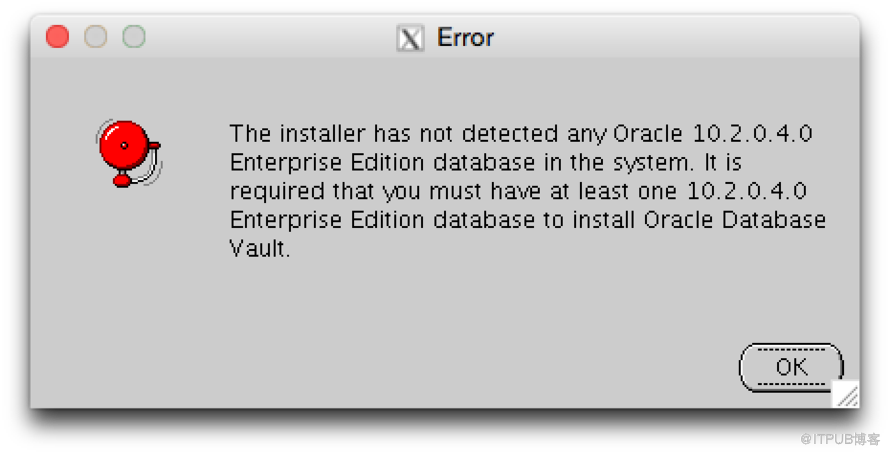
我的系统中已经安装并升级数据库了,为什么会找不到呢。
[oracle@snowlab ~]$ ps -ef|grep smon
oracle 1102 307 0 04:43 pts/5 00:00:00 grep smon
oracle 32507 1 0 04:25 ? 00:00:00 ora_smon_dv
[oracle@snowlab ~]$ sqlplus / as sysdba
SQL> select version,comments from registry$history;
VERSION COMMENTS
------------------------------ ------------------------------
10.2.0.4 PSU 10.2.0.4.4
view recompilation
view recompilation
10.2.0.4 PSU 10.2.0.4.8
view recompilation
其实原因很简单,就是因为在/etc/oratab中没有该数据库的sid和ORACLE_HOME的记录。可以手工添加黄色高亮部分的数据库信息,再次运行./runInstaller就顺利通过了。 有时候我们的数据库不是采用dbca安装的,可能是使用rman恢复的等等,在这里就不会有记录。当使用dbca删除数据库时候同理,图形工具来判断已经安装的数据库也是通过/etc/oratab中的记录来定位。
[oracle@snowlab ~]$ vi /etc/oratab
#
# This file is used by ORACLE utilities. It is created by root.sh
# and updated by the Database Configuration Assistant when creating
# a database.
# A colon, ':', is used as the field terminator. A new line terminates
# the entry. Lines beginning with a pound sign, '#', are comments.
#
# Entries are of the form:
# $ORACLE_SID:$ORACLE_HOME::
#
# The first and second fields are the system identifier and home
# directory of the database respectively. The third filed indicates
# to the dbstart utility that the database should , "Y", or should not,
# "N", be brought up at system boot time.
#
# Multiple entries with the same $ORACLE_SID are not allowed.
#
#
dv:/u01/app/oracle/product/10.2.0/db_1:N
来自 “ ITPUB博客 ” ,链接:https://blog.itpub.net/29047826/viewspace-1710426/ ,如需转载,请注明出处,否则将追究法律责任。

请登录后发表评论
登录
全部评论
