Duplicating a Database Without a Target Connection to a Host with ASM,感觉这个标题还是用英文描述比较直接。
最近公司有一个新的项目,是上海、北京异地数据库灾备。
上海市为生产端,数据库版本为Oracle11.2.0.4 RAC双节点,采用集群文件系统保存数据。并没有采用我们熟悉的ASM。
北京市为灾备端,数据库版本也是Oracle11.2.0.4,单实例,采用文件系统保存数据。
当发生灾难的时候,需要将灾备端的单实例数据库挂载到接管区的一套双节点RAC环境上去。本次工作内容是将灾备端的文件系统迁移到ASM上,为下一次的单机挂载到RAC做好准备。
灾备端的数据库没有多余的存储空间,无法搭建好一套ASM环境并采用RMAN的backup as copy tablespace xx format ‘+DATA’的方式。这次的实施计划是在上海生产端用RMAN执行一次全备,保存到磁盘上。在灾备端删除现有数据库,创建ASM磁盘组,使用生产端的全备来复制数据库。下面的实验模拟了这次实施的步骤。
步骤如下:
1,执行生产端数据库全备
2,将全备介质挂载到灾备端
3,备份灾备端pfile文件,导出控制文件到trace文件
4,删除灾备端数据库
5,灾备端创建ASM实例,并且创建磁盘组
6,创建灾备端所需目录
7,添加灾备端静态监听
8,使用生产端全备duplicate复制数据库
本次实验都是在虚拟机上演练
1,DBCA创建生产端数据库PROD,为临时的生产环境。
创建过程不演示,来查看一下基本信息
查看目标数据库数据文件路径
SYS@PROD >select name from v$datafile;
NAME
--------------------------------------------------------------------------------
/u01/oradata/PROD/system01.dbf
/u01/oradata/PROD/sysaux01.dbf
/u01/oradata/PROD/undotbs01.dbf
/u01/oradata/PROD/users01.dbf
查看目标数据库临时文件路径
SYS@PROD >select name from v$tempfile;
NAME
--------------------------------------------------------------------------------
/u01/oradata/PROD/temp01.dbf
查看目标数据库联机重做日志路径
SYS@PROD >select member from v$logfile;
MEMBER
--------------------------------------------------------------------------------
/u01/oradata/PROD/redo03.log
/u01/oradata/PROD/redo02.log
/u01/oradata/PROD/redo01.log
2,使用生产端数据库的spfile创建pfile到/home/oracle/pfile
SYS@PROD >create pfile='/home/oracle/pfile' from spfile;
修改新创建的目标数据库pfile将控制文件路径修改为ASM磁盘组+DATA和+FRA上,修改快速恢复区路径为+FRA
注意红色字体部分为修改后的路径,##注释的是刚才创建时的路径
PROD.__db_cache_size=222298112
PROD.__java_pool_size=4194304
PROD.__large_pool_size=8388608
PROD.__oracle_base='/u01'#ORACLE_BASE set from environment
PROD.__pga_aggregate_target=234881024
PROD.__sga_target=348127232
PROD.__shared_io_pool_size=0
PROD.__shared_pool_size=104857600
PROD.__streams_pool_size=0
*.audit_file_dest='/u01/admin/PROD/adump'
*.audit_trail='db'
*.compatible='11.2.0.4.0'
##*.control_files='/u01/oradata/PROD/control01.ctl','/u01/fast_recovery_area/PROD/control02.ctl'
*.control_files='+DATA/PROD/controlfile/control01.ctl','+FRA/PROD/controlfile/control02.ctl'
*.db_block_size=8192
*.db_create_file_dest='+DATA'
*.db_domain=''
*.db_name='PROD'
##*.db_recovery_file_dest='/u01/fast_recovery_area'
*.db_recovery_file_dest='+FRA'
*.db_recovery_file_dest_size=4385144832
*.diagnostic_dest='/u01'
*.dispatchers='(PROTOCOL=TCP) (SERVICE=PRODXDB)'
*.log_archive_format='%t_%s_%r.dbf'
*.memory_target=583008256
*.open_cursors=300
*.processes=150
*.remote_login_passwordfile='EXCLUSIVE'
*.undo_tablespace='UNDOTBS1'
3,生产端数据库执行一次全备,保存路径为/home/oracle
$ rman target /
Recovery Manager: Release 11.2.0.4.0 - Production on Wed Oct 8 04:14:09 2014
Copyright (c) 1982, 2011, Oracle and/or its affiliates. All rights reserved.
connected to target database: PROD (DBID=272224555)
run{
allocate channel c1 device type disk;
allocate channel c2 device type disk;
backup tag 'SH_DB' as compressed backupset format '/home/oracle/full_%U.bak' database
include current controlfile;
backup tag 'SH_ARCH' archivelog all format '/home/oracle/arch_%U.bak';
release channel c1;
release channel c2;
}
4,DBCA删除数据库
删除数据库后,现在的生产端系统就不存在了。该系统变成了已经删除数据库等待创建ASM的灾备端环境了。
5,创建灾备端auxiliary所需目录
mkdir -p $ORACLE_BASE/admin/PROD/adump
6,创建auxiliary数据库密码文件
$ orapwd file=$ORACLE_HOME/dbs/orapwPROD password=oracle entries=5
7,在grid用户下为auxiliary数据库添加静态监听连接,红色字体部分为添加的内容
[grid@single ~]$ vi /grid/app/11.2.0/grid/network/admin/listener.ora
LISTENER =
(DESCRIPTION_LIST =
(DESCRIPTION =
(ADDRESS = (PROTOCOL = IPC)(KEY = EXTPROC1521))
(ADDRESS = (PROTOCOL = TCP)(HOST = single)(PORT = 1521))
)
)
SID_LIST_LISTENER=
(SID_LIST=
(SID_DESC=
(SID_NAME=PROD)
(ORACLE_HOME=/u01/oracle)
(GLOBAL_DBNAME=PROD)))
ADR_BASE_LISTENER = /grid
ENABLE_GLOBAL_DYNAMIC_ENDPOINT_LISTENER=ON # line added by Agent
8,auxiliary数据库使用修改过的pfile启动数据库到nomount状态,并且quit推出。
$ sqlplus / as sysdba
SYS@PROD >startup nomount pfile=/home/oracle/pfile;
SYS@PROD >exit
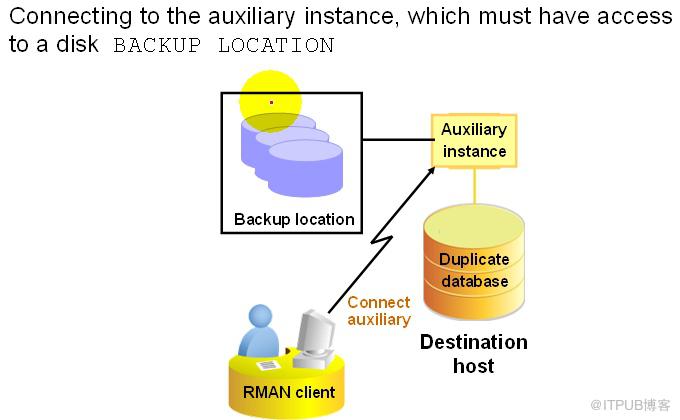
9,使用rman登录auxiliary数据库
[oracle@single ~]$ rman auxiliary /
Recovery Manager: Release 11.2.0.4.0 - Production on Wed Oct 8 06:26:36 2014
Copyright (c) 1982, 2011, Oracle and/or its affiliates. All rights reserved.
connected to auxiliary database: PROD (not mounted)
10,使用RMAN执行duplicate复制灾备数据库
在这一步需要从生产库alter database backup controlfile to trace导出脚本,在使用select value from v$diag_info找到该trace的路径。将生成控制文件脚本中的数据库文件路径进行参考来写入set newname for datafile n,因为生产端的数据文件在集群人文件系统上,而灾备端数据保存在ASM上。所以需要set newname来修改路径
run{
allocate auxiliary channel dup1 type disk;
set newname for datafile 1 to '+DATA';
set newname for datafile 2 to '+DATA';
set newname for datafile 3 to '+DATA';
set newname for datafile 4 to '+DATA';
set newname for tempfile 1 to '+DATA';
duplicate target database to PROD backup location '/home/oracle'
logfile
group 1('+DATA') size 50m reuse,
group 2('+DATA') size 50m reuse,
group 3('+DATA') size 50m reuse;
}
屏幕输出内容较多,放在文章末尾供参考
11,验证auxiliary数据库的复制结果,对比之前的文件系统目标库
SYS@PROD >select name from v$datafile;
NAME
--------------------------------------------------------------------------------
+DATA/prod/datafile/system.264.860394501
+DATA/prod/datafile/sysaux.280.860394525
+DATA/prod/datafile/undotbs1.279.860394525
+DATA/prod/datafile/users.281.860394501
SYS@PROD >select name from v$tempfile;
NAME
--------------------------------------------------------------------------------
+DATA/prod/tempfile/temp.259.860394555
SYS@PROD >select member from v$logfile;
MEMBER
--------------------------------------------------------------------------------
+DATA/prod/onlinelog/group_3.296.860394553
+DATA/prod/onlinelog/group_2.287.860394553
+DATA/prod/onlinelog/group_1.269.860394553
+FRA/prod/onlinelog/group_1.257.860394553
+FRA/prod/onlinelog/group_2.273.860394553
+FRA/prod/onlinelog/group_3.274.860394553
6 rows selected.
SYS@PROD >show parameter control_file;
NAME TYPE VALUE
------------------------------------ ----------- ------------------------------
control_file_record_keep_time integer 7
control_files string +DATA/prod/controlfile/control
01.ctl, +FRA/prod/controlfile/
control02.ctl
SYS@PROD >select name,open_mode from v$database;
NAME OPEN_MODE
--------- --------------------
PROD READ WRITE
SYS@PROD >select * from t1;
ID NAME
---------- ----------
1 007
12,auxiliary数据库从内存中创建参数文件到ASM磁盘组+DATA/PROD
SYS@PROD >create spfile='+DATA/PROD/spfilePROD.ora' from memory;
在ASM磁盘组中生成了手工创建的spfile文件
ASMCMD> ls
CONTROLFILE/
DATAFILE/
ONLINELOG/
PARAMETERFILE/
TEMPFILE/
spfilePROD.ora
13,创建auxiliary的pfile文件,指定spfile所在路径.红色字体内容是需要添加的。
$ vi $ORACLE_HOME/dbs/initPROD.ora
SPFILE='+DATA/PROD/spfilePROD.ora’
$ cat $ORACLE_HOME/dbs/initPROD.ora
SPFILE='+DATA/PROD/spfilePROD.ora'
14,使用新创建的initPROD.ora来启动auxiliary数据库
SYS@PROD >shutdown immediate;
SYS@PROD >startup;
SYS@PROD >show parameter spfile;
NAME TYPE VALUE
------------------------------------ ----------- ------------------------------
spfile string +DATA/prod/spfileprod.ora
本次试验圆满成功!
duplicate复制auxiliary数据库的屏幕输出如下:
RMAN> run{
2> allocate auxiliary channel dup1 type disk;
3> set newname for datafile 1 to '+DATA';
4> set newname for datafile 2 to '+DATA';
5> set newname for datafile 3 to '+DATA';
6> set newname for datafile 4 to '+DATA';
7> set newname for tempfile 1 to '+DATA';
8> duplicate target database to PROD backup location '/home/oracle'
9> logfile
10> group 1('+DATA') size 50m reuse,
11> group 2('+DATA') size 50m reuse,
12> group 3('+DATA') size 50m reuse;
13> }
allocated channel: dup1
channel dup1: SID=24 device type=DISK
executing command: SET NEWNAME
executing command: SET NEWNAME
executing command: SET NEWNAME
executing command: SET NEWNAME
executing command: SET NEWNAME
Starting Duplicate Db at 2014-10-08 06:28:01
contents of Memory Script:
{
sql clone "create spfile from memory";
}
executing Memory Script
sql statement: create spfile from memory
contents of Memory Script:
{
shutdown clone immediate;
startup clone nomount;
}
executing Memory Script
Oracle instance shut down
connected to auxiliary database (not started)
Oracle instance started
Total System Global Area 580395008 bytes
Fixed Size 2255392 bytes
Variable Size 411043296 bytes
Database Buffers 163577856 bytes
Redo Buffers 3518464 bytes
allocated channel: dup1
channel dup1: SID=24 device type=DISK
contents of Memory Script:
{
sql clone "alter system set db_name =
''PROD'' comment=
''Modified by RMAN duplicate'' scope=spfile";
sql clone "alter system set db_unique_name =
''PROD'' comment=
''Modified by RMAN duplicate'' scope=spfile";
shutdown clone immediate;
startup clone force nomount
restore clone primary controlfile from '/home/oracle/full_03pkgtf4_1_1.bak';
alter clone database mount;
}
executing Memory Script
sql statement: alter system set db_name = ''PROD'' comment= ''Modified by RMAN duplicate'' scope=spfile
sql statement: alter system set db_unique_name = ''PROD'' comment= ''Modified by RMAN duplicate'' scope=spfile
Oracle instance shut down
Oracle instance started
Total System Global Area 580395008 bytes
Fixed Size 2255392 bytes
Variable Size 411043296 bytes
Database Buffers 163577856 bytes
Redo Buffers 3518464 bytes
allocated channel: dup1
channel dup1: SID=24 device type=DISK
Starting restore at 2014-10-08 06:28:12
channel dup1: restoring control file
channel dup1: restore complete, elapsed time: 00:00:03
output file name=+DATA/prod/controlfile/control01.ctl
output file name=+FRA/prod/controlfile/control02.ctl
Finished restore at 2014-10-08 06:28:15
database mounted
contents of Memory Script:
{
set until scn 963961;
set newname for datafile 1 to
"+DATA";
set newname for datafile 2 to
"+DATA";
set newname for datafile 3 to
"+DATA";
set newname for datafile 4 to
"+DATA";
restore
clone database
;
}
executing Memory Script
executing command: SET until clause
executing command: SET NEWNAME
executing command: SET NEWNAME
executing command: SET NEWNAME
executing command: SET NEWNAME
Starting restore at 2014-10-08 06:28:19
channel dup1: starting datafile backup set restore
channel dup1: specifying datafile(s) to restore from backup set
channel dup1: restoring datafile 00001 to +DATA
channel dup1: restoring datafile 00004 to +DATA
channel dup1: reading from backup piece /home/oracle/full_01pkgtea_1_1.bak
channel dup1: piece handle=/home/oracle/full_01pkgtea_1_1.bak tag=SH_DB
channel dup1: restored backup piece 1
channel dup1: restore complete, elapsed time: 00:00:25
channel dup1: starting datafile backup set restore
channel dup1: specifying datafile(s) to restore from backup set
channel dup1: restoring datafile 00002 to +DATA
channel dup1: restoring datafile 00003 to +DATA
channel dup1: reading from backup piece /home/oracle/full_02pkgtea_1_1.bak
channel dup1: piece handle=/home/oracle/full_02pkgtea_1_1.bak tag=SH_DB
channel dup1: restored backup piece 1
channel dup1: restore complete, elapsed time: 00:00:15
Finished restore at 2014-10-08 06:29:00
contents of Memory Script:
{
switch clone datafile all;
}
executing Memory Script
datafile 1 switched to datafile copy
input datafile copy RECID=5 STAMP=860394540 file name=+DATA/prod/datafile/system.264.860394501
datafile 2 switched to datafile copy
input datafile copy RECID=6 STAMP=860394540 file name=+DATA/prod/datafile/sysaux.280.860394525
datafile 3 switched to datafile copy
input datafile copy RECID=7 STAMP=860394540 file name=+DATA/prod/datafile/undotbs1.279.860394525
datafile 4 switched to datafile copy
input datafile copy RECID=8 STAMP=860394540 file name=+DATA/prod/datafile/users.281.860394501
contents of Memory Script:
{
set until scn 963961;
recover
clone database
delete archivelog
;
}
executing Memory Script
executing command: SET until clause
Starting recover at 2014-10-08 06:29:00
starting media recovery
channel dup1: starting archived log restore to default destination
channel dup1: restoring archived log
archived log thread=1 sequence=4
channel dup1: reading from backup piece /home/oracle/arch_05pkgtf7_1_1.bak
channel dup1: piece handle=/home/oracle/arch_05pkgtf7_1_1.bak tag=SH_ARCH
channel dup1: restored backup piece 1
channel dup1: restore complete, elapsed time: 00:00:01
archived log file name=+FRA/prod/archivelog/2014_10_08/thread_1_seq_4.257.860394541 thread=1 sequence=4
channel clone_default: deleting archived log(s)
archived log file name=+FRA/prod/archivelog/2014_10_08/thread_1_seq_4.257.860394541 RECID=1 STAMP=860394540
media recovery complete, elapsed time: 00:00:00
Finished recover at 2014-10-08 06:29:01
Oracle instance started
Total System Global Area 580395008 bytes
Fixed Size 2255392 bytes
Variable Size 411043296 bytes
Database Buffers 163577856 bytes
Redo Buffers 3518464 bytes
contents of Memory Script:
{
sql clone "alter system set db_name =
''PROD'' comment=
''Reset to original value by RMAN'' scope=spfile";
sql clone "alter system reset db_unique_name scope=spfile";
shutdown clone immediate;
startup clone nomount;
}
executing Memory Script
sql statement: alter system set db_name = ''PROD'' comment= ''Reset to original value by RMAN'' scope=spfile
sql statement: alter system reset db_unique_name scope=spfile
Oracle instance shut down
connected to auxiliary database (not started)
Oracle instance started
Total System Global Area 580395008 bytes
Fixed Size 2255392 bytes
Variable Size 411043296 bytes
Database Buffers 163577856 bytes
Redo Buffers 3518464 bytes
allocated channel: dup1
channel dup1: SID=24 device type=DISK
sql statement: CREATE CONTROLFILE REUSE SET DATABASE "PROD" RESETLOGS ARCHIVELOG
MAXLOGFILES 16
MAXLOGMEMBERS 3
MAXDATAFILES 100
MAXINSTANCES 8
MAXLOGHISTORY 292
LOGFILE
GROUP 1 ( '+DATA' ) SIZE 50 M REUSE,
GROUP 2 ( '+DATA' ) SIZE 50 M REUSE,
GROUP 3 ( '+DATA' ) SIZE 50 M REUSE
DATAFILE
'+DATA/prod/datafile/system.264.860394501'
CHARACTER SET AL32UTF8
contents of Memory Script:
{
set newname for tempfile 1 to
"+DATA";
switch clone tempfile all;
catalog clone datafilecopy "+DATA/prod/datafile/sysaux.280.860394525",
"+DATA/prod/datafile/undotbs1.279.860394525",
"+DATA/prod/datafile/users.281.860394501";
switch clone datafile all;
}
executing Memory Script
executing command: SET NEWNAME
renamed tempfile 1 to +DATA in control file
cataloged datafile copy
datafile copy file name=+DATA/prod/datafile/sysaux.280.860394525 RECID=1 STAMP=860394553
cataloged datafile copy
datafile copy file name=+DATA/prod/datafile/undotbs1.279.860394525 RECID=2 STAMP=860394553
cataloged datafile copy
datafile copy file name=+DATA/prod/datafile/users.281.860394501 RECID=3 STAMP=860394553
datafile 2 switched to datafile copy
input datafile copy RECID=1 STAMP=860394553 file name=+DATA/prod/datafile/sysaux.280.860394525
datafile 3 switched to datafile copy
input datafile copy RECID=2 STAMP=860394553 file name=+DATA/prod/datafile/undotbs1.279.860394525
datafile 4 switched to datafile copy
input datafile copy RECID=3 STAMP=860394553 file name=+DATA/prod/datafile/users.281.860394501
contents of Memory Script:
{
Alter clone database open resetlogs;
}
executing Memory Script
database opened
Finished Duplicate Db at 2014-10-08 06:29:16
released channel: dup1
 |
最近公司有一个新的项目,是上海、北京异地数据库灾备。
上海市为生产端,数据库版本为Oracle11.2.0.4 RAC双节点,采用集群文件系统保存数据。并没有采用我们熟悉的ASM。
北京市为灾备端,数据库版本也是Oracle11.2.0.4,单实例,采用文件系统保存数据。
当发生灾难的时候,需要将灾备端的单实例数据库挂载到接管区的一套双节点RAC环境上去。本次工作内容是将灾备端的文件系统迁移到ASM上,为下一次的单机挂载到RAC做好准备。
灾备端的数据库没有多余的存储空间,无法搭建好一套ASM环境并采用RMAN的backup as copy tablespace xx format ‘+DATA’的方式。这次的实施计划是在上海生产端用RMAN执行一次全备,保存到磁盘上。在灾备端删除现有数据库,创建ASM磁盘组,使用生产端的全备来复制数据库。下面的实验模拟了这次实施的步骤。
步骤如下:
1,执行生产端数据库全备
2,将全备介质挂载到灾备端
3,备份灾备端pfile文件,导出控制文件到trace文件
4,删除灾备端数据库
5,灾备端创建ASM实例,并且创建磁盘组
6,创建灾备端所需目录
7,添加灾备端静态监听
8,使用生产端全备duplicate复制数据库
本次实验都是在虚拟机上演练
1,DBCA创建生产端数据库PROD,为临时的生产环境。
创建过程不演示,来查看一下基本信息
查看目标数据库数据文件路径
SYS@PROD >select name from v$datafile;
NAME
--------------------------------------------------------------------------------
/u01/oradata/PROD/system01.dbf
/u01/oradata/PROD/sysaux01.dbf
/u01/oradata/PROD/undotbs01.dbf
/u01/oradata/PROD/users01.dbf
查看目标数据库临时文件路径
SYS@PROD >select name from v$tempfile;
NAME
--------------------------------------------------------------------------------
/u01/oradata/PROD/temp01.dbf
查看目标数据库联机重做日志路径
SYS@PROD >select member from v$logfile;
MEMBER
--------------------------------------------------------------------------------
/u01/oradata/PROD/redo03.log
/u01/oradata/PROD/redo02.log
/u01/oradata/PROD/redo01.log
2,使用生产端数据库的spfile创建pfile到/home/oracle/pfile
SYS@PROD >create pfile='/home/oracle/pfile' from spfile;
修改新创建的目标数据库pfile将控制文件路径修改为ASM磁盘组+DATA和+FRA上,修改快速恢复区路径为+FRA
注意红色字体部分为修改后的路径,##注释的是刚才创建时的路径
PROD.__db_cache_size=222298112
PROD.__java_pool_size=4194304
PROD.__large_pool_size=8388608
PROD.__oracle_base='/u01'#ORACLE_BASE set from environment
PROD.__pga_aggregate_target=234881024
PROD.__sga_target=348127232
PROD.__shared_io_pool_size=0
PROD.__shared_pool_size=104857600
PROD.__streams_pool_size=0
*.audit_file_dest='/u01/admin/PROD/adump'
*.audit_trail='db'
*.compatible='11.2.0.4.0'
##*.control_files='/u01/oradata/PROD/control01.ctl','/u01/fast_recovery_area/PROD/control02.ctl'
*.control_files='+DATA/PROD/controlfile/control01.ctl','+FRA/PROD/controlfile/control02.ctl'
*.db_block_size=8192
*.db_create_file_dest='+DATA'
*.db_domain=''
*.db_name='PROD'
##*.db_recovery_file_dest='/u01/fast_recovery_area'
*.db_recovery_file_dest='+FRA'
*.db_recovery_file_dest_size=4385144832
*.diagnostic_dest='/u01'
*.dispatchers='(PROTOCOL=TCP) (SERVICE=PRODXDB)'
*.log_archive_format='%t_%s_%r.dbf'
*.memory_target=583008256
*.open_cursors=300
*.processes=150
*.remote_login_passwordfile='EXCLUSIVE'
*.undo_tablespace='UNDOTBS1'
3,生产端数据库执行一次全备,保存路径为/home/oracle
$ rman target /
Recovery Manager: Release 11.2.0.4.0 - Production on Wed Oct 8 04:14:09 2014
Copyright (c) 1982, 2011, Oracle and/or its affiliates. All rights reserved.
connected to target database: PROD (DBID=272224555)
run{
allocate channel c1 device type disk;
allocate channel c2 device type disk;
backup tag 'SH_DB' as compressed backupset format '/home/oracle/full_%U.bak' database
include current controlfile;
backup tag 'SH_ARCH' archivelog all format '/home/oracle/arch_%U.bak';
release channel c1;
release channel c2;
}
4,DBCA删除数据库
删除数据库后,现在的生产端系统就不存在了。该系统变成了已经删除数据库等待创建ASM的灾备端环境了。
5,创建灾备端auxiliary所需目录
mkdir -p $ORACLE_BASE/admin/PROD/adump
6,创建auxiliary数据库密码文件
$ orapwd file=$ORACLE_HOME/dbs/orapwPROD password=oracle entries=5
7,在grid用户下为auxiliary数据库添加静态监听连接,红色字体部分为添加的内容
[grid@single ~]$ vi /grid/app/11.2.0/grid/network/admin/listener.ora
LISTENER =
(DESCRIPTION_LIST =
(DESCRIPTION =
(ADDRESS = (PROTOCOL = IPC)(KEY = EXTPROC1521))
(ADDRESS = (PROTOCOL = TCP)(HOST = single)(PORT = 1521))
)
)
SID_LIST_LISTENER=
(SID_LIST=
(SID_DESC=
(SID_NAME=PROD)
(ORACLE_HOME=/u01/oracle)
(GLOBAL_DBNAME=PROD)))
ADR_BASE_LISTENER = /grid
ENABLE_GLOBAL_DYNAMIC_ENDPOINT_LISTENER=ON # line added by Agent
8,auxiliary数据库使用修改过的pfile启动数据库到nomount状态,并且quit推出。
$ sqlplus / as sysdba
SYS@PROD >startup nomount pfile=/home/oracle/pfile;
SYS@PROD >exit
9,使用rman登录auxiliary数据库
[oracle@single ~]$ rman auxiliary /
Recovery Manager: Release 11.2.0.4.0 - Production on Wed Oct 8 06:26:36 2014
Copyright (c) 1982, 2011, Oracle and/or its affiliates. All rights reserved.
connected to auxiliary database: PROD (not mounted)
10,使用RMAN执行duplicate复制灾备数据库
在这一步需要从生产库alter database backup controlfile to trace导出脚本,在使用select value from v$diag_info找到该trace的路径。将生成控制文件脚本中的数据库文件路径进行参考来写入set newname for datafile n,因为生产端的数据文件在集群人文件系统上,而灾备端数据保存在ASM上。所以需要set newname来修改路径
run{
allocate auxiliary channel dup1 type disk;
set newname for datafile 1 to '+DATA';
set newname for datafile 2 to '+DATA';
set newname for datafile 3 to '+DATA';
set newname for datafile 4 to '+DATA';
set newname for tempfile 1 to '+DATA';
duplicate target database to PROD backup location '/home/oracle'
logfile
group 1('+DATA') size 50m reuse,
group 2('+DATA') size 50m reuse,
group 3('+DATA') size 50m reuse;
}
屏幕输出内容较多,放在文章末尾供参考
11,验证auxiliary数据库的复制结果,对比之前的文件系统目标库
SYS@PROD >select name from v$datafile;
NAME
--------------------------------------------------------------------------------
+DATA/prod/datafile/system.264.860394501
+DATA/prod/datafile/sysaux.280.860394525
+DATA/prod/datafile/undotbs1.279.860394525
+DATA/prod/datafile/users.281.860394501
SYS@PROD >select name from v$tempfile;
NAME
--------------------------------------------------------------------------------
+DATA/prod/tempfile/temp.259.860394555
SYS@PROD >select member from v$logfile;
MEMBER
--------------------------------------------------------------------------------
+DATA/prod/onlinelog/group_3.296.860394553
+DATA/prod/onlinelog/group_2.287.860394553
+DATA/prod/onlinelog/group_1.269.860394553
+FRA/prod/onlinelog/group_1.257.860394553
+FRA/prod/onlinelog/group_2.273.860394553
+FRA/prod/onlinelog/group_3.274.860394553
6 rows selected.
SYS@PROD >show parameter control_file;
NAME TYPE VALUE
------------------------------------ ----------- ------------------------------
control_file_record_keep_time integer 7
control_files string +DATA/prod/controlfile/control
01.ctl, +FRA/prod/controlfile/
control02.ctl
SYS@PROD >select name,open_mode from v$database;
NAME OPEN_MODE
--------- --------------------
PROD READ WRITE
SYS@PROD >select * from t1;
ID NAME
---------- ----------
1 007
12,auxiliary数据库从内存中创建参数文件到ASM磁盘组+DATA/PROD
SYS@PROD >create spfile='+DATA/PROD/spfilePROD.ora' from memory;
在ASM磁盘组中生成了手工创建的spfile文件
ASMCMD> ls
CONTROLFILE/
DATAFILE/
ONLINELOG/
PARAMETERFILE/
TEMPFILE/
spfilePROD.ora
13,创建auxiliary的pfile文件,指定spfile所在路径.红色字体内容是需要添加的。
$ vi $ORACLE_HOME/dbs/initPROD.ora
SPFILE='+DATA/PROD/spfilePROD.ora’
$ cat $ORACLE_HOME/dbs/initPROD.ora
SPFILE='+DATA/PROD/spfilePROD.ora'
14,使用新创建的initPROD.ora来启动auxiliary数据库
SYS@PROD >shutdown immediate;
SYS@PROD >startup;
SYS@PROD >show parameter spfile;
NAME TYPE VALUE
------------------------------------ ----------- ------------------------------
spfile string +DATA/prod/spfileprod.ora
本次试验圆满成功!
duplicate复制auxiliary数据库的屏幕输出如下:
RMAN> run{
2> allocate auxiliary channel dup1 type disk;
3> set newname for datafile 1 to '+DATA';
4> set newname for datafile 2 to '+DATA';
5> set newname for datafile 3 to '+DATA';
6> set newname for datafile 4 to '+DATA';
7> set newname for tempfile 1 to '+DATA';
8> duplicate target database to PROD backup location '/home/oracle'
9> logfile
10> group 1('+DATA') size 50m reuse,
11> group 2('+DATA') size 50m reuse,
12> group 3('+DATA') size 50m reuse;
13> }
allocated channel: dup1
channel dup1: SID=24 device type=DISK
executing command: SET NEWNAME
executing command: SET NEWNAME
executing command: SET NEWNAME
executing command: SET NEWNAME
executing command: SET NEWNAME
Starting Duplicate Db at 2014-10-08 06:28:01
contents of Memory Script:
{
sql clone "create spfile from memory";
}
executing Memory Script
sql statement: create spfile from memory
contents of Memory Script:
{
shutdown clone immediate;
startup clone nomount;
}
executing Memory Script
Oracle instance shut down
connected to auxiliary database (not started)
Oracle instance started
Total System Global Area 580395008 bytes
Fixed Size 2255392 bytes
Variable Size 411043296 bytes
Database Buffers 163577856 bytes
Redo Buffers 3518464 bytes
allocated channel: dup1
channel dup1: SID=24 device type=DISK
contents of Memory Script:
{
sql clone "alter system set db_name =
''PROD'' comment=
''Modified by RMAN duplicate'' scope=spfile";
sql clone "alter system set db_unique_name =
''PROD'' comment=
''Modified by RMAN duplicate'' scope=spfile";
shutdown clone immediate;
startup clone force nomount
restore clone primary controlfile from '/home/oracle/full_03pkgtf4_1_1.bak';
alter clone database mount;
}
executing Memory Script
sql statement: alter system set db_name = ''PROD'' comment= ''Modified by RMAN duplicate'' scope=spfile
sql statement: alter system set db_unique_name = ''PROD'' comment= ''Modified by RMAN duplicate'' scope=spfile
Oracle instance shut down
Oracle instance started
Total System Global Area 580395008 bytes
Fixed Size 2255392 bytes
Variable Size 411043296 bytes
Database Buffers 163577856 bytes
Redo Buffers 3518464 bytes
allocated channel: dup1
channel dup1: SID=24 device type=DISK
Starting restore at 2014-10-08 06:28:12
channel dup1: restoring control file
channel dup1: restore complete, elapsed time: 00:00:03
output file name=+DATA/prod/controlfile/control01.ctl
output file name=+FRA/prod/controlfile/control02.ctl
Finished restore at 2014-10-08 06:28:15
database mounted
contents of Memory Script:
{
set until scn 963961;
set newname for datafile 1 to
"+DATA";
set newname for datafile 2 to
"+DATA";
set newname for datafile 3 to
"+DATA";
set newname for datafile 4 to
"+DATA";
restore
clone database
;
}
executing Memory Script
executing command: SET until clause
executing command: SET NEWNAME
executing command: SET NEWNAME
executing command: SET NEWNAME
executing command: SET NEWNAME
Starting restore at 2014-10-08 06:28:19
channel dup1: starting datafile backup set restore
channel dup1: specifying datafile(s) to restore from backup set
channel dup1: restoring datafile 00001 to +DATA
channel dup1: restoring datafile 00004 to +DATA
channel dup1: reading from backup piece /home/oracle/full_01pkgtea_1_1.bak
channel dup1: piece handle=/home/oracle/full_01pkgtea_1_1.bak tag=SH_DB
channel dup1: restored backup piece 1
channel dup1: restore complete, elapsed time: 00:00:25
channel dup1: starting datafile backup set restore
channel dup1: specifying datafile(s) to restore from backup set
channel dup1: restoring datafile 00002 to +DATA
channel dup1: restoring datafile 00003 to +DATA
channel dup1: reading from backup piece /home/oracle/full_02pkgtea_1_1.bak
channel dup1: piece handle=/home/oracle/full_02pkgtea_1_1.bak tag=SH_DB
channel dup1: restored backup piece 1
channel dup1: restore complete, elapsed time: 00:00:15
Finished restore at 2014-10-08 06:29:00
contents of Memory Script:
{
switch clone datafile all;
}
executing Memory Script
datafile 1 switched to datafile copy
input datafile copy RECID=5 STAMP=860394540 file name=+DATA/prod/datafile/system.264.860394501
datafile 2 switched to datafile copy
input datafile copy RECID=6 STAMP=860394540 file name=+DATA/prod/datafile/sysaux.280.860394525
datafile 3 switched to datafile copy
input datafile copy RECID=7 STAMP=860394540 file name=+DATA/prod/datafile/undotbs1.279.860394525
datafile 4 switched to datafile copy
input datafile copy RECID=8 STAMP=860394540 file name=+DATA/prod/datafile/users.281.860394501
contents of Memory Script:
{
set until scn 963961;
recover
clone database
delete archivelog
;
}
executing Memory Script
executing command: SET until clause
Starting recover at 2014-10-08 06:29:00
starting media recovery
channel dup1: starting archived log restore to default destination
channel dup1: restoring archived log
archived log thread=1 sequence=4
channel dup1: reading from backup piece /home/oracle/arch_05pkgtf7_1_1.bak
channel dup1: piece handle=/home/oracle/arch_05pkgtf7_1_1.bak tag=SH_ARCH
channel dup1: restored backup piece 1
channel dup1: restore complete, elapsed time: 00:00:01
archived log file name=+FRA/prod/archivelog/2014_10_08/thread_1_seq_4.257.860394541 thread=1 sequence=4
channel clone_default: deleting archived log(s)
archived log file name=+FRA/prod/archivelog/2014_10_08/thread_1_seq_4.257.860394541 RECID=1 STAMP=860394540
media recovery complete, elapsed time: 00:00:00
Finished recover at 2014-10-08 06:29:01
Oracle instance started
Total System Global Area 580395008 bytes
Fixed Size 2255392 bytes
Variable Size 411043296 bytes
Database Buffers 163577856 bytes
Redo Buffers 3518464 bytes
contents of Memory Script:
{
sql clone "alter system set db_name =
''PROD'' comment=
''Reset to original value by RMAN'' scope=spfile";
sql clone "alter system reset db_unique_name scope=spfile";
shutdown clone immediate;
startup clone nomount;
}
executing Memory Script
sql statement: alter system set db_name = ''PROD'' comment= ''Reset to original value by RMAN'' scope=spfile
sql statement: alter system reset db_unique_name scope=spfile
Oracle instance shut down
connected to auxiliary database (not started)
Oracle instance started
Total System Global Area 580395008 bytes
Fixed Size 2255392 bytes
Variable Size 411043296 bytes
Database Buffers 163577856 bytes
Redo Buffers 3518464 bytes
allocated channel: dup1
channel dup1: SID=24 device type=DISK
sql statement: CREATE CONTROLFILE REUSE SET DATABASE "PROD" RESETLOGS ARCHIVELOG
MAXLOGFILES 16
MAXLOGMEMBERS 3
MAXDATAFILES 100
MAXINSTANCES 8
MAXLOGHISTORY 292
LOGFILE
GROUP 1 ( '+DATA' ) SIZE 50 M REUSE,
GROUP 2 ( '+DATA' ) SIZE 50 M REUSE,
GROUP 3 ( '+DATA' ) SIZE 50 M REUSE
DATAFILE
'+DATA/prod/datafile/system.264.860394501'
CHARACTER SET AL32UTF8
contents of Memory Script:
{
set newname for tempfile 1 to
"+DATA";
switch clone tempfile all;
catalog clone datafilecopy "+DATA/prod/datafile/sysaux.280.860394525",
"+DATA/prod/datafile/undotbs1.279.860394525",
"+DATA/prod/datafile/users.281.860394501";
switch clone datafile all;
}
executing Memory Script
executing command: SET NEWNAME
renamed tempfile 1 to +DATA in control file
cataloged datafile copy
datafile copy file name=+DATA/prod/datafile/sysaux.280.860394525 RECID=1 STAMP=860394553
cataloged datafile copy
datafile copy file name=+DATA/prod/datafile/undotbs1.279.860394525 RECID=2 STAMP=860394553
cataloged datafile copy
datafile copy file name=+DATA/prod/datafile/users.281.860394501 RECID=3 STAMP=860394553
datafile 2 switched to datafile copy
input datafile copy RECID=1 STAMP=860394553 file name=+DATA/prod/datafile/sysaux.280.860394525
datafile 3 switched to datafile copy
input datafile copy RECID=2 STAMP=860394553 file name=+DATA/prod/datafile/undotbs1.279.860394525
datafile 4 switched to datafile copy
input datafile copy RECID=3 STAMP=860394553 file name=+DATA/prod/datafile/users.281.860394501
contents of Memory Script:
{
Alter clone database open resetlogs;
}
executing Memory Script
database opened
Finished Duplicate Db at 2014-10-08 06:29:16
released channel: dup1
来自 “ ITPUB博客 ” ,链接:https://blog.itpub.net/29047826/viewspace-1297065/ ,如需转载,请注明出处,否则将追究法律责任。

请登录后发表评论
登录
全部评论
