一:前言
kube-dns是Kubernetes中的一个内置插件,目前作为一个独立的开源项目维护,见https://github.com/kubernetes/dns。通过将 Service 注册到 DNS 中,Kuberentes 可以为我们提供一种简单的服务注册发现与负载均衡方式。至此,别的服务就可以通过名称来访问相关的服务。

Kubernetes DNS pod 中包括 3 个容器:
二: 部署kube-dns
1.配置文件
官方网址下载需要的yaml部署文件:https://github.com/kubernetes/kubernetes/tree/release-1.8/cluster/addons/dns
kubedns-cm.yaml
kubedns-sa.yaml
kubedns-controller.yaml
kubedns-svc.yaml
kubedns-cm.yaml不需要修改
kubedns-sa.yaml不需要修改
kubedns-controller.yaml 主要是$DNS_DOMAIN和image路径的修改
kubedns-svc.yaml 主要是 clusterIP的修改
2.系统预定义的 RoleBinding
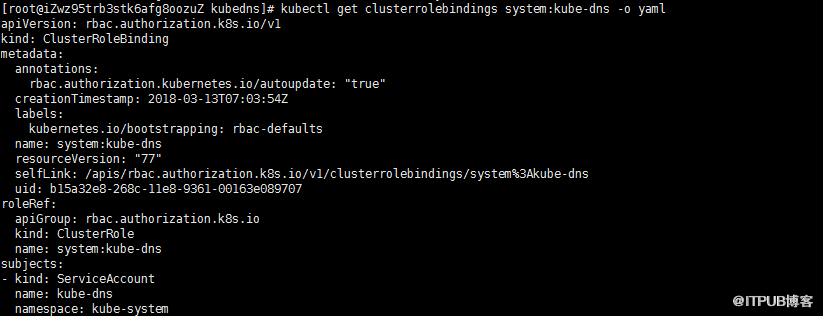
预定义的 RoleBinding system:kube-dns 将 kube-system 命名空间的kube-dns ServiceAccount 与 system:kube-dns Role 绑定, 该 Role 具有访问 kube-apiserver DNS 相关 API 的权限;
3.执行相关文件
kubectl create -f .
三:验证
1.创建一个Deployment
my-nginx.yaml
kubectl create -f my-nginx.yaml
2.Export 该 Deployment, 生成 my-nginx 服务
kubectl expose deploy my-nginx


3.往其中一个pod中植入ping 工具
kubectl cp /usr/bin/ping my-nginx-58778897c8-c9x2q:/usr/bin/
kubectl cp /usr/lib64/libidn.so.11 my-nginx-58778897c8-c9x2q:/usr/lib/
kubectl cp /usr/lib64/libcrypto.so.10 my-nginx-58778897c8-c9x2q:/usr/lib/
kubectl cp /usr/lib64/libcap.so.2 my-nginx-58778897c8-c9x2q:/usr/lib/
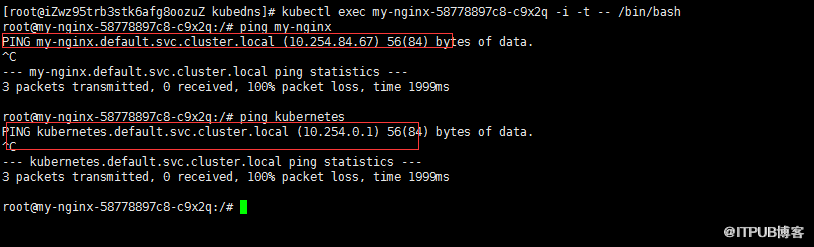
4.进入pod,执行ping命令进行验证
kubectl exec my-nginx-58778897c8-c9x2q -i -t -- /bin/bash
对应的service名称,自动映射到IP。
或者创建一个简单的busybox pod
busybox.yaml
创建POD
kubectl create -f busybox.yaml
验证
kubectl exec -ti busybox -- nslookup kubernetes.default
验证成功。
如果出现nslookup: can't resolve 'kubernetes.default' 则说明DNS有问题,通过日志排查错误。
kube-dns是Kubernetes中的一个内置插件,目前作为一个独立的开源项目维护,见https://github.com/kubernetes/dns。通过将 Service 注册到 DNS 中,Kuberentes 可以为我们提供一种简单的服务注册发现与负载均衡方式。至此,别的服务就可以通过名称来访问相关的服务。

Kubernetes DNS pod 中包括 3 个容器:
- kubedns:kubedns 进程监视 Kubernetes master 中的 Service 和 Endpoint 的变化,并维护内存查找结构来服务DNS请求。
- dnsmasq:dnsmasq 容器添加 DNS 缓存以提高性能。
- sidecar:sidecar 容器在执行双重健康检查(针对 dnsmasq 和 kubedns)时提供单个健康检查端点(监听在10054端口)
二: 部署kube-dns
1.配置文件
官方网址下载需要的yaml部署文件:https://github.com/kubernetes/kubernetes/tree/release-1.8/cluster/addons/dns
kubedns-cm.yaml
kubedns-sa.yaml
kubedns-controller.yaml
kubedns-svc.yaml
kubedns-cm.yaml不需要修改
点击(此处)折叠或打开
-
# Copyright 2016 The Kubernetes Authors.
-
#
-
# Licensed under the Apache License, Version 2.0 (the "License");
-
# you may not use this file except in compliance with the License.
-
# You may obtain a copy of the License at
-
#
-
# http://www.apache.org/licenses/LICENSE-2.0
-
#
-
# Unless required by applicable law or agreed to in writing, software
-
# distributed under the License is distributed on an "AS IS" BASIS,
-
# WITHOUT WARRANTIES OR CONDITIONS OF ANY KIND, either express or implied.
-
# See the License for the specific language governing permissions and
-
# limitations under the License.
-
-
apiVersion: v1
-
kind: ConfigMap
-
metadata:
-
name: kube-dns
-
namespace: kube-system
-
labels:
- addonmanager.kubernetes.io/mode: EnsureExists
点击(此处)折叠或打开
-
apiVersion: v1
-
kind: ServiceAccount
-
metadata:
-
name: kube-dns
-
namespace: kube-system
-
labels:
-
kubernetes.io/cluster-service: "true"
- addonmanager.kubernetes.io/mode: Reconcile
点击(此处)折叠或打开
-
# Copyright 2016 The Kubernetes Authors.
-
#
-
# Licensed under the Apache License, Version 2.0 (the "License");
-
# you may not use this file except in compliance with the License.
-
# You may obtain a copy of the License at
-
#
-
# http://www.apache.org/licenses/LICENSE-2.0
-
#
-
# Unless required by applicable law or agreed to in writing, software
-
# distributed under the License is distributed on an "AS IS" BASIS,
-
# WITHOUT WARRANTIES OR CONDITIONS OF ANY KIND, either express or implied.
-
# See the License for the specific language governing permissions and
-
# limitations under the License.
-
-
# Should keep target in cluster/addons/dns-horizontal-autoscaler/dns-horizontal-autoscaler.yaml
-
# in sync with this file.
-
-
# __MACHINE_GENERATED_WARNING__
-
-
apiVersion: extensions/v1beta1
-
kind: Deployment
-
metadata:
-
name: kube-dns
-
namespace: kube-system
-
labels:
-
k8s-app: kube-dns
-
kubernetes.io/cluster-service: "true"
-
addonmanager.kubernetes.io/mode: Reconcile
-
spec:
-
# replicas: not specified here:
-
# 1. In order to make Addon Manager do not reconcile this replicas parameter.
-
# 2. Default is 1.
-
# 3. Will be tuned in real time if DNS horizontal auto-scaling is turned on.
-
strategy:
-
rollingUpdate:
-
maxSurge: 10%
-
maxUnavailable: 0
-
selector:
-
matchLabels:
-
k8s-app: kube-dns
-
template:
-
metadata:
-
labels:
-
k8s-app: kube-dns
-
annotations:
-
scheduler.alpha.kubernetes.io/critical-pod: ''
-
spec:
-
tolerations:
-
- key: "CriticalAddonsOnly"
-
operator: "Exists"
-
volumes:
-
- name: kube-dns-config
-
configMap:
-
name: kube-dns
-
optional: true
-
containers:
-
- name: kubedns
-
image: index.tenxcloud.com/jimmy/k8s-dns-kube-dns-amd64:1.14.1
-
resources:
-
# TODO: Set memory limits when we've profiled the container for large
-
# clusters, then set request = limit to keep this container in
-
# guaranteed class. Currently, this container falls into the
-
# "burstable" category so the kubelet doesn't backoff from restarting it.
-
limits:
-
memory: 170Mi
-
requests:
-
cpu: 100m
-
memory: 70Mi
-
livenessProbe:
-
httpGet:
-
path: /healthcheck/kubedns
-
port: 10054
-
scheme: HTTP
-
initialDelaySeconds: 60
-
timeoutSeconds: 5
-
successThreshold: 1
-
failureThreshold: 5
-
readinessProbe:
-
httpGet:
-
path: /readiness
-
port: 8081
-
scheme: HTTP
-
# we poll on pod startup for the Kubernetes master service and
-
# only setup the /readiness HTTP server once that's available.
-
initialDelaySeconds: 3
-
timeoutSeconds: 5
-
args:
-
- --domain=cluster.local.
-
- --dns-port=10053
-
- --config-dir=/kube-dns-config
-
- --v=2
-
#__PILLAR__FEDERATIONS__DOMAIN__MAP__
-
env:
-
- name: PROMETHEUS_PORT
-
value: "10055"
-
ports:
-
- containerPort: 10053
-
name: dns-local
-
protocol: UDP
-
- containerPort: 10053
-
name: dns-tcp-local
-
protocol: TCP
-
- containerPort: 10055
-
name: metrics
-
protocol: TCP
-
volumeMounts:
-
- name: kube-dns-config
-
mountPath: /kube-dns-config
-
- name: dnsmasq
-
image: index.tenxcloud.com/jimmy/k8s-dns-dnsmasq-nanny-amd64:1.14.1
-
livenessProbe:
-
httpGet:
-
path: /healthcheck/dnsmasq
-
port: 10054
-
scheme: HTTP
-
initialDelaySeconds: 60
-
timeoutSeconds: 5
-
successThreshold: 1
-
failureThreshold: 5
-
args:
-
- -v=2
-
- -logtostderr
-
- -configDir=/etc/k8s/dns/dnsmasq-nanny
-
- -restartDnsmasq=true
-
- --
-
- -k
-
- --cache-size=1000
-
- --log-facility=-
-
- --server=/cluster.local./127.0.0.1#10053
-
- --server=/in-addr.arpa/127.0.0.1#10053
-
- --server=/ip6.arpa/127.0.0.1#10053
-
ports:
-
- containerPort: 53
-
name: dns
-
protocol: UDP
-
- containerPort: 53
-
name: dns-tcp
-
protocol: TCP
-
# see: https://github.com/kubernetes/kubernetes/issues/29055 for details
-
resources:
-
requests:
-
cpu: 150m
-
memory: 20Mi
-
volumeMounts:
-
- name: kube-dns-config
-
mountPath: /etc/k8s/dns/dnsmasq-nanny
-
- name: sidecar
-
image: index.tenxcloud.com/jimmy/k8s-dns-sidecar-amd64:1.14.1
-
livenessProbe:
-
httpGet:
-
path: /metrics
-
port: 10054
-
scheme: HTTP
-
initialDelaySeconds: 60
-
timeoutSeconds: 5
-
successThreshold: 1
-
failureThreshold: 5
-
args:
-
- --v=2
-
- --logtostderr
-
- --probe=kubedns,127.0.0.1:10053,kubernetes.default.svc.cluster.local.,5,A
-
- --probe=dnsmasq,127.0.0.1:53,kubernetes.default.svc.cluster.local.,5,A
-
ports:
-
- containerPort: 10054
-
name: metrics
-
protocol: TCP
-
resources:
-
requests:
-
memory: 20Mi
-
cpu: 10m
-
dnsPolicy: Default # Don't use cluster DNS.
- serviceAccountName: kube-dns
点击(此处)折叠或打开
-
# Copyright 2016 The Kubernetes Authors.
-
#
-
# Licensed under the Apache License, Version 2.0 (the "License");
-
# you may not use this file except in compliance with the License.
-
# You may obtain a copy of the License at
-
#
-
# http://www.apache.org/licenses/LICENSE-2.0
-
#
-
# Unless required by applicable law or agreed to in writing, software
-
# distributed under the License is distributed on an "AS IS" BASIS,
-
# WITHOUT WARRANTIES OR CONDITIONS OF ANY KIND, either express or implied.
-
# See the License for the specific language governing permissions and
-
# limitations under the License.
-
-
# __MACHINE_GENERATED_WARNING__
-
-
apiVersion: v1
-
kind: Service
-
metadata:
-
name: kube-dns
-
namespace: kube-system
-
labels:
-
k8s-app: kube-dns
-
kubernetes.io/cluster-service: "true"
-
addonmanager.kubernetes.io/mode: Reconcile
-
kubernetes.io/name: "KubeDNS"
-
spec:
-
selector:
-
k8s-app: kube-dns
-
clusterIP: 10.254.0.2
-
ports:
-
- name: dns
-
port: 53
-
protocol: UDP
-
- name: dns-tcp
-
port: 53
- protocol: TCP
预定义的 RoleBinding system:kube-dns 将 kube-system 命名空间的kube-dns ServiceAccount 与 system:kube-dns Role 绑定, 该 Role 具有访问 kube-apiserver DNS 相关 API 的权限;
3.执行相关文件
kubectl create -f .
三:验证
1.创建一个Deployment
my-nginx.yaml
点击(此处)折叠或打开
-
apiVersion: extensions/v1beta1
-
kind: Deployment
-
metadata:
-
name: my-nginx
-
spec:
-
replicas: 2
-
template:
-
metadata:
-
labels:
-
run: my-nginx
-
spec:
-
containers:
-
- name: my-nginx
-
image: docker.io/nginx
-
ports:
- - containerPort: 80
2.Export 该 Deployment, 生成 my-nginx 服务
kubectl expose deploy my-nginx
3.往其中一个pod中植入ping 工具
kubectl cp /usr/bin/ping my-nginx-58778897c8-c9x2q:/usr/bin/
kubectl cp /usr/lib64/libidn.so.11 my-nginx-58778897c8-c9x2q:/usr/lib/
kubectl cp /usr/lib64/libcrypto.so.10 my-nginx-58778897c8-c9x2q:/usr/lib/
kubectl cp /usr/lib64/libcap.so.2 my-nginx-58778897c8-c9x2q:/usr/lib/
4.进入pod,执行ping命令进行验证
kubectl exec my-nginx-58778897c8-c9x2q -i -t -- /bin/bash
对应的service名称,自动映射到IP。
或者创建一个简单的busybox pod
busybox.yaml
点击(此处)折叠或打开
-
apiVersion: v1
-
kind: Pod
-
metadata:
-
name: busybox
-
namespace: default
-
spec:
-
containers:
-
- image: busybox
-
command:
-
- sleep
-
- "3600"
-
imagePullPolicy: IfNotPresent
-
name: busybox
- restartPolicy: Always
kubectl create -f busybox.yaml
验证
kubectl exec -ti busybox -- nslookup kubernetes.default
点击(此处)折叠或打开
-
Server: 10.0.0.10
-
Address 1: 10.0.0.10
-
-
Name: kubernetes.default
- Address 1: 10.0.0.1
如果出现nslookup: can't resolve 'kubernetes.default' 则说明DNS有问题,通过日志排查错误。
来自 “ ITPUB博客 ” ,链接:https://blog.itpub.net/28624388/viewspace-2152243/ ,如需转载,请注明出处,否则将追究法律责任。

请登录后发表评论
登录
全部评论
