一: 背景
1.服务器 阿里云 CentOS
2.Tomcat 8.0.24
3.该插件通过tomcat的http://localhost:8080/manager/status?XML=true 进行监控
二:Tomcat配置
1.tomcat-users.xml配置
2.开启tomcat manager应用

三: 安装插件xmlstarlet
yum install xmlstarlet
四:tomcat监控插件脚本 tomcat.chart.sh
1.脚本存放路径 /usr/local/netdata/usr/libexec/netdata/charts.d
2.脚本下载路径 https://github.com/firehol/netdata/blob/master/charts.d/tomcat.chart.sh
3.绿色背景标示的地方,是需要根据自己的tomcat进行调整
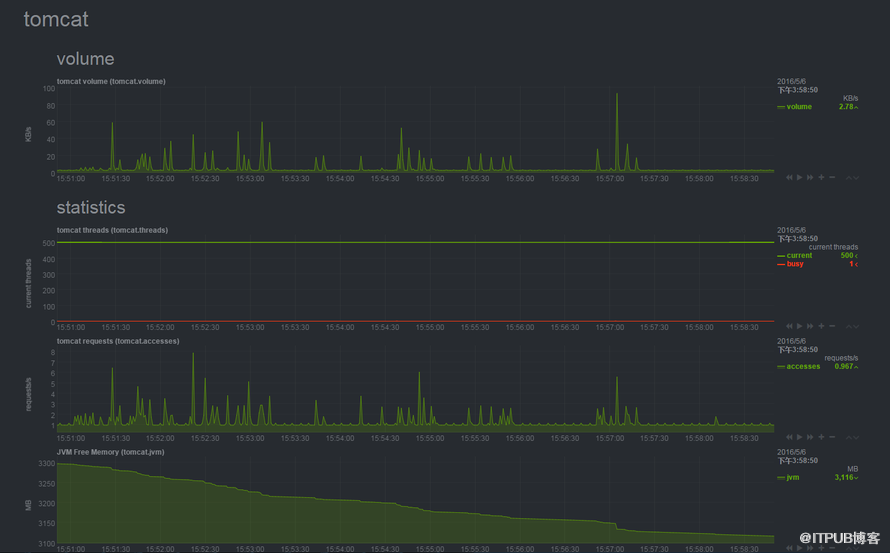
五:tomcat监控截图
1.服务器 阿里云 CentOS
2.Tomcat 8.0.24
3.该插件通过tomcat的http://localhost:8080/manager/status?XML=true 进行监控
二:Tomcat配置
1.tomcat-users.xml配置
点击(此处)折叠或打开
-
<?xml version='1.0' encoding='utf-8'?>
-
<!--
-
Licensed to the Apache Software Foundation (ASF) under one or more
-
contributor license agreements. See the NOTICE file distributed with
-
this work for additional information regarding copyright ownership.
-
The ASF licenses this file to You under the Apache License, Version 2.0
-
(the "License"); you may not use this file except in compliance with
-
the License. You may obtain a copy of the License at
-
-
http://www.apache.org/licenses/LICENSE-2.0
-
-
Unless required by applicable law or agreed to in writing, software
-
distributed under the License is distributed on an "AS IS" BASIS,
-
WITHOUT WARRANTIES OR CONDITIONS OF ANY KIND, either express or implied.
-
See the License for the specific language governing permissions and
-
limitations under the License.
-
-->
-
<tomcat-users xmlns="http://tomcat.apache.org/xml"
-
xmlns:xsi="http://www.w3.org/2001/XMLSchema-instance"
-
xsi:schemaLocation="http://tomcat.apache.org/xml tomcat-users.xsd"
-
version="1.0">
-
<!--
-
NOTE: By default, no user is included in the "manager-gui" role required
-
to operate the "/manager/html" web application. If you wish to use this app,
-
you must define such a user - the username and password are arbitrary.
-
-->
-
<!--
-
NOTE: The sample user and role entries below are wrapped in a comment
-
and thus are ignored when reading this file. Do not forget to remove
-
<!.. ..> that surrounds them.
-
-->
-
<!--
-
<role rolename="tomcat"/>
-
<role rolename="role1"/>
-
<user username="tomcat" password="tomcat" roles="tomcat"/>
-
<user username="both" password="tomcat" roles="tomcat,role1"/>
-
<user username="role1" password="tomcat" roles="role1"/>
-
-->
-
<role rolename="admin-gui"/>
-
<role rolename="admin-script"/>
-
<role rolename="manager-gui"/>
-
<role rolename="manager-script"/>
-
<role rolename="manager-jmx"/>
-
<role rolename="manager-status"/>
-
<user username="tomcat" password="tomcat1" roles="manager-gui,manager-script,manager-jmx,manager-status,admin-script,admin-gui"/>
- </tomcat-users>
2.开启tomcat manager应用
三: 安装插件xmlstarlet
yum install xmlstarlet
四:tomcat监控插件脚本 tomcat.chart.sh
1.脚本存放路径 /usr/local/netdata/usr/libexec/netdata/charts.d
2.脚本下载路径 https://github.com/firehol/netdata/blob/master/charts.d/tomcat.chart.sh
3.绿色背景标示的地方,是需要根据自己的tomcat进行调整
点击(此处)折叠或打开
-
#!/bin/bash
-
-
# Description: Tomcat netdata charts.d plugin
-
# Author: Jorge Romero
-
-
# the URL to download tomcat status info
-
tomcat_url="http://localhost:8080/manager/status?XML=true"
-
-
# _update_every is a special variable - it holds the number of seconds
-
# between the calls of the _update() function
-
tomcat_update_every=1
-
-
tomcat_priority=60000
-
-
# convert tomcat floating point values
-
# to integer using this multiplier
-
# this only affects precision - the values
-
# will be in the proper units
-
tomcat_decimal_detail=1000000
-
-
# used by volume chart to convert bytes to KB
-
tomcat_decimal_KB_detail=1000
-
-
tomcat_check() {
-
-
require_cmd xmlstarlet || return 1
-
-
tomcat_get
-
if [ $? -ne 0 ]
-
then
-
echo >&2 "tomcat: cannot find stub_status on URL '${tomcat_url}'. Please set tomcat_url='http://tomcat:$Brilliantstar2016@localhost:8080/manager/status?XML=true'"
-
return 1
-
fi
-
-
# this should return:
-
# - 0 to enable the chart
-
# - 1 to disable the chart
-
-
return 0
-
}
-
-
tomcat_get() {
-
# Collect tomcat values
-
mapfile -t lines < <(curl -u tomcatUser:tomcatPassword -Ss "$tomcat_url" |\
-
xmlstarlet sel \
-
-t -m "/status/jvm/memory" -v @free \
-
-n -m "/status/connector[@name='\"http-nio-8080\"']/threadInfo" -v @currentThreadCount \
-
-n -v @currentThreadsBusy \
-
-n -m "/status/connector[@name='\"http-nio-8080\"']/requestInfo" -v @requestCount \
-
-n -v @bytesSent -n -)
-
-
tomcat_jvm_freememory="${lines[0]}"
-
tomcat_threads="${lines[1]}"
-
tomcat_threads_busy="${lines[2]}"
-
tomcat_accesses="${lines[3]}"
-
tomcat_volume="${lines[4]}"
-
-
return 0
-
}
-
-
# _create is called once, to create the charts
-
tomcat_create() {
-
cat <<EOF
-
CHART tomcat.accesses '' "tomcat requests" "requests/s" statistics tomcat.accesses area $((tomcat_priority + 8)) $tomcat_update_every
-
DIMENSION accesses '' incremental
-
CHART tomcat.volume '' "tomcat volume" "KB/s" volume tomcat.volume area $((tomcat_priority + 5)) $tomcat_update_every
-
DIMENSION volume '' incremental divisor ${tomcat_decimal_KB_detail}
-
CHART tomcat.threads '' "tomcat threads" "current threads" statistics tomcat.threads line $((tomcat_priority + 6)) $tomcat_update_every
-
DIMENSION current '' absolute 1
-
DIMENSION busy '' absolute 1
-
CHART tomcat.jvm '' "JVM Free Memory" "MB" statistics tomcat.jvm area $((tomcat_priority + 8)) $tomcat_update_every
-
DIMENSION jvm '' absolute 1 ${tomcat_decimal_detail}
-
EOF
-
return 0
-
}
-
-
# _update is called continiously, to collect the values
-
tomcat_update() {
-
local reqs net
-
# the first argument to this function is the microseconds since last update
-
# pass this parameter to the BEGIN statement (see bellow).
-
-
# do all the work to collect / calculate the values
-
# for each dimension
-
# remember: KEEP IT SIMPLE AND SHORT
-
-
tomcat_get || return 1
-
-
# write the result of the work.
-
cat <<VALUESEOF
-
BEGIN tomcat.accesses $1
-
SET accesses = $((tomcat_accesses))
-
END
-
BEGIN tomcat.volume $1
-
SET volume = $((tomcat_volume))
-
END
-
BEGIN tomcat.threads $1
-
SET current = $((tomcat_threads))
-
SET busy = $((tomcat_threads_busy))
-
END
-
BEGIN tomcat.jvm $1
-
SET jvm = $((tomcat_jvm_freememory))
-
END
-
VALUESEOF
-
-
return 0
- }
来自 “ ITPUB博客 ” ,链接:https://blog.itpub.net/28624388/viewspace-2094935/ ,如需转载,请注明出处,否则将追究法律责任。
上一篇:
fireHOL and fireQOS

请登录后发表评论
登录
全部评论
