介绍
现在很多网站为了实现即时通讯,所用的技术都是轮询(polling)。轮询是在特定的的时间间隔(如每1秒),由浏览器对服务器发出HTTP request,然后由服务器返回最新的数据给客服端的浏览器。
这种传统的HTTP request 的模式带来很明显的缺点 – 浏览器需要不断的向服务器发出请求,然而HTTP request 的header是非常长的,里面包含的数据可能只是一个很小的值,这样会占用很多的带宽。
而最比较新的技术去做轮询的效果是comet – 用了AJAX。但这种技术虽然可达到全双工通信,但依然需要发出请求。
在 WebSocket API,浏览器和服务器只需要要做一个握手的动作,然后,浏览器和服务器之间就形成了一条快速通道。两者之间就直接可以数据互相传送。
运行环境:
客户端
实现了websocket的浏览器
| Chrome | Supported in version 4+ |
| Firefox | Supported in version 4+ |
| Internet Explorer | Supported in version 10+ |
| Opera | Supported in version 10+ |
| Safari | Supported in version 5+ |
服务端
依赖
Tomcat 7.0.47以上 + J2EE7
    org.apache.tomcat
    tomcat-websocket-api
    7.0.47
    provided
    javax
    javaee-api
    7.0
    provided
注意:早前业界没有统一的标准,各服务器都有各自的实现,现在J2EE7的JSR356已经定义了统一的标准,请尽量使用支持最新通用标准的服务器。
详见:
http://www.oracle.com/technetwork/articles/java/jsr356-1937161.html
http://jinnianshilongnian.iteye.com/blog/1909962
我是用的Tomcat 7.0.57 + Java7
必须是Tomcat 7.0.47以上
详见:http://www.iteye.com/news/28414
ps:最早我们是用的Tomcat 7自带的实现,后来要升级Tomcat 8,结果原来的实现方式在Tomcat 8不支持了,就只好切换到支持Websocket 1.0版本的Tomcat了。
主流的java web服务器都有支持JSR365标准的版本了,请自行Google。
用nginx做反向代理的需要注意啦,socket请求需要做特殊配置的,切记!
Tomcat的处理方式建议修改为NIO的方式,同时修改连接数到合适的参数,请自行Google!
服务端不需要在web.xml中做额外的配置,Tomcat启动后就可以直接连接了。
实现
import com.dooioo.websocket.utils.SessionUtils;import org.apache.commons.logging.Log;import org.apache.commons.logging.LogFactory;import javax.websocket.*;import javax.websocket.server.PathParam;import javax.websocket.server.ServerEndpoint;/**
 * 功能说明:websocket处理类, 使用J2EE7的标准
 *         切忌直接在该连接处理类中加入业务处理代码
 * 作者:liuxing(2014-11-14 04:20)
 *///relationId和userCode是我的业务标识参数,websocket.ws是连接的路径,可以自行定义@ServerEndpoint("/websocket.ws/{relationId}/{userCode}")public class WebsocketEndPoint {    private static Log log = LogFactory.getLog(WebsocketEndPoint.class);    /**
     * 打开连接时触发
     * @param relationId
     * @param userCode
     * @param session
     */
    @OnOpen
    public void onOpen(@PathParam("relationId") String relationId,
                       @PathParam("userCode") int userCode,
                       Session session){
        log.info("Websocket Start Connecting: " + SessionUtils.getKey(relationId, userCode));
        SessionUtils.put(relationId, userCode, session);
    }    /**
     * 收到客户端消息时触发
     * @param relationId
     * @param userCode
     * @param message
     * @return
     */
    @OnMessage
    public String onMessage(@PathParam("relationId") String relationId,
                            @PathParam("userCode") int userCode,
                            String message) {        return "Got your message (" + message + ").Thanks !";
    }    /**
     * 异常时触发
     * @param relationId
     * @param userCode
     * @param session
     */
    @OnError
    public void onError(@PathParam("relationId") String relationId,
                        @PathParam("userCode") int userCode,
                        Throwable throwable,
                        Session session) {
        log.info("Websocket Connection Exception: " + SessionUtils.getKey(relationId, userCode));
        log.info(throwable.getMessage(), throwable);
        SessionUtils.remove(relationId, userCode);
    }    /**
     * 关闭连接时触发
     * @param relationId
     * @param userCode
     * @param session
     */
    @OnClose
    public void onClose(@PathParam("relationId") String relationId,
                        @PathParam("userCode") int userCode,
                        Session session) {
        log.info("Websocket Close Connection: " + SessionUtils.getKey(relationId, userCode));
        SessionUtils.remove(relationId, userCode);
    }

}
工具类用来存储唯一key和连接
这个是我业务的需要,我的业务是服务器有对应动作触发时,推送数据到客户端,没有接收客户端数据的操作。
import javax.websocket.Session;import java.util.Map;import java.util.concurrent.ConcurrentHashMap;/**
 * 功能说明:用来存储业务定义的sessionId和连接的对应关系
 *          利用业务逻辑中组装的sessionId获取有效连接后进行后续操作
 * 作者:liuxing(2014-12-26 02:32)
 */public class SessionUtils {    public static Map clients = new ConcurrentHashMap();    public static void put(String relationId, int userCode, Session session){
        clients.put(getKey(relationId, userCode), session);
    }    public static Session get(String relationId, int userCode){        return clients.get(getKey(relationId, userCode));
    }    public static void remove(String relationId, int userCode){
        clients.remove(getKey(relationId, userCode));
    }    /**
     * 判断是否有连接
     * @param relationId
     * @param userCode
     * @return
     */
    public static boolean hasConnection(String relationId, int userCode) {        return clients.containsKey(getKey(relationId, userCode));
    }    /**
     * 组装唯一识别的key
     * @param relationId
     * @param userCode
     * @return
     */
    public static String getKey(String relationId, int userCode) {        return relationId + "_" + userCode;
    }

}
推送数据到客户端
在其他业务方法中调用
/**
 * 将数据传回客户端
 * 异步的方式
 * @param relationId
 * @param userCode
 * @param message
 */public void broadcast(String relationId, int userCode, String message) {    if (TelSocketSessionUtils.hasConnection(relationId, userCode)) {
        TelSocketSessionUtils.get(relationId, userCode).getAsyncRemote().sendText(message);
    } else {        throw new NullPointerException(TelSocketSessionUtils.getKey(relationId, userCode) + " Connection does not exist");
    }
}
我是使用异步的方法推送数据,还有同步的方法
详见:http://docs.oracle.com/javaee/7/api/javax/websocket/Session.html
客户端代码
var webSocket = null;var tryTime = 0;
$(function () {
initSocket(); window.onbeforeunload = function () { //离开页面时的其他操作
};
});/**
* 初始化websocket,建立连接
*/function initSocket() { if (!window.WebSocket) {
alert("您的浏览器不支持websocket!"); return false;
}
webSocket = new WebSocket("ws://127.0.0.1:8080/websocket.ws/" + relationId + "/" + userCode); // 收到服务端消息
webSocket.onmessage = function (msg) { console.log(msg);
}; // 异常
webSocket.onerror = function (event) { console.log(event);
}; // 建立连接
webSocket.onopen = function (event) { console.log(event);
}; // 断线重连
webSocket.onclose = function () { // 重试10次,每次之间间隔10秒
if (tryTime 其他调试工具
Java实现一个websocket的客户端
依赖:
org.java-websocket
Java-WebSocket
1.3.0
代码:
import java.io.IOException;
import javax.websocket.ClientEndpoint;
import javax.websocket.OnError;
import javax.websocket.OnMessage;
import javax.websocket.OnOpen;
import javax.websocket.Session;
@ClientEndpoint public class MyClient {
@OnOpen
public void onOpen(Session session) {
System.out.println("Connected to endpoint: " + session.getBasicRemote());
try {
session.getBasicRemote().sendText("Hello");
} catch (IOException ex) {
}
}
@OnMessage
public void onMessage(String message) {
System.out.println(message);
}
@OnError
public void onError(Throwable t) {
t.printStackTrace();
}
} import java.io.BufferedReader;
import java.io.IOException;
import java.io.InputStreamReader;
import java.net.URI;
import javax.websocket.ContainerProvider;
import javax.websocket.DeploymentException;
import javax.websocket.Session;
import javax.websocket.WebSocketContainer;
public class MyClientApp {
public Session session;
protected void start()
{
WebSocketContainer container = ContainerProvider.getWebSocketContainer();
String uri = "ws://127.0.0.1:8080/websocket.ws/relationId/12345";
System.out.println("Connecting to " + uri);
try {
session = container.connectToServer(MyClient.class, URI.create(uri));
} catch (DeploymentException e) {
e.printStackTrace();
} catch (IOException e) {
e.printStackTrace();
}
}
public static void main(String args[]){
MyClientApp client = new MyClientApp();
client.start();
BufferedReader br = new BufferedReader(new InputStreamReader(System.in));
String input = "";
try {
do{
input = br.readLine();
if(!input.equals("exit"))
client.session.getBasicRemote().sendText(input);
}while(!input.equals("exit"));
} catch (IOException e) {
// TODO Auto-generated catch block
e.printStackTrace();
}
}
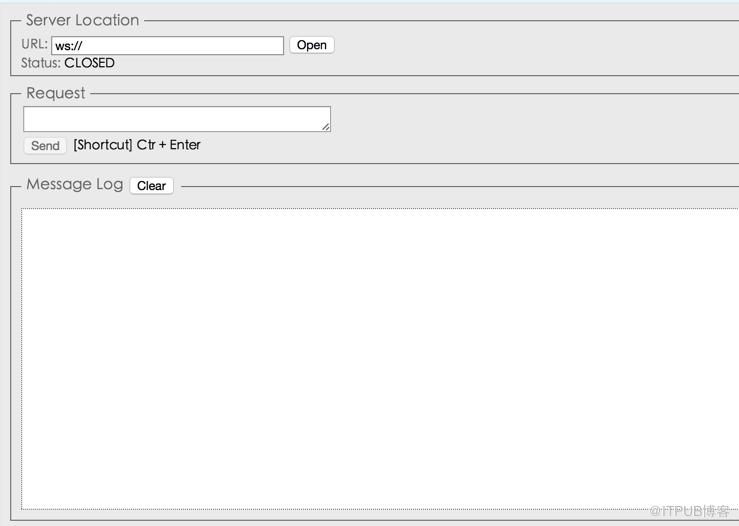
}chrome安装一个websocket客户端调试
最后
为了统一的操作体验,对于一些不支持websocket的浏览器,请使用socketjs技术做客户端开发。
来自 “ ITPUB博客 ” ,链接:https://blog.itpub.net/2790/viewspace-2810140/ ,如需转载,请注明出处,否则将追究法律责任。

