昨晚一直在弄Nginx安装Lua模块,一开始我是yum install nginx安装的Nginx,这样的话就不需要编译安装的那么麻烦,在安装Lua模块的过程中,我想更新下Pcre的版本,结果把系统搞炸了,删除了不该删的文件(可能当时我用的root权限的,直接rpm -e --nodeps xxxx)就把pcre给卸载了,结果阿里云的服务器炸了,远程连接也断了,后面尝试着恢复,但是没办法,基本命令全部失效,什么都没用了,无赖之下远程重启阿里云服务器,想看下有没有系统备份,这时候系统也起不来了,只好将磁盘格式化(辛辛苦苦装了那么多东西,这下要重新来过),特意写下这篇博客,记录遇到的坑。
一 安装步骤如下:
1 首先yum list | grep nginx 看下yum源中是否有nginx.
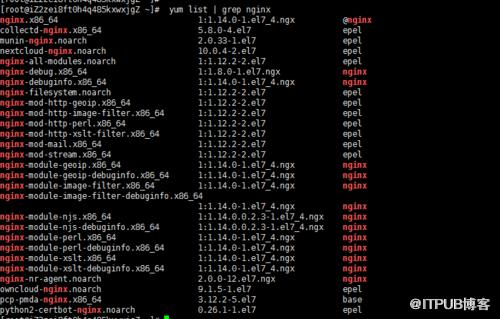
2 yum install nginx 安装nginx
3 nginx -V 查看编译的参数

4 LuaJIT
wget http://luajit.org/download/LuaJIT-2.0.2.tar.gz
tar -zxvf LuaJIT-2.0.2.tar.gz
cd LuaJIT-2.0.2
make install PREFIX=/usr/local/LuaJIT
5 /etc/profile 文件中加入环境变量
export LUAJIT_LIB=/usr/local/lib
export LUAJIT_INC=/usr/local/include/luajit-2.0
6 ngx_devel_kit和lua-nginx-module
cd /opt/download
wget https://github.com/simpl/ngx_devel_kit/archive/v0.3.0.tar.gz
wget https://github.com/openresty/lua-nginx-module/archive/v0.10.9rc7.tar.gz
分别解压、安装
7 下载nginx的源码包
cd /opt/download
wget http://nginx.org/download/nginx-1.12.1.tar.gz
tar -zxvf nginx-1.12.1.tar.gzcd nginx-1.12.1
安装完后的路径如下:
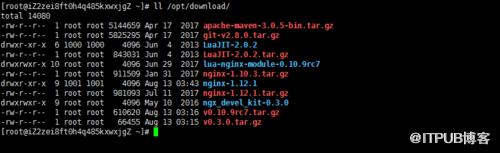
8 进行编译
cd /opt/download/nginx-1.12.1
[root@iZ2zei8ft0h4q485kxwxjgZ nginx-1.12.1]# ./configure --prefix=/etc/nginx --sbin-path=/usr/sbin/nginx --modules-path=/usr/lib64/nginx/modules --conf-path=/etc/nginx/nginx.conf --error-log-path=/var/log/nginx/error.log --http-log-path=/var/log/nginx/access.log --pid-path=/var/run/nginx.pid --lock-path=/var/run/nginx.lock --http-client-body-temp-path=/var/cache/nginx/client_temp --http-proxy-temp-path=/var/cache/nginx/proxy_temp --http-fastcgi-temp-path=/var/cache/nginx/fastcgi_temp --http-uwsgi-temp-path=/var/cache/nginx/uwsgi_temp --http-scgi-temp-path=/var/cache/nginx/scgi_temp --user=nginx --group=nginx --with-compat --with-file-aio --with-threads --with-http_addition_module --with-http_auth_request_module --with-http_dav_module --with-http_flv_module --with-http_gunzip_module --with-http_gzip_static_module --with-http_mp4_module --with-http_random_index_module --with-http_realip_module --with-http_secure_link_module --with-http_slice_module --with-http_ssl_module --with-http_stub_status_module --with-http_sub_module --with-http_v2_module --with-mail --with-mail_ssl_module --with-stream --with-stream_realip_module --with-stream_ssl_module --with-stream_ssl_preread_module --with-cc-opt='-O2 -g -pipe -Wall -Wp,-D_FORTIFY_SOURCE=2 -fexceptions -fstack-protector-strong --param=ssp-buffer-size=4 -grecord-gcc-switches -m64 -mtune=generic -fPIC' --with-ld-opt='-Wl,-z,relro -Wl,-z,now -pie' --add-module=/opt/download/ngx_devel_kit-0.3.0 --add-module=/opt/download/lua-nginx-module-0.10.9rc7
最后加入lua的模块,注意路径别错了
make 以下 ,会覆盖之前yum下载的nginx
9 加载lua库,加入到ld.so.conf文件
echo "/usr/local/lib" >> /etc/ld.so.conf
10 ldconfig
执行此 命令后,nginx -V 看下参数
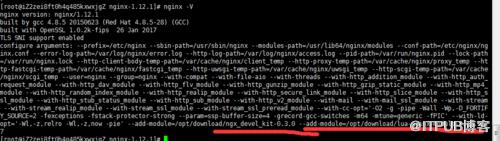
二 测试Lua
cd /etc/nginx/conf.d/default.conf 加入下面的location
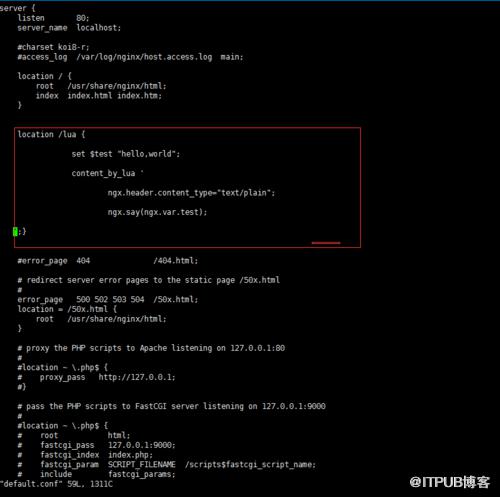
nginx -tc /etc/nginx/nginx.conf 检查错误
nginx -s reload -c /etc/nginx/nginx.conf 重新加载
浏览器访问 ip/lua ,我这里直接用域名解析的
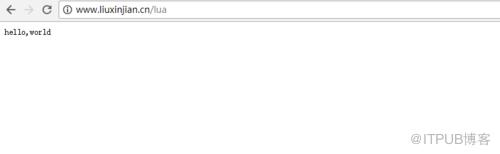
这样说明lua模块安装好了
三 最后还是提醒下,在删除一下东西之前考虑一下依赖,特别是把那些运行需要的依赖删除后,后果很严重,还好我的只是个人服务器,东西重新配置部署就好了。
来自 “ ITPUB博客 ” ,链接:https://blog.itpub.net/2790/viewspace-2806746/ ,如需转载,请注明出处,否则将追究法律责任。

