在某次公开课上,发现老师使用存错过程show_space()来打印出表的块使用信息,非常方便。经过查询资料终于找到Tom kyte 大神的原作,我在这里体验一次使用SQL脚本的便利性。
因为是在sys用户下创建的show_space()存储过程,如果想被其他用户可以使用如何操作呢,方法如下:使用同义词的方式
这样其他用户就可以正常的使用show_space()存储过程来统计表的块的信息了。
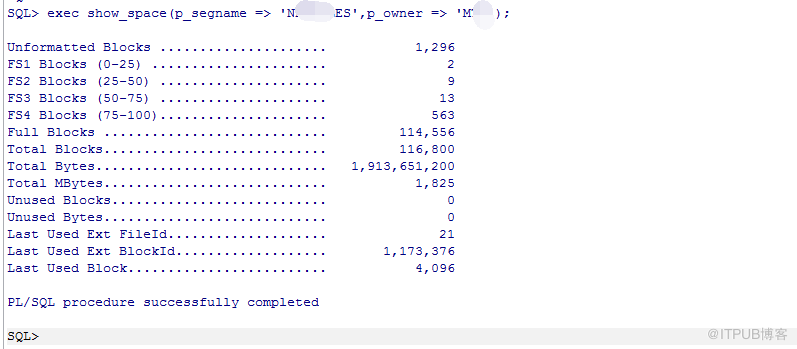
点击(此处)折叠或打开
-
-- -----------------------------------------------------------------------------------
-
-- Author : Tom Kyte
-
-- Description : Displays free and unused space for the specified object.
-
-- Call Syntax : EXEC Show_Space('Tablename');
-
-- Requirements : SET SERVEROUTPUT ON
-
-- Last Modified: June 22, 2010
-
-- This enhance version has all the fixes for ASSM, LMT, partitions etc (Oracle version 10gr2 +)
-
-- -----------------------------------------------------------------------------------
-
create or replace procedure show_space(p_segname in varchar2,
-
p_owner in varchar2 default user,
-
p_type in varchar2 default 'TABLE',
-
p_partition in varchar2 default NULL)
-
-- this procedure uses authid current user so it can query DBA_*
-
-- views using privileges from a ROLE and so it can be installed
-
-- once per database, instead of once per user that wanted to use it
-
authid current_user as
-
l_free_blks number;
-
l_total_blocks number;
-
l_total_bytes number;
-
l_unused_blocks number;
-
l_unused_bytes number;
-
l_LastUsedExtFileId number;
-
l_LastUsedExtBlockId number;
-
l_LAST_USED_BLOCK number;
-
l_segment_space_mgmt varchar2(255);
-
l_unformatted_blocks number;
-
l_unformatted_bytes number;
-
l_fs1_blocks number;
-
l_fs1_bytes number;
-
l_fs2_blocks number;
-
l_fs2_bytes number;
-
l_fs3_blocks number;
-
l_fs3_bytes number;
-
l_fs4_blocks number;
-
l_fs4_bytes number;
-
l_full_blocks number;
-
l_full_bytes number;
-
-- inline procedure to print out numbers nicely formatted
-
-- with a simple label
-
procedure p(p_label in varchar2, p_num in number) is
-
begin
-
dbms_output.put_line(rpad(p_label, 40, '.') ||
-
to_char(p_num, '999,999,999,999'));
-
end;
-
begin
-
-- this query is executed dynamically in order to allow this procedure
-
-- to be created by a user who has access to DBA_SEGMENTS/TABLESPACES
-
-- via a role as is customary.
-
-- NOTE: at runtime, the invoker MUST have access to these two
-
-- views!
-
-- this query determines if the object is a ASSM object or not
-
begin
-
execute immediate 'select ts.segment_space_management
-
from dba_segments seg, dba_tablespaces ts
-
where seg.segment_name = :p_segname
-
and (:p_partition is null or
-
seg.partition_name = :p_partition)
-
and seg.owner = :p_owner
-
and seg.segment_type = :p_type
-
and seg.tablespace_name = ts.tablespace_name'
-
into l_segment_space_mgmt
-
using p_segname, p_partition, p_partition, p_owner, p_type;
-
exception
-
when too_many_rows then
-
dbms_output.put_line('This must be a partitioned table, use p_partition => ');
-
return;
-
end;
-
-- if the object is in an ASSM tablespace, we must use this API
-
-- call to get space information, else we use the FREE_BLOCKS
-
-- API for the user managed segments
-
if l_segment_space_mgmt = 'AUTO' then
-
dbms_space.space_usage(p_owner,
-
p_segname,
-
p_type,
-
l_unformatted_blocks,
-
l_unformatted_bytes,
-
l_fs1_blocks,
-
l_fs1_bytes,
-
l_fs2_blocks,
-
l_fs2_bytes,
-
l_fs3_blocks,
-
l_fs3_bytes,
-
l_fs4_blocks,
-
l_fs4_bytes,
-
l_full_blocks,
-
l_full_bytes,
-
p_partition);
-
p('Unformatted Blocks ', l_unformatted_blocks);
-
p('FS1 Blocks (0-25) ', l_fs1_blocks);
-
p('FS2 Blocks (25-50) ', l_fs2_blocks);
-
p('FS3 Blocks (50-75) ', l_fs3_blocks);
-
p('FS4 Blocks (75-100)', l_fs4_blocks);
-
p('Full Blocks ', l_full_blocks);
-
else
-
dbms_space.free_blocks(segment_owner => p_owner,
-
segment_name => p_segname,
-
segment_type => p_type,
-
freelist_group_id => 0,
-
free_blks => l_free_blks);
-
p('Free Blocks', l_free_blks);
-
end if;
-
-- and then the unused space API call to get the rest of the
-
-- information
-
dbms_space.unused_space(segment_owner => p_owner,
-
segment_name => p_segname,
-
segment_type => p_type,
-
partition_name => p_partition,
-
total_blocks => l_total_blocks,
-
total_bytes => l_total_bytes,
-
unused_blocks => l_unused_blocks,
-
unused_bytes => l_unused_bytes,
-
LAST_USED_EXTENT_FILE_ID => l_LastUsedExtFileId,
-
LAST_USED_EXTENT_BLOCK_ID => l_LastUsedExtBlockId,
-
LAST_USED_BLOCK => l_LAST_USED_BLOCK);
-
p('Total Blocks', l_total_blocks);
-
p('Total Bytes', l_total_bytes);
-
p('Total MBytes', trunc(l_total_bytes / 1024 / 1024));
-
p('Unused Blocks', l_unused_blocks);
-
p('Unused Bytes', l_unused_bytes);
-
p('Last Used Ext FileId', l_LastUsedExtFileId);
-
p('Last Used Ext BlockId', l_LastUsedExtBlockId);
-
p('Last Used Block', l_LAST_USED_BLOCK);
- end;
点击(此处)折叠或打开
-
SQL> create public synonym show_space for sys.show_space;
-
-
Synonym created.
-
-
SQL> grant execute on show_space to public ;
-
- Grant succeeded.
来自 “ ITPUB博客 ” ,链接:https://blog.itpub.net/27039319/viewspace-2121051/ ,如需转载,请注明出处,否则将追究法律责任。

请登录后发表评论
登录
全部评论
最新文章
- 闪回技术-闪回查询
- 闪回技术-闪回数据库01
- 配置ADG 产生ORA-10458错误
- oracle RAC 迁移votedisk
- ORACL RAC 环境下添加磁盘组提示ORA-15032 ORA-15201
- create database提示ORA-01501 ORA-00200 ORA-00202 ORA-27038错误提示
- 手动创建实例时提示ORA-00845的解决方法
- RAC环境中ORA-01157: cannot identify/lock data file 9 - see DBWR trace file
- 在RAC环境中recreate controlfile 提示ORA-01503和ORA-12720 错误
- RMAN-Configuring an Archived Redo Log Deletion Policy
