Oracle Install 32bit 11.2.0.3 db on 64bit redhat 6.2需要(i386)解决方法
Install 32bit 11.2.0.3 db on 64bit redhat 6.2 需要(i386)解决方法
IBM安装Cognos的工程师,要求我们现有的一台64bit redhat 6.2的服务器安装 32bit 11.2.0.3 db。安装一个32 db 在64bit的服务器本来是一项DBA的日常工作,今天竟然卡了一天。真是郁闷之极。
自检报错如下:
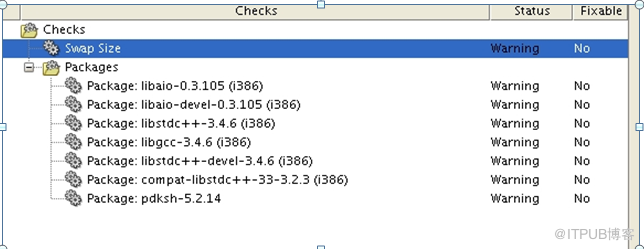
最后发现问题的根本原因:
32 Bit 11.2.0.3 software media OUI does not check for RHEL 6 pre-requirements and instead it checks for default OEL4 pre-requirements
解决方法:
Make the below changes to direct OUI to use OS pre-requirement of OEL6 ( pre-requirements are same for OEL 6 and RHEL 6)
1. Change directory to
2. Backup cvu_config
% cp cvu_config backup_cvu_config
3. Edit cvu_config and change the following line:
CV_ASSUME_DISTID=OEL4
to:
CV_ASSUME_DISTID=OEL6
4. Start the installtion again.
如果以上4步,还解决不了,
5.另外安装所需包
rpm -Uvh binutils-2*x86_64*
rpm -Uvh glibc-2*x86_64* nss-softokn-freebl-3*x86_64*
rpm -Uvh glibc-2*i686* nss-softokn-freebl-3*i686*
rpm -Uvh compat-libstdc++-33*x86_64*
rpm -Uvh glibc-common-2*x86_64*
rpm -Uvh glibc-devel-2*x86_64*
rpm -Uvh glibc-devel-2*i686*
rpm -Uvh glibc-headers-2*x86_64*
rpm -Uvh elfutils-libelf-0*x86_64*
rpm -Uvh elfutils-libelf-devel-0*x86_64*
rpm -Uvh gcc-4*x86_64*
rpm -Uvh gcc-c++-4*x86_64*
rpm -Uvh ksh-*x86_64*
rpm -Uvh libaio-0*x86_64*
rpm -Uvh libaio-devel-0*x86_64*
rpm -Uvh libaio-0*i686*
rpm -Uvh libaio-devel-0*i686*
rpm -Uvh libgcc-4*x86_64*
rpm -Uvh libgcc-4*i686*
rpm -Uvh libstdc++-4*x86_64*
rpm -Uvh libstdc++-4*i686*
rpm -Uvh libstdc++-devel-4*x86_64*
rpm -Uvh make-3.81*x86_64*
rpm -Uvh numactl-devel-2*x86_64*
rpm -Uvh sysstat-9*x86_64*
rpm -Uvh compat-libstdc++-33*i686*
rpm -Uvh compat-libcap*
总结:解决问题多多看MOS
来自 “ ITPUB博客 ” ,链接:https://blog.itpub.net/26442936/viewspace-1152964/ ,如需转载,请注明出处,否则将追究法律责任。

最新文章
- Oracle ogg for 微软云 mysql 下云至本地延迟应用(云上与云下延迟应用)
- Oracle 12c Manual Create Database No-CDB
- Oracle 19c adg全库迁移数据
- Oracle listener log 日志分析方法
- Tuning CPU 100% in Oracle 11g rac-20220215
- 数据库服务器安全加固之禁用22或3389端口
- RAC架构中public网卡down后发生什么和RAC如何自愈?
- Oracle RMAN备份为什么会大量使用temp表空间?
- Mysql 5.7 MHA 高可用
- How to solve of ORA-04063 and RMAN-06429 in 19c
