oracle23i安装后登录数据库报错
环境变量配置
数据库配置后su 到oracle 用户下 发现无法登陆进数据库,
ps -ef|grep smon 看到实例已经在运行,提示没有配置环境变量
[root@ORACLE01T tmp]# su - oracle
[oracle@ORACLE01T ~]$ cd /opt/oracle/product/23ai/dbhomeFree/bin/
[oracle@ORACLE01T bin]$
[oracle@ORACLE01T bin]$ ./sqlplus / as sysdba
Error 6 initializing SQL*Plus
SP2-0667: Message file sp1<lang>.msb not found
SP2-0750: You may need to set ORACLE_HOME to your Oracle software directory
[oracle@SZSPLORACLE01T ~]$ ps -ef|grep smon
oracle 42755 1 0 10:49 ? 00:00:00 db_smon_FREE
oracle 43387 43294 0 10:56 pts/0 00:00:00 grep --color=auto smon
-----------------------------------------------
配置环境变量
vi /home/oracle/.bash_profile
export PATH
export TMP=/tmp
export TMPDIR=$TMP
export ORACLE_SID=FREE
export ORACLE_BASE=/opt/oracle/
export ORACLE_HOME=$ORACLE_BASE/product/23ai/dbhomeFree
export TNS_ADMIN=$ORACLE_HOME/network/admin
export PATH=/usr/sbin:$PATH
export PATH=$ORACLE_HOME/bin:$PATH
# User specific environment and startup programs
配置好环境变量后,sqlplus登入提示idle instance,但是确认oracle_sid配置无误
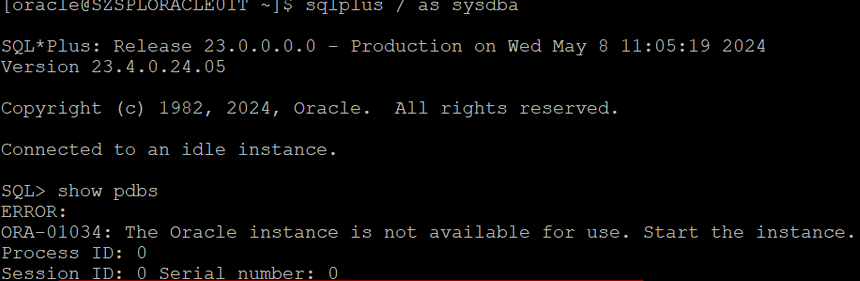
直接kill掉smon 相当于强制关库,然后重新启动即可
来自 “ ITPUB博客 ” ,链接:https://blog.itpub.net/26342786/viewspace-3105387/ ,如需转载,请注明出处,否则将追究法律责任。

