一、故障说明:
刚过完年上班就接到同事的电话,说邮件服务器出了些问题,需要尽快处理一下。服务器采用windows server 2008,邮件服务软件是著名的Microsoft Exchange,说到这里,我想说明一下,本人是第一次接触这个软件,心里想windows microsoft的东西鼠标点点就成了。谁可想,装入数据库时失败,报错如下图,开始我想会不会是使用的sql server数据库,找了一下,没有。这个应该是软件内部自带的,想必都是Microsoft的自家产品。时间紧迫,好多同事都着急用邮箱呢,还是言归正转,快去求助网络吧。找了几遍靠谱的文章,准备进行尝试。在文档中明确指应该对修复的文件进行备份,可是这服务器的空间也真是可怜,连备份个50G都没有了。下面就是拼人品的时刻了。

报错小窗口内容:
--------------------------------------------------------
Microsoft Exchange 错误
--------------------------------------------------------
装入数据库'holytax'失败。
holytax
失败
错误:
无法装入指定的数据库。指定的数据库 :holytax;错误代码: 活动管理器操作失败。错误: 数据库操作失败。错误: 操作失败,出现消息: MapiExceptionJetErrorMissingLogFile: Unable to mount database. (hr=0x80004005, ec=-528)
。 [数据库: holytax, 服务器: Mail.chinab2bi.com]。
活动管理器操作失败。错误: 数据库操作失败。错误: 操作失败,出现消息: MapiExceptionJetErrorMissingLogFile: Unable to mount database. (hr=0x80004005, ec=-528)
。 [数据库: holytax, 服务器: Mail.chinab2bi.com]
活动管理器操作失败。错误: 操作失败,出现消息: MapiExceptionJetErrorMissingLogFile: Unable to mount database. (hr=0x80004005, ec=-528)
。 [服务器: Mail.chinab2bi.com]
MapiExceptionJetErrorMissingLogFile: Unable to mount database. (hr=0x80004005, ec=-528)
--------------------------------------------------------
确定
--------------------------------------------------------
二、故障处理
1.根据网上资料
If the database has been shut down correctly(clean shutdown), please moved the Checkpoint file and all Logfiles to a different folder and try to mount database again. If the database has not been shut down correctly(dirty shutdown). You may need to restore the database with the backup. Or you need to do a database repair.
如果数据库已经关闭正确(清洁关闭),请将检查点文件和所有日志到另一个文件夹并再次尝试安装数据库。如果数据库没有被正确地关闭(脏关闭)。您可能需要使用备份恢复数据库,或者你需要做一个数据库修复,此处我直接使用修复方式。
2.备份*.edb文件(此处由于空间不足,未进行,强烈建议备份)
3.使用eseutil命令修复文件
(1)修复tempchinab2bi.edb文件
E:\Program Files\Microsoft\Exchange Serve\V14\Mailbox\tempchinab2bi>ESEUTIL /P tempchinab2bi.edb
Extensible Storage Engine Utilities for Microsoft(R) Exchange Server
Version 14.01
Copyright (C) Microsoft Corporation. All Rights Reserved.
Initiating REPAIR mode...
Database: tempchinab2bi.edb
Temp. Database: TEMPREPAIR10020.EDB
Checking database integrity.
The database is not up-to-date. This operation may find that
this database is corrupt because data from the log files has
yet to be placed in the database.
To ensure the database is up-to-date please use the 'Recovery' operation.
Scanning Status (% complete)
0 10 20 30 40 50 60 70 80 90 100
|----|----|----|----|----|----|----|----|----|----|
Rebuilding MSysObjects from MSysObjectsShadow.
Scanning Status (% complete)
0 10 20 30 40 50 60 70 80 90 100
|----|----|----|----|----|----|----|----|----|----|
...................................................
Checking the database.
Scanning Status (% complete)
0 10 20 30 40 50 60 70 80 90 100
|----|----|----|----|----|----|----|----|----|----|
...................................................
Scanning the database.
Scanning Status (% complete)
0 10 20 30 40 50 60 70 80 90 100
|----|----|----|----|----|----|----|----|----|----|
...................................................
Repairing damaged tables.
Scanning Status (% complete)
0 10 20 30 40 50 60 70 80 90 100
|----|----|----|----|----|----|----|----|----|----|
.........................
Deleting unicode fixup table.
Deleting MSObjids.
Deleting MSysLocales.
..........................
Repair completed. Database corruption has been repaired!
Note:
It is recommended that you immediately perform a full backup
of this database. If you restore a backup made before the
repair, the database will be rolled back to the state
it was in at the time of that backup.
Operation completed successfully with 595 (JET_wrnDatabaseRepaired, Database cor
ruption has been repaired) after 573.865 seconds.
(2)修复zongcaiban.edb文件
Extensible Storage Engine Utilities for Microsoft(R) Exchange Server
Version 14.01
Copyright (C) Microsoft Corporation. All Rights Reserved.
Initiating REPAIR mode...
Database: zongcaiban.edb
Temp. Database: TEMPREPAIR8024.EDB
Checking database integrity.
The database is not up-to-date. This operation may find that
this database is corrupt because data from the log files has
yet to be placed in the database.
To ensure the database is up-to-date please use the 'Recovery' operation.
Scanning Status (% complete)
0 10 20 30 40 50 60 70 80 90 100
|----|----|----|----|----|----|----|----|----|----|
...................................................
Scanning the database.
Scanning Status (% complete)
0 10 20 30 40 50 60 70 80 90 100
|----|----|----|----|----|----|----|----|----|----|
...................................................
Repairing damaged tables.
Scanning Status (% complete)
0 10 20 30 40 50 60 70 80 90 100
|----|----|----|----|----|----|----|----|----|----|
...................................................
Repair completed. Database corruption has been repaired!
Note:
It is recommended that you immediately perform a full backup
of this database. If you restore a backup made before the
repair, the database will be rolled back to the state
it was in at the time of that backup.
Operation completed successfully with 595 (JET_wrnDatabaseRepaired, Database cor
ruption has been repaired) after 459.594 seconds.
(3)修复holytax.edb文件
E:\Program Files\Microsoft\Exchange Serve\V14\Mailbox\tempchinab2bi>ESEUTIL /P holytax.edb
Extensible Storage Engine Utilities for Microsoft(R) Exchange Server
Version 14.01
Copyright (C) Microsoft Corporation. All Rights Reserved.
Initiating REPAIR mode...
Database: holytax.edb
Temp. Database: TEMPREPAIR9020.EDB
Checking database integrity.
The database is not up-to-date. This operation may find that
this database is corrupt because data from the log files has
yet to be placed in the database.
To ensure the database is up-to-date please use the 'Recovery' operation.
Scanning Status (% complete)
0 10 20 30 40 50 60 70 80 90 100
|----|----|----|----|----|----|----|----|----|----|
Rebuilding MSysObjects from MSysObjectsShadow.
Scanning Status (% complete)
0 10 20 30 40 50 60 70 80 90 100
|----|----|----|----|----|----|----|----|----|----|
...................................................
Checking the database.
Scanning Status (% complete)
0 10 20 30 40 50 60 70 80 90 100
|----|----|----|----|----|----|----|----|----|----|
...................................................
Scanning the database.
Scanning Status (% complete)
0 10 20 30 40 50 60 70 80 90 100
|----|----|----|----|----|----|----|----|----|----|
...................................................
Repairing damaged tables.
Scanning Status (% complete)
0 10 20 30 40 50 60 70 80 90 100
|----|----|----|----|----|----|----|----|----|----|
.........................
Deleting unicode fixup table.
Deleting MSObjids.
Deleting MSysLocales.
..........................
Repair completed. Database corruption has been repaired!
Note:
It is recommended that you immediately perform a full backup
of this database. If you restore a backup made before the
repair, the database will be rolled back to the state
it was in at the time of that backup.
Operation completed successfully with 756 (JET_wrnDatabaseRepaired, Database cor
ruption has been repaired) after 631.042 seconds.
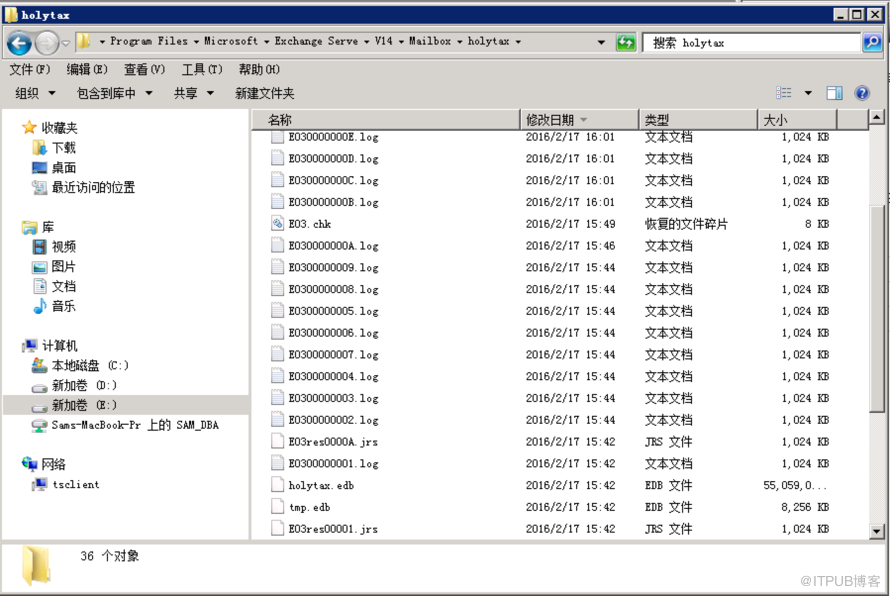
4.将日志文件*.log *.jrs *.chk 文件移出该目录,待载入数据库成功方可删除
5.载入数据库成功

三、总结
头一次处理Microsoft Exchange故障,而且是在没有备份的基础上操作的,心情大家都懂得,问题是处理好了,但是原因还是不很清楚,我个人感觉是由于库停止时,没有一致性关闭导致的,同事之前的操作是删除日志,我通过第三方恢复文件软件扫描,发现确是删除了很多的log文件,在做些操作前也尝试恢复了几个最近日志文件,问题仍旧,最终还是采取修复方案,其实还是可以先尝试将*.log *.jrs *.chk 文件移出后,载入数据库。因为时间缘故,就没有再尝试其他方法。
四、参考
https://technet.microsoft.com/zh-cn/library/aa998231
刚过完年上班就接到同事的电话,说邮件服务器出了些问题,需要尽快处理一下。服务器采用windows server 2008,邮件服务软件是著名的Microsoft Exchange,说到这里,我想说明一下,本人是第一次接触这个软件,心里想windows microsoft的东西鼠标点点就成了。谁可想,装入数据库时失败,报错如下图,开始我想会不会是使用的sql server数据库,找了一下,没有。这个应该是软件内部自带的,想必都是Microsoft的自家产品。时间紧迫,好多同事都着急用邮箱呢,还是言归正转,快去求助网络吧。找了几遍靠谱的文章,准备进行尝试。在文档中明确指应该对修复的文件进行备份,可是这服务器的空间也真是可怜,连备份个50G都没有了。下面就是拼人品的时刻了。

报错小窗口内容:
--------------------------------------------------------
Microsoft Exchange 错误
--------------------------------------------------------
装入数据库'holytax'失败。
holytax
失败
错误:
无法装入指定的数据库。指定的数据库 :holytax;错误代码: 活动管理器操作失败。错误: 数据库操作失败。错误: 操作失败,出现消息: MapiExceptionJetErrorMissingLogFile: Unable to mount database. (hr=0x80004005, ec=-528)
。 [数据库: holytax, 服务器: Mail.chinab2bi.com]。
活动管理器操作失败。错误: 数据库操作失败。错误: 操作失败,出现消息: MapiExceptionJetErrorMissingLogFile: Unable to mount database. (hr=0x80004005, ec=-528)
。 [数据库: holytax, 服务器: Mail.chinab2bi.com]
活动管理器操作失败。错误: 操作失败,出现消息: MapiExceptionJetErrorMissingLogFile: Unable to mount database. (hr=0x80004005, ec=-528)
。 [服务器: Mail.chinab2bi.com]
MapiExceptionJetErrorMissingLogFile: Unable to mount database. (hr=0x80004005, ec=-528)
--------------------------------------------------------
确定
--------------------------------------------------------
二、故障处理
1.根据网上资料
If the database has been shut down correctly(clean shutdown), please moved the Checkpoint file and all Logfiles to a different folder and try to mount database again. If the database has not been shut down correctly(dirty shutdown). You may need to restore the database with the backup. Or you need to do a database repair.
如果数据库已经关闭正确(清洁关闭),请将检查点文件和所有日志到另一个文件夹并再次尝试安装数据库。如果数据库没有被正确地关闭(脏关闭)。您可能需要使用备份恢复数据库,或者你需要做一个数据库修复,此处我直接使用修复方式。
2.备份*.edb文件(此处由于空间不足,未进行,强烈建议备份)
3.使用eseutil命令修复文件
(1)修复tempchinab2bi.edb文件
E:\Program Files\Microsoft\Exchange Serve\V14\Mailbox\tempchinab2bi>ESEUTIL /P tempchinab2bi.edb
Extensible Storage Engine Utilities for Microsoft(R) Exchange Server
Version 14.01
Copyright (C) Microsoft Corporation. All Rights Reserved.
Initiating REPAIR mode...
Database: tempchinab2bi.edb
Temp. Database: TEMPREPAIR10020.EDB
Checking database integrity.
The database is not up-to-date. This operation may find that
this database is corrupt because data from the log files has
yet to be placed in the database.
To ensure the database is up-to-date please use the 'Recovery' operation.
Scanning Status (% complete)
0 10 20 30 40 50 60 70 80 90 100
|----|----|----|----|----|----|----|----|----|----|
Rebuilding MSysObjects from MSysObjectsShadow.
Scanning Status (% complete)
0 10 20 30 40 50 60 70 80 90 100
|----|----|----|----|----|----|----|----|----|----|
...................................................
Checking the database.
Scanning Status (% complete)
0 10 20 30 40 50 60 70 80 90 100
|----|----|----|----|----|----|----|----|----|----|
...................................................
Scanning the database.
Scanning Status (% complete)
0 10 20 30 40 50 60 70 80 90 100
|----|----|----|----|----|----|----|----|----|----|
...................................................
Repairing damaged tables.
Scanning Status (% complete)
0 10 20 30 40 50 60 70 80 90 100
|----|----|----|----|----|----|----|----|----|----|
.........................
Deleting unicode fixup table.
Deleting MSObjids.
Deleting MSysLocales.
..........................
Repair completed. Database corruption has been repaired!
Note:
It is recommended that you immediately perform a full backup
of this database. If you restore a backup made before the
repair, the database will be rolled back to the state
it was in at the time of that backup.
Operation completed successfully with 595 (JET_wrnDatabaseRepaired, Database cor
ruption has been repaired) after 573.865 seconds.
(2)修复zongcaiban.edb文件
Extensible Storage Engine Utilities for Microsoft(R) Exchange Server
Version 14.01
Copyright (C) Microsoft Corporation. All Rights Reserved.
Initiating REPAIR mode...
Database: zongcaiban.edb
Temp. Database: TEMPREPAIR8024.EDB
Checking database integrity.
The database is not up-to-date. This operation may find that
this database is corrupt because data from the log files has
yet to be placed in the database.
To ensure the database is up-to-date please use the 'Recovery' operation.
Scanning Status (% complete)
0 10 20 30 40 50 60 70 80 90 100
|----|----|----|----|----|----|----|----|----|----|
...................................................
Scanning the database.
Scanning Status (% complete)
0 10 20 30 40 50 60 70 80 90 100
|----|----|----|----|----|----|----|----|----|----|
...................................................
Repairing damaged tables.
Scanning Status (% complete)
0 10 20 30 40 50 60 70 80 90 100
|----|----|----|----|----|----|----|----|----|----|
...................................................
Repair completed. Database corruption has been repaired!
Note:
It is recommended that you immediately perform a full backup
of this database. If you restore a backup made before the
repair, the database will be rolled back to the state
it was in at the time of that backup.
Operation completed successfully with 595 (JET_wrnDatabaseRepaired, Database cor
ruption has been repaired) after 459.594 seconds.
(3)修复holytax.edb文件
E:\Program Files\Microsoft\Exchange Serve\V14\Mailbox\tempchinab2bi>ESEUTIL /P holytax.edb
Extensible Storage Engine Utilities for Microsoft(R) Exchange Server
Version 14.01
Copyright (C) Microsoft Corporation. All Rights Reserved.
Initiating REPAIR mode...
Database: holytax.edb
Temp. Database: TEMPREPAIR9020.EDB
Checking database integrity.
The database is not up-to-date. This operation may find that
this database is corrupt because data from the log files has
yet to be placed in the database.
To ensure the database is up-to-date please use the 'Recovery' operation.
Scanning Status (% complete)
0 10 20 30 40 50 60 70 80 90 100
|----|----|----|----|----|----|----|----|----|----|
Rebuilding MSysObjects from MSysObjectsShadow.
Scanning Status (% complete)
0 10 20 30 40 50 60 70 80 90 100
|----|----|----|----|----|----|----|----|----|----|
...................................................
Checking the database.
Scanning Status (% complete)
0 10 20 30 40 50 60 70 80 90 100
|----|----|----|----|----|----|----|----|----|----|
...................................................
Scanning the database.
Scanning Status (% complete)
0 10 20 30 40 50 60 70 80 90 100
|----|----|----|----|----|----|----|----|----|----|
...................................................
Repairing damaged tables.
Scanning Status (% complete)
0 10 20 30 40 50 60 70 80 90 100
|----|----|----|----|----|----|----|----|----|----|
.........................
Deleting unicode fixup table.
Deleting MSObjids.
Deleting MSysLocales.
..........................
Repair completed. Database corruption has been repaired!
Note:
It is recommended that you immediately perform a full backup
of this database. If you restore a backup made before the
repair, the database will be rolled back to the state
it was in at the time of that backup.
Operation completed successfully with 756 (JET_wrnDatabaseRepaired, Database cor
ruption has been repaired) after 631.042 seconds.
4.将日志文件*.log *.jrs *.chk 文件移出该目录,待载入数据库成功方可删除
5.载入数据库成功

三、总结
头一次处理Microsoft Exchange故障,而且是在没有备份的基础上操作的,心情大家都懂得,问题是处理好了,但是原因还是不很清楚,我个人感觉是由于库停止时,没有一致性关闭导致的,同事之前的操作是删除日志,我通过第三方恢复文件软件扫描,发现确是删除了很多的log文件,在做些操作前也尝试恢复了几个最近日志文件,问题仍旧,最终还是采取修复方案,其实还是可以先尝试将*.log *.jrs *.chk 文件移出后,载入数据库。因为时间缘故,就没有再尝试其他方法。
四、参考
https://technet.microsoft.com/zh-cn/library/aa998231
来自 “ ITPUB博客 ” ,链接:https://blog.itpub.net/26148431/viewspace-1991525/ ,如需转载,请注明出处,否则将追究法律责任。

请登录后发表评论
登录
全部评论
