oracle EM 登陆报错
安装好oracle10G后,用EM登陆:
报错:java.lang.Exception: Exception in sending Request :: null
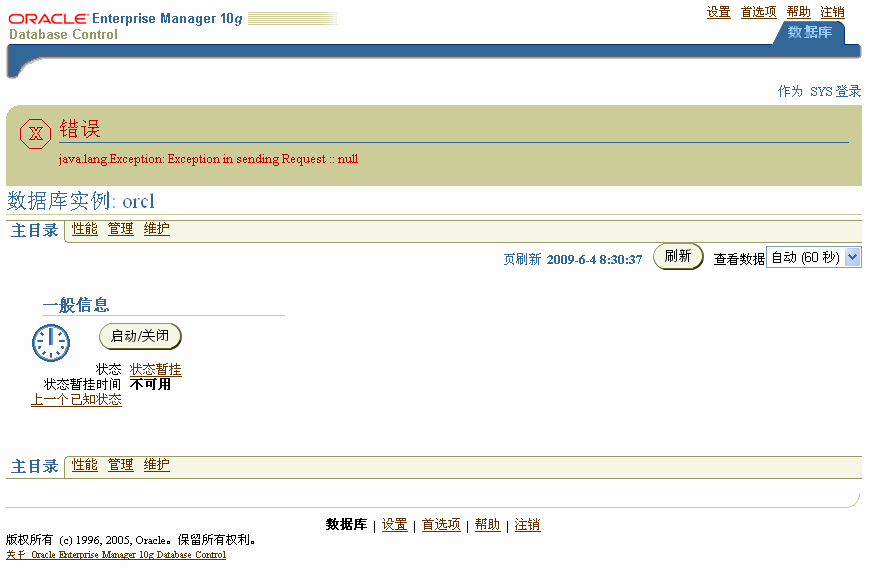
解决方案:找到下面的文件
windows下:“$ORACLE_HOME\db_1\$HOSTNAME\sysman\config\emd.properties”
linux下:$ORACLE_HOME/sysman/config/emd.properties
其中的agentTZRegion缺省是GMT,改为你所在的时区即可,例如:
agentTZRegion=Asia/Shanghai
关于设置时区的列表参考:“10.2.0\db_1\sysman\admin\supportedtzs.lst”
然后先停止dbconsole 在重启dbconsole :
set ORACLE_SID=orcl
emctl stop dbconsole
emctl start dbconsole
重新登陆 OK!!
来自 “ ITPUB博客 ” ,链接:https://blog.itpub.net/25373498/viewspace-719128/ ,如需转载,请注明出处,否则将追究法律责任。
上一篇:
Oracle RAC日常基本维护命令
下一篇:
oracle10g安装过程中报错

请登录后发表评论
登录
全部评论
最新文章
- oracle等待事件类型wait_class说明
- 【思考点亮生命之光】AWR之父Graham Wood专访
- oracle 10g awr 报告中内容所对应的sql
- reboot和init 6之间的区别
- Active Session History (ASH) performed an emergency flush
- Oracle oradebug命令使用说明
- Symantec - NetBackup (NBU) 简体中文文档汇总(持续更新)
- Fatal NI connect error 12170 TNS-12535/TNS-00505 TNS:operation timed out
- EXP-00091: Exporting questionable statistics 问题处理方法
- Linux系统性能调优之性能分析
