SchemaSpy 简介
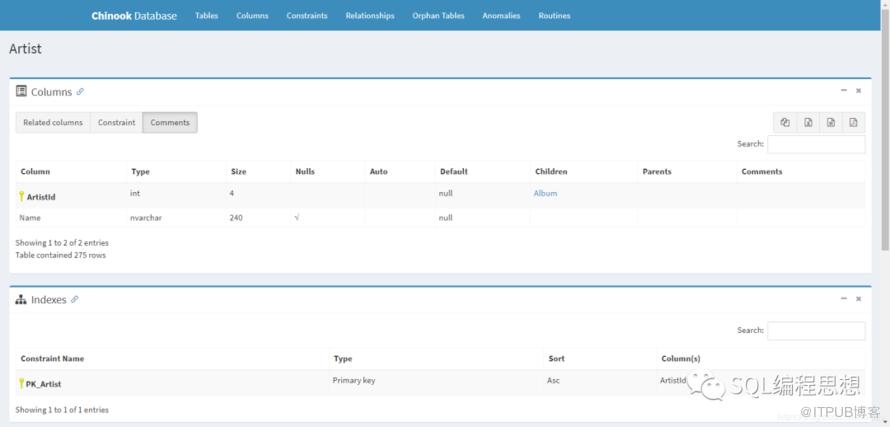
支持绝大多数 JDBC 兼容的数据库 ;
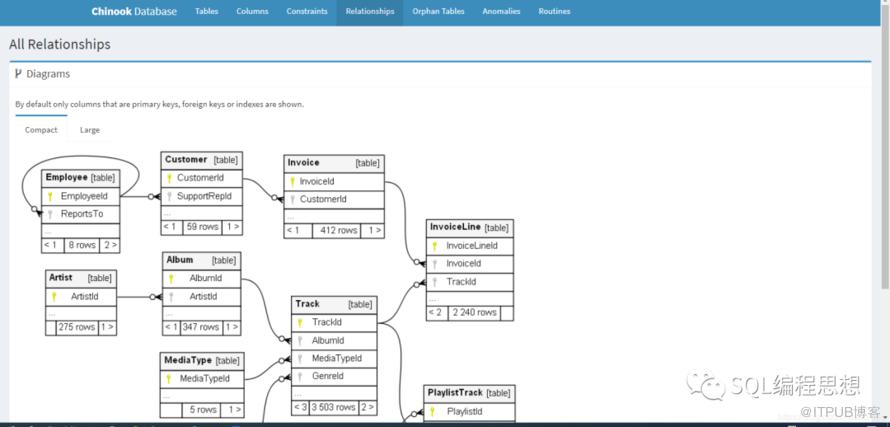
生成 ER 图,支持保存为图片;
显示字段之间的外键关联和级联操作;
显示存储过程和函数源代码;
显示视图及定义;
在注释中支持 Markdown 渲染;
支持导出为 Excel、CSV 以及 PDF 文件;
支持额外的元数据,具体参考 SchemaMeta;
显示数据库中的异常情况,例如没有任何索引的表。
SchemaSpy 安装
PS C:\Users\tony> java -version
java version "1.8.0_281"
Java(TM) SE Runtime Environment (build 1.8.0_281-b09)
Java HotSpot(TM) Client VM (build 25.281-b09, mixed mode)
PS C:\Users\tony>
SchemaSpy 使用
C:\Users\tony>java -jar schemaspy-6.1.0.jar -help
  ____       _                          ____
 / ___|  ___| |__   ___ _ __ ___   __ _/ ___| _ __  _   _
\___ \ / __| '_ \ / _ \ '_ ` _ \ / _` \___ \| '_ \| | | |
  ___) | (__| | | |  __/ | | | | | (_| |___) | |_) | |_| |
 |____/ \___|_| |_|\___|_| |_| |_|\__,_|____/| .__/ \__, |
                                             |_|    |___/

                                              6.1.0

SchemaSpy generates an HTML representation of a database schema's relationships.
SchemaSpy comes with ABSOLUTELY NO WARRANTY.
SchemaSpy is free software and can be redistributed under the conditions of LGPL version 3 or later.
http://www.gnu.org/licenses/

INFO  - Starting Main v6.1.0 on LAPTOP-DGRB6HD9 with PID 3228 (C:\Users\tony\schemaspy-6.1.0.jar started by tony in C:\Users\tony)
INFO  - The following profiles are active: default
INFO  - Started Main in 1.802 seconds (JVM running for 2.282)
INFO  - Usage: java -jar /C:/Users/tony/schemaspy-6.1.0.jar [options]
  Options:
    ?, -?, /?, -h, help, -help, --help
      show general usage and available options
    -dbHelp, -dbhelp, --dbHelp, --dbhelp
      Show built-in database types and their required connection parameters
    -l, --license
      Print license, it will first print GPL and then LGPL (LGPL is addition to GPL)
    -cat, --catalog, catalog, schemaspy.cat, schemaspy.catalog
      catalog
    -db, -database-name, schemaspy.db, schemaspy.database-name
      Name of database to connect to
    -t, --database-type, database-type, schemaspy.t, schemaspy.database-type
type of database
      Default: ora
    -debug, --debug, debug, schemaspy.debug
      Enable debug logging
      Default: false
    -degree, schemaspy.degree
      Limit the degree of separation, allowed values 1 or 2, defaults to 2
      Default: 2
    -dp, --driverPath, driverPath, schemaspy.dp, schemaspy.driverPath
      path to look for JDBC drivers overrides driverPath in [databaseType].properties, supports directory, will add
      directory and recurse to add all content. Supports multiple paths using os dependent pathSeparator.
    -nohtml, --no-html, nohtml, schemaspy.nohtml
      Skip html generation
      Default: false
    -o, --outputDirectory, outputDirectory, schemaspy.o, schemaspy.outputDirectory
      directory to place the generated output in
    -port, --port, port, schemaspy.port

    -s, --schema, schema, schemaspy.s, schemaspy.schema
      name of the schema to analyze (defaults to the specified user)
    -sso, --single-sign-on, schemaspy.sso, schemaspy.single-sign-on
      Remove requirement for user
      Default: false
    -u, --user, user, schemaspy.u, schemaspy.user
      connect to the database with this user id
    -vizjs, schemaspy.vizjs
      Use viz.js instead of graphviz graphvizDot executable
      Default: false

Go to http://schemaspy.org for a complete list/description of additional parameters.

Sample usage using the default database type (implied -t ora):

 java -jar schemaSpy.jar -db mydb -s myschema -u devuser -p password -o output
java -jar schemaspy.jar -configFile path/to/config.file
# 指定数据库类型. 使用 -dbhelp 参数查看详细信息.
schemaspy.t=mssql
# 可选参数,指定替代的 jdbc 驱动.
schemaspy.dp=path/to/drivers
# 数据库连接属性:主机、端口、数据库名、用户、密码
schemaspy.host=server
schemaspy.port=port_num
schemaspy.db=db_name
schemaspy.u=database_user
schemaspy.p=database_password
# 输出结果的存储目录
schemaspy.o=path/to/output
# 需要创建 ERD 的数据库模式 Schema
schemaspy.s=dbo
java -jar schemaspy-vX.Y.Z.jar -t dbType -dp path/to/driver -db dbName -host server -port port_num [-s schema] -u user [-p password] -o outputDir -vizjs
C:\Users\tony>java -jar schemaspy-6.1.0.jar -t pgsql11 -dp D:/Applications/DBeaver/drivers/postgresql-42.2.5.jar -host 127.0.0.1 -port 5432 -db hrdb -u postgres -p Pg@2020 -o ./pg -vizjs
  ____       _                          ____
 / ___|  ___| |__   ___ _ __ ___   __ _/ ___| _ __  _   _
\___ \ / __| '_ \ / _ \ '_ ` _ \ / _` \___ \| '_ \| | | |
  ___) | (__| | | |  __/ | | | | | (_| |___) | |_) | |_| |
 |____/ \___|_| |_|\___|_| |_| |_|\__,_|____/| .__/ \__, |
                                             |_|    |___/

                                              6.1.0

SchemaSpy generates an HTML representation of a database schema's relationships.
SchemaSpy comes with ABSOLUTELY NO WARRANTY.
SchemaSpy is free software and can be redistributed under the conditions of LGPL version 3 or later.
http://www.gnu.org/licenses/

INFO  - Starting Main v6.1.0 on LAPTOP-DGRB6HD9 with PID 13932 (C:\Users\tony\schemaspy-6.1.0.jar started by tony in C:\Users\tony)
INFO  - The following profiles are active: default
INFO  - Started Main in 1.35 seconds (JVM running for 1.944)
INFO  - Starting schema analysis
INFO  - Connected to PostgreSQL - 13.1
INFO  - Gathering schema details
Gathering schema details......................................(0sec)
Connecting relationships......................................(1sec)
Writing/graphing summary.INFO  - Gathered schema details in 1 seconds
INFO  - Writing/graphing summary
........(38sec)
Writing/diagramming detailsINFO  - Completed summary in 38 seconds
INFO  - Writing/diagramming details
.................Java HotSpot(TM) Client VM warning: CodeCache is full. Compiler has been disabled.
Java HotSpot(TM) Client VM warning: Try increasing the code cache size using -XX:ReservedCodeCacheSize=
CodeCache: size=32768Kb used=31969Kb max_used=31969Kb free=798Kb
 bounds [0x02230000, 0x04230000, 0x04230000]
total_blobs=6108 nmethods=5798 adapters=237
 compilation: disabled (not enough contiguous free space left)
..................(9sec)
Wrote relationship details of 35 tables/views to directory '.\pg' in 52 seconds.
View the results by opening .\pg\index.html
INFO  - Wrote table details in 9 seconds
INFO  - Wrote relationship details of 35 tables/views to directory '.\pg' in 52 seconds.
INFO  - View the results by opening .\pg\index.html

总结
原文作者:SQL编程思想;如有侵权,请联系管理员删除。

请登录后发表评论
登录
全部评论
