It is allowed to create several reference objects per header or item of a given business document.
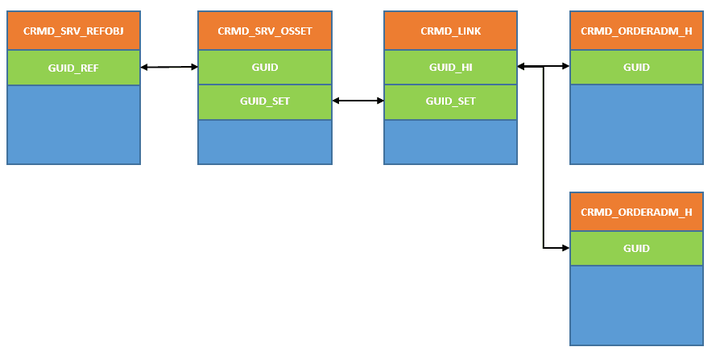
The related database tables to maintain the relationship between a business document and its referenced object are listed below:
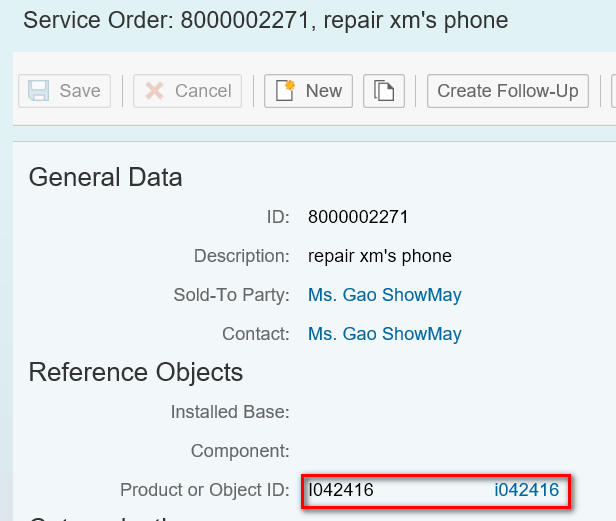
You can run the following report to get a list of all business document which have been assigned with at least one product as reference object:
REPORT order_display_has_ref_obj.SELECT * INTO TABLE @DATA(lt_refobj) FROM crmd_srv_refobj WHERE type_object = 'A'. " productCHECK sy-subrc = 0.SELECT * INTO TABLE @DATA(lt_osset) FROM crmd_srv_osset FOR ALL ENTRIES IN @lt_refobj
   WHERE guid = @lt_refobj-guid_ref.CHECK sy-subrc = 0.SELECT * INTO TABLE @DATA(lt_link) FROM crmd_link FOR ALL ENTRIES IN @lt_osset
   WHERE guid_set = @lt_osset-guid_set.CHECK sy-subrc = 0.SELECT * INTO TABLE @DATA(lt_order) FROM crmd_orderadm_h FOR ALL ENTRIES IN @lt_link
   WHERE guid = @lt_link-guid_hi.LOOP AT lt_order ASSIGNING FIELD-SYMBOL(<order>).
  WRITE:/ |Order ID: { <order>-object_id }, type: { <order>-process_type },  Description: { <order>-description }| COLOR COL_GROUP.ENDLOOP.SELECT * INTO TABLE @DATA(lt_item) FROM crmd_orderadm_i FOR ALL ENTRIES IN @lt_link
   WHERE guid = @lt_link-guid_hi.CLEAR: lt_order.SELECT * INTO TABLE lt_order FROM crmd_orderadm_h  FOR ALL ENTRIES IN lt_item
   WHERE guid = lt_item-header.LOOP AT lt_item ASSIGNING FIELD-SYMBOL(<item>).
  READ TABLE lt_order ASSIGNING <order> WITH KEY guid = <item>-header.
  ASSERT sy-subrc = 0.
  WRITE:/ |Item: { <item>-description }, Order id: { <order>-object_id } | COLOR COL_NEGATIVE.ENDLOOP.
On the other hand, if you know the ID of order and you would like to check whether it has been assigned with reference product or not, you can execute this report:
REPORT ORDER_DISPLAY_REFERENCE_PROD.PARAMETERS: id    TYPE crmd_orderadm_h-object_id OBLIGATORY DEFAULT '8000002271',
            ptype TYPE crmd_orderadm_h-process_type OBLIGATORY DEFAULT 'SRVO'.SELECT SINGLE guid INTO @DATA(guid) FROM crmd_orderadm_h WHERE object_id = @id
  AND process_type = @ptype.IF sy-subrc <> 0.
  WRITE:/ |document not found for id: { id }| COLOR COL_NEGATIVE.
  RETURN.ENDIF.SELECT SINGLE guid_set INTO @DATA(setguid) FROM crmd_link
   WHERE guid_hi = @guid AND objtype_set = '29'.CHECK sy-subrc = 0.SELECT  * INTO TABLE @DATA(lt_osset) FROM crmd_srv_osset
    WHERE guid_set = @setguid.CHECK sy-subrc = 0.SELECT * INTO TABLE @DATA(lt_refobj) FROM crmd_srv_refobj FOR ALL ENTRIES IN @lt_osset
  WHERE guid_ref = @lt_osset-guid.LOOP AT lt_refobj ASSIGNING FIELD-SYMBOL(<obj>).
  cl_crm_1order_set_print_tool=>print_structure( <obj> ).ENDLOOP.
Specify the order ID and type:

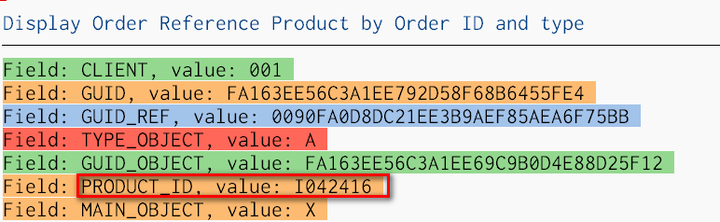
If this order has reference product assigned, the product information will be printed out:
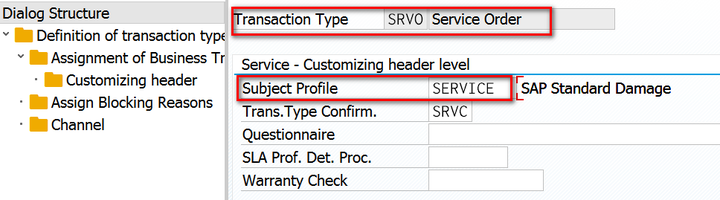
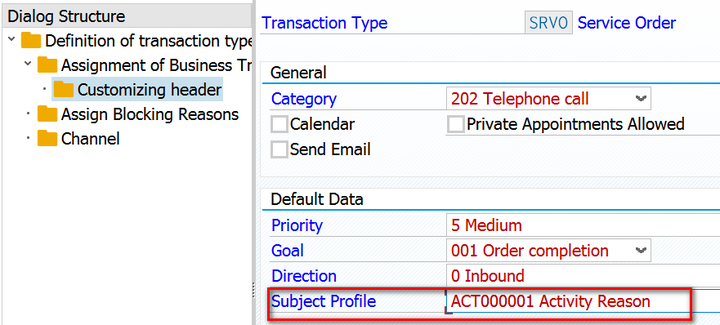
You may observe that every time you create a new Service Order with transaction type SRVO, there will automatically be two entries generated in table CRMD_SRV_OSSET, one for subject_profile SERVICE and the other for ACT00001.

The two profiles are configured via the following customizing:
要获取更多Jerry的原创文章,请关注公众号"汪子熙":

来自 “ ITPUB博客 ” ,链接:https://blog.itpub.net/24475491/viewspace-2715903/ ,如需转载,请注明出处,否则将追究法律责任。

