Recently I was responsible for a performance benchmark test and I need to create a large number of One order documents as test data. For each created document, it is assigned with a random number of items and a random sales / service order from organization unit pool. as we need a draft overview statistic about the order item number distribution and the usage of each organization as Sales / Service organization unit, I write this simple tool. Run the following report, and it gives the following output in my system:
REPORT z.DATA(result) = zcl_crm_order_statistic=>count( ).cl_demo_output=>begin_section(
      `Order Item number overview` ).cl_demo_output=>display( result-item ).cl_demo_output=>begin_section(
      `Sales Org usage overview` ).cl_demo_output=>display( result-sales ).cl_demo_output=>begin_section(
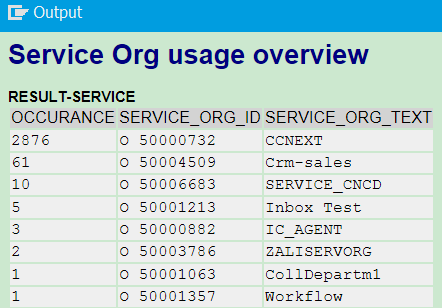
      `Service Org usage overview` ).cl_demo_output=>display( result-service ).
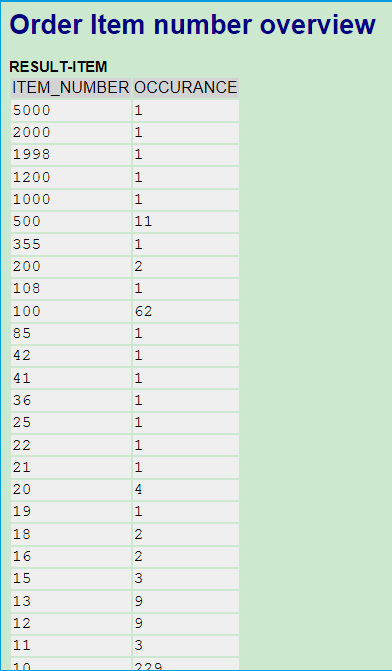
Below picture means there are one order in my system which has been assigned with 5000 items, and 1 order with 2000 items etc.
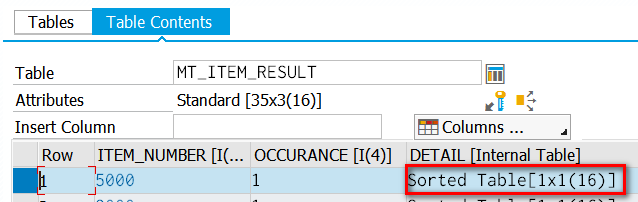
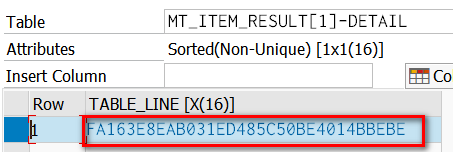
If you would like to know the exact order information, set breakpoint on the end line of method count_item, then you can find the order guid from column DETAIL:
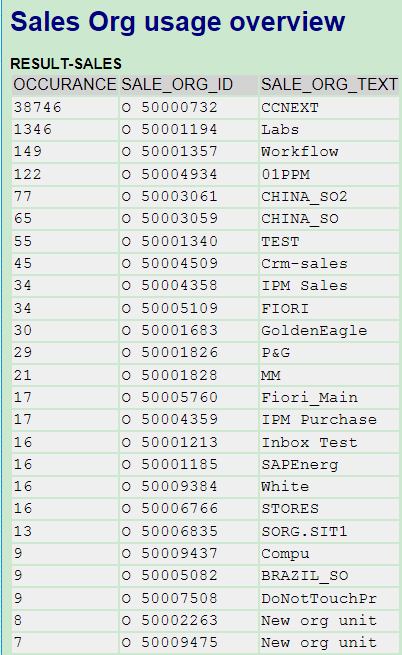
The below screenshot means the Sales Organization 50000732 are used in 38746 orders.
And this is for Service Org accordingly.
If you would like to achieve a better display of result, for example, to review them in browser instead of SAPGUI, you can refer to this blog Step by step to use jChartFX in BSP application.
要获取更多Jerry的原创文章,请关注公众号"汪子熙":

来自 “ ITPUB博客 ” ,链接:https://blog.itpub.net/24475491/viewspace-2715058/ ,如需转载,请注明出处,否则将追究法律责任。

