In previous eight steps all we focus on is transactional stuff. This time let’s touch some analytics stuff.
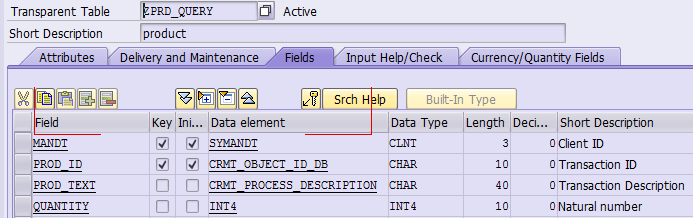
Let’s first create a most simple database table in ABAP backend:
Then create a simple cube view:
@EndUserText.label: 'Jerry cube view'@Analytics.dataCategory: #CUBE@VDM.viewType: #COMPOSITE@AccessControl.authorizationCheck:#CHECK@AbapCatalog.sqlViewName: 'zprdcube'define view Z_C_Prod_Cube as select from zprd_query{
   key zprd_query.prod_id,
  zprd_query.prod_text,
  @DefaultAggregation: #MAX
  zprd_query.quantity}
This cube view has only three fields: prod_id, prod_text and quantity.
For more detail for annotation @Analytics.dataCategory: #CUBE, please refer to SAP help.
Then create a query view on top of the cube view:
```sql @EndUserText.label: 'Jerry query verification' @VDM.viewType: #CONSUMPTION @Analytics.query: true @AccessControl.authorizationCheck:#NOT_ALLOWED @AbapCatalog.sqlViewName: 'zprdquery' @OData.publish: true define view Z_C_Product as select from Z_C_Prod_Cube { key Z_C_Prod_Cube.prod_id, Z_C_Prod_Cube.prod_text, @DefaultAggregation: #MAX Z_C_Prod_Cube.quantity } Since I use @OData.publish: true, a new OData service is automatically generated when this query view is activated. We have already discussed how this generation is achieved in this blog:My CDS view self study tutorial – Part 4 how does annotation @OData.publish work. Once activation is finished, we can do some testing. In ABAP backend I have two entries in the table:
So once we perform the read operation via generated OData service: /sap/opu/odata/sap/Z_C_Product_cds/Z_C_PRODUCT we can see these two entries are returned in OData response automatically:
Let’s do some further research to find out how these two entries are retrieved from backend. We have CDS view name as Z_C_Product and the generated OData service based on it has name Z_C_Product_CDS. Like normal CDS view activation with annotation @OData.publish: true, there is also a new ABAP class @OData.publish: true automatically generated, which has only one method redefined: GET_QUERY_NAME. In this method, a constant attribute is returned. The content of this attribute: ‘2Czprdquery’. The biggest difference compared with a normal CDS view activation is: when a query view is activated, the generated OData service data provider class has CL_NAT_ODATA_MODEL_ABS as its super class, giving you a hint that all data retrieved based on this query view will be handled by analytics framework.
While for a normal CDS view, the DPC class has super class CL_SADL_GTK_EXPOSURE_MPC, which means the data access in this case is done by SADL framework.
In order to figure out the detail data access logic implementation by analytics framework, I write the following report to simulate the OData call: REPORT zcds_get_query_view_data. DATA(lo_tool) = NEW cl_nat_generic_dpc( ). DATA(lo_context) = NEW /iwbep/cl_mgw_context( ). DATA: l_r_rs_gw_columns TYPE REF TO cl_abap_tabledescr, l_t_rs_gw_columns TYPE REF TO data, lo_request TYPE REF TO /iwbep/cl_mgw_request, lo_detail TYPE REF TO /iwbep/if_mgw_core_srv_runtime=>ty_s_mgw_request_context, ls_detail TYPE /iwbep/if_mgw_core_srv_runtime=>ty_s_mgw_request_context, lt_header TYPE tihttpnvp, lt_filter TYPE /iwbep/t_mgw_select_option, lt_order TYPE /iwbep/t_mgw_sorting_order, ls_page TYPE /iwbep/s_mgw_paging, ls_header TYPE LINE OF tihttpnvp. FIELD-SYMBOLS: TYPE table. lo_context->/iwbep/if_mgw_context~set_parameter( iv_name = /iwbep/if_mgw_context=>gc_param_isn iv_value = 'Z_C_PRODUCT_CDS' ). lo_context->/iwbep/if_mgw_context~set_parameter( iv_name = /iwbep/if_mgw_context=>gc_param_isv iv_value = '0001' ). lo_tool->/iwbep/if_mgw_core_srv_runtime~set_context( lo_context ). CREATE DATA lo_detail. lo_request = NEW /iwbep/cl_mgw_request( ir_request_details = lo_detail it_headers = lt_header ). DATA(lo_rt) = NEW cl_eq_bics_gw_rt( i_query = '2Czprdquery' i_servicetype_oq = abap_true ). lo_rt->get_designtime( IMPORTING e_t_column_description = DATA(l_t_query_struc) ) . l_r_rs_gw_columns = cl_eq_bics_gw_dt=>build_rs_structure( l_t_query_struc ). CREATE DATA l_t_rs_gw_columns TYPE HANDLE l_r_rs_gw_columns. ASSIGN l_t_rs_gw_columns-> TO . ls_detail-technical_request-service_name = 'Z_C_PRODUCT_CDS'. ls_detail-technical_request-service_version = '0001'. ls_detail-technical_request-source_entity_type = ls_detail-technical_request-target_entity_type = 'Z_C_PRODUCTType'. ls_detail-technical_request-source_entity_set = ls_detail-technical_request-target_entity_set = 'Z_C_PRODUCTTypeCollection'. ls_header-name = 'dummy'. APPEND ls_header TO ls_detail-technical_request-request_header. CALL METHOD lo_tool->/iwbep/if_mgw_core_srv_runtime~read_entityset( EXPORTING iv_entity_name = 'Z_C_PRODUCTType' iv_source_name = 'Z_C_PRODUCTType' is_paging = ls_page it_order = lt_order it_filter_select_options = lt_filter is_request_details = ls_detail CHANGING cr_entityset = l_t_rs_gw_columns ct_headers = lt_header ). ASSIGN l_t_rs_gw_columns-> TO . WRITE: 'lines of data: ', lines( ). With SAT trace I can easily locate the exact location of code where the data retrieve is done:
In this line the DB cursor is opened with generated SQL statement:
Mystery Revealed!
要获取更多Jerry的原创文章,请关注公众号"汪子熙":
来自 “ ITPUB博客 ” ,链接:https://blog.itpub.net/24475491/viewspace-2713507/ ,如需转载,请注明出处,否则将追究法律责任。

