Email inbound process is done by user SAPCONNECT so that you cannot debug it via normal debugging approach. then you have to follow the steps below to debug:
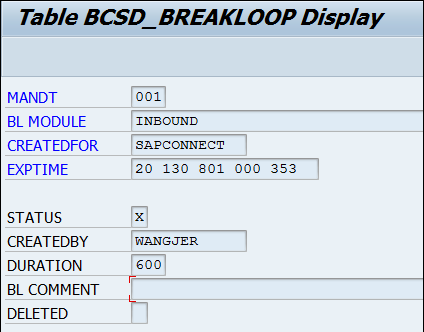
(1) Inside one entry like below into table BCSD_BREAKLOOP. BL Module = INBOUND CREATEDFOR = SAPCONNECT Set the expire time accordingly. Note: As the insertion of this entry will lead to an endless loop in SAPconnect inbound processing, please make sure to delete it or set the status to abap_false.
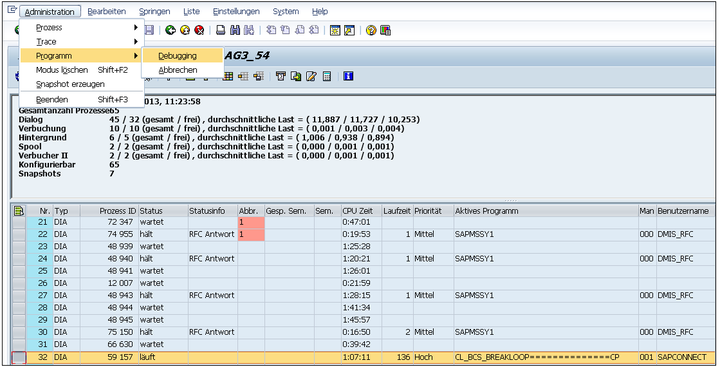
(2) Send your mail to agent inbox mail box as usual, then go to tcode SM51, you should find the endless loop there. Click Administration->Programm->Debugging:
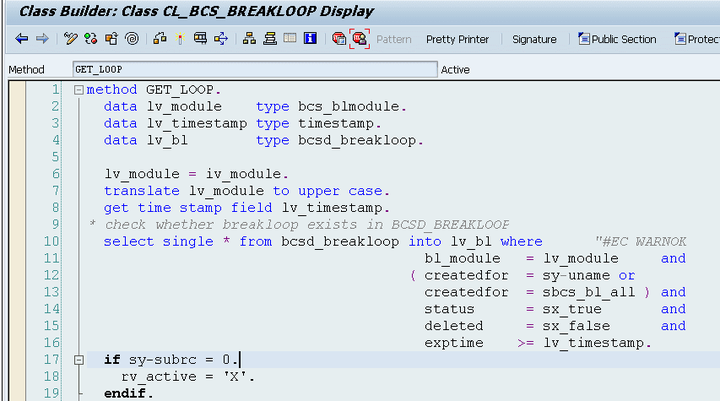
This is because your entry inserted by step1 takes effect:
(3) In debugger, use Shift+F12 to jump out of the endless loop manually:
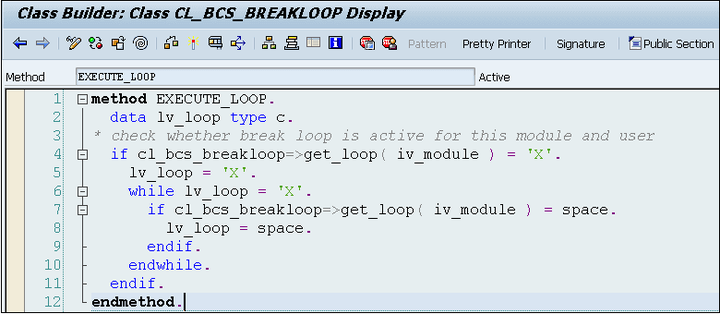
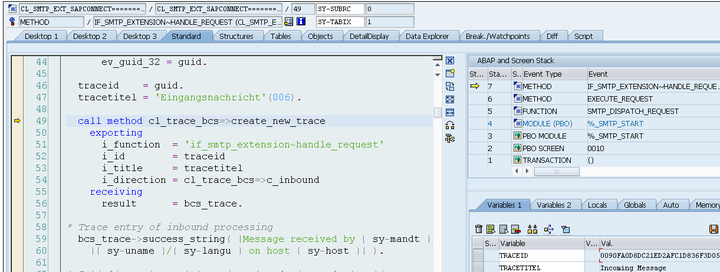
After that you could debug the left inbound process of SAP connect now:
要获取更多Jerry的原创文章,请关注公众号"汪子熙":

来自 “ ITPUB博客 ” ,链接:https://blog.itpub.net/24475491/viewspace-2712090/ ,如需转载,请注明出处,否则将追究法律责任。

