PLSQL怎么创建oracle数据库用户
PLSQL:[3]PLSQL怎么创建oracle数据库用户
方法1
-
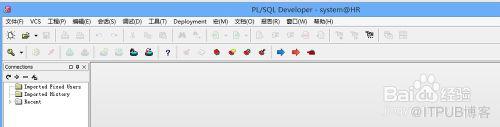
双击运行PLSQL Developer软件,连接oracle数据库服务器

-
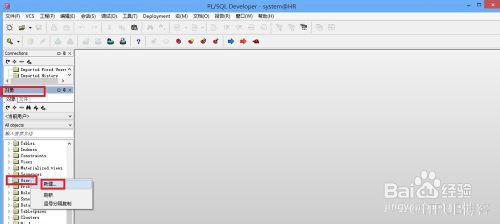
在“对象”下,找到users,右击选择“新建”
-
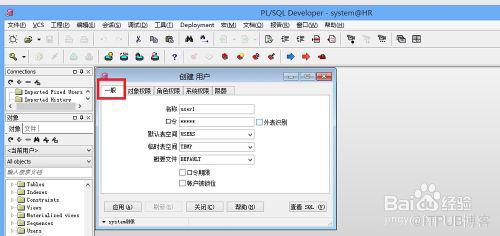
在弹出的“创建用户”窗口中,输入新用户的名称、口令,默认表空间、临时表空间等
-
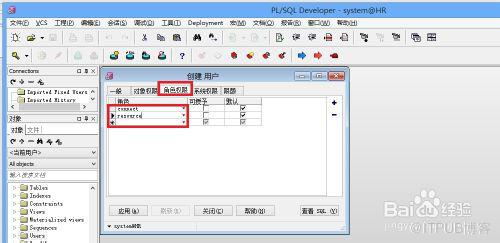
赋予新用户权限,赋予其角色权限:connect、resource,这样用户才能登录操作数据库
 END
END

方法2
-
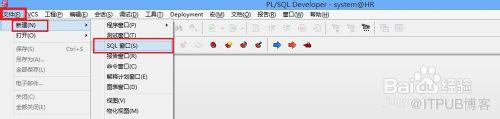
通过sql语句创建用户:依次单击“文件”--“新建”--“SQL窗口”
-
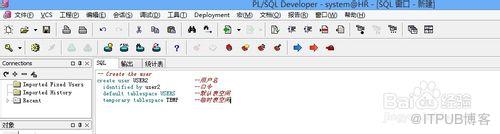
输入sql语句:
-- Create the user
create user USER2 --用户名 identified by user2 --口令 default tablespace USERS --默认表空间 temporary tablespace TEMP --临时表空间
-
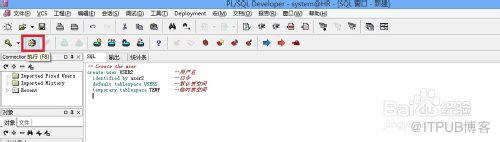
单击执行按钮或按快捷键F8,执行sql语句,创建用户
-
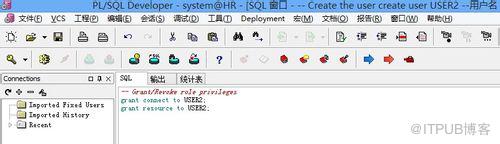
输入sql语句:
-- Grant/Revoke role privileges grant connect to USER2;grant resource to USER2;
给用户赋予权限,按F8执行语句
-
运行plsql,输入新建用户的用户名和口令登录


 END
END


来自 “ ITPUB博客 ” ,链接:https://blog.itpub.net/23972738/viewspace-1109256/ ,如需转载,请注明出处,否则将追究法律责任。
上一篇:
没有了~
下一篇:
没有了~

请登录后发表评论
登录
全部评论
