OGG搭建(rac到-->单实例)
开启归档。
在两个节点分别创建本地目录/arch1
两个节点都启动到mount状态然后,alter database archivelog; 执行完之后两个节点再open,你懂得否则报错:
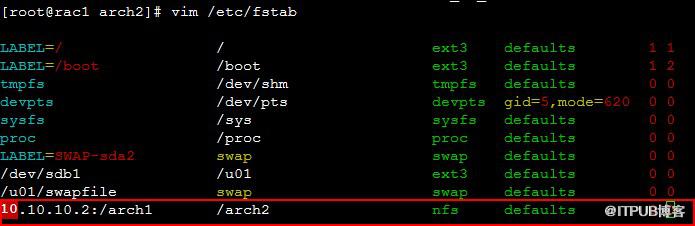
因为我们在节点1配置ogg所以得配置NFS,让节点1看到节点2的归档。
在节点2上 /etc/exports添加如下内容:
然后启动NFS
在节点1上
添加NFS自启
配置ASM动态注册
Oracle 11g RAC的监听是用grid用户来管理的,所以用grid用户来操作。
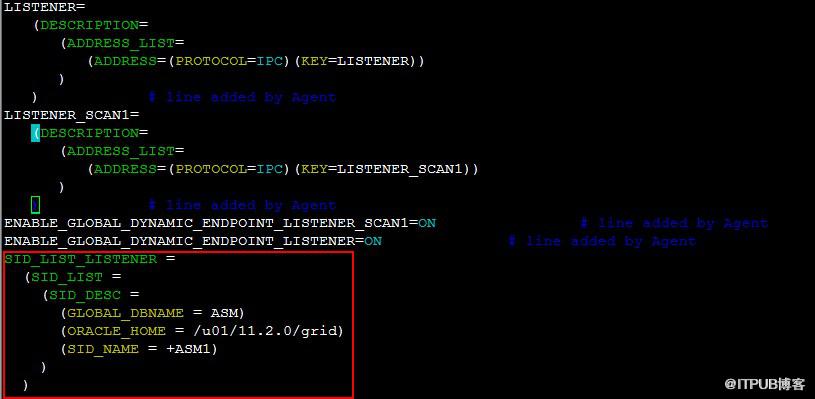
节点而一样
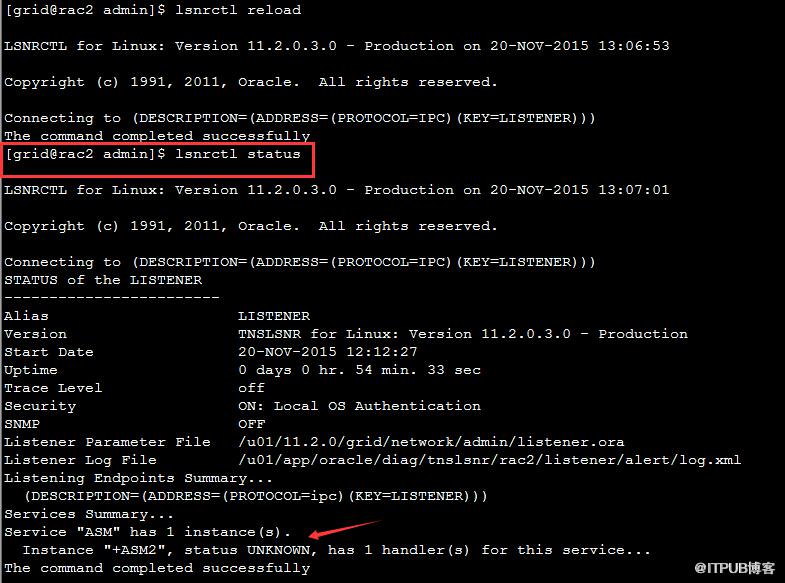
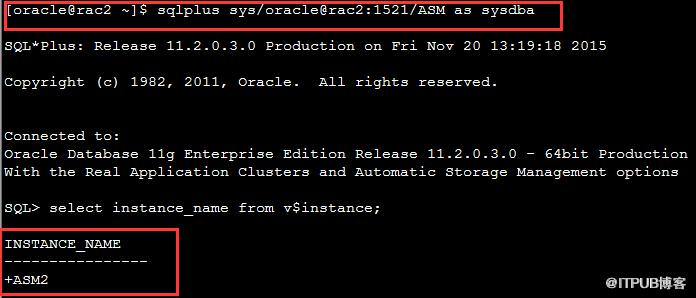
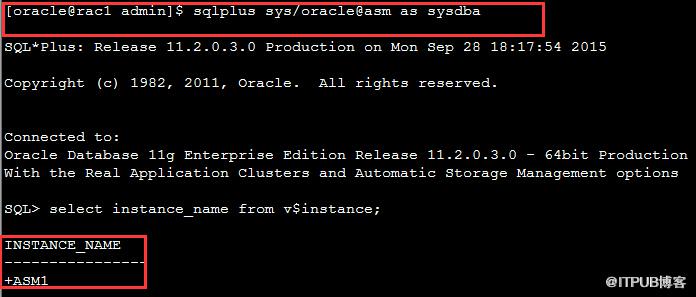
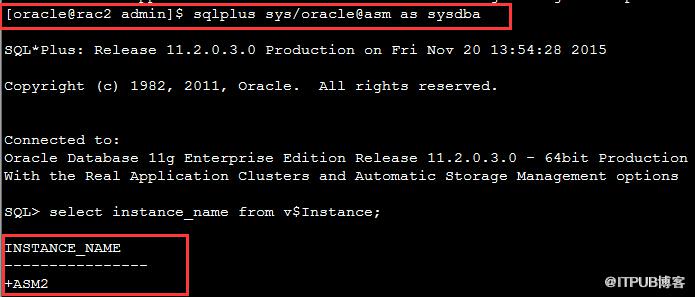
配置TNS文件
注意这里连接ASM的配置中必须添加(UR = A),该参数表示允许远程调用,这个必须有,否则ASM实例不能连接。
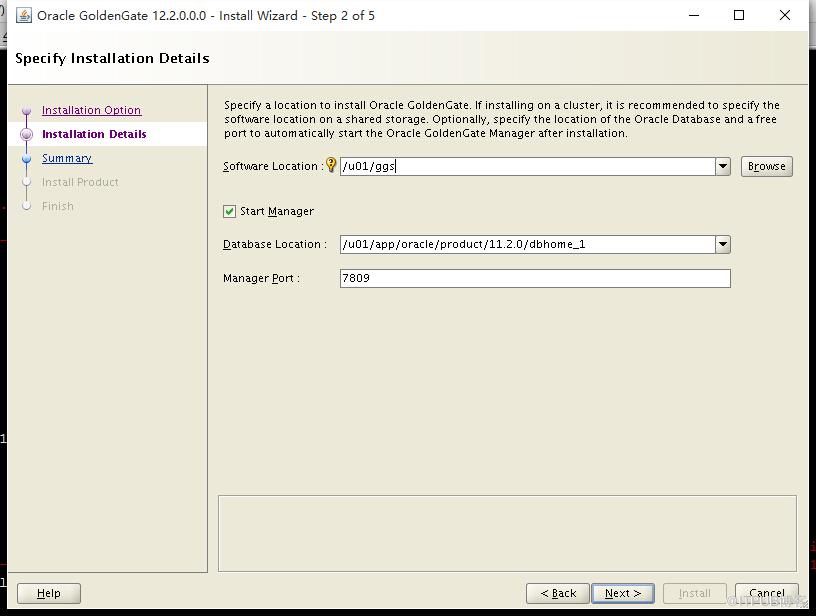
安装ogg软件
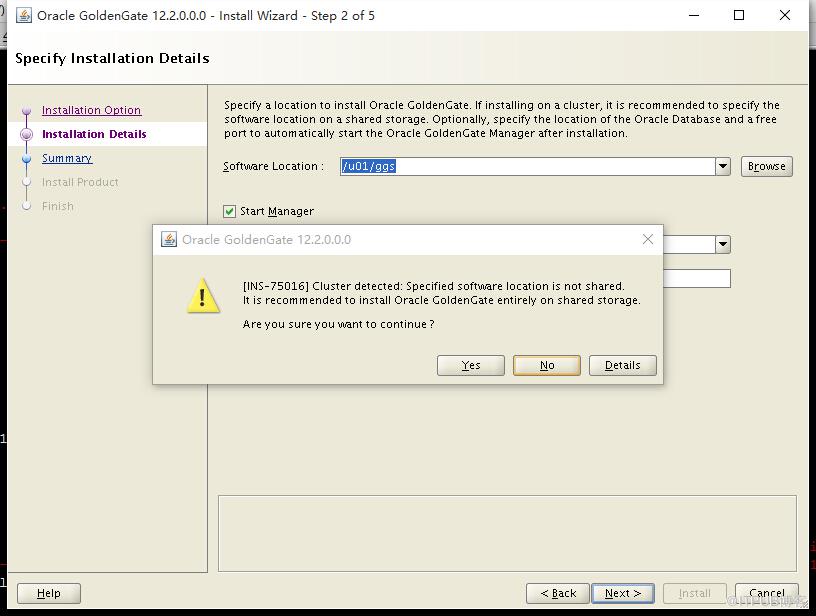
继续... ...
安装完成后将数据库配置成归档,强制日志,附加日志。
创建ogg单独的表空间及用户这是12c必须做的。
在两个节点分别创建本地目录/arch1
点击(此处)折叠或打开
- SQL> alter system set log_archive_dest_1 ='location=/arch1' scope=both sid='*';
-
-
System altered.
-
-
SQL> archive log lsit
-
SP2-0718: illegal ARCHIVE LOG option
-
SQL> archive log list
-
Database log mode No Archive Mode
-
Automatic archival Disabled
-
Archive destination /arch1
-
Oldest online log sequence 32
- Current log sequence 34
点击(此处)折叠或打开
-
SQL> alter database archivelog;
-
alter database archivelog
-
*
-
ERROR at line 1:
-
ORA-01126: database must be mounted in this instance and not open in any
- instance
在节点2上 /etc/exports添加如下内容:
点击(此处)折叠或打开
- /arch1 *(ro)
点击(此处)折叠或打开
-
[root@rac2 ~]# service nfs start
-
Starting NFS services: [ OK ]
-
Starting NFS quotas: [ OK ]
-
Starting NFS daemon: [ OK ]
- Starting NFS mountd: [ OK ]
点击(此处)折叠或打开
-
[root@rac1 ~]# mkdir /arch2
-
[root@rac1 ~]# chown -R oracle:oinstall /arch2
-
[root@rac1 ~]# mount -t nfs 10.10.10.2:/arch1 /arch2 -o nolock
-
[root@rac1 ~]# cd /arch2
-
[root@rac1 arch2]# ls
- 1_34_876782166.dbf
配置ASM动态注册
Oracle 11g RAC的监听是用grid用户来管理的,所以用grid用户来操作。
点击(此处)折叠或打开
-
[root@rac1 ~]# su - grid
- [grid@rac1 ~]$ srvctl status listener
-
Listener LISTENER is enabled
-
Listener LISTENER is running on node(s): rac2,rac1
- [grid@rac1 ~]$ lsnrctl status
-
-
LSNRCTL for Linux: Version 11.2.0.3.0 - Production on 28-SEP-2015 17:07:10
-
-
Copyright (c) 1991, 2011, Oracle. All rights reserved.
-
-
Connecting to (DESCRIPTION=(ADDRESS=(PROTOCOL=IPC)(KEY=LISTENER)))
-
STATUS of the LISTENER
-
------------------------
-
Alias LISTENER
-
Version TNSLSNR for Linux: Version 11.2.0.3.0 - Production
-
Start Date 28-SEP-2015 16:30:33
-
Uptime 0 days 0 hr. 36 min. 36 sec
-
Trace Level off
-
Security ON: Local OS Authentication
-
SNMP OFF
-
Listener Parameter File /u01/11.2.0/grid/network/admin/listener.ora
-
Listener Log File /u01/app/oracle/diag/tnslsnr/rac1/listener/alert/log.xml
-
Listening Endpoints Summary...
-
(DESCRIPTION=(ADDRESS=(PROTOCOL=ipc)(KEY=LISTENER)))
-
(DESCRIPTION=(ADDRESS=(PROTOCOL=tcp)(HOST=192.168.6.101)(PORT=1521)))
-
(DESCRIPTION=(ADDRESS=(PROTOCOL=tcp)(HOST=192.168.6.103)(PORT=1521)))
-
Services Summary...
-
Service "+ASM" has 1 instance(s).
-
Instance "+ASM1", status READY, has 1 handler(s) for this service...
-
Service "prod" has 2 instance(s).
-
Instance "prod1", status READY, has 2 handler(s) for this service...
-
Instance "prod2", status READY, has 1 handler(s) for this service...
-
Service "prodXDB" has 2 instance(s).
-
Instance "prod1", status READY, has 1 handler(s) for this service...
-
Instance "prod2", status READY, has 1 handler(s) for this service...
- The command completed successfully
点击(此处)折叠或打开
-
SID_LIST_LISTENER =
-
(SID_LIST =
-
(SID_DESC =
-
(GLOBAL_DBNAME = ASM)
-
(ORACLE_HOME = /u01/11.2.0/grid)
-
(SID_NAME = +ASM1)
-
)
- )
点击(此处)折叠或打开
-
[grid@rac1 ~]$ lsnrctl status
-
-
LSNRCTL for Linux: Version 11.2.0.3.0 - Production on 28-SEP-2015 17:07:10
-
-
Copyright (c) 1991, 2011, Oracle. All rights reserved.
-
-
Connecting to (DESCRIPTION=(ADDRESS=(PROTOCOL=IPC)(KEY=LISTENER)))
-
STATUS of the LISTENER
-
------------------------
-
Alias LISTENER
-
Version TNSLSNR for Linux: Version 11.2.0.3.0 - Production
-
Start Date 28-SEP-2015 16:30:33
-
Uptime 0 days 0 hr. 36 min. 36 sec
-
Trace Level off
-
Security ON: Local OS Authentication
-
SNMP OFF
-
Listener Parameter File /u01/11.2.0/grid/network/admin/listener.ora
-
Listener Log File /u01/app/oracle/diag/tnslsnr/rac1/listener/alert/log.xml
-
Listening Endpoints Summary...
-
(DESCRIPTION=(ADDRESS=(PROTOCOL=ipc)(KEY=LISTENER)))
-
(DESCRIPTION=(ADDRESS=(PROTOCOL=tcp)(HOST=192.168.6.101)(PORT=1521)))
-
(DESCRIPTION=(ADDRESS=(PROTOCOL=tcp)(HOST=192.168.6.103)(PORT=1521)))
-
Services Summary...
-
Service "+ASM" has 1 instance(s).
-
Instance "+ASM1", status READY, has 1 handler(s) for this service...
-
Service "prod" has 2 instance(s).
-
Instance "prod1", status READY, has 2 handler(s) for this service...
-
Instance "prod2", status READY, has 1 handler(s) for this service...
-
Service "prodXDB" has 2 instance(s).
-
Instance "prod1", status READY, has 1 handler(s) for this service...
-
Instance "prod2", status READY, has 1 handler(s) for this service...
-
The command completed successfully
-
[grid@rac1 ~]$ echo $ORACLE_HOME
- /u01/11.2.0/grid
-
[grid@rac1 home]$ cd $ORACLE_HOME
-
[grid@rac1 grid]$ ls
-
assistants crf dbs evm install jlib mdns ologgerd osysmond racg slax wwg
-
auth crs dc_ocm gipc instantclient JRE mesg OPatch oui rdbms sqlplus xdk
-
bin csmig deinstall gns inventory ldap network opmn owm relnotes srvm
-
cdata css demo gpnp javavm lib nls oracore perl root.sh sysman
-
cfgtoollogs ctss diagnostics has jdbc log oc4j oraInst.loc plsql rootupgrade.sh usm
-
clone cv eons hs jdk md ohasd ord precomp scheduler utl
-
[grid@rac1 grid]$ pwd
- /u01/11.2.0/grid
- [grid@rac1 grid]$ cd network/admin
-
[grid@rac1 admin]$ ll
-
total 72
-
-rw-r--r-- 1 grid oinstall 182 Apr 8 19:34 endpoints_listener.ora
-
-rw-r--r-- 1 grid oinstall 184 Apr 8 19:34 listener1504087PM3409.bak
-
-rw-r--r-- 1 grid oinstall 350 May 20 12:04 listener15052012PM0404.bak
-
-rw-r--r-- 1 grid oinstall 350 Apr 8 19:34 listener.ora
-
-rw-r--r-- 1 grid oinstall 184 Apr 8 19:20 listener.ora.bak.rac1
-
drwxr-xr-x 2 grid oinstall 4096 Apr 8 18:44 samples
-
-rw-r--r-- 1 grid oinstall 205 May 11 2011 shrept.lst
-
-rw-r--r-- 1 grid oinstall 210 May 20 12:04 sqlnet15052012PM0404.bak
- -rw-r--r-- 1 grid oinstall 210 Apr 8 19:34 sqlnet.ora
-
[grid@rac1 admin]$ cat listener.ora
-
LISTENER=(DESCRIPTION=(ADDRESS_LIST=(ADDRESS=(PROTOCOL=IPC)(KEY=LISTENER)))) # line added by Agent
-
LISTENER_SCAN1=(DESCRIPTION=(ADDRESS_LIST=(ADDRESS=(PROTOCOL=IPC)(KEY=LISTENER_SCAN1)))) # line added by Agent
-
ENABLE_GLOBAL_DYNAMIC_ENDPOINT_LISTENER_SCAN1=ON # line added by Agent
-
ENABLE_GLOBAL_DYNAMIC_ENDPOINT_LISTENER=ON # line added by Agent
-
[grid@rac1 admin]$ vim listener.ora
-
[grid@rac1 admin]$
- [grid@rac1 admin]$ lsnrctl reload
-
-
LSNRCTL for Linux: Version 11.2.0.3.0 - Production on 28-SEP-2015 17:25:09
-
-
Copyright (c) 1991, 2011, Oracle. All rights reserved.
-
-
Connecting to (DESCRIPTION=(ADDRESS=(PROTOCOL=IPC)(KEY=LISTENER)))
-
The command completed successfully
-
[grid@rac1 admin]$ lsnrctl status
-
-
LSNRCTL for Linux: Version 11.2.0.3.0 - Production on 28-SEP-2015 17:25:12
-
-
Copyright (c) 1991, 2011, Oracle. All rights reserved.
-
-
Connecting to (DESCRIPTION=(ADDRESS=(PROTOCOL=IPC)(KEY=LISTENER)))
-
STATUS of the LISTENER
-
------------------------
-
Alias LISTENER
-
Version TNSLSNR for Linux: Version 11.2.0.3.0 - Production
-
Start Date 28-SEP-2015 16:30:33
-
Uptime 0 days 0 hr. 54 min. 39 sec
-
Trace Level off
-
Security ON: Local OS Authentication
-
SNMP OFF
-
Listener Parameter File /u01/11.2.0/grid/network/admin/listener.ora
-
Listener Log File /u01/app/oracle/diag/tnslsnr/rac1/listener/alert/log.xml
-
Listening Endpoints Summary...
-
(DESCRIPTION=(ADDRESS=(PROTOCOL=ipc)(KEY=LISTENER)))
-
Services Summary...
-
Service "ASM" has 1 instance(s).
-
Instance "+ASM1", status UNKNOWN, has 1 handler(s) for this service...
- The command completed successfully
点击(此处)折叠或打开
-
SID_LIST_LISTENER =
-
(SID_LIST =
-
(SID_DESC =
-
(GLOBAL_DBNAME = ASM)
-
(ORACLE_HOME = /u01/11.2.0/grid)
-
(SID_NAME = +ASM2)
-
)
- )
配置TNS文件
点击(此处)折叠或打开
-
RAC_11G =
-
(DESCRIPTION =
-
(ADDRESS_LIST =
-
(LOAD_BALANCE = yes)
-
(FAILOVER = ON)
-
(ADDRESS = (PROTOCOL = TCP)(HOST = 192.168.6.103)(PORT = 1521))
-
(ADDRESS = (PROTOCOL = TCP)(HOST = 192.168.6.104)(PORT = 1521))
-
)
-
(CONNECT_DATA =
-
(SERVICE_NAME = prod)
-
(failover_mode=(type=select)(mothod=basic))
-
)
-
)
-
-
ASM =
-
(DESCRIPTION =
-
(ADDRESS = (PROTOCOL = TCP)(HOST = 192.168.6.103)(PORT = 1521))
-
(CONNECT_DATA =
-
(SERVCE = DEDICATED)
-
(SERVICE_NAME = ASM)
-
(INSTANCE_NAME = +ASM1)
-
(UR = A)
-
)
- )
安装ogg软件
继续... ...
安装完成后将数据库配置成归档,强制日志,附加日志。
点击(此处)折叠或打开
-
SQL> select log_mode,supplemental_log_data_min,force_logging from v$database;
-
-
LOG_MODE SUPPLEME FOR
-
------------ -------- ---
-
ARCHIVELOG NO NO
-
-
SQL> alter database force logging;
-
-
Database altered.
-
-
SQL> alter database add supplemental log data;
-
-
Database altered.
-
-
SQL> select log_mode,supplemental_log_data_min,force_logging from v$database;
-
-
LOG_MODE SUPPLEME FOR
-
------------ -------- ---
- ARCHIVELOG YES YES
点击(此处)折叠或打开
-
SQL> create tablespace ggs datafile '+DATA_MORMAL' size 100M autoextend on;
-
-
Tablespace created.
-
-
SQL> create user ggs identified by ggs default tablespace ggs temporary tablespace temp;
-
- User created.
-
-
SQL> grant connect ,resource to ggs;
-
-
Grant succeeded.
-
-
SQL> grant execute on utl_file to ggs;
-
- Grant succeeded.
来自 “ ITPUB博客 ” ,链接:https://blog.itpub.net/15797451/viewspace-2120333/ ,如需转载,请注明出处,否则将追究法律责任。

请登录后发表评论
登录
全部评论
