MacBook OS X安装Oracle12.1 Instant Client
问题
方案
通常,我们需要下载如下几个包即可
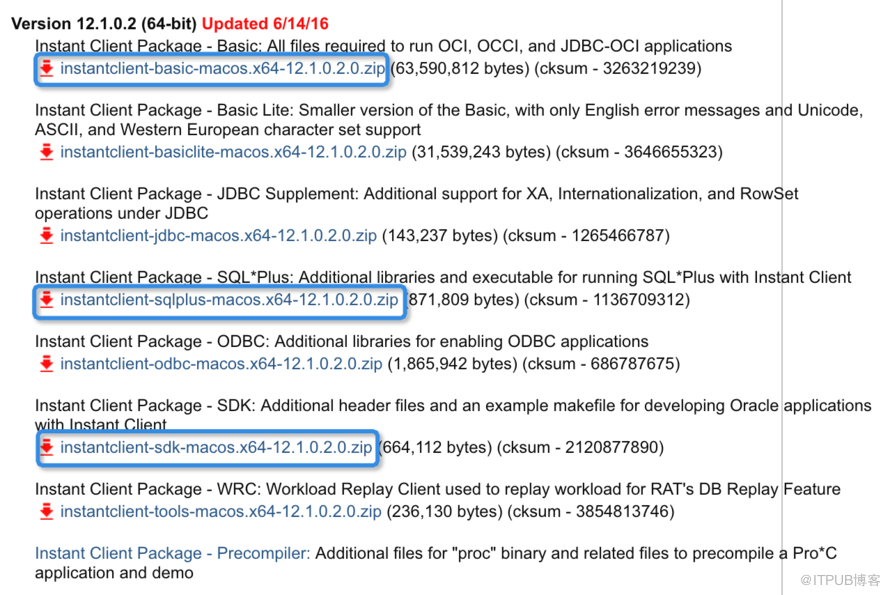
操作
localhost:Downloads wangzhen$ unzip -qq instantclient-sqlplus-macos.x64-12.1.0.2.0.zip
localhost:Downloads wangzhen$ unzip -qq instantclient-sdk-macos.x64-12.1.0.2.0.zip
localhost:Downloads wangzhen$ unzip -qq instantclient-basic-macos.x64-12.1.0.2.0.zip
localhost:~ wangzhen$ mkdir -p /Applications/oracle/product/instantclient_64/12.1.0/bin
localhost:~ wangzhen$ mkdir -p /Applications/oracle/product/instantclient_64/12.1.0/lib
localhost:~ wangzhen$ mkdir -p /Applications/oracle/product/instantclient_64/12.1.0/jdbc/lib
localhost:~ wangzhen$ mkdir -p /Applications/oracle/product/instantclient_64/12.1.0/rdbms/jlib
localhost:~ wangzhen$ mkdir -p /Applications/oracle/product/instantclient_64/12.1.0/sqlplus/admin
localhost:instantclient_12_1 wangzhen$ mv x*.jar /Applications/oracle/product/instantclient_64/12.1.0/rdbms/jlib/
localhost:instantclient_12_1 wangzhen$ mv glogin.sql /Applications/oracle/product/instantclient_64/12.1.0/sqlplus/admin/
localhost:instantclient_12_1 wangzhen$ mv *dylib* /Applications/oracle/product/instantclient_64/12.1.0/lib/
localhost:instantclient_12_1 wangzhen$ mv sdk /Applications/oracle/product/instantclient_64/12.1.0/lib/
localhost:instantclient_12_1 wangzhen$ mv *README /Applications/oracle/product/instantclient_64/12.1.0/
localhost:instantclient_12_1 wangzhen$ mv * /Applications/oracle/product/instantclient_64/12.1.0/bin/
localhost:admin wangzhen$ sqlplus system/oracle@apex
SQL*Plus: Release 12.1.0.2.0 Production on Thu Oct 6 16:15:32 2016
Copyright (c) 1982, 2016, Oracle. All rights reserved.
Last Successful login time: Thu Oct 06 2016 08:15:17 +08:00
Connected to:
Oracle Database 12c Enterprise Edition Release 12.1.0.2.0 - 64bit Production
With the Partitioning, Real Application Clusters, Automatic Storage Management, OLAP,
Advanced Analytics and Real Application Testing options
SQL> show con_name
CON_NAME
------------------------------
CDB$ROOT
SQL>
解压后,所有文件都会存储到instantclient_12_1文件夹中。
2、创建目录
localhost:~ wangzhen$ mkdir -p /Applications/oracle/product/instantclient_64/12.1.0/network/admin
3、移动文件到相应的目录中
localhost:instantclient_12_1 wangzhen$ mv ojdbc* /Applications/oracle/product/instantclient_64/12.1.0/jdbc/lib/
4、编辑profile
localhost:~ wangzhen$ vi ~/.bash_profile
添加如下内容:
export ORACLE_BASE=/Applications/oracle
export ORACLE_HOME=$ORACLE_BASE/product/instantclient_64/12.1.0
export PATH=$ORACLE_HOME/bin:$PATH
export DYLD_LIBRARY_PATH=$ORACLE_HOME/lib
export TNS_ADMIN=$ORACLE_BASE/admin/network
export NLS_LANG="AMERICAN_AMERICA.UTF8"
5、应用profile
localhost:~ wangzhen$ source ~/.bash_profile
到$ORACLE_HOME/network/admin目录中并创建tnsnames.ora文件,添加tns条目。
通过sqlplus连接远程数据库:sqlplus system/oracle@apex
来自 “ ITPUB博客 ” ,链接:https://blog.itpub.net/15156791/viewspace-2125870/ ,如需转载,请注明出处,否则将追究法律责任。

