shutdown abort关库,真的有可能起不来吗?
有学生今天问我,一个adg环境,没有按标准步骤停止,后面停主库的时候alert log不断提示一些信息,看上有些异常,但是又不是报错;问我怎么办?
我说直接abort吧,没问题的。但是他仍然不敢操作。干数据库工作,谨慎一些是ok的!
这会儿小孩都睡觉了,抽点时间来探讨一下这个话题。
abort关库,真的有可能起不来吗?
针对这个问题,我特意搜索了一下Oracle MOS,确实发现了几个相关的Bug,不过我发现几乎主要集中在12.1+版本的多租户场景中。
Bug 29163415 - ORA-00752 during pdb media recovery after it was aborted (Doc ID 29163415.8)


Description

Close abort a pdb on all instances,
then try to start it, the  media

recovery failed due to lost write:


ORA-65368: unable to open the pluggable database due to errors during recovery

ORA-00752: recovery detected a lost write of a data block


.

Workaround

None
除了打补丁之外,Oracle没有提供其他的方案,另外可以看到在19.3以及新版本中已经fix了。

除此之外,我还发现了另外一个bug:
Bug 32254063 - After the PDB Shutdown Abort,
if we open the PDB, it May Fail with ORA-00600: [kpdbSwitchPreRestore: txn] (Doc ID 32254063.8)
上述Bug的描述是这样的:
This bug is only relevant when using Pluggable Database (PDB) / Container

If getting
"ORA-00600: [kpdbSwitchPreRestore: txn]" error Upon PDB restart after SHUTDOWN ABORT,


then this bug is probably hit.


REDISCOVERY INFORMATION:

  If getting
"ORA-00600: [kpdbSwitchPreRestore: txn]" error Upon PDB restart after SHUTDOWN ABORT,


then this bug is probably hit.
而且我发现这个bug影响了几个比较关键的版本:
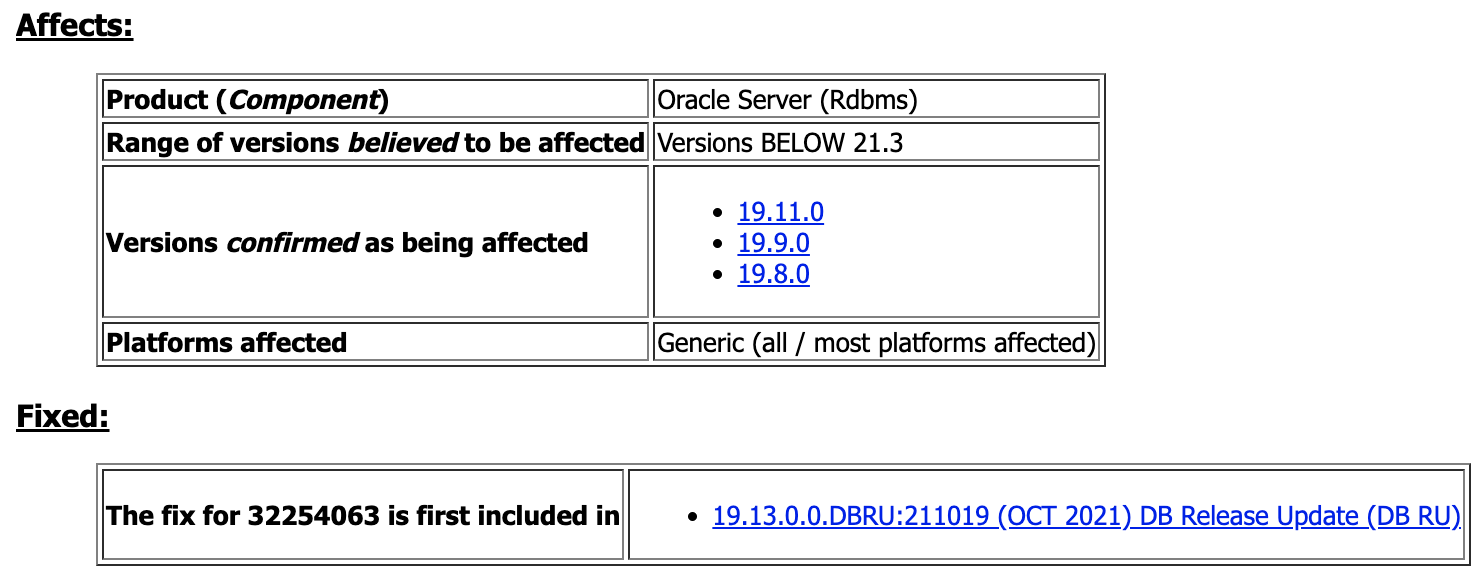
看上去,建议至少是19.13更稳妥一些;实际上前几年我们确实在不少客户的19.9/10上面遇到了不少的Bug。
还有一篇文章也有一些描述:
PDB Fails To Open With ORA-65368 ORA-15173 After Shutdown Abort. (Doc ID 2962869.1)
该文章提到在Oracle 12.2.0.1+版本中,如果是shutdown abort的情况之下,当restart之后,数据库处于不一致的状态,是无法直接open的,需要先进行recover database一下,然后才能open。
当然这并不算是Bug;另外一个相关如下:
Bug 29707246 - ORA-39511 DURING STARTUP, EVEN THOUGH INSTANCE WAS
"SHUTDOWN ABORT" 38 SEC EARLIER (Doc ID 29707246.8)
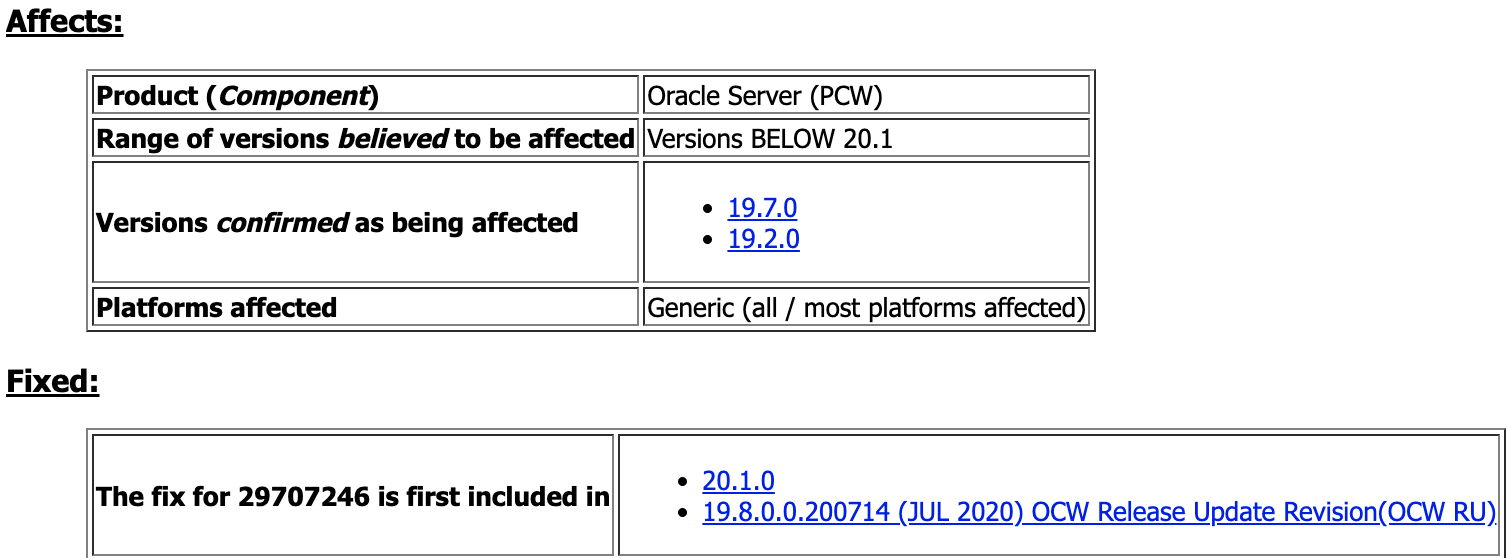
除了上述几个之外,其他的Bug我并没有看到。 同时我们可以发现,确实在多租户场景之下,abort pdb 是存在一定风险的。
abort关库与immediate有啥区别?
在Oracle的一篇文章 What Is The Fastest Way To Cleanly Shutdown An Oracle Database? (Doc ID 386408.1) 中发现了一些内容;这里我摘录部分:
SHUTDOWN ABORT is the fastest way to shutdown an Oracle database.  However, this
type of shutdown leaves the database
in a inconsistent state (non-rolled back) any backups taken at this point would require recovery at the next startup (See NOTE 1 below)


*** NOTE *** SHUTDOWN ABORT is not recommended
for databases prior to 8.1.6 as the chances of corrupting the database are much higher
in such older versions.


1) Determine how much rollback (
in bytes) is needed
for a clean shutdown using the following query:


select sum(used_ublk) * <block size of the undo / rollback segment tablespace> from v
$transaction;


2) SHUTDOWN ABORT


This will terminate all processes (CLIENT and BACKGROUND) as quickly as possible with no transaction rollback.


A SHUTDOWN IMMEDIATE will cause SMON to try to terminate all client processes (SIGKILL) but there are many cases
where SMON cannot
do so
in a timely manner hence the reason
for the SHUTDOWN ABORT. (See NOTE 2 below)


3) From the results
in
#1 and your experience with your database, determine if you can wait for a clean shutdown (shutdown immediate).  If you cannot wait for a shutdown immediate, then skip the remaining steps and at the next startup SMON will rollback the transactions.


4) STARTUP RESTRICT


5) Watch the rollback (number of blocks) with the following query:


select sum(distinct(ktuxesiz)) from x
$ktuxe
where ktuxecfl =
'DEAD';
同时还有另外一段:
Shutdown Timeout and Abort


Shutdown modes that
wait
for users to disconnect or
for transactions to complete have a
limit on the amount of time that they
wait. If all events blocking the shutdown
do not occur within one hour, the shutdown
command aborts with the following message: ORA-01013: user requested cancel of current operation. This message is also displayed
if you interrupt the shutdown process,
for example by pressing CTRL-C. Oracle recommends that you
do not attempt to interrupt an instance shutdown. Instead, allow the shutdown process to complete, and
then restart the instance.


After ORA-01013 occurs, you must consider the instance to be
in an unpredictable state. You must therefore
continue the shutdown process by resubmitting a SHUTDOWN
command. If subsequent SHUTDOWN commands
continue to fail, you must submit a SHUTDOWN ABORT
command to bring down the instance. You can
then restart the instance。
abort之后startup的日志是怎么样的
这里我给大家看一段19c版本中我abort实例之后startup启动的日志:
2024-10-24T23:01:40.628966-04:00

ALTER DATABASE OPEN

2024-10-24T23:01:40.732510-04:00

Smart fusion block transfer is disabled:

  instance mounted
in exclusive mode.

2024-10-24T23:01:40.821950-04:00

Beginning crash recovery of 1 threads

 parallel recovery started with 7 processes

 Thread 1: Recovery starting at checkpoint rba (logseq 720 block 233894), scn 0

2024-10-24T23:01:40.887327-04:00

Started redo scan

2024-10-24T23:01:41.038645-04:00

Completed redo scan


read 5232 KB redo, 1119 data blocks need recovery

2024-10-24T23:01:41.328010-04:00

Started redo application at

 Thread 1: logseq 720, block 233894, offset 0

2024-10-24T23:01:41.423103-04:00

Recovery of Online Redo Log: Thread 1 Group 6 Seq 720 Reading mem 0

  Mem
# 0: /u01/app/oracle/oradata/ORA19C/onlinelog/redo06.log

2024-10-24T23:01:41.499138-04:00

Completed redo application of 4.70MB

2024-10-24T23:01:42.197044-04:00

Completed crash recovery at

 Thread 1: RBA 720.244359.16, nab 244359, scn 0x0000000001d0a8a5

 1119 data blocks
read, 1119 data blocks written, 5232 redo k-bytes
read

Endian
type of dictionary
set to little

2024-10-24T23:01:43.217559-04:00

TT00 (PID:3817): Gap Manager starting

2024-10-24T23:01:43.244301-04:00

Thread 1 advanced to
log sequence 721 (thread open)

Redo
log
for group 7, sequence 721 is not located on DAX storage

Thread 1 opened at
log sequence 721

  Current
log
# 7 seq# 721 mem# 0: /u01/app/oracle/oradata/ORA19C/onlinelog/redo07.log

Successful open of redo thread 1

2024-10-24T23:01:43.412748-04:00
从日志我们大概能看出几个点:
1、重启之后实例恢复会从low cache rba开始进行恢复,一直恢复到current redo的最末端结束。
如果要这段时间内恢复正常,那么这段redo apply就不能报错,同时这段redo 相关的data block也必须是完全一致的状态,不能出现任何逻辑错误,否则redo apply就会异常。
因此,从这个角度来讲,是不能出现write lost的,否则会出现redo apply失败。
2、19c日志中会提示not located on DAX storage。
什么事DAX storage?简单的讲就是Persistent memory 设备。
换句话讲,如果是把redo log都放到DAX storage上,是能过一定程度提升写性能的,Oracle exadata 8M之后的版本是已经支持了。
不过我在这篇文章中发现,在Oracle 19.12之前版本,并不建议使用,因为确实容易出现问题。
File Systems and Devices on Persistent Memory (PMEM) in Database Servers May Cause Database Corruption (Doc ID 2608116.1)
所以最后总结一下,如果你的环境是11.2+版本,且并不是多租户环境,那么我认为通常情况下shutdown abort是安全的。
当然,如果你还设置了db_lost_write_protect以及针对pdb的_db_shadow_lost_write_protect参数;那么我认为是基本上是万无一失的!
至少我从也10多年,没有遇见过shutdown abort起不来的。
So,下次数据库割接,你敢直接abort吗?
-----------------------------------------------------------------------------------
喜欢本文的朋友,欢迎关注公众号 Roger的数据库专栏,收看更多精彩内容

来自 “ ITPUB博客 ” ,链接:https://blog.itpub.net/14306684/viewspace-3042949/ ,如需转载,请注明出处,否则将追究法律责任。

