记ORA-00600: [4194]故障处理
故障现象
生产环境是 windowns Oracle11g 11203 版本的单机数据库。 在启动数据库实例时遇到“ORA-00600: internal error code, arguments: [4194] [][][].....”ora-1595错误,实例在启动后,会自然Down掉。具体情况如下所示:
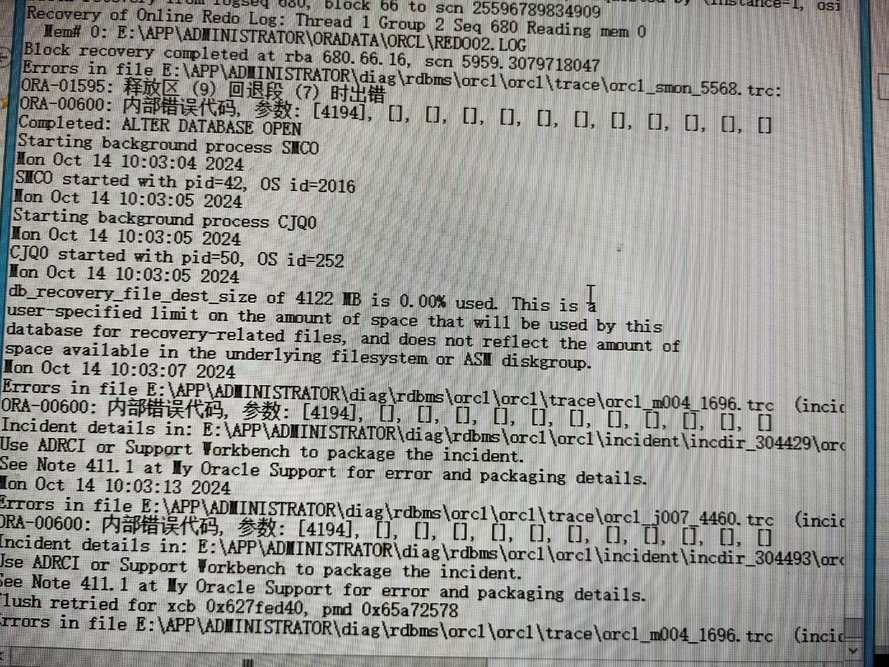
4194:表示也是undo和redo不一致(Arg [a] Maximum Undo record number in Undo block,Arg [b] Undo record number from Redo block)
故障过程:
查看官方文档Step by step to resolve ORA-600 4194 4193 4197 on database crash (文档 ID 1428786.1)有提供详细的介绍。建议处理前,建议先查阅次文档,错误出现的主要场景: This issue generally occurs when there is a power outage or hardware failure that initially crashes the database. On startup, the database does the normal roll forward (redo) and then rollback (undo), this is where the error is generated on the rollback. 具体操作如下所示
1、 通过spfile创建生成pfile
SQL> create pfile from spfile;
File created.
2、修改pfile中undo_management为MANUAL
initorcl.ora
*.
undo_management
=
'MANUAL'


*.
undo_tablespace
=
'UNDOTBS2'
3、使用PFILE启动数据库
sqlplus
/

as
 sysdba


SQL
>
 startup  restrict  pfile
=
'initorcl.ora'
4、新建一个UNDO表空间
SQL
>
 create undo tablespace UNDOTBS2 datafile
''
E
:
\APP\ADMINSTRATOR\ORDATA\ORCL\UNDOTBS201
.
DBF
'


SIZE 5G;


Tablespace created.
5、删除旧的UNDO表空间、并重新创建spfile
SQL
>
 drop tablespace UNDOTBS including contents
and
 datafiles
;


Tablespace
 dropped
.


SQL
>
 create spfile form pfile
;
6、关闭数据库实例
SQL
>
 shutdown immediate
;


Database
 closed
.


Database
 dismounted
.


ORACLE instance shut down
.
7、启动数据库实例(使用spfile)
SQL
>
 startup
;


ORACLE instance started
.


Total

System

Global

Area

1.6777E+10
 bytes


Fixed

Size

2113368
 bytes


Variable

Size

9982443688
 bytes


Database

Buffers

6777995264
 bytes


Redo

Buffers

14663680
 bytes


Database
 mounted
.


Database
 opened
.
至此数据库无报错。
微信公众号:
老杜随笔
如有问题或建议,请公众号留言;
**[如果你觉得对你有帮助,欢迎关注

来自 “ ITPUB博客 ” ,链接:https://blog.itpub.net/10201716/viewspace-3038333/ ,如需转载,请注明出处,否则将追究法律责任。

最新文章
- Oracle 迁移到 PostgreSQL:难度最低的迁移路线,但这些细节依然能让你栽跟头
- PostgreSQL 迁移到 MySQL 全指南:这些"隐形陷阱"不提前排查,上线后必踩
- Oracle 迁移数据到 MySQL,你需要注意这些事项
- 同样的 SQL,Oracle 跑得飞快,达梦却慢成狗?
- MySQL 迁移 PostgreSQL 时 DDL 需要注意的事项
- MySQL 5.7 与 MySQL 8.0 区别(特性)
- ogg 延迟传输 怎么排查
- oracle 19c 客户端链接报ORA-01017: invalid username/password的排查方法
- 查找oracle归档日志 产生的原因
- Oracle 数据库巡检脚本(增强版)
