demo,或者也可以从我的这个地址下载相应的内容,之后我的这个系列的代码都会放在这个地址
我们tree一下子这个文档,就可以查看到相应的内容,示例如下:
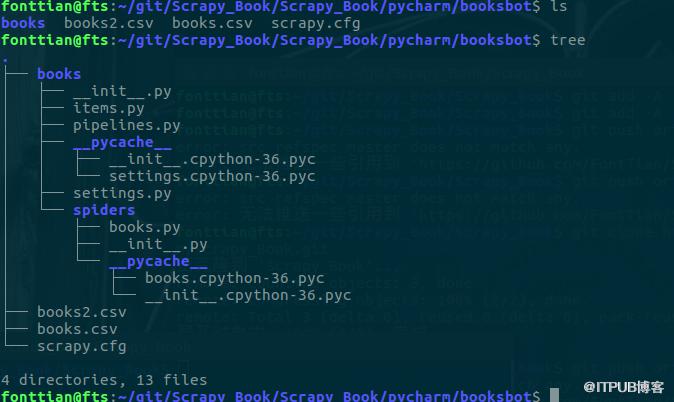
下面是其中的示例代码:
# -*- coding: utf-8 -*-import scrapyclass BooksSpider(scrapy.Spider):
    # 首先要继承原来额Spider方法
    name = "books"
    # 然后是name ,用于在终端中执行该脚本
    # allowed_domains = ["books.toscrape.com"]
    #
    start_urls = [        'http://books.toscrape.com/',
    ]    # 我们需要一个start url

    def parse(self, response):
        for book_url in response.css("article.product_pod > h3 > a ::attr(href)").extract():            yield scrapy.Request(response.urljoin(book_url), callback=self.parse_book_page)        # 然后是获取相应内容,并创建解析函数
        next_page = response.css("li.next > a ::attr(href)").extract_first()        if next_page:            yield scrapy.Request(response.urljoin(next_page), callback=self.parse)        # 关键之处之一,找到下一个链接

    def parse_book_page(self, response):
        # 解析函数,我们在Scrapy中使用,Selector与xpath选择器,css选择器与一些其他Python代码实现该功能
        item = {}
        product = response.css("div.product_main")
        item["title"] = product.css("h1 ::text").extract_first()
        item['category'] = response.xpath(            "//ul[@class='breadcrumb']/li[@class='active']/preceding-sibling::li[1]/a/text()"
        ).extract_first()
        item['description'] = response.xpath(            "//div[@id='product_description']/following-sibling::p/text()"
        ).extract_first()
        item['price'] = response.css('p.price_color ::text').extract_first()        yield item
至于,这份代码的详细解释,我会在之后的内容中给出,当然这份简单的demo是不能帮助我们真正的入门的,我们还需要一些其他内容,之后我会写更多的demo.
FontTian的Scrapy爬虫入门
来自 “ ITPUB博客 ” ,链接:https://blog.itpub.net/855/viewspace-2802473/ ,如需转载,请注明出处,否则将追究法律责任。
上一篇:
复习PHP-语言参考-常量

请登录后发表评论
登录
全部评论
