一 、封装自定义弹窗有一下几种:
1 直接在当前视图控制器上放view(简直6翻了)
2 present到一个新的半透明视图控制器(类似UIAlertViewController,也就是说咱们要用的就是个控制器而不是个View了)
3 使用一个windowLevel更高的UIWindow(UIAlertView就是这种)
4 放在keyWindow上(使用这种方式有隐患,点击查看详情)
5 放在[UIApplication sharedApplication] delegate] window]上
二 看看效果
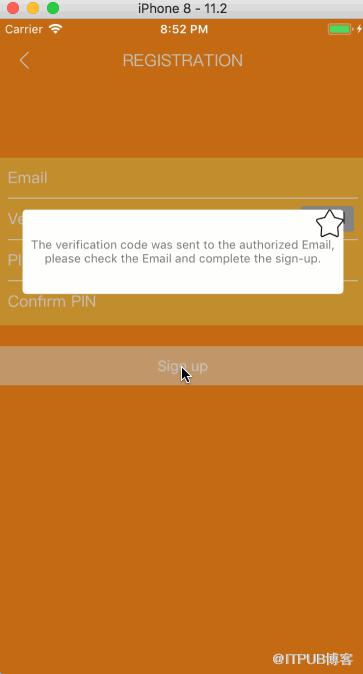
我选择这种方法的原因是简单方便,有复杂交互的也可以,那就是两个控制器之间的传值了。
这里上代码:
#import "BCAlertViewController.h"

@interface BCAlertViewController ()
@property (weak, nonatomic) IBOutlet UIView *alertView0;
@property (weak, nonatomic) IBOutlet UILabel *textContent;
@property (weak, nonatomic) IBOutlet UIButton *closeBtn;

@end

@implementation BCAlertViewController

- (void)viewDidLoad {
    [super viewDidLoad];
//标注方法setCornerRadious:4 borderColor:nil borderWidth:0  ①
    [self.alertView0 setCornerRadious:4 borderColor:nil borderWidth:0];
}

- (void)didReceiveMemoryWarning {
    [super didReceiveMemoryWarning];
}

- (IBAction)closeBtnClicked:(id)sender {
    [self dismissViewControllerAnimated:YES completion:nil];
}

-(void)touchesBegan:(NSSet *)touches withEvent:(UIEvent *)event
{
    [self dismissViewControllerAnimated:YES completion:nil];
}

@end
//方法①的注释 自己写Category
#import "UIView+CornerRadious.h"

@implementation UIView (CornerRadious)

//设置圆角
- (void)setCornerRadious:(CGFloat)cornerRadious borderColor:(UIColor *)borderColor borderWidth:(CGFloat)borderWidth
{
    UIBezierPath *path = [UIBezierPath bezierPathWithRoundedRect:self.bounds cornerRadius:cornerRadious];
    CAShapeLayer *maskLayer= [[CAShapeLayer alloc]init];
    maskLayer.frame = self.bounds;
    maskLayer.path = path.CGPath;

    CAShapeLayer *borderLayer = [[CAShapeLayer alloc]init];
    borderLayer.lineWidth = borderWidth;
    borderLayer.strokeColor = borderColor.CGColor;
    borderLayer.fillColor = ClearColor.CGColor;
    borderLayer.frame = self.bounds;
    borderLayer.path = path.CGPath;

    [self.layer insertSublayer:borderLayer atIndex:0];
    self.layer.mask = maskLayer;
}
///使用方法
- (IBAction)registerBtnClicked:(id)sender {

    BCAlertViewController *alert = [[BCAlertViewController alloc]init];
    alert.modalPresentationStyle = UIModalPresentationOverCurrentContext;
    alert.modalTransitionStyle = UIModalTransitionStyleCrossDissolve;
    [self.navigationController presentViewController:alert animated:YES completion:nil];

}
注意:BCAlertViewController.h 的view的背景色设置
[[UIColor blackColor]colorWithAlphaComponent:0.2];来自 “ ITPUB博客 ” ,链接:https://blog.itpub.net/855/viewspace-2799745/ ,如需转载,请注明出处,否则将追究法律责任。
上一篇:
java实现文件的下载的方法概述
下一篇:
如何安装并设置 Vagrant

请登录后发表评论
登录
全部评论
