在LINUX下再次安装ORACLE 10G 遇到的问题
安装10G遇到的问题,查询到11G中也是同样的问题。
root@node1-pub ~]# xhost +
access control disabled, clients can connect from any host
[root@node2-pub ~]# su - oracle
[oracle@node1-pub ~]$ 11g_database/database/runInstaller
-bash: 11g_database/database/runInstaller: Permission denied
[oracle@node1-pub ~]$ ls -l 11g_database/database/runInstaller
-rw-r--r-- 1 oracle oinstall 2911 Aug 3 09:28 11g_database/database/runInstaller
[oracle@node1-pub ~]$ chmod u+x 11g_database/database/runInstaller
[oracle@node1-pub ~]$ 11g_database/database/runInstaller
11g_database/database/runInstaller: line 86: /home/oracle/11g_database/database/install/.oui: Permission denied
[oracle@node1-pub ~]$ chmod u+x /home/oracle/11g_database/database/install/.oui
[oracle@node1-pub ~]$ 11g_database/database/runInstaller
Starting Oracle Universal Installer...
Checking Temp space: must be greater than 80 MB. Actual 131098 MB Passed
Checking swap space: must be greater than 150 MB. Actual 601 MB Passed
Checking monitor: must be configured to display at least 256 colors. Actual 16777216 Passed
Preparing to launch Oracle Universal Installer from /tmp/OraInstall2007-09-28_05-58-53PM. Please wait ...sh: /home/oracle/11g_database/database/install/unzip: Permission denied
[oracle@node1-pub ~]$ chmod u+x /home/oracle/11g_database/database/install/unzip
Change the permissions of the below file and rerun the runInstaller
http://www.oracledba.org/11g/rac/install_11g_rac_software_asm.html
(RAC) Software 32-bit on CentOS EL 4 Update 5 (ASM_HOME)
It is always recommended to install RAC bineries in atleast two different HOMEs one for ASM and another for DB homes.
Lets start Installing RAC bineries for ASM_HOME.
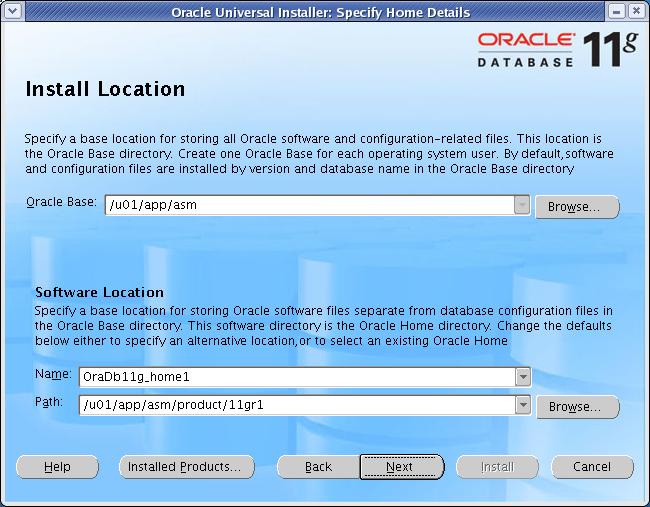
set ORACLE_BASE to /u01/app/asm for this installation.
Start the runInstaller command as oracle user from any one node When OUI displays the Welcome page, click Next
[oracle@node1-pub ~]$ export ORACLE_BASE=/u01/app/asm
[oracle@node1-pub ~]$ 11g_database/database/runInstaller
Xlib: connection to ":0.0" refused by server
Xlib: No protocol specified
Can't connect to X11 window server using ':0.0' as the value of the DISPLAY variable.
If you get the above error, please execute the below command as root and then start the runInstaller by connecting as oracle.
access control disabled, clients can connect from any host
[root@node2-pub ~]# su - oracle
[oracle@node1-pub ~]$ 11g_database/database/runInstaller
-bash: 11g_database/database/runInstaller: Permission denied
[oracle@node1-pub ~]$ ls -l 11g_database/database/runInstaller
-rw-r--r-- 1 oracle oinstall 2911 Aug 3 09:28 11g_database/database/runInstaller
[oracle@node1-pub ~]$ chmod u+x 11g_database/database/runInstaller
[oracle@node1-pub ~]$ 11g_database/database/runInstaller
11g_database/database/runInstaller: line 86: /home/oracle/11g_database/database/install/.oui: Permission denied
[oracle@node1-pub ~]$ chmod u+x /home/oracle/11g_database/database/install/.oui
[oracle@node1-pub ~]$ 11g_database/database/runInstaller
Starting Oracle Universal Installer...
Checking Temp space: must be greater than 80 MB. Actual 131098 MB Passed
Checking swap space: must be greater than 150 MB. Actual 601 MB Passed
Checking monitor: must be configured to display at least 256 colors. Actual 16777216 Passed
Preparing to launch Oracle Universal Installer from /tmp/OraInstall2007-09-28_05-58-53PM. Please wait ...sh: /home/oracle/11g_database/database/install/unzip: Permission denied
[oracle@node1-pub ~]$ chmod u+x /home/oracle/11g_database/database/install/unzip
Change the permissions of the below file and rerun the runInstaller
chmod u+x /tmp/database/install/.oui
chmod u+x /tmp/database/install/unzip

Click Next

Select "Custom" and Click Next.
chmod u+x /tmp/database/install/.oui
chmod u+x /tmp/database/install/unzip
来自 “ ITPUB博客 ” ,链接:https://blog.itpub.net/8102208/viewspace-626726/ ,如需转载,请注明出处,否则将追究法律责任。

