Summary: in this tutorial, you will learn how to use the MySQL DELETE statement to remove data from one ore more database tables.
To remove data from a table, you use the MySQL DELETEstatement. The MySQL DELETE statement allows you to remove records from not only one table but also multiple tables using a single DELETE statement.
MySQL delete from one table
To remove data from a single table, you use the following DELETE statement:
DELETE FROM table [WHERE conditions] [ORDER BY ...] [LIMIT rows]
Followed the DELETE FROM clause is the table name that you want to delete records.
The WHERE clause specifies which rows you want to delete. If a record meets the WHERE condition, it is deleted permanently from the table. If you omit the WHERE clause, all records in the table are deleted.
The DELETE statement returns the number of rows deleted specified by the ROW_COUNT() function.
Notice that the ROW_COUNT() function returns the number of rows inserted, updated or deleted by the last INSERT, UPDATE or DELETE statement
MySQL delete from a table examples
Suppose you want to remove employees whose officeNumberis 4, you use the DELETE statement with the WHEREclause as the following query:
DELETE FROM employees WHERE officeCode = 4
To delete all employee records from the employees table, you use the DELETE statement without the WHERE clause as follows:
DELETE FROM employees
All employee records in the employees table were deleted.
MySQL delete from multiple tables
To delete records from multiple tables, you use one of the following DELETE statements:
DELETE table_1, table_2,... FROM table-refs [WHERE conditions] DELETE FROM table_1, table_2,... USING table-refs [WHERE conditions]
Let’s examine each statement in greater detail:
Both
DELETEstatements delete records from multiple tables i.e.,table_1,table_2,… specified after theDELETEkeyword.The first
DELETEstatement uses theFROMclause while the second one use theUSINGclause.The
WHEREclause is used to determine which record to be deleted.Both statements return the number of rows deleted from the multiple tables.
MySQL delete from multiple tables example
Let’s take a look at the offices and employees tables in the MySQL sample database.
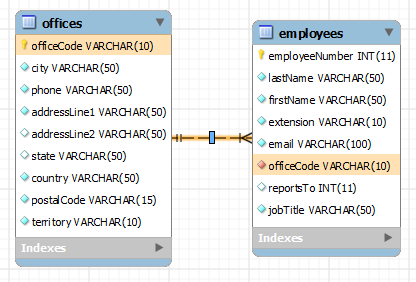
Suppose one office is closed and you want to remove all employee records in the employees table associated with that office and also the office itself in the offices table, you can use the second form of the MySQL DELETEstatement
The following query removes the office record with the code is 1 in the offices table and also all employee records associated with the office 1 in the employees table:
DELETE employees, offices FROM employees, offices WHERE employees.officeCode = offices.officeCode AND offices.officeCode = 1
You can verify the changes by using the following SELECT statements to query data from both employees table and offices table.
SELECT * FROM employees WHERE officeCode = 1; SELECT * FROM offices WHERE officeCode = 1;
You can achieve the same effect by using the second form of the MySQL DELETE statement as follows:
DELETE FROM employees, offices USING employees, offices WHERE employees.officeCode = offices.officeCode AND offices.officeCode = 1
In this tutorial, you have learned various forms of the MySQL DELETE statement to delete records from one or more tables.
Related Tutorials
PHP MySQL Delete Data
来自 “ ITPUB博客 ” ,链接:https://blog.itpub.net/810/viewspace-2811374/ ,如需转载,请注明出处,否则将追究法律责任。

