Exporting data from multiple SQL tables to flat files using SSIS
if yes, you can use a foreach loop, to loops through tables first ,and inside foreach loop container use a data flow task with oledb source as sql server table, and flat file destination .
But if structure isn't same,you should do it as follow:
first of all create three package scope variable:
first one: Package scope, datatype Object , name TablesList
second one: package scope , datatype string , name TableName
third one: package scope, datatype string, name BCPCommand
(Note that you should set a default valid table name as a default value for TableName variable)
then add a data flow task to the control flow , inside data flow task add an oledb source, and set a connection to source database, and set the table which contains name of other tables to export inside ,
then add a RecordSet destination , and connect green arrow from oledb source to this destination, then double click on recordset destination, and set the variable as User::TablesList. also go to column mappings tab, and map the column which have name of tables inside to destination.
then go back to control flow
add a foreach loop container after data flow, and set enumerator as ADO enumerator,
and set source variable as TablesList
then go to variable mappings tab, and set variable as TableName there, and set index as 0
then click ok
then go to variables pane,
and click on BCPCommand variable, and go to properties window, in the expression property write this:
"BCP databasename.schemaname."+@[User::TableName]+" out c:\"+@[User::TableName]+".txt -c -t, -T –S
also set the EvaluateAsExpression property to true.
then add an execute sql task inside foreach loop container,
and set up a connection to source database,
then set source type as variable,
and set source variable as BCPCommand
BCP - Export data to Text File
Here is a simple method of exporting all the data from SQL Server table to a Text File
CREATE Procedure BCP_Text_File
(
@table varchar(100),
@FileName varchar(100)
)
as
If exists(Select * from information_Schema.tables where table_name=@table)
Begin
Declare @str varchar(1000)
set @str='Exec Master..xp_Cmdshell ''bcp "Select * from '+db_name()+'..'+@table+'" queryout "'+@FileName+'" -c'''
Exec(@str)
end
else
Select 'The table '+@table+' does not exist in the database'
Execute this procedure by giving Table Name and the File Name
EXEC BCP_Text_File 'Employee','C:\emp.txt'
Now all the data from Employee table will be exported to the text file which will be located at C:\emp.txt
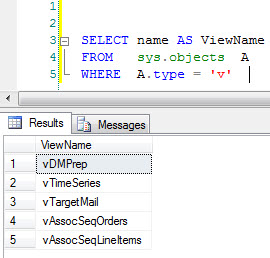
3-I'll create 4 Variables, I love to always to the proper naming convention to tell the data type of the variable.
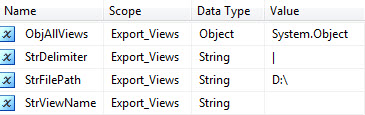
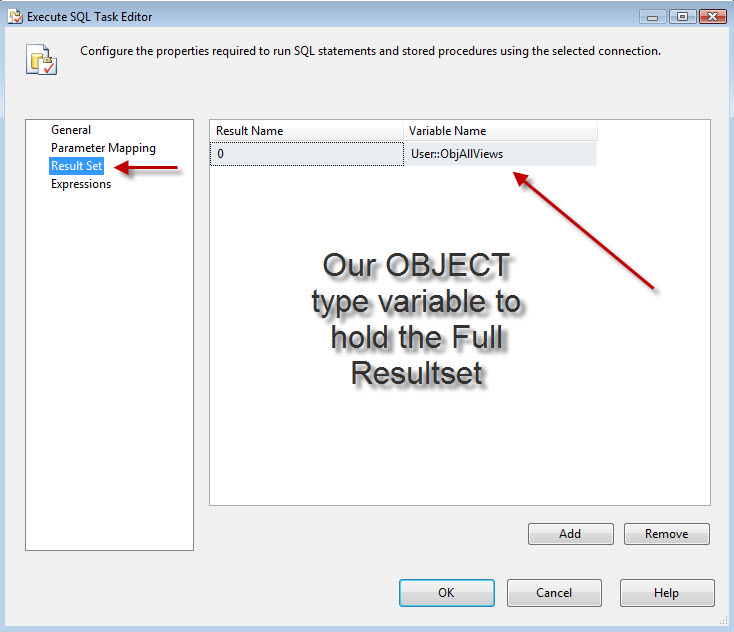
A-Variable "ObjAllViews" will hold back the result set which has all the views' Names.
B-Variable "StrDelimiter" will hold the delimiter that you want to use between columns, I love to use the Vertical Line "|" because most of our data has commas in it, you can get it by pressing (SHIFT + \ )
C-Variable "StrViewName" will hold each individual view.
D-Variable "StrFilePath" will hold the desired path to save the files.
4-Create a connection to your server, in my case it's 'localhost' as I've my testing SQL server on the same machine, and I named the connection 'Localhost', take note of naming the connection because it's mentioned later in the script. task.
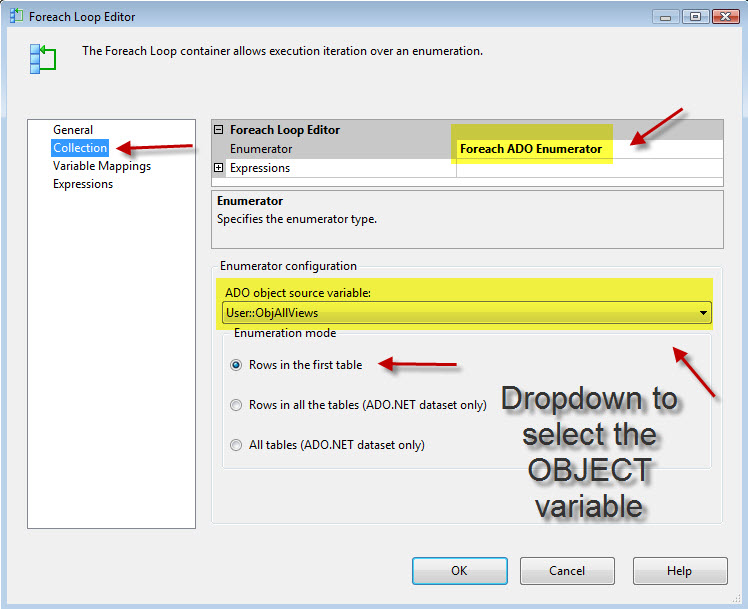
oh...so now you get the idea? we will use the "Execute SQL Task" to get us the list of the views that exists in that table into "ObjAllViews" variable, then we will use "Foreach Loop Container" to shred resultset from "ObjAllViews" variable to each individual view name into "StrViewName" variable .
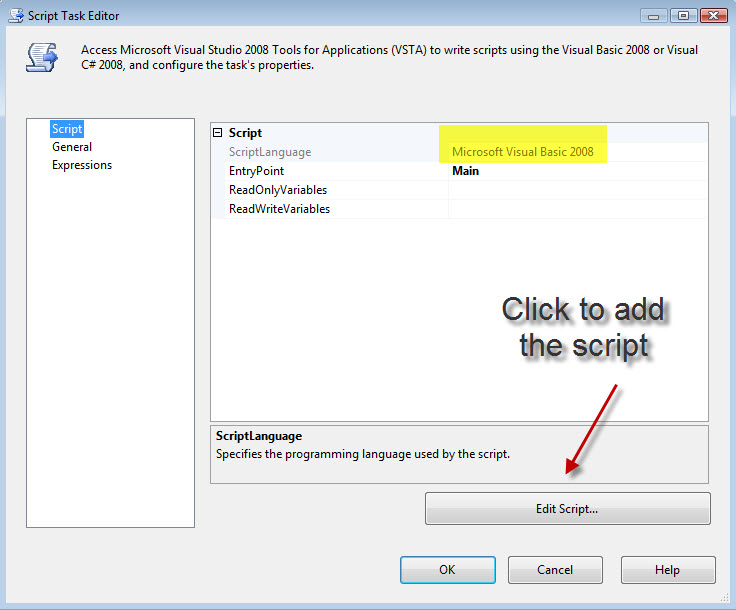
Then inside the "Foreach Loop Container" we will place a "Script. Task" that will do the trick for us.
Now let's go over each tasks and how it's configured....
1-The control flow and the connection
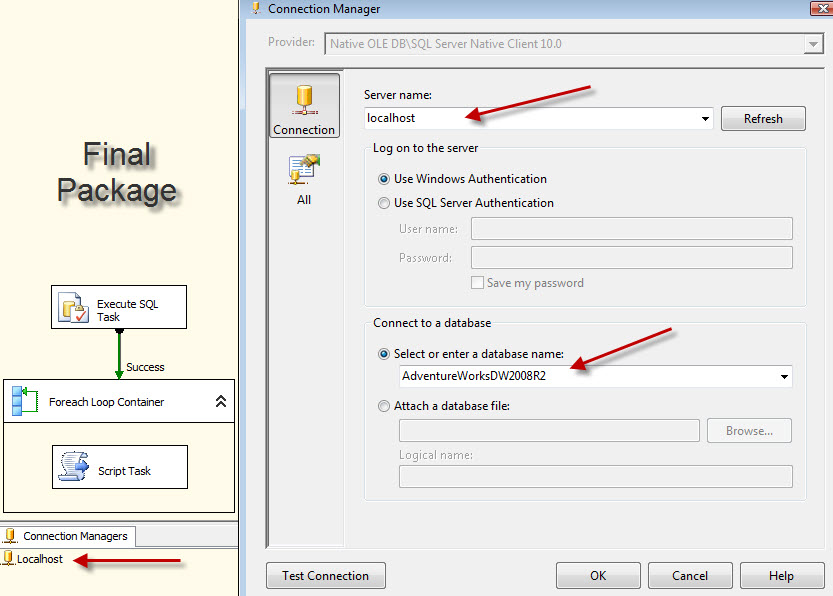
2-Execute SQL Task
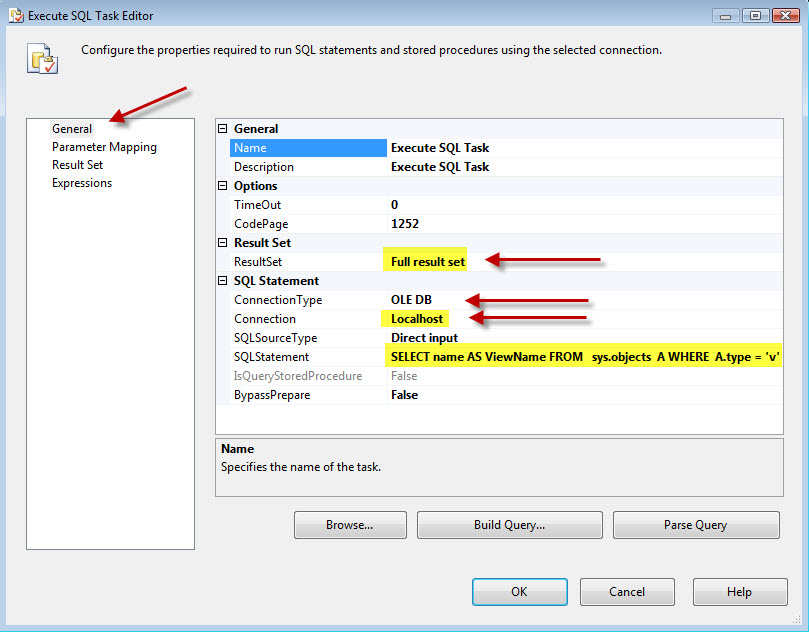
3-Foreach Loop Container

4-Script. Task , Thanks for SIVA for helping me with the counter code.
来自 “ ITPUB博客 ” ,链接:https://blog.itpub.net/7899089/viewspace-732304/ ,如需转载,请注明出处,否则将追究法律责任。

