最近一个问题和file_system有关,因此将这部分数据结构和重要的函数简单看了一下,好在数据结构不多,成员变量也不多。但是这部分的知识和IO子系统联系太紧密了,因为IO子系统不熟,所以难免有错误。但是也为学习IO子系统做了一层铺垫。并且不管错误与否必须要记录一下否则很容易忘记,现记录如下(包含代码,文章稍显混乱),代码来自8.0.23。
仅供参考。
一、前言
在我们数据库启动的时候,实际上很多表都是没有打开的,当然除了一些redo/undo等系统空间会常驻打开,其他的用户的innodb表示没有打开,当遇到真正的IO操作后才会打开文件,这些文件会存在于file_system中,其中fil_system_t对于单表或者分区表的一个分区来讲就对应一个fil_node_t,但是对于redo或者undo这些来讲一个fil_space_t对应了多个file_node_t,因为有多个相关文件,真正的io handler存储在fil_node_t上。 在5.7中打开的文件都整体存在于一个file_system下,但是最近遇到了一个问题,稍微看了下8.0发现做了拆分,将一个file_system查分为 69个(8.0.19是65个)这个是个硬编码。这样如果我们需要打开文件或者关闭文件那么拆分后锁的代价就更小了,其中每一个拆分出来的结构叫做shard(内部结构叫做Fil_shard)。
二、总体示意图
注意这里我们只讨论一个fil_space_t对应一个fil_node_t的情况,也就是普通表(分区表的分区),这往往也是和用户关系较大的。
三、file_system(Fil_system)的重点变量
图中包含另一些重点的数据结构,其中 file_system中包含:
m_shards:这是一个vecoter数组,包含了69个shard。 m_max_n_open:这个是我们的参数Innodb_open_files是一个值。 m_max_assigned_id:是我们当前分配的最大的space_id。
四、shard的重点变量
m_id:当前shard的序号,从0开始 m_spaces:一个std map结构,在数据库初始化的时候就建立好了,其主要是space_id和fil_space_t做的一个map结构 m_names:一个std map结构,在数据库初始化的时候就建立好了,其主要是space_name和fil_space_t做的一个map结构
m_spaces和m_names变量的初始化可以查看函数Fil_shard::space_add,如下:
void Fil_shard::space_add(fil_space_t *space) {
  ut_ad(mutex_owned());
  {
    auto it = m_spaces.insert(Spaces::value_type(space->id, space));
    ut_a(it.second);
  }
  {
    auto name = space->name;
    auto it = m_names.insert(Names::value_type(name, space));
    ut_a(it.second);
  }
}
我们通常在进行物理IO的时候需要打开文件,这个时候拿到的一般为page的space_id,这样通过Fil_shard::get_space_by_id就快速拿了fil_space_t的结构。
但是需要注意的一点是,我们首先还需要判定是的到底这个space_id到底到那个shard上建立或者到那个shard上查找,是需要定位到相关的shard上的,这个是通过space_id取余来做到的,函数 Fil_system::shard_by_id(FIL_system 就是我们的file_system的数据结构)函数完成这个功能,计算取余如下:
  Fil_shard *shard_by_id(space_id_t space_id) const
      MY_ATTRIBUTE((warn_unused_result)) {
#ifndef UNIV_HOTBACKUP
    if (space_id == dict_sys_t::s_log_space_first_id) {
      return m_shards[REDO_SHARD];
    } else if (fsp_is_undo_tablespace(space_id)) {
      const size_t limit = space_id % UNDO_SHARDS;
      return m_shards[UNDO_SHARDS_START + limit];
    }
    ut_ad(m_shards.size() == MAX_SHARDS);
    return m_shards[space_id % UNDO_SHARDS_START]; //取余,将各个space分布到不同的shard上
#else  /* !UNIV_HOTBACKUP */
    ut_ad(m_shards.size() == 1);
    return m_shards[0];
#endif /* !UNIV_HOTBACKUP */
  }
因为我们的undo,redo会独占末尾的几个shard,因此这里用了宏来减去了这部分然后取余,相关宏定义如下。
/** Maximum number of shards supported. */
static const size_t MAX_SHARDS = 69; //69个shard
/** The redo log is in its own shard. */
static const size_t REDO_SHARD = MAX_SHARDS - 1; //末尾第1个为redo的shard
/** Number of undo shards to reserve. */
static const size_t UNDO_SHARDS = 4;//倒数第2到第5为undo的shard
/** The UNDO logs have their own shards (4). */
static const size_t UNDO_SHARDS_START = REDO_SHARD - UNDO_SHARDS;
#else  /* !UNIV_HOTBACKUP */
m_LRU:这个玩意是一个最重要的数据结构了,如果一个文件刚刚打开或者io complete读操作就会将其以头插法加入到这个链表,这就形成了一个LRU链表,如果超过参数Innodb_open_files的设置就会在这里面进行尾部淘汰。打开文件函数如下:
Fil_shard::prepare_file_for_io 调入为物理IO准备好文件:

void Fil_shard::file_opened(fil_node_t *file) {
  ut_ad(m_id == REDO_SHARD || mutex_owned());
  if (Fil_system::space_belongs_in_LRU(file->space)) {
    /* Put the file to the LRU list */
    UT_LIST_ADD_FIRST(m_LRU, file); //头插法
  }
  ++s_n_open;
  file->is_open = true;
  fil_n_file_opened = s_n_open;
}
IO COMPLETE如下:
void Fil_shard::complete_io(fil_node_t *file, const IORequest &type) {
  ut_ad(m_id == REDO_SHARD || mutex_owned());
  ut_a(file->n_pending > 0);
  --file->n_pending;
  ut_ad(type.validate());
  if (type.is_write()) { //如果是写操作
    ut_ad(!srv_read_only_mode || fsp_is_system_temporary(file->space->id));
    write_completed(file); //需要加入flush  而不是 LRU 链表
  }

  if (file->n_pending == 0 && Fil_system::space_belongs_in_LRU(file->space)) { //是否为 tablespace
    /* The file must be put back to the LRU list */
    UT_LIST_ADD_FIRST(m_LRU, file); //如果是读操作直接加入 LRU链表
  }
}
当调用Fil_shard::close_file关闭文件时候会从LRU的末尾去掉,见后文分析。这个结构就是我们最为最熟悉的file system(下shard)的LRU链表,当然如果数据库当时打开了很多文件超过了参数Innodb_open_files的设置 ,并且做了大量的IO操作,那么这个LRU链表可能找不到相应的能够关闭的文件。
m_unflushed_spaces:如其名,主要是进行写操作的IO可能涉及到需要进行flush data file,因此都放在这个链表里面。加入调用也是Fil_shard::write_completed ,但是需要判定是否文件打开用的SRV_UNIX_O_DIRECT_NO_FSYNC,当然一般都不是的,如下:
Fil_shard::write_completed
     ->add_to_unflushed_list(file->space); //写入完成,还没有flush
         UT_LIST_ADD_FIRST(m_unflushed_spaces, space);//头插法
去掉时机:
Fil_shard::space_flush
   ->remove_from_unflushed_list(space)
      UT_LIST_REMOVE(m_unflushed_spaces, space);//尾部去除
看起来就是space进行flush刷盘过后。那么需要注意的打开的文件并不一定在m_unflushed_spaces或者m_LRU,如果正在进行读IO可能两个链表中都没有这个打开的文件,但是问题不大,因为本来就不能淘汰。
static原子变量s_n_open:显然这个属性不是某个shard特有的,是全部shard一起持有的,那么它代表的实际上就是当前打开的innodb文件总数,使用原子变量避免加锁,这样在比较是否超过最大打开数的时候就可以通过file_system的m_max_n_open和其比较即可。 static原子变量s_open_slot:显然这个属性不是某个shard特有的,是全部shard一起持有的,它用处是保护(The number of open file descriptors is a shard resource),使用一个原子变量的比较/交换操作compare_exchange_weak并且附加while循环,来保证共享资源file descriptors ,这是无锁化编程一种方式。
四、关于文件的关闭
如果文件没有保存在file_system中,进行物理IO的时候需要打开它(Fil_shard::do_io),也就是Fil_shard::prepare_file_for_io调用准备打开文件之前,需要当前打开的innodb文件数量是否大于了参数Innodb_open_files的设置,如果大于了那么就需要做淘汰文件出来,代码在Fil_shard::mutex_acquire_and_get_space中,当然Fil_shard::mutex_acquire_and_get_space的调用在Fil_shard::prepare_file_for_io调用之前,且都在Fil_shard::do_io下面。这里有一个重点,就是参数Innodb_open_files设置是总的大小,因此不管从哪个shard中淘汰一个,那么这个文件就能打开,而不是一定要在本space所在的shard中关闭,比如我们在shard 4中关闭了一个文件,我需要打开的文件映射到了shard 10,那么打开文件总是还是相等的,没有问题。这也是我开始疑惑的地方。来看看主要流程,也是很简单:
Fil_shard::mutex_acquire_and_get_space
  ->Fil_system::close_file_in_all_LRU(循环每个shard)
    ->Fil_shard::close_files_in_LRU(判断LRU上是否有可以close文件)
      ->Fil_shard::close_file(关闭文件)

Fil_shard::mutex_acquire_and_get_space //mutex只是本shard的mutex
本函数有1个嵌套循环
for (size_t i = 0; i < 3; ++i){ //尝试清理3次,每次都必须清理出一个文件(压力过大刚清理又满了?)
 while (fil_system->m_max_n_open <= s_n_open && //如果s_n_open static变量大于了fil_system设置m_max_n_open(也就是参数Innodb_open_files设置的大小)
           !fil_system->close_file_in_all_LRU(i > 1)) {  //根据LRU 关闭 打开的文件如果清理尝试来到第2次开始输出note级别的日志,如果清理失败可能继续
      if (ut_time_monotonic() - start_time >= PRINT_INTERVAL_SECS) { //如果本次清理时间大于了PRINT_INTERVAL_SECS 设置就报警
        start_time = ut_time_monotonic();
        ib::warn(ER_IB_MSG_279) << "Trying to close a file for "
                                << start_time - begin_time << " seconds"
                                << ". Configuration only allows for "
                                << fil_system->m_max_n_open << " open files.";
      }
    }

Fil_system::close_file_in_all_LRU函数
bool Fil_system::close_file_in_all_LRU(bool print_info) {
  for (auto shard : m_shards) {//m_shards 为一个 数组循环每个shard
    shard->mutex_acquire();
    if (print_info) {
      ib::info(ER_IB_MSG_277, shard->id(),
               ulonglong{UT_LIST_GET_LEN(shard->m_LRU)}); //如果是第2次尝试会打印日志
    }
    bool success = shard->close_files_in_LRU(print_info);
    shard->mutex_release();
    if (success) { //如果成功关闭了一个文件success为true
      return true; //返回成功
    }
  }
  return false;//返回失败
}

Fil_shard::close_files_in_LRU函数
bool Fil_shard::close_files_in_LRU(bool print_info) {
  for (auto file = UT_LIST_GET_LAST(m_LRU); file != nullptr;
       file = UT_LIST_GET_PREV(LRU, file)) { //循环LRU链表,如果链表没有元素即可返回
    if (file->modification_counter == file->flush_counter &&
        file->n_pending_flushes == 0 && file->in_use == 0) {//继续额外的判断,尚不清楚为什么。
      close_file(file, true); //关闭1个文件,并且会从LRU中取下来
      return true; //关闭一个则成功
    }
    if (!print_info) {//如果不需要打印日志,也就是是第1次尝试清理,不需要打印日志
      continue;
    }
...//关闭失败的note日志省略
  return false;//如果本shard没有可以关闭的则返回flase
这里的流程如果出现文件较多,并且同时打开进行IO文件较多(显著的就是包含大量分区的分区表)的情况超过了参数Innodb_open_files的大小情况,可能出现日志: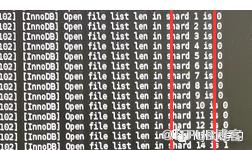
也就是ER_IB_MSG_277的note日志输出,第一个为shard的id,第二个0代表是LRU元素的个数,但是从上面的逻辑来看,虽然循环次数比较多,但是每次循环的元素很少或者为0个元素,因此代价也就不那么高了。另外从这个算法来看因为是从头遍历shard 1-69 个shard,如果要淘汰打开的文件,理论上前面的shard相关的fil_space_t(可简单理解为表或者分区)更容易淘汰和关闭掉。此处代码来自8.0.23,不知道过后是否会改进(随机算法取shard是不是更好?),测试情况下我设置参数Innodb_open_files为400,建立了2000个表,全部打开后,发现前面很多shard的m_LRU为空如下:
(gdb) p ((Fil_shard*)(0x7fffe0044c90))->m_LRU
$15 = {count = 0, start = 0x0, end = 0x0, node = &fil_node_t::LRU, init = 51966}
(gdb) p ((Fil_shard*)(0x7fffe02e0f90))->m_LRU
$16 = {count = 0, start = 0x0, end = 0x0, node = &fil_node_t::LRU, init = 51966}
(gdb) p ((Fil_shard*)(0x7fffe02ea480))->m_LRU
$17 = {count = 17, start = 0x7fffe3267240, end = 0x7fffe2a9f1f0, node = &fil_node_t::LRU, init = 51966}
(gdb) p ((Fil_shard*)(0x7fffe02e19d0))->m_LRU
$18 = {count = 0, start = 0x0, end = 0x0, node = &fil_node_t::LRU, init = 51966}
(gdb) p ((Fil_shard*)(0x7fffe02e1f30))->m_LRU
$19 = {count = 0, start = 0x0, end = 0x0, node = &fil_node_t::LRU, init = 51966}
(gdb) p ((Fil_shard*)(0x7fffe02e49c0))->m_LRU
$20 = {count = 0, start = 0x0, end = 0x0, node = &fil_node_t::LRU, init = 51966}
(gdb) p ((Fil_shard*)(0x7fffe02e6ec0))->m_LRU
$21 = {count = 0, start = 0x0, end = 0x0, node = &fil_node_t::LRU, init = 51966}
(gdb) p ((Fil_shard*)(0x7fffe02e7170))->m_LRU
$22 = {count = 0, start = 0x0, end = 0x0, node = &fil_node_t::LRU, init = 51966}
(gdb) p ((Fil_shard*)(0x7fffe02e5480))->m_LRU
$23 = {count = 0, start = 0x0, end = 0x0, node = &fil_node_t::LRU, init = 51966}
//前面好多shard的m_LRU长度都是0
//到这里才开m_LRU有值
(gdb) p ((Fil_shard*)(0x7fffe02e7ee0))->m_LRU
$24 = {count = 1, start = 0x7fffe3279530, end = 0x7fffe3279530, node = &fil_node_t::LRU, init = 51966}
$25 = {count = 18, start = 0x7fffe327b290, end = 0x7fffe2a9c670, node = &fil_node_t::LRU, init = 51966}
(gdb) p ((Fil_shard*)(0x7fffe02e8190))->m_LRU
$26 = {count = 17, start = 0x7fffe3279ae0, end = 0x7fffe30974d0, node = &fil_node_t::LRU, init = 51966}
我大概数了一下,就是后面20来个shard才有值,差不多一个有17 18个表,这样算起来差不多是参数Innodb_open_files设置的400大小。这样分布不均匀直接导致的问题就是拆分效果大打折扣。
随后查看8.0.28的代码似乎进行更改,具体的提交就不去查了,看来官方是发现了这个问题:
bool Fil_system::close_file_in_all_LRU() {
  const auto n_shards = m_shards.size();
  const auto index = m_next_shard_to_close_from_LRU++;//原子变量
  for (size_t i = 0; i < n_shards; ++i) {
    auto shard = m_shards[(index + i) % n_shards]; //跳跃性查找,不在数循序的
    if (shard->id() == REDO_SHARD) {
      /* Redo shard don't ever have any spaces on LRU. It is not guarded by a
      mutex so we can't continue the execution of the for block. */
      continue;
    }
    shard->mutex_acquire();
    bool success = shard->close_files_in_LRU();
    shard->mutex_release();
    if (success) {
      return true;
    }
  }
  return false;
}
五、最后
最后我们来看看如果debug这些元素其实很简单,因为file_system是一个全局变量,直接就能拿到比如,我想查看这69个shard如下:
(gdb) p fil_system->m_shards
$2 = std::vector of length 69, capacity 128 = {0x7fffe0044c90, 0x7fffe02e0f90, 0x7fffe02e1120, 0x7fffe02e13d0, 0x7fffe02e1680, 0x7fffe02e19d0, 0x7fffe02e1c80, 0x7fffe02e1f30,
  0x7fffe02e21e0, 0x7fffe02e25b0, 0x7fffe02e2860, 0x7fffe02e2b10, 0x7fffe02e2dc0, 0x7fffe02e3070, 0x7fffe02e3320, 0x7fffe02e35d0, 0x7fffe02e3880, 0x7fffe02e3cd0, 0x7fffe02e3f00,
  0x7fffe02e41b0, 0x7fffe02e4460, 0x7fffe02e4710, 0x7fffe02e49c0, 0x7fffe02e4c70, 0x7fffe02e4f20, 0x7fffe02e51d0, 0x7fffe02e5480, 0x7fffe02e5730, 0x7fffe02e59e0, 0x7fffe02e5c90,
  0x7fffe02e5f40, 0x7fffe02e61f0, 0x7fffe02e64a0, 0x7fffe02e3b30, 0x7fffe02e6c10, 0x7fffe02e6ec0, 0x7fffe02e7170, 0x7fffe02e7420, 0x7fffe02e76d0, 0x7fffe02e7980, 0x7fffe02e7c30,
  0x7fffe02e7ee0, 0x7fffe02e8190, 0x7fffe02e8440, 0x7fffe02e86f0, 0x7fffe02e89a0, 0x7fffe02e8c50, 0x7fffe02e8f00, 0x7fffe02e91b0, 0x7fffe02e9460, 0x7fffe02e9710, 0x7fffe02e99c0,
  0x7fffe02e9c70, 0x7fffe02e9f20, 0x7fffe02ea1d0, 0x7fffe02ea480, 0x7fffe02ea730, 0x7fffe02ea9e0, 0x7fffe02eac90, 0x7fffe02eaf40, 0x7fffe02eb1f0, 0x7fffe02eb4a0, 0x7fffe02eb750,
  0x7fffe02eba00, 0x7fffe02ebcb0, 0x7fffe02e6750, 0x7fffe02ec700, 0x7fffe02ec910, 0x7fffe02ecbc0}
(gdb)
如果我想看每个shard里面包含哪些表的fil_space_t如下即可:
(gdb) p ((Fil_shard*)(0x7fffe0044c90))->m_names
$6 = std::unordered_map with 18 elements = {[0x7fffe32513c0 "t10/t883"] = 0x7fffe32511e0, [0x7fffe323a2d0 "t10/t819"] = 0x7fffe323a0f0, [0x7fffe3223630 "t10/t755"] = 0x7fffe3223450,
  [0x7fffe320cc60 "t10/t691"] = 0x7fffe320ca80, [0x7fffe31c51b0 "t10/t499"] = 0x7fffe31c4fd0, [0x7fffe309e2c0 "testpri/t1"] = 0x7fffe309e0e0, [0x7fffe31954b0 "t10/t371"] = 0x7fffe31952d0,
  [0x7fffe308c620 "t10/ERPDB_TEST"] = 0x7fffe308c440, [0x7fffe31dcca0 "t10/t563"] = 0x7fffe31dcac0, [0x7fffe3104ee0 "t10/t115"] = 0x7fffe3121620,
  [0x7fffe043eb40 "innodb_system"] = 0x7fffe0437280, [0x7fffe31511c0 "t10/t243"] = 0x7fffe3150fe0, [0x7fffe317e750 "t10/t307"] = 0x7fffe317e570,
  [0x7fffe326a450 "t10/t947"] = 0x7fffe326a270, [0x7fffe31f4c10 "t10/t627"] = 0x7fffe31f4a30, [0x7fffe2b7bee0 "t10/t51"] = 0x7fffe310b9e0, [0x7fffe3139a90 "t10/t179"] = 0x7fffe31398b0,
  [0x7fffe31adc40 "t10/t435"] = 0x7fffe31ada60}(这里就是names和fil_space_t的map映射,当然fil_space_t是指针类型)
(gdb) p ((Fil_shard*)(0x7fffe0044c90))->m_id
$7 = 0(这里是share id 我取的第1个元素 1 id就是0)
也可以查看shard的其他元素,当然可以继续debug各个fil_space_t,fil_node_t 数据结构的数据。
另外除了8.0.28代码看到的问题修复,还有2个和这部分相关的BUG供参考如下,当然这几个BUG没仔细看,在新版(8.0.27)都修复了:
InnoDB: “Too many open files” errors were encountered when creating a large number of tables. (Bug #32634620) InnoDB: An excessive number of notes were written to the error log when the innodb_open_files limit was temporarily exceeded. (Bug #33343690)
其实说了这么多和貌似和我们运维相关的只有1个variable和1个status如下,略显尴尬:
variable Innodb_open_files:innodb层能够打开的最大文件,自适应算法可参考官方文档,体现在Fil_system::m_max_n_open上。 status Innodb_num_open_files:显然这个就是Innodb当前打开的文件数量,和static原子变量shard::s_n_open是一个值( fil_n_file_opened = s_n_open;)。

原文作者:MySQL学习;如有侵权,请联系管理员删除。

