Strom框架基本概念就不提了,这里主要讲的是Stream自定义ID的消息流。默认spout、bolt都需实现接口方法declareOutputFields,代码如下:
@Overridepublic void declareOutputFields(OutputFieldsDeclarer outputFieldsDeclarer) {
    outputFieldsDeclarer.declare(new Fields("body"));
}
这种情况下发的消息会被所有定义的bolts接收。我们如果需要根据得到的消息类型来选择不同的bolt,就需要用到Stream Grouping。
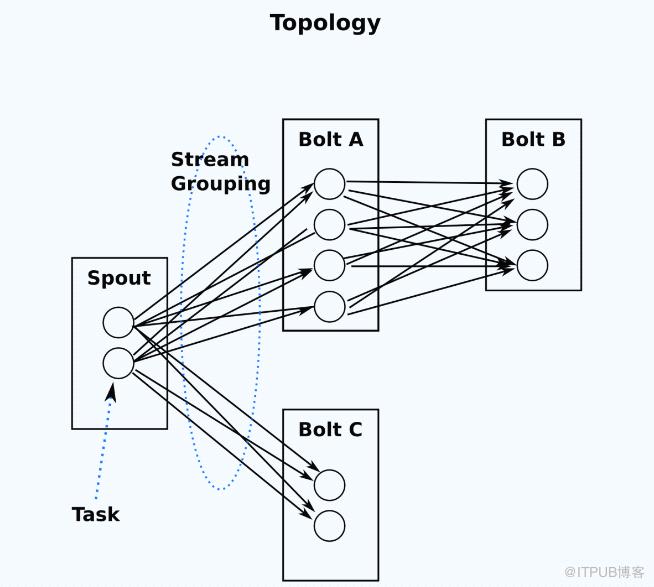
首先通过消息源的
OutputFieldsDeclarer来定义发射多条消息流stream
以下定义了两种stream消息流:email邮件、sms短信
@Overridepublic void declareOutputFields(OutputFieldsDeclarer outputFieldsDeclarer) {
    outputFieldsDeclarer.declareStream("email", new Fields("body"));
    outputFieldsDeclarer.declareStream("sms", new Fields("body"));
}
然后我们通过对消息内容进行分析判断来决定发射指定的stream类型
@Overridepublic void execute(Tuple tuple) {
    String streamType;
    String value = tuple.getStringByField("body");    # 逻辑判断stub code
    if (value.startsWith("email:")) {
        streamType = "email";
    } else {
        streamType = "sms";
    }

    outputCollector.emit(streamType, new Values(value));
}
topology设置bolt的消息源时通过localOrShuffleGrouping来设置只接收指定stream的消息
FilterBolt通过对消息进行加工处理,下发给bolts时会指定不同的stream,EmailNotifyBolt只接收email类型的stream消息,SmsNotifyBolt只接收sms类型的stream消息。
TopologyBuilder topologyBuilder = new TopologyBuilder();
topologyBuilder.setSpout("RabbitmqSpout", new RabbitmqSpout());
topologyBuilder.setBolt("FilterBolt", new FilterBolt()).shuffleGrouping("RabbitmqSpout");

topologyBuilder.setBolt("EmailNotifyBolt", new EmailNotifyBolt()).localOrShuffleGrouping("FilterBolt", "email");

topologyBuilder.setBolt("SmsNotifyBolt", new SmsNotifyBolt()).localOrShuffleGrouping("FilterBolt", "sms");
Hey, show me the code!
来自 “ ITPUB博客 ” ,链接:https://blog.itpub.net/758/viewspace-2816783/ ,如需转载,请注明出处,否则将追究法律责任。
上一篇:
java实现生产者消费者问题

请登录后发表评论
登录
全部评论
