搭建Ansible实验环境
#### 下载并安装 VirtualBox
https://www.virtualbox.org/wiki/Downloads
#### 下载 CentOS 7
https://www.osboxes.org/centos/
创建一个centos-template
clone ansible-controller
clone ansible-target1
clone ansible-target2
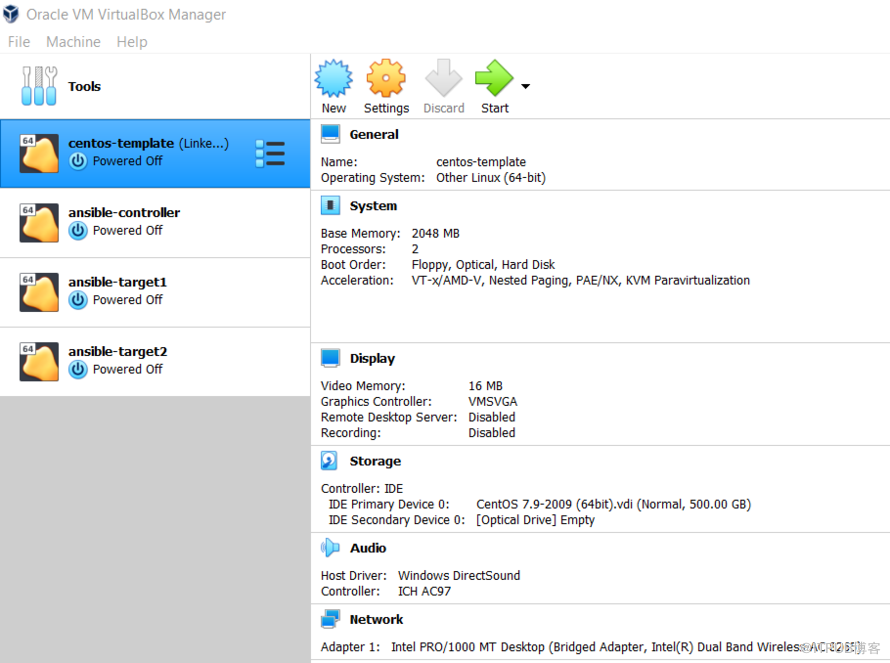
(1)
#### 修改host name
sudo vi /etc/hostname
sudo vi /etc/hosts
shutdown now -r
(2)
#### ansiblecontroller
[osboxes@ansiblecontroller ~]$ cat /etc/hostname
ansiblecontroller
[osboxes@ansiblecontroller ~]$ cat /etc/hosts
127.0.0.1 localhost ansiblecontroller
::1 localhost ansiblecontroller
[osboxes@ansiblecontroller ~]$
(3)
#### target1
[osboxes@target1 ~]$ cat /etc/hostname
target1
[osboxes@target1 ~]$ cat /etc/hosts
127.0.0.1 localhost target1
::1 localhost target1
[osboxes@target1 ~]$
(4)
#### target2
[osboxes@target2 ~]$ cat /etc/hostname
target2
[osboxes@target2 ~]$ cat /etc/hosts
127.0.0.1 localhost target2
::1 localhost target2
[osboxes@target2 ~]$
==========================================================
#### 该命表示把Centos-7.repo下载到/etc/yum.repos.d/目录下,如果该目录下有CentOS-Base.repo,则会自动覆盖。
curl -o /etc/yum.repos.d/CentOS-Base.repo
yum clean cache
yum makecache
==========================================================
#### 安装 epel 源
yum install epel-release -y
#### 安装依赖工具
yum install git python python-pip -y
==========================================================
#### 设置EPEL仓库
cd /tmp
wget
#### 使用yum安装epel
rpm -ivh epel-release-latest-7.noarch.rpm
#### 安装ansible
yum -y install ansible
[root@ansiblecontroller tmp]# ansible --version
ansible 2.9.18
config file = /etc/ansible/ansible.cfg
configured module search path = [u'/root/.ansible/plugins/modules', u'/usr/share/ansible/plugins/modules']
ansible python module location = /usr/lib/python2.7/site-packages/ansible
executable location = /bin/ansible
python version = 2.7.5 (default, Nov 16 2020, 22:23:17) [GCC 4.8.5 20150623 (Red Hat 4.8.5-44)]
[root@ansiblecontroller tmp]#
来自 “ ITPUB博客 ” ,链接:https://blog.itpub.net/725820/viewspace-2762631/ ,如需转载,请注明出处,否则将追究法律责任。

最新文章
- Postgresql pg_cron使用的一个注意点
- crunchy postgres 使用注意事项
- Mac VirtualBox 7.0 下安装Redhat 8.5虚拟机
- PostgreSQL的CTID
- Crunchy PostgreSQL database restore via pgo command
- Crunchy PostgreSQL database backup via pgo command
- Crunchy PG手动备份实验
- 理解PG的xmin和xmax的几个小实验
- PG: Utility queries
- PG: Estimate last modified or read time of a table
