
win下的my.ini文件,一般会在安装目录的根目录。
查看mysql的ini文件的方法:
1、使用下面的命令查看
show variables like "%char%";
C:Users78204>mysql
Welcome to the MySQL monitor.  Commands end with ; or g.
Your MySQL connection id is 3
Server version: 5.7.25 MySQL Community Server (GPL)

Copyright (c) 2000, 2019, Oracle and/or its affiliates. All rights reserved.

Oracle is a registered trademark of Oracle Corporation and/or its
affiliates. Other names may be trademarks of their respective
owners.

Type 'help;' or 'h' for help. Type 'c' to clear the current input statement.

mysql> show variables like "%char%";
+--------------------------+----------------------------------------+
| Variable_name            | Value                                  |
+--------------------------+----------------------------------------+
| character_set_client     | utf8                                   |
| character_set_connection | utf8                                   |
| character_set_database   | utf8                                   |
| character_set_filesystem | binary                                 |
| character_set_results    | utf8                                   |
| character_set_server     | utf8                                   |
| character_set_system     | utf8                                   |
| character_sets_dir       | D:mysql-5.7.25-winx64sharecharsets |
+--------------------------+----------------------------------------+
rows in set, 1 warning (0.01 sec)

mysql>
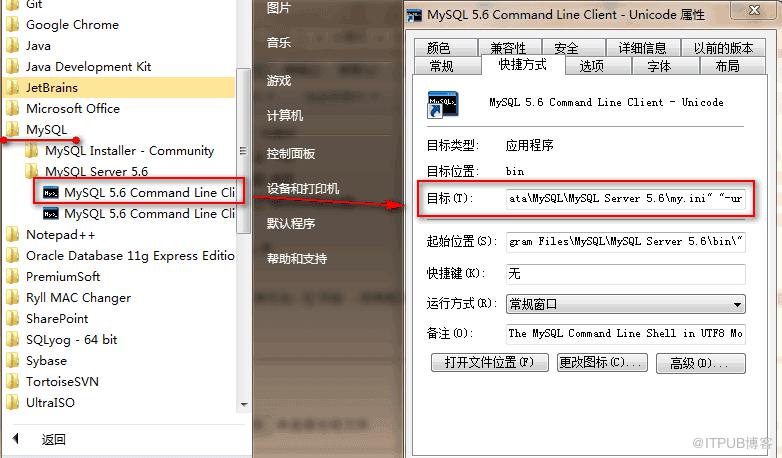
2、在“开始 → 所有程序 → MySQL”下面找到MySQL的命令行客户端工具,右键选择该命令行工具查看“属性”,在“目标”里面也可以看到MySQL使用的配置文件位置。
推荐:MySQL教程
来自 “ ITPUB博客 ” ,链接:https://blog.itpub.net/717/viewspace-2833751/ ,如需转载,请注明出处,否则将追究法律责任。
上一篇:
如何将python定义一个变量并使用?
下一篇:
解压版MySQL怎么安装

请登录后发表评论
登录
全部评论
