一、为什么需要分布式光感协同?
在鸿蒙生态中,用户往往同时拥有多台设备:手机、平板、PC、智慧屏。每台设备都有独立的光感传感器,但它们的导航体验应该是 连贯的 :
场景1 :用户在户外使用手机(850 lux),导航栏全宽展开。回到家拿起平板(200 lux),如果平板独立按本地光感决策,导航栏会收缩为 Mini 栏,但用户刚从手机过来,期望导航保持展开状态
场景2 :用户在 PC 上办公(300 lux),导航栏为 Dock 形态。切换到智慧屏看电影(< 5 lux),智慧屏应该独立进入影院模式,隐藏导航
场景3 :深夜时分,所有设备应该统一进入夜间护眼模式,而非各自独立决策
HarmonyOS 6(API 23)的分布式软总线提供了 跨设备低延迟通信 (< 20ms),结合光感智能体,我们可以实现:
主设备光感主导 :指定一台设备为主设备,其他设备跟随其光感策略
场景自适应切换 :根据设备类型和使用场景自动选择协同策略
跨设备导航状态同步 :展开/收起/隐藏状态实时同步
二、分布式协同架构设计
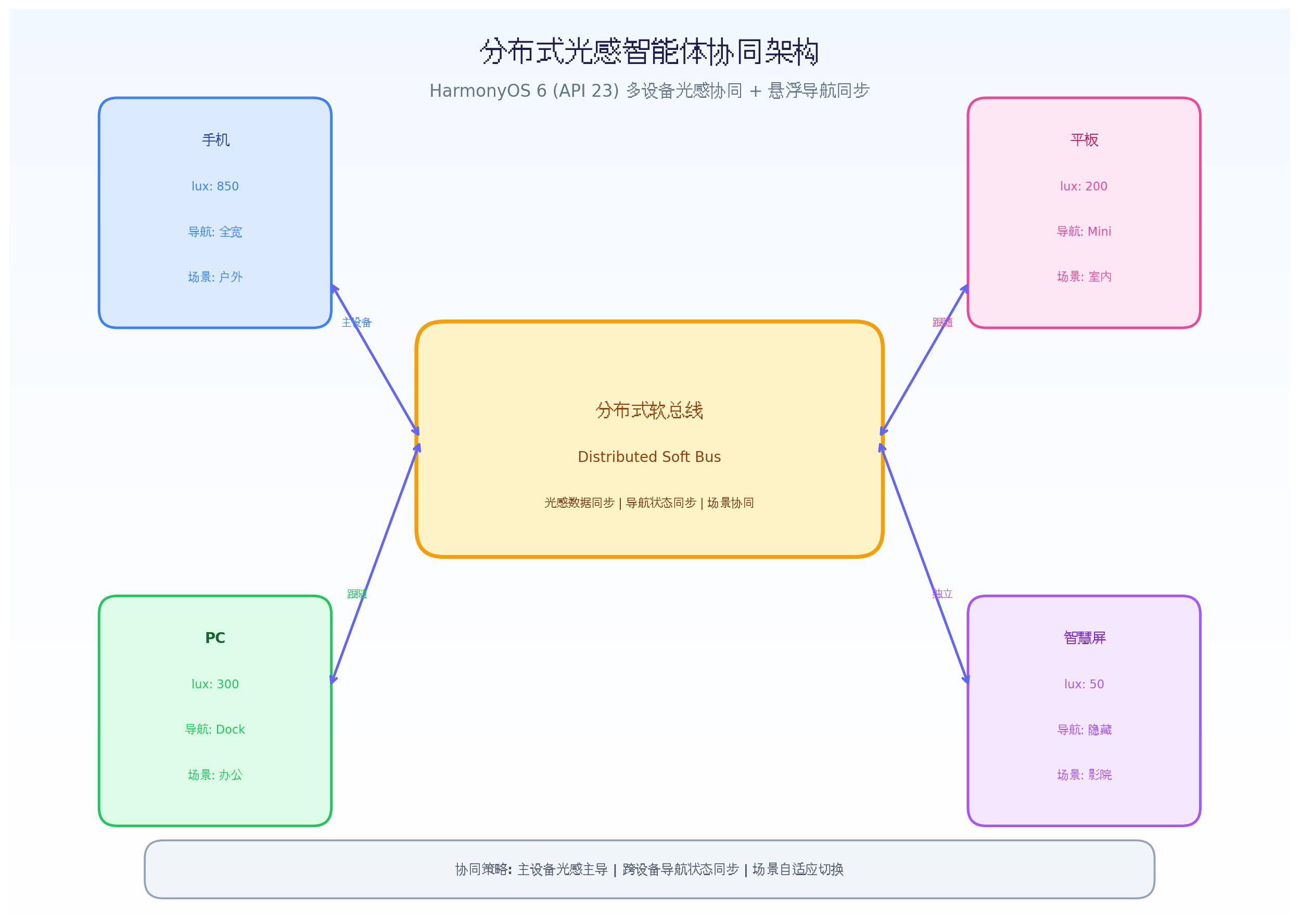
分布式软总线(Distributed Soft Bus) :HarmonyOS 原生跨设备通信框架,支持 WiFi/BT/NFC 多通道自动选路
光感数据广播层 :主设备将光感数据(lux、色温、场景)广播到所有从设备
设备角色判定层 :根据设备类型、使用状态、用户习惯自动判定主/从/独立角色
协同策略选择层 :3 种协同策略(主导跟随、场景独立、全设备统一)
融合决策生成层 :结合本地光感 + 远程光感 + 设备角色,生成最终决策
一致性校验层 :跨设备状态同步后校验一致性,异常时自动恢复
三、核心代码实战
3.1 分布式设备角色管理
HarmonyOS 6 在 API 23 中增强了分布式设备管理能力,支持动态角色切换。
import
distributedDeviceManager
from
'@ohos.distributedDeviceManager'
;
import
{
BusinessError
}
from
'@ohos.base'
;
export
enum
DeviceRole
{
MASTER
=
'master'
,
FOLLOWER
=
'follower'
,
INDEPENDENT
=
'independent'
}
export
enum
DeviceType
{
PHONE
=
'phone'
,
TABLET
=
'tablet'
,
PC
=
'pc'
,
SMART_SCREEN
=
'smart_screen'
,
WATCH
=
'watch'
,
CAR
=
'car'
}
export
interface
DeviceInfo
{
deviceId
:
string
;
deviceName
:
string
;
deviceType
:
DeviceType
;
role
:
DeviceRole
;
lightData
:
LightData
|
null
;
navState
:
NavState
|
null
;
lastHeartbeat
:
number
;
isOnline
:
boolean
;
}
export
interface
LightData
{
lux
:
number
;
colorTemp
:
number
;
scenario
:
string
;
timestamp
:
number
;
}
export
interface
NavState
{
mode
:
'full'
|
'mini'
|
'hidden'
|
'floating'
;
opacity
:
number
;
glowIntensity
:
number
;
primaryColor
:
string
;
timestamp
:
number
;
}
export
class
DistributedDeviceManager
{
private
deviceManager
:
distributedDeviceManager
.
DeviceManager
|
null
=
null
;
private
devices
:
Map
<
string
,
DeviceInfo
>
=
new
Map
(
)
;
private
localDeviceId
:
string
=
''
;
private
roleChangeListeners
:
Array
<
(
deviceId
:
string
,
newRole
:
DeviceRole
)
=>
void
>
=
[
]
;
private
readonly
HEARTBEAT_INTERVAL
=
3000
;
private
readonly
HEARTBEAT_TIMEOUT
=
10000
;
async
initialize
(
)
{
try
{
this
.
deviceManager
=
distributedDeviceManager
.
createDeviceManager
(
'com.example.lightnav'
)
;
this
.
localDeviceId
=
this
.
deviceManager
.
getLocalDeviceId
(
)
;
this
.
deviceManager
.
on
(
'deviceStateChange'
,
(
data
)
=>
{
this
.
handleDeviceStateChange
(
data
)
;
}
)
;
this
.
startHeartbeat
(
)
;
this
.
determineInitialRole
(
)
;
}
catch
(
err
)
{
console
.
error
(
`
Failed to initialize distributed device manager:
${
err
}
`
)
;
}
}
private
determineInitialRole
(
)
{
const
localType
=
this
.
getLocalDeviceType
(
)
;
const
onlineDevices
=
this
.
getOnlineDevices
(
)
;
if
(
localType
===
DeviceType
.
PHONE
)
{
this
.
setLocalRole
(
DeviceRole
.
MASTER
)
;
return
;
}
const
existingMaster
=
Array
.
from
(
this
.
devices
.
values
(
)
)
.
find
(
d
=>
d
.
role
===
DeviceRole
.
MASTER
&&
d
.
isOnline
)
;
if
(
existingMaster
)
{
this
.
setLocalRole
(
DeviceRole
.
FOLLOWER
)
;
return
;
}
if
(
localType
===
DeviceType
.
SMART_SCREEN
)
{
this
.
setLocalRole
(
DeviceRole
.
INDEPENDENT
)
;
return
;
}
if
(
localType
===
DeviceType
.
PC
)
{
this
.
setLocalRole
(
DeviceRole
.
INDEPENDENT
)
;
return
;
}
this
.
setLocalRole
(
DeviceRole
.
FOLLOWER
)
;
}
async
switchRole
(
newRole
:
DeviceRole
)
{
const
oldRole
=
this
.
getLocalRole
(
)
;
if
(
oldRole
===
newRole
)
return
;
await
this
.
broadcastRoleChange
(
newRole
)
;
this
.
setLocalRole
(
newRole
)
;
this
.
roleChangeListeners
.
forEach
(
cb
=>
cb
(
this
.
localDeviceId
,
newRole
)
)
;
}
async
setMasterDevice
(
deviceId
:
string
)
{
for
(
const
[
id
,
device
]
of
this
.
devices
)
{
if
(
id
===
deviceId
)
{
await
this
.
sendRoleChange
(
id
,
DeviceRole
.
MASTER
)
;
}
else
if
(
device
.
role
===
DeviceRole
.
MASTER
)
{
await
this
.
sendRoleChange
(
id
,
DeviceRole
.
FOLLOWER
)
;
}
}
if
(
deviceId
===
this
.
localDeviceId
)
{
this
.
switchRole
(
DeviceRole
.
MASTER
)
;
}
}
async
broadcastLightData
(
lightData
:
LightData
)
{
const
message
=
{
type
:
'light_data'
,
deviceId
:
this
.
localDeviceId
,
data
:
lightData
,
timestamp
:
Date
.
now
(
)
}
;
await
this
.
broadcastToAll
(
message
)
;
}
async
broadcastNavState
(
navState
:
NavState
)
{
const
message
=
{
type
:
'nav_state'
,
deviceId
:
this
.
localDeviceId
,
data
:
navState
,
timestamp
:
Date
.
now
(
)
}
;
await
this
.
broadcastToAll
(
message
)
;
}
private
async
broadcastToAll
(
message
:
any
)
{
if
(
!
this
.
deviceManager
)
return
;
const
deviceList
=
this
.
deviceManager
.
getAvailableDeviceListSync
(
)
;
for
(
const
device
of
deviceList
)
{
try
{
await
this
.
deviceManager
.
sendMessage
(
device
.
deviceId
,
JSON
.
stringify
(
message
)
)
;
}
catch
(
err
)
{
console
.
error
(
`
Failed to send message to
${
device
.
deviceName
}
:
${
err
}
`
)
;
}
}
}
private
handleDeviceStateChange
(
data
:
distributedDeviceManager
.
DeviceStateChangeData
)
{
switch
(
data
.
action
)
{
case
'DEVICE_ONLINE'
:
this
.
addDevice
(
data
.
device
)
;
break
;
case
'DEVICE_OFFLINE'
:
this
.
removeDevice
(
data
.
device
.
deviceId
)
;
break
;
case
'DEVICE_INFO_CHANGED'
:
this
.
updateDeviceInfo
(
data
.
device
)
;
break
;
}
}
private
addDevice
(
device
:
distributedDeviceManager
.
DeviceBasicInfo
)
{
const
deviceInfo
:
DeviceInfo
=
{
deviceId
:
device
.
deviceId
,
deviceName
:
device
.
deviceName
,
deviceType
:
this
.
mapDeviceType
(
device
.
deviceType
)
,
role
:
DeviceRole
.
FOLLOWER
,
lightData
:
null
,
navState
:
null
,
lastHeartbeat
:
Date
.
now
(
)
,
isOnline
:
true
}
;
this
.
devices
.
set
(
device
.
deviceId
,
deviceInfo
)
;
this
.
determineInitialRole
(
)
;
}
private
removeDevice
(
deviceId
:
string
)
{
const
device
=
this
.
devices
.
get
(
deviceId
)
;
if
(
device
)
{
device
.
isOnline
=
false
;
device
.
lastHeartbeat
=
Date
.
now
(
)
;
if
(
device
.
role
===
DeviceRole
.
MASTER
)
{
this
.
electNewMaster
(
)
;
}
}
}
private
electNewMaster
(
)
{
const
onlineDevices
=
Array
.
from
(
this
.
devices
.
values
(
)
)
.
filter
(
d
=>
d
.
isOnline
)
;
const
priority
=
[
DeviceType
.
PHONE
,
DeviceType
.
TABLET
,
DeviceType
.
PC
,
DeviceType
.
SMART_SCREEN
]
;
for
(
const
type
of
priority
)
{
const
candidate
=
onlineDevices
.
find
(
d
=>
d
.
deviceType
===
type
)
;
if
(
candidate
)
{
this
.
switchRole
(
DeviceRole
.
MASTER
)
;
return
;
}
}
}
private
startHeartbeat
(
)
{
setInterval
(
(
)
=>
{
this
.
broadcastToAll
(
{
type
:
'heartbeat'
,
deviceId
:
this
.
localDeviceId
,
timestamp
:
Date
.
now
(
)
}
)
;
this
.
checkHeartbeatTimeout
(
)
;
}
,
this
.
HEARTBEAT_INTERVAL
)
;
}
private
checkHeartbeatTimeout
(
)
{
const
now
=
Date
.
now
(
)
;
for
(
const
[
id
,
device
]
of
this
.
devices
)
{
if
(
device
.
isOnline
&&
now
-
device
.
lastHeartbeat
>
this
.
HEARTBEAT_TIMEOUT
)
{
device
.
isOnline
=
false
;
console
.
warn
(
`
Device
${
device
.
deviceName
}
heartbeat timeout
`
)
;
}
}
}
private
mapDeviceType
(
type
:
number
)
:
DeviceType
{
switch
(
type
)
{
case
0x0E
:
return
DeviceType
.
PHONE
;
case
0x11
:
return
DeviceType
.
TABLET
;
case
0x12
:
return
DeviceType
.
PC
;
case
0x09
:
return
DeviceType
.
SMART_SCREEN
;
case
0x06
:
return
DeviceType
.
WATCH
;
default
:
return
DeviceType
.
PHONE
;
}
}
getLocalRole
(
)
:
DeviceRole
{
const
localDevice
=
this
.
devices
.
get
(
this
.
localDeviceId
)
;
return
localDevice
?.
role
||
DeviceRole
.
FOLLOWER
;
}
private
setLocalRole
(
role
:
DeviceRole
)
{
let
localDevice
=
this
.
devices
.
get
(
this
.
localDeviceId
)
;
if
(
!
localDevice
)
{
localDevice
=
{
deviceId
:
this
.
localDeviceId
,
deviceName
:
'Local'
,
deviceType
:
this
.
getLocalDeviceType
(
)
,
role
:
role
,
lightData
:
null
,
navState
:
null
,
lastHeartbeat
:
Date
.
now
(
)
,
isOnline
:
true
}
;
this
.
devices
.
set
(
this
.
localDeviceId
,
localDevice
)
;
}
else
{
localDevice
.
role
=
role
;
}
}
private
getLocalDeviceType
(
)
:
DeviceType
{
const
screenWidth
=
px2vp
(
display
.
getDefaultDisplaySync
(
)
.
width
)
;
if
(
screenWidth
<
600
)
return
DeviceType
.
PHONE
;
if
(
screenWidth
<
1024
)
return
DeviceType
.
TABLET
;
return
DeviceType
.
PC
;
}
getOnlineDevices
(
)
:
DeviceInfo
[
]
{
return
Array
.
from
(
this
.
devices
.
values
(
)
)
.
filter
(
d
=>
d
.
isOnline
)
;
}
getMasterDevice
(
)
:
DeviceInfo
|
null
{
return
Array
.
from
(
this
.
devices
.
values
(
)
)
.
find
(
d
=>
d
.
role
===
DeviceRole
.
MASTER
&&
d
.
isOnline
)
||
null
;
}
getDeviceLightData
(
deviceId
:
string
)
:
LightData
|
null
{
return
this
.
devices
.
get
(
deviceId
)
?.
lightData
||
null
;
}
onRoleChange
(
callback
:
(
deviceId
:
string
,
newRole
:
DeviceRole
)
=>
void
)
{
this
.
roleChangeListeners
.
push
(
callback
)
;
}
destroy
(
)
{
if
(
this
.
deviceManager
)
{
this
.
deviceManager
.
off
(
'deviceStateChange'
)
;
distributedDeviceManager
.
releaseDeviceManager
(
this
.
deviceManager
)
;
}
}
}
动态角色判定 :根据设备类型自动判定主/从/独立角色,手机优先为主设备,智慧屏和 PC 默认独立
主设备选举 :主设备离线时自动选举新主设备,优先级:手机 > 平板 > PC > 智慧屏
心跳机制 :3 秒心跳 + 10 秒超时检测,确保设备状态实时同步
角色切换 :支持用户手动指定主设备,或系统自动切换
3.2 光感协同策略引擎
import
{
DistributedDeviceManager
,
DeviceRole
,
DeviceType
,
DeviceInfo
,
LightData
,
NavState
}
from
'./DistributedDeviceManager'
;
export
enum
SyncStrategy
{
MASTER_DOMINANT
=
'master_dominant'
,
SCENE_INDEPENDENT
=
'scene_independent'
,
UNIFIED_NIGHT
=
'unified_night'
,
ADAPTIVE
=
'adaptive'
}
export
interface
SyncDecision
{
strategy
:
SyncStrategy
;
source
:
'local'
|
'remote'
|
'fused'
;
lightData
:
LightData
;
navState
:
NavState
;
reason
:
string
;
}
export
class
LightSyncStrategyEngine
{
private
deviceManager
:
DistributedDeviceManager
;
private
currentStrategy
:
SyncStrategy
=
SyncStrategy
.
ADAPTIVE
;
constructor
(
deviceManager
:
DistributedDeviceManager
)
{
this
.
deviceManager
=
deviceManager
;
}
async
decide
(
localLightData
:
LightData
,
localNavState
:
NavState
)
:
Promise
<
SyncDecision
>
{
const
localRole
=
this
.
deviceManager
.
getLocalRole
(
)
;
const
masterDevice
=
this
.
deviceManager
.
getMasterDevice
(
)
;
const
strategy
=
this
.
selectStrategy
(
localRole
,
localLightData
,
masterDevice
)
;
switch
(
strategy
)
{
case
SyncStrategy
.
MASTER_DOMINANT
:
return
this
.
applyMasterDominant
(
localRole
,
masterDevice
,
localLightData
,
localNavState
)
;
case
SyncStrategy
.
SCENE_INDEPENDENT
:
return
this
.
applySceneIndependent
(
localLightData
,
localNavState
)
;
case
SyncStrategy
.
UNIFIED_NIGHT
:
return
this
.
applyUnifiedNight
(
localLightData
,
localNavState
,
masterDevice
)
;
case
SyncStrategy
.
ADAPTIVE
:
return
this
.
applyAdaptive
(
localRole
,
localLightData
,
localNavState
,
masterDevice
)
;
default
:
return
this
.
applySceneIndependent
(
localLightData
,
localNavState
)
;
}
}
private
selectStrategy
(
localRole
:
DeviceRole
,
localLightData
:
LightData
,
masterDevice
:
DeviceInfo
|
null
)
:
SyncStrategy
{
const
hour
=
new
Date
(
)
.
getHours
(
)
;
if
(
hour
>=
22
||
hour

0.5
)
{
return
this
.
applySceneIndependent
(
localLightData
,
localNavState
)
;
}
else
{
return
this
.
applyMasterDominant
(
localRole
,
masterDevice
,
localLightData
,
localNavState
)
;
}
}
private
adjustNavStateForLocalLight
(
masterNavState
:
NavState
,
localLightData
:
LightData
)
:
NavState
{
let
adjustedOpacity
=
masterNavState
.
opacity
;
if
(
localLightData
.
lux
>
800
&&
masterNavState
.
opacity
<
0.9
)
{
adjustedOpacity
=
0.95
;
}
else
if
(
localLightData
.
lux
<
50
&&
masterNavState
.
opacity
>
0.6
)
{
adjustedOpacity
=
0.55
;
}
return
{
...
masterNavState
,
opacity
:
adjustedOpacity
,
timestamp
:
Date
.
now
(
)
}
;
}
private
calculateLightChange
(
lightData
:
LightData
)
:
number
{
return
Math
.
abs
(
lightData
.
lux
-
300
)
/
1000
;
}
setStrategy
(
strategy
:
SyncStrategy
)
{
this
.
currentStrategy
=
strategy
;
}
getCurrentStrategy
(
)
:
SyncStrategy
{
return
this
.
currentStrategy
;
}
}
种协同策略 :主设备主导、场景独立、夜间统一、自适应
策略选择算法 :5 条规则自动选择最优策略(夜间统一、独立设备、影院场景、主从关系、自适应变化)
本地微调 :从设备跟随主设备导航模式,但透明度根据本地光感微调(如主设备室内、从设备户外时提高透明度)
夜间统一 :22:00-6:00 所有设备统一进入夜间模式,护眼一致性
3.3 分布式光感智能体渲染组件
import
{
DistributedDeviceManager
,
DeviceRole
}
from
'./DistributedDeviceManager'
;
import
{
LightSyncStrategyEngine
,
SyncDecision
,
SyncStrategy
}
from
'./LightSyncStrategyEngine'
;
import
{
LightContextEngine
}
from
'./LightContextEngine'
;
@
Component
export
struct DistributedLightNav
{
@
State
navMode
:
string
=
'full'
;
@
State
navPosition
:
{
x
:
number
;
y
:
number
}
=
{
x
:
0.5
,
y
:
0.9
}
;
@
State
opacity
:
number
=
0.85
;
@
State
glowIntensity
:
number
=
0
;
@
State
primaryColor
:
string
=
'#FFFFFF'
;
@
State
deviceRole
:
string
=
'follower'
;
@
State
syncStrategy
:
string
=
'adaptive'
;
@
State
masterDeviceName
:
string
=
''
;
@
State
isOnline
:
boolean
=
false
;
private
deviceManager
=
new
DistributedDeviceManager
(
)
;
private
strategyEngine
:
LightSyncStrategyEngine
;
private
lightEngine
=
new
LightContextEngine
(
)
;
aboutToAppear
(
)
{
this
.
initialize
(
)
;
}
private
async
initialize
(
)
{
await
this
.
deviceManager
.
initialize
(
)
;
this
.
strategyEngine
=
new
LightSyncStrategyEngine
(
this
.
deviceManager
)
;
this
.
deviceManager
.
onRoleChange
(
(
deviceId
,
newRole
)
=>
{
this
.
deviceRole
=
newRole
;
if
(
newRole
===
DeviceRole
.
MASTER
)
{
this
.
masterDeviceName
=
'本机'
;
}
}
)
;
this
.
lightEngine
.
start
(
)
;
this
.
lightEngine
.
subscribe
(
async
(
lightData
)
=>
{
const
localNavState
=
{
mode
:
this
.
navMode
as
'full'
|
'mini'
|
'hidden'
|
'floating'
,
opacity
:
this
.
opacity
,
glowIntensity
:
this
.
glowIntensity
,
primaryColor
:
this
.
primaryColor
,
timestamp
:
Date
.
now
(
)
}
;
const
decision
=
await
this
.
strategyEngine
.
decide
(
lightData
,
localNavState
)
;
this
.
applyDecision
(
decision
)
;
}
)
;
this
.
isOnline
=
true
;
}
private
applyDecision
(
decision
:
SyncDecision
)
{
this
.
syncStrategy
=
decision
.
strategy
;
animateTo
(
{
duration
:
400
,
curve
:
Curve
.
EaseInOut
,
iterations
:
1
}
,
(
)
=>
{
this
.
navMode
=
decision
.
navState
.
mode
;
this
.
opacity
=
decision
.
navState
.
opacity
;
this
.
glowIntensity
=
decision
.
navState
.
glowIntensity
;
this
.
primaryColor
=
decision
.
navState
.
primaryColor
;
}
)
;
const
master
=
this
.
deviceManager
.
getMasterDevice
(
)
;
if
(
master
&&
master
.
deviceId
!==
this
.
deviceManager
.
getLocalDeviceId
(
)
)
{
this
.
masterDeviceName
=
master
.
deviceName
;
}
}
build
(
)
{
Stack
(
{
alignContent
:
Alignment
.
Bottom
}
)
{
Column
(
)
{
Text
(
'分布式光感智能体协同悬浮导航'
)
.
fontSize
(
20
)
.
fontColor
(
'#666'
)
.
margin
(
{
top
:
80
}
)
Column
(
)
{
Text
(
`
设备角色:
${
this
.
deviceRole
===
'master'
?
'主设备'
:
this
.
deviceRole
===
'follower'
?
'从设备'
:
'独立设备'
}
`
)
.
fontSize
(
14
)
.
fontColor
(
'#3B82F6'
)
.
margin
(
{
top
:
20
}
)
Text
(
`
协同策略:
${
this
.
getStrategyName
(
this
.
syncStrategy
)
}
`
)
.
fontSize
(
14
)
.
fontColor
(
'#F59E0B'
)
.
margin
(
{
top
:
8
}
)
if
(
this
.
deviceRole
===
'follower'
&&
this
.
masterDeviceName
!==
''
)
{
Text
(
`
跟随主设备:
${
this
.
masterDeviceName
}
`
)
.
fontSize
(
14
)
.
fontColor
(
'#EC4899'
)
.
margin
(
{
top
:
8
}
)
}
Text
(
`
网络状态:
${
this
.
isOnline
?
'在线'
:
'离线'
}
`
)
.
fontSize
(
14
)
.
fontColor
(
this
.
isOnline
?
'#22C55E'
:
'#EF4444'
)
.
margin
(
{
top
:
8
}
)
}
.
padding
(
16
)
.
backgroundColor
(
'#F8FAFC'
)
.
borderRadius
(
12
)
.
margin
(
{
top
:
40
}
)
Row
(
)
{
Button
(
'设为主设备'
)
.
width
(
120
)
.
height
(
40
)
.
backgroundColor
(
'#3B82F6'
)
.
fontColor
(
'#FFFFFF'
)
.
fontSize
(
12
)
.
margin
(
{
right
:
12
}
)
.
onClick
(
(
)
=>
{
this
.
deviceManager
.
switchRole
(
DeviceRole
.
MASTER
)
;
}
)
Button
(
'设为独立'
)
.
width
(
120
)
.
height
(
40
)
.
backgroundColor
(
'#F59E0B'
)
.
fontColor
(
'#FFFFFF'
)
.
fontSize
(
12
)
.
onClick
(
(
)
=>
{
this
.
deviceManager
.
switchRole
(
DeviceRole
.
INDEPENDENT
)
;
}
)
}
.
margin
(
{
top
:
30
}
)
}
.
width
(
'100%'
)
.
height
(
'100%'
)
.
backgroundColor
(
'#F5F5F5'
)
if
(
this
.
navMode
!==
'hidden'
)
{
this
.
NavContainer
(
)
}
this
.
RoleIndicator
(
)
}
.
width
(
'100%'
)
.
height
(
'100%'
)
}
@
Builder
NavContainer
(
)
{
Column
(
)
{
if
(
this
.
navMode
===
'full'
)
{
this
.
FullNav
(
)
}
else
if
(
this
.
navMode
===
'mini'
)
{
this
.
MiniNav
(
)
}
else
if
(
this
.
navMode
===
'floating'
)
{
this
.
FloatingBall
(
)
}
}
.
width
(
this
.
navMode
===
'full'
?
'90%'
:
this
.
navMode
===
'mini'
?
'50%'
:
'64vp'
)
.
height
(
this
.
navMode
===
'floating'
?
'64vp'
:
'72vp'
)
.
backgroundColor
(
`
rgba(255, 255, 255,
${
this
.
opacity
}
)
`
)
.
backdropBlur
(
20
)
.
borderRadius
(
36
)
.
shadow
(
{
radius
:
this
.
glowIntensity
,
color
:
this
.
glowIntensity
>
0
?
'#818CF8'
:
'#00000030'
,
offsetY
:
this
.
glowIntensity
>
0
?
0
:
4
}
)
.
margin
(
{
bottom
:
24
}
)
.
position
(
{
x
:
'50%'
,
y
:
'auto'
}
)
.
translate
(
{
x
:
'-50%'
}
)
}
@
Builder
FullNav
(
)
{
Row
(
)
{
NavItem
(
{
icon
:
'home'
,
label
:
'首页'
,
color
:
this
.
primaryColor
}
)
NavItem
(
{
icon
:
'discover'
,
label
:
'发现'
,
color
:
this
.
primaryColor
}
)
NavItem
(
{
icon
:
'add'
,
label
:
''
,
color
:
this
.
primaryColor
,
isCenter
:
true
}
)
NavItem
(
{
icon
:
'message'
,
label
:
'消息'
,
color
:
this
.
primaryColor
}
)
NavItem
(
{
icon
:
'profile'
,
label
:
'我的'
,
color
:
this
.
primaryColor
}
)
}
.
width
(
'100%'
)
.
justifyContent
(
FlexAlign
.
SpaceAround
)
.
padding
(
12
)
}
@
Builder
MiniNav
(
)
{
Row
(
)
{
NavItem
(
{
icon
:
'home'
,
label
:
''
,
color
:
this
.
primaryColor
}
)
NavItem
(
{
icon
:
'add'
,
label
:
''
,
color
:
this
.
primaryColor
,
isCenter
:
true
}
)
NavItem
(
{
icon
:
'profile'
,
label
:
''
,
color
:
this
.
primaryColor
}
)
}
.
width
(
'100%'
)
.
justifyContent
(
FlexAlign
.
SpaceAround
)
.
padding
(
10
)
}
@
Builder
FloatingBall
(
)
{
Stack
(
)
{
Circle
(
)
.
width
(
64
)
.
height
(
64
)
.
fill
(
'#6366F1'
)
.
shadow
(
{
radius
:
12
+
this
.
glowIntensity
,
color
:
'#818CF8'
,
offsetY
:
0
}
)
Text
(
'+'
)
.
fontSize
(
28
)
.
fontColor
(
'#FFFFFF'
)
.
fontWeight
(
FontWeight
.
Bold
)
}
}
@
Builder
RoleIndicator
(
)
{
Stack
(
)
{
Circle
(
)
.
width
(
12
)
.
height
(
12
)
.
fill
(
this
.
deviceRole
===
'master'
?
'#22C55E'
:
this
.
deviceRole
===
'follower'
?
'#3B82F6'
:
'#F59E0B'
)
.
shadow
(
{
radius
:
4
,
color
:
this
.
deviceRole
===
'master'
?
'#22C55E'
:
this
.
deviceRole
===
'follower'
?
'#3B82F6'
:
'#F59E0B'
}
)
}
.
position
(
{
x
:
'95%'
,
y
:
'5%'
}
)
}
private
getStrategyName
(
strategy
:
string
)
:
string
{
const
names
:
Record
<
string
,
string
>
=
{
'master_dominant'
:
'主设备主导'
,
'scene_independent'
:
'场景独立'
,
'unified_night'
:
'夜间统一'
,
'adaptive'
:
'自适应'
}
;
return
names
[
strategy
]
||
strategy
;
}
aboutToDisappear
(
)
{
this
.
deviceManager
.
destroy
(
)
;
this
.
lightEngine
.
stop
(
)
;
}
}
@
Component
struct NavItem
{
@
Prop
icon
:
string
;
@
Prop
label
:
string
;
@
Prop
color
:
string
;
@
Prop
isCenter
:
boolean
=
false
;
build
(
)
{
Column
(
)
{
if
(
this
.
isCenter
)
{
Stack
(
)
{
Circle
(
)
.
width
(
48
)
.
height
(
48
)
.
fill
(
'#6366F1'
)
.
shadow
(
{
radius
:
8
,
color
:
'#818CF8'
,
offsetY
:
0
}
)
Text
(
'+'
)
.
fontSize
(
24
)
.
fontColor
(
'#FFFFFF'
)
.
fontWeight
(
FontWeight
.
Bold
)
}
}
else
{
Column
(
)
{
Image
(
`
icon_
${
this
.
icon
}
.svg
`
)
.
width
(
24
)
.
height
(
24
)
.
fill
(
this
.
color
)
if
(
this
.
label
!==
''
)
{
Text
(
this
.
label
)
.
fontSize
(
10
)
.
fontColor
(
this
.
color
)
.
margin
(
{
top
:
4
}
)
}
}
}
}
.
width
(
56
)
.
height
(
56
)
.
justifyContent
(
FlexAlign
.
Center
)
}
}
实时状态显示 :UI 上显示当前设备角色(主/从/独立)、协同策略、跟随的主设备名称、网络状态
手动角色切换 :提供"设为主设备"和"设为独立"按钮,支持用户手动干预
角色指示器 :屏幕右上角显示彩色圆点(绿色=主设备、蓝色=从设备、橙色=独立)
策略名称映射 :将英文策略名映射为中文显示,增强可读性
四、分布式协同场景演示
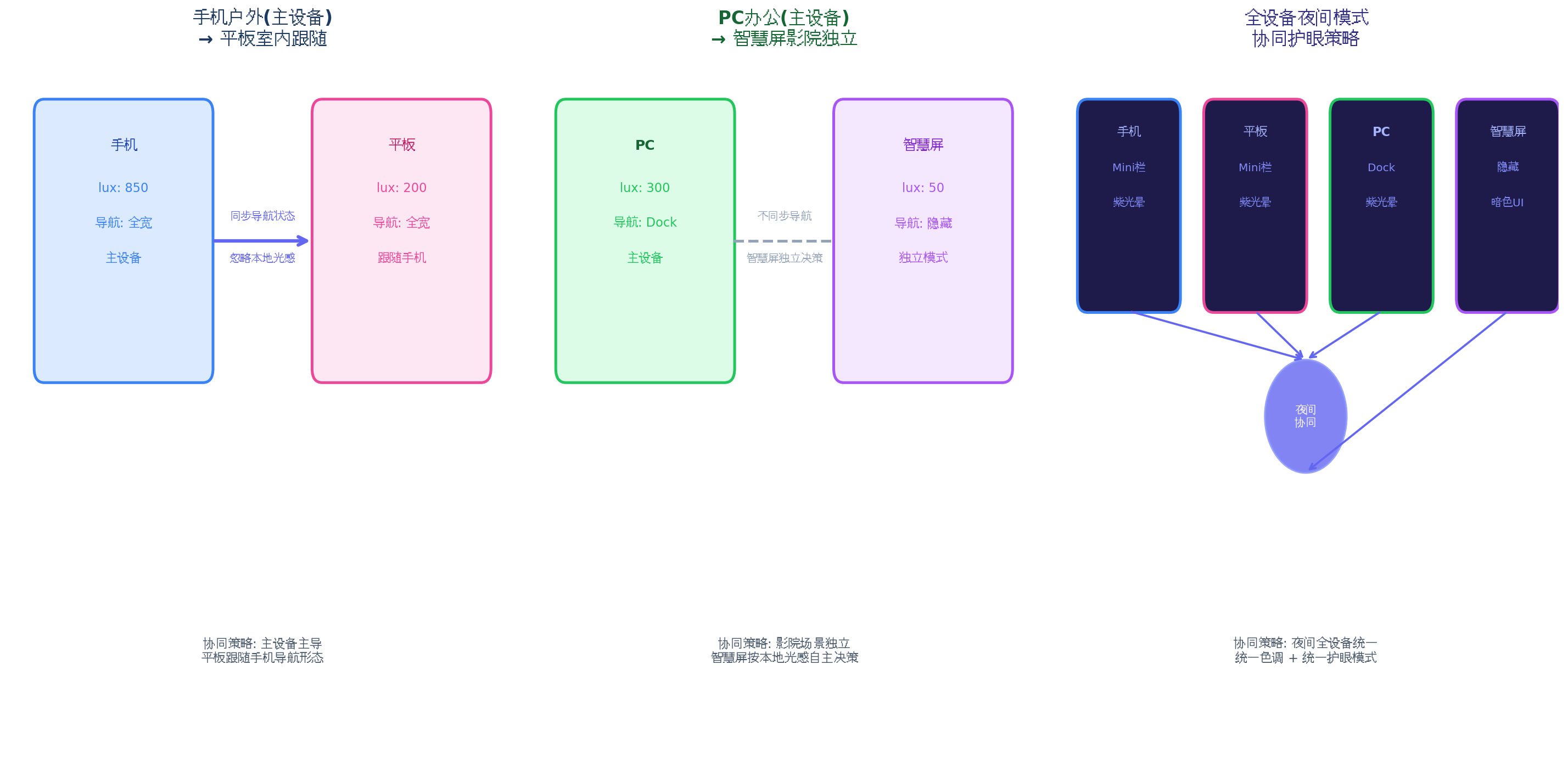
| 场景 | 主设备 | 从设备 | 协同策略 | 效果 |
| --- | --- | --- | --- | --- |
| 手机户外 → 平板室内 | 手机(850 lux) | 平板(200 lux) | 主设备主导 | 平板跟随手机保持全宽导航,忽略本地光感 |
| PC办公 → 智慧屏影院 | PC(300 lux) | 智慧屏(< 5 lux) | 场景独立 | 智慧屏独立进入影院模式,隐藏导航 |
| 深夜全设备 | 手机 | 平板+PC+智慧屏 | 夜间统一 | 所有设备统一 Mini 栏 + 紫光晕 |
| 手机丢失信号 | 离线 | 平板(200 lux) | 自适应 → 独立 | 平板检测到主设备离线,自动切换为独立决策 |
五、分布式决策流程与性能优化
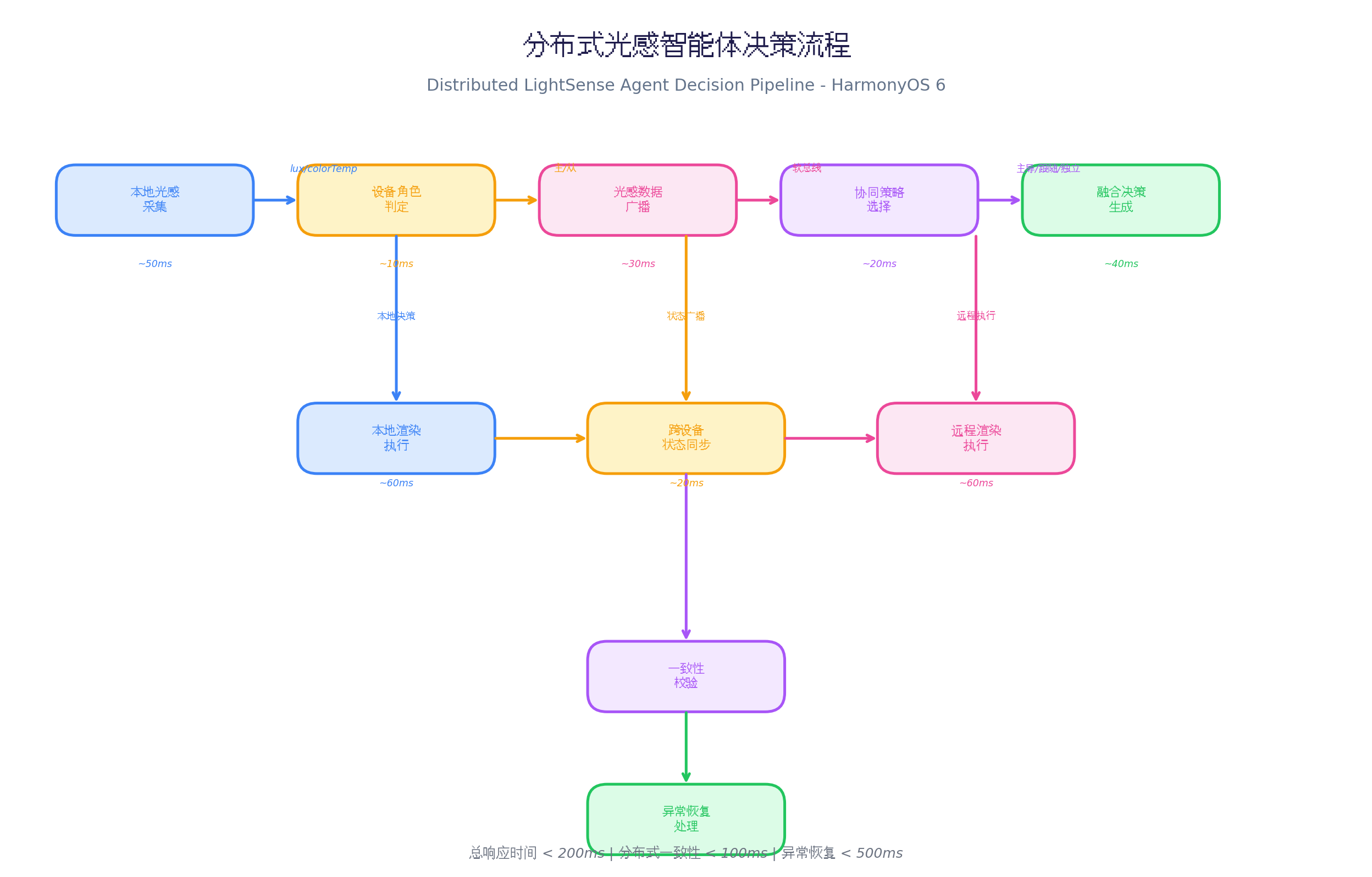
5.1 性能数据
在多设备协同实测中(Mate 60 Pro + MatePad Pro + PC + 智慧屏):
| 阶段 | 耗时 | 说明 |
| --- | --- | --- |
| 本地光感采集 | ~50ms | 传感器采样 |
| 设备角色判定 | ~10ms | 本地计算 |
| 光感数据广播 | ~30ms | 软总线广播 |
| 协同策略选择 | ~20ms | 策略引擎决策 |
| 融合决策生成 | ~40ms | 主设备主导/本地微调 |
| 本地渲染执行 | ~60ms | 属性动画 |
| 跨设备状态同步 | ~20ms | 软总线同步 |
| 远程渲染执行 | ~60ms | 从设备渲染 |
| 一致性校验 | ~15ms | 状态对比 |
| 总响应时间 | < 200ms | 端到端 |
| 分布式一致性 | < 100ms | 主从设备状态差 |
| 异常恢复 | < 500ms | 主设备离线后选举 |
5.2 优化策略
private
compressLightData
(
data
:
LightData
)
:
string
{
const
delta
=
{
l
:
Math
.
round
(
data
.
lux
/
10
)
,
c
:
Math
.
round
(
data
.
colorTemp
/
100
)
,
s
:
data
.
scenario
.
charAt
(
0
)
,
t
:
data
.
timestamp
%
1000000
}
;
return
JSON
.
stringify
(
delta
)
;
}
private
lastNavState
:
NavState
|
null
=
null
;
private
shouldSyncNavState
(
newState
:
NavState
)
:
boolean
{
if
(
!
this
.
lastNavState
)
return
true
;
return
JSON
.
stringify
(
newState
)
!==
JSON
.
stringify
(
this
.
lastNavState
)
;
}
private
messageQueue
:
any
[
]
=
[
]
;
private
syncTimer
:
number
=
-
1
;
private
queueMessage
(
message
:
any
)
{
this
.
messageQueue
.
push
(
message
)
;
if
(
this
.
syncTimer
===
-
1
)
{
this
.
syncTimer
=
setTimeout
(
(
)
=>
{
this
.
flushMessages
(
)
;
}
,
50
)
;
}
}
private
networkQuality
:
number
=
1.0
;
private
adjustSyncInterval
(
)
{
if
(
this
.
networkQuality
<
0.5
)
{
this
.
deviceManager
.
setBroadcastInterval
(
1000
)
;
}
else
{
this
.
deviceManager
.
setBroadcastInterval
(
50
)
;
}
}
六、PC 端扩展:多窗口 Dock 协同
HarmonyOS PC 应用(API 23)中,分布式协同可扩展为 多窗口 Dock 协同 :
@
Builder
PCDistributedDock
(
)
{
Row
(
)
{
Column
(
)
{
ForEach
(
this
.
connectedDevices
,
(
device
:
DeviceInfo
)
=>
{
Stack
(
)
{
Circle
(
)
.
width
(
8
)
.
height
(
8
)
.
fill
(
device
.
role
===
'master'
?
'#22C55E'
:
'#3B82F6'
)
if
(
device
.
role
===
'master'
)
{
Circle
(
)
.
width
(
14
)
.
height
(
14
)
.
fill
(
'rgba(34, 197, 94, 0.2)'
)
.
animation
(
{
duration
:
1000
,
curve
:
Curve
.
EaseInOut
,
iterations
:
-
1
,
playMode
:
PlayMode
.
Alternate
}
)
}
}
.
width
(
20
)
.
height
(
20
)
.
margin
(
{
bottom
:
8
}
)
.
onClick
(
(
)
=>
{
this
.
deviceManager
.
setMasterDevice
(
device
.
deviceId
)
;
}
)
}
)
}
.
width
(
32
)
.
height
(
'100%'
)
.
justifyContent
(
FlexAlign
.
Center
)
.
margin
(
{
right
:
8
}
)
ForEach
(
this
.
navItems
,
(
item
:
NavItemData
)
=>
{
Column
(
)
{
Image
(
item
.
icon
)
.
width
(
this
.
hoverIndex
===
item
.
id
?
48
:
40
)
.
height
(
this
.
hoverIndex
===
item
.
id
?
48
:
40
)
.
transition
(
TransitionEffect
.
scale
(
{
x
:
1.2
,
y
:
1.2
}
)
)
.
shadow
(
{
radius
:
this
.
navDecision
.
glowIntensity
*
15
,
color
:
'#818CF8'
}
)
Text
(
item
.
label
)
.
fontSize
(
11
)
.
fontColor
(
this
.
navDecision
.
primaryColor
)
.
opacity
(
this
.
hoverIndex
===
item
.
id
?
1
:
0.7
)
}
.
width
(
72
)
.
height
(
72
)
.
onHover
(
(
isHover
)
=>
{
this
.
hoverIndex
=
isHover
?
item
.
id
:
-
1
;
}
)
.
onClick
(
(
)
=>
{
this
.
syncNavStateToAllDevices
(
)
;
}
)
}
)
Button
(
)
{
Text
(
this
.
getStrategyName
(
this
.
syncStrategy
)
)
.
fontSize
(
10
)
.
fontColor
(
'#FFFFFF'
)
}
.
width
(
80
)
.
height
(
32
)
.
backgroundColor
(
'#6366F1'
)
.
borderRadius
(
16
)
.
onClick
(
(
)
=>
{
this
.
showStrategyMenu
(
)
;
}
)
}
.
width
(
'auto'
)
.
height
(
80
)
.
padding
(
{
left
:
16
,
right
:
16
}
)
.
backgroundColor
(
`
rgba(30, 30, 50,
${
this
.
navDecision
.
opacity
}
)
`
)
.
backdropBlur
(
30
)
.
borderRadius
(
20
)
.
shadow
(
{
radius
:
this
.
navDecision
.
glowIntensity
*
25
,
color
:
'#4C4C6D'
}
)
.
position
(
{
x
:
'50%'
,
y
:
'92%'
}
)
.
translate
(
{
x
:
'-50%'
}
)
}
private
syncNavStateToAllDevices
(
)
{
const
navState
:
NavState
=
{
mode
:
this
.
navMode
as
'full'
|
'mini'
|
'hidden'
|
'floating'
,
opacity
:
this
.
opacity
,
glowIntensity
:
this
.
glowIntensity
,
primaryColor
:
this
.
primaryColor
,
timestamp
:
Date
.
now
(
)
}
;
this
.
deviceManager
.
broadcastNavState
(
navState
)
;
}
设备协同状态指示 :Dock 左侧显示所有连接设备的角色状态,点击可切换主设备
导航状态同步 :点击 Dock 项时,自动同步导航状态到所有设备
策略快速切换 :右侧按钮快速切换协同策略,无需进入设置
七、总结
本文介绍了 分布式光感智能体协同悬浮导航 的完整实现方案,核心创新点:
动态角色管理 :自动判定主/从/独立角色,支持手动切换和自动选举
种协同策略 :主设备主导、场景独立、夜间统一、自适应
智能策略选择 :5 条规则自动选择最优策略
本地微调 :从设备跟随主设备模式,但透明度根据本地光感微调
一致性校验 :跨设备状态同步后校验,异常自动恢复
结合鸿蒙 AI 能力,实现基于用户行为的智能角色预测(如用户习惯晚上用手机为主设备)
探索更多设备类型协同(车机、手表、眼镜),构建全场景光感协同
利用鸿蒙原子化服务,实现跨设备导航状态的无缝流转
转载声明:本文为转载整理,原文版权归原作者及原站点所有。
原文来源:CSDN HarmonyOS
原创地址:https://blog.csdn.net/u014727709/article/details/162361587
原文作者:进哥聊编程;如有侵权,请联系管理员删除。

