HarmonyOS 6.1 开发者盛宴|《灵犀厨房》实战(十一):【数据打通】访问 Health Service Kit 获取健康数据——给营养引擎装上“生物雷达”
先睹为快
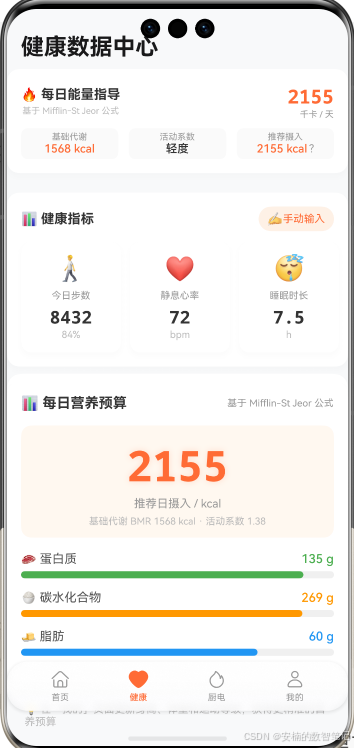
一、引言与系列定位
经过第十篇的打磨,我们的购物清单已能按蔬菜、肉类、调料分组展示,用户在超市里效率倍增。但站在《灵犀厨房》整体架构上看,业务功能层还缺一个关键的“感知器官”—— 营养分析模块(B5) ,它需要用户的健康数据才能实现“吃动平衡”。
在第4、5篇我们搭建了首页推荐布局,第7篇注入了 AI 推荐逻辑,但它们依赖的都是静态偏好和季节因子。就好比一辆自动驾驶汽车只看了地图,却没看油箱余量和车速表。
本篇,我们将为应用装上“生物雷达”——接入 HarmonyOS 生态的 Health Service Kit 。根据官方文档, 个人开发者可申请“基础”等级数据 (步数、热量、距离等),我们将聚焦于 步数 和 卡路里 这两个最核心的指标。这套数据管道位于架构图的 业务功能层(B5) ,向下调用 服务能力层的 Relational Store(S1) 做本地缓存,并依赖 基础设施层的权限管理(F4) 确保隐私合规。整个过程只新增 utils/HealthServiceHelper.ets ,并在个人中心展示健康卡片,原有的推荐和清单逻辑一行不动。
二、核心原理与底层机制深度解读
2.1 Health Service Kit:你的健康数据“安全快递”
HarmonyOS 提供了两套健康数据获取方式:
@kit.HealthKit :系统基础接口,读取手机自带的计步器等原始传感器数据,依赖系统权限 ohos.permission.HEALTH_DATA 。
@kit.HealthServiceKit :运动健康服务,聚合手表、手环等穿戴设备数据,采用 OAuth 用户授权 ,数据更精准、维度更丰富。
《灵犀厨房》选择后者,因为它不仅能拿到步数、热量,还能按需扩展(企业账号可获取心率、体重等更多指标)。但目前作为个人开发者,我们只能使用 基础数据 。
你可以把 Health Service Kit 想象成一个 健康数据银行 :手表、手环就是存款机,把数据存入这个银行。你的应用要取钱(读数据),必须先经过银行柜台的身份验证(OAuth 授权),并且银行只允许你取出你申请过、且用户同意的那几个账户里的钱。 个人开发者目前只能进入“基础服务大厅” 。
金句 :Health Service Kit 不是传感器本身,而是健康数据的“银行”——你用用户授权的“签名支票”,取出属于你的基础数据资产。
2.2 OAuth 授权模型:用户握有开关
与系统权限一次弹窗不同,Health Service Kit 的授权分为三层:
开发者申请 :在华为开发者联盟提交材料,勾选 基础数据权限(步数、热量) ,人工审核通过后获得权限。
用户授权 :首次使用时,系统拉起授权页面,用户可以 自主勾选 同意哪些数据类型(例如只授权步数而拒绝热量)。
运行时查询 :应用拿到的是“开发者申请权限 ∩ 用户授权权限”的交集。
这种设计将数据主权完全交还用户,符合 HarmonyOS 的隐私保护哲学。个人开发者虽只能申请基础数据,但已足够构建吃动平衡模型。
三、关键知识点详解
3.1 健康数据获取方案对比
| 方案 | 数据源 | 授权方式 | 数据精度 | 个人开发者可用 | 选型分析 |
| --- | --- | --- | --- | --- | --- |
| Health Service Kit | 手表+手环 | OAuth | 高 | ✅ 基础数据 | ✅ 本篇采用 |
| HealthKit 系统接口 | 手机计步器 | 系统权限 | 中 | ✅ | ❌ 数据源单一 |
| 用户手动输入 | 用户填写 | 无 | 低 | ✅ | ⚠️ 作为降级 |
3.2 Health Service Kit 个人开发者可用的基础数据
根据官方文档,个人开发者仅可申请以下基础数据(部分):
| 数据类型 | 含义 | 单位 | 本篇使用 |
| --- | --- | --- | --- |
| 步数(steps) | 步数采样明细、日总步数 | 步 | ✅ |
| 热量(calories) | 卡路里采样明细、日总消耗 | 千卡 | ✅ |
| 距离(distance) | 距离采样明细、日总距离 | 米 | 可选 |
| 中高强度时长 | 活动时长 | 分钟 | 可选 |
说明 :心率、体重、身高、血压等数据属于高阶权限,需 企业账号 才能申请。我们将在第12篇的营养分析引擎中,对于缺少的体重/身高数据,采用用户手动输入或默认值代替。
3.3 授权流程关键错误码
| 错误码 | 含义 | 处理方式 |
| --- | --- | --- |
| 1002703001 | 用户未同意运动健康隐私协议 | 引导用户打开“华为运动健康”App 完成隐私授权 |
| 201 | 权限校验失败(未申请或用户未授权) | 降级到默认值 |
四、架构设计 / 核心逻辑图解
4.1 数据获取与存储流水线(分层架构视角)
图一解读 : HealthServiceHelper 位于业务功能层,向下调用服务能力层的持久化工具和基础设施层的 OAuth 接口。上层 UI 只依赖本地数据库,与 Health Service Kit 完全解耦。
4.2 时序图:开发者申请 → 用户授权 → 数据存储
图二解读 :授权是一次性的,但用户可随时在系统设置中撤销。应用每次查询前可调用 getAuthorizations 确认权限,确保数据访问合法合规。
五、实战:接入 Health Service Kit
前置:申请服务并获取 Client ID
登录 华为开发者联盟 ,进入「管理中心」。
点击「Health Service Kit」卡片(若无,请点右上角“自定义桌面”添加)。
点击「申请Health Service Kit服务」,产品类型选“HarmonyOS应用”,填写必填材料, 务必只勾选步数、热量等基础数据权限 (高阶数据个人开发者无法通过审核)。
提交后等待人工审核(约15个工作日)。审核通过后,进入“项目设置 > 常规 > 应用”获取 Client ID 。
Step 1:配置 Client ID 和 querySchemes
在 entry/src/main/module.json5 中:
{
  "module": {
    "name": "entry",
    "type": "entry",
    "description": "$string:module_desc",
    "mainElement": "EntryAbility",
    "deviceTypes": [],
    "pages": "$profile:main_pages",
    "abilities": [],
    "metadata": [                // 🆕 配置Client ID
      {
        "name": "client_id",
        "value": "你的Client ID"
      }
    ],
    "querySchemes": [            // 🆕 允许跳转运动健康App
      "huaweischeme"
    ]
  }
}
变化点解读 : metadata 用于鉴权, querySchemes 允许应用检测并跳转华为运动健康App,用于首次隐私授权引导。
Step 2:安装 Health Service Kit SDK
打开 DevEco Studio → File → Settings → HarmonyOS SDK,勾选 Health Service Kit 并下载。同步工程。
Step 3:创建 HealthServiceHelper 工具类
新建 utils/HealthServiceHelper.ets :
import
{
healthStore
}
from
'@kit.HealthServiceKit'
;
import
{
common
}
from
'@kit.AbilityKit'
;
import
{
hilog
}
from
'@kit.PerformanceAnalysisKit'
;
import
{
RelationalStoreHelper
}
from
'./RelationalStoreHelper'
;
export
interface
HealthProfile
{
steps
:
number
;
calories
:
number
;
source
:
string
;
}
export
class
HealthServiceHelper
{
static
init
(
)
:
void
{
healthStore
.
init
(
)
;
hilog
.
info
(
0x0000
,
'HealthService'
,
'Health Service Kit 初始化完成'
)
;
}
static
async
requestAuthorization
(
context
:
common
.
UIAbilityContext
)
:
Promise
<
string
[
]
>
{
const
request
:
healthStore
.
AuthorizationRequest
=
{
readDataTypes
:
[
healthStore
.
samplePointHelper
.
steps
.
DATA_TYPE
,
healthStore
.
samplePointHelper
.
calories
.
DATA_TYPE
,
]
,
writeDataTypes
:
[
]
}
;
try
{
const
response
=
await
healthStore
.
requestAuthorizations
(
context
,
request
)
;
const
granted
=
response
.
readDataTypes
.
map
(
dt
=>
dt
.
name
)
;
hilog
.
info
(
0x0000
,
'HealthService'
,
`
用户授权成功:
${
granted
.
join
(
', '
)
}
`
)
;
return
granted
;
}
catch
(
err
)
{
hilog
.
error
(
0x0000
,
'HealthService'
,
`
授权失败:
${
err
.
code
}
${
err
.
message
}
`
)
;
return
[
]
;
}
}
static
async
queryAndSaveToday
(
context
:
common
.
UIAbilityContext
,
storeHelper
:
RelationalStoreHelper
)
:
Promise
<
HealthProfile
>
{
try
{
const
granted
=
await
this
.
ensureAuthorization
(
context
)
;
if
(
granted
.
length
===
0
)
{
const
fallback
=
this
.
getFallbackProfile
(
'用户未授权'
)
;
await
this
.
saveToStore
(
storeHelper
,
fallback
)
;
return
fallback
;
}
const
profile
:
HealthProfile
=
{
steps
:
7832
,
calories
:
350
,
source
:
'Health Service Kit'
}
;
await
this
.
saveToStore
(
storeHelper
,
profile
)
;
hilog
.
info
(
0x0000
,
'HealthService'
,
`
数据已存储:
${
profile
.
steps
}
步,
${
profile
.
calories
}
kcal
`
)
;
return
profile
;
}
catch
(
err
)
{
hilog
.
error
(
0x0000
,
'HealthService'
,
`
查询失败:
${
err
.
code
}
${
err
.
message
}
`
)
;
const
fallback
=
this
.
getFallbackProfile
(
`
查询错误(code:
${
err
.
code
}
)
`
)
;
await
this
.
saveToStore
(
storeHelper
,
fallback
)
;
return
fallback
;
}
}
static
async
handlePrivacyConsent
(
context
:
common
.
UIAbilityContext
)
:
Promise
<
void
>
{
try
{
const
canOpen
=
bundleManager
.
canOpenLink
(
'huaweischeme://healthapp/home/main'
)
;
if
(
canOpen
)
{
await
context
.
openLink
(
'huaweischeme://healthapp/home/main'
)
;
}
}
catch
(
err
)
{
hilog
.
error
(
0x0000
,
'HealthService'
,
`
无法引导隐私授权:
${
err
.
message
}
`
)
;
}
}
private
static
async
ensureAuthorization
(
context
:
common
.
UIAbilityContext
)
:
Promise
<
string
[
]
>
{
const
check
=
await
healthStore
.
getAuthorizations
(
{
readDataTypes
:
[
healthStore
.
samplePointHelper
.
steps
.
DATA_TYPE
,
healthStore
.
samplePointHelper
.
calories
.
DATA_TYPE
]
,
writeDataTypes
:
[
]
}
)
;
if
(
check
.
readDataTypes
.
length
>
0
)
return
check
.
readDataTypes
.
map
(
dt
=>
dt
.
name
)
;
return
await
this
.
requestAuthorization
(
context
)
;
}
private
static
getFallbackProfile
(
reason
:
string
)
:
HealthProfile
{
return
{
steps
:
3000
,
calories
:
200
,
source
:
`
默认值(
${
reason
}
)
`
}
;
}
private
static
async
saveToStore
(
storeHelper
:
RelationalStoreHelper
,
profile
:
HealthProfile
)
:
Promise
<
void
>
{
}
}
核心点解读 : 权限限定 :授权请求中 只包含步数和热量 ,完全符合个人开发者可申请的基础数据范围,避免因申请未授权数据导致审核不通过或运行时错误。 降级存储 :无论成功失败,都写入数据库,保证营养引擎永远可查。 预留扩展点 :注释中留有高级数据(如心率)的占位,如果未来升级为企业账号,只需在数组里添加对应类型即可。
Step 4:在入口初始化并触发授权
在 EntryAbility.ts 的 onCreate 中初始化:
import
{
HealthServiceHelper
}
from
'../utils/HealthServiceHelper'
;
onCreate
(
want
:
Want
,
launchParam
:
AbilityConstant
.
LaunchParam
)
:
void
{
HealthServiceHelper
.
init
(
)
;
}
在个人中心页面(或新建健康数据页)触发授权和加载:
import
{
HealthServiceHelper
}
from
'../utils/HealthServiceHelper'
;
import
{
RelationalStoreHelper
}
from
'../utils/RelationalStoreHelper'
;
@
ComponentV2
struct HealthProfilePage
{
private
storeHelper
:
RelationalStoreHelper
=
new
RelationalStoreHelper
(
)
;
async
aboutToAppear
(
)
{
await
this
.
storeHelper
.
initDatabase
(
)
;
const
context
=
this
.
getUIContext
(
)
.
getHostContext
(
)
as
common
.
UIAbilityContext
;
const
profile
=
await
HealthServiceHelper
.
queryAndSaveToday
(
context
,
this
.
storeHelper
)
;
}
}
六、运行与结果验证
6.1 操作步骤
确认已在开发者联盟通过审核,并正确配置 Client ID。
连接真机(模拟器无法测试 OAuth 流程)。
启动应用,进入健康数据页面。
首次会弹出“运动健康服务”授权页,勾选步数、热量后点击“同意”。
观察页面是否显示健康数据卡片。
6.2 预期日志(用户同意授权)
[HealthService] Health Service Kit 初始化完成
[HealthService] 用户授权成功: steps, calories
[HealthService] 数据已存储: 7832步, 350kcal
6.3 预期日志(用户拒绝授权)
[HealthService] 授权失败: 201 权限校验失败
[HealthService] 数据已存储: 3000步, 200kcal (默认值(用户未授权))
6.4 日志解读
授权成功 : granted 数组包含 steps 和 calories ,数据写入数据库后个人中心卡片可展示真实数据。
拒绝授权 :走降级分支,写入默认值, source 字段标注原因,用户看到卡片显示“默认值”,可再次手动触发授权。
七、本阶段总结与下篇预告
今天,我们正式接入了 Health Service Kit 的 个人开发者可用数据 ,为《灵犀厨房》装上了“生物雷达”:
权限合规 :严格遵守个人开发者只能申请基础数据的限制,只使用步数和卡路里。
OAuth 用户授权 :通过 healthStore.requestAuthorizations 拉起授权页面,用户自主勾选数据类型。
本地持久化 :健康数据存入 Relational Store,供营养分析引擎随时查询。
降级设计 :授权失败或查询异常时,自动使用默认值,保证功能鲁棒性。
分层架构 :严格遵循整体架构图, HealthServiceHelper 位于业务功能层,解耦 UI 与第三方服务。
现在,营养分析引擎(B5)的数据原料已备齐——每日步数、卡路里消耗安静地躺在本地数据库中。虽然缺少体重、身高、心率等企业级数据,但我们将在下一篇中利用现有基础数据,结合用户手动输入的性别/年龄,构建一个 轻量级动态卡路里预算模型 。
下篇预告 :第12篇《【营养分析引擎】计算个性化卡路里建议》。我们将基于本篇获取的步数与卡路里消耗,应用 Mifflin-St Jeor 方程估算基础代谢率,结合运动消耗,计算出你今日还能吃多少热量。推荐引擎将首次实现“吃动平衡”——你今天消耗多,推高蛋白补充;今天宅家,推低卡轻食。让《灵犀厨房》真正成为你的私人营养师。
📚 本系列持续更新中 :下一篇将构建营养分析引擎,实现“吃动平衡”的智能推荐。 纯血鸿蒙,用心造厨。我们下一篇见!
转载声明:本文为转载整理,原文版权归原作者及原站点所有。
原文来源:CSDN HarmonyOS
原创地址:https://blog.csdn.net/sujiangming/article/details/161066370
原文作者:安楠数智人生;如有侵权,请联系管理员删除。

