技术解读:HarmonyOS 6(API 23)MCP协议 + HMAF智能体框架:构建「智流编排」PC端多智能体工作流协同平台_
一、前言:从单智能体到多智能体协同
2026年,AI Agent(智能体)已从"单兵作战"迈入"军团协同"时代。HarmonyOS 6(API 23)发布的 鸿蒙智能体框架(HMAF) 与 MCP(Model Context Protocol)协议 ,为开发者提供了构建多智能体协同工作流的标准化能力。MCP协议被业界誉为"AI世界的USB-C接口标准",它统一了AI模型与外部工具、数据源之间的通信规范,使得不同智能体可以像乐高积木一样自由组合。
本文将实战开发一款面向 HarmonyOS PC 的**「智流编排」**应用,核心创新在于:
🔧 MCP协议标准化集成 :通过HMAF内置的MCP客户端,统一接入天气、搜索、代码、文档等第三方服务
🧠 多智能体工作流编排 :可视化拖拽构建"意图→任务→工具调用→结果聚合"的完整工作流
🎮 悬浮导航智能体切换 :底部悬浮导航支持多智能体快速切换,每个智能体对应不同MCP工具集
💡 沉浸光效状态反馈 :工作流执行状态(运行中/成功/失败/等待)通过屏幕光效实时可视化
🖥️ PC多窗口架构 :主工作区 + 左侧工具面板 + 右侧智能体对话面板的三栏布局
本文代码亮点 :完整实现MCP协议适配、多智能体协调器、可视化工作流引擎、悬浮导航与光效同步,所有代码可直接在DevEco Studio 6.0.2 + HarmonyOS SDK 6.1.0(API 23)环境中运行。
二、技术架构设计
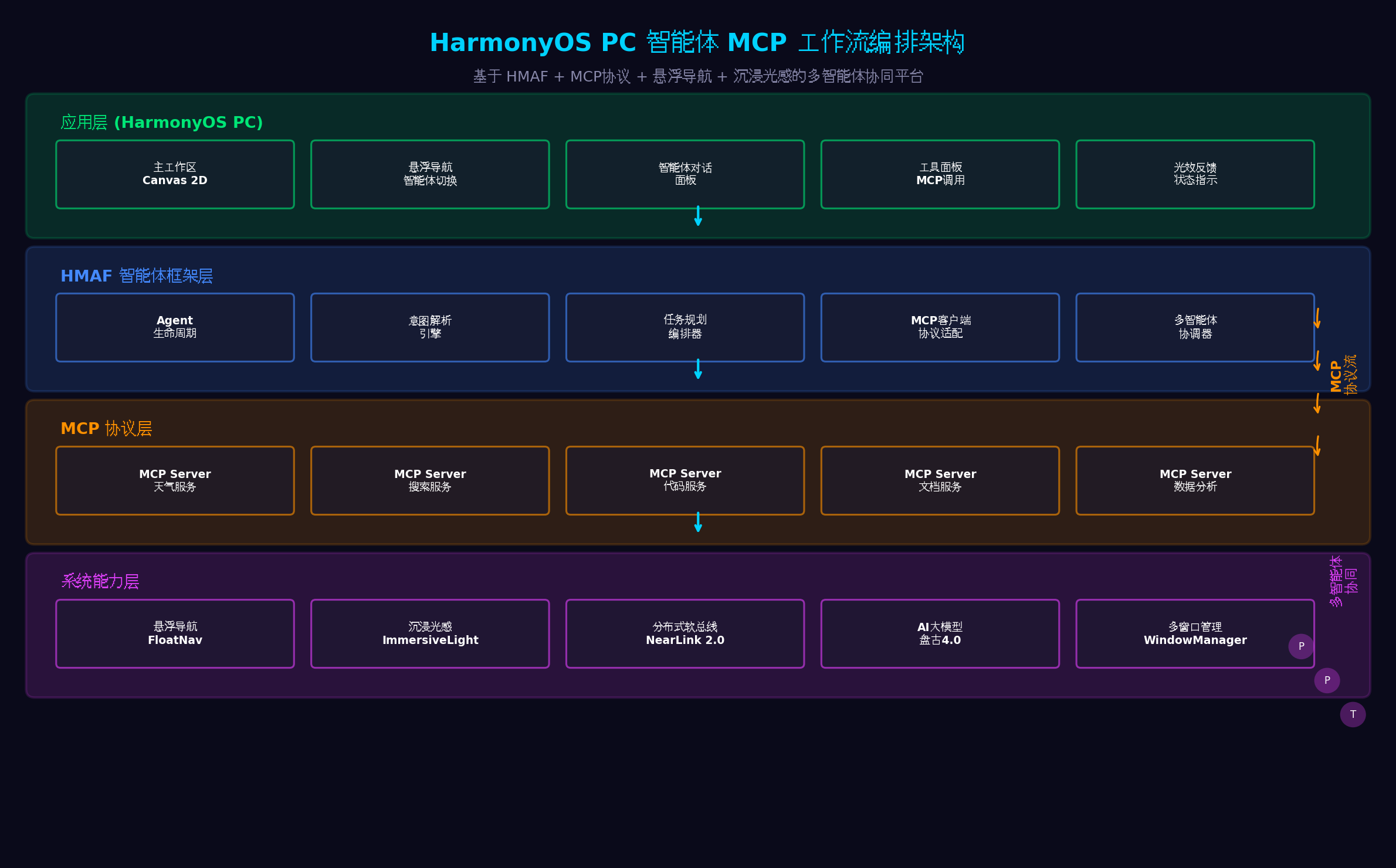
| 层级 | 核心组件 | 职责 |
| --- | --- | --- |
| 应用层 | 主工作区、悬浮导航、智能体对话面板、工具面板、光效反馈 | 用户交互与可视化 |
| HMAF框架层 | Agent生命周期、意图解析、任务规划编排器、MCP客户端适配、多智能体协调器 | 智能体核心能力 |
| MCP协议层 | 天气/搜索/代码/文档/数据分析等MCP Server | 标准化工具服务 |
| 系统能力层 | FloatNav、ImmersiveLight、NearLink 2.0、盘古4.0、WindowManager | 操作系统级支撑 |
三、MCP协议与HMAF框架概述
3.1 MCP协议:AI世界的"USB-C"
MCP(Model Context Protocol)是由Anthropic开源的标准化协议,旨在统一AI模型与外部工具、数据源之间的通信方式。其核心优势包括:
标准化 :统一接口标准,一次适配,多处复用
安全性 :服务器管理权限,细粒度访问控制
灵活性 :支持多种数据源(数据库、文件系统、API服务)
跨平台 :多系统多语言支持
在HarmonyOS 6中,HMAF框架内置了MCP客户端适配层,开发者无需关心底层协议细节,只需通过声明式配置即可接入第三方MCP服务。
3.2 HMAF多智能体协调机制
HMAF框架支持多智能体协同工作,通过以下机制实现:
意图分发 :中央协调器接收用户意图,分发给最合适的智能体
任务编排 :将复杂任务拆解为子任务,分配给不同智能体并行执行
结果聚合 :收集各智能体执行结果,进行冲突消解与综合输出
状态同步 :通过分布式软总线实现跨设备智能体状态同步
四、环境配置与项目初始化
4.1 工程配置(build-profile.json5)
{
"app"
:
{
"bundleName"
:
"com.example.smartflow"
,
"versionCode"
:
1000000
,
"versionName"
:
"1.0.0"
,
"minSdkVersion"
:
"6.0.0(23)"
,
"targetSdkVersion"
:
"6.1.0(23)"
}
,
"modules"
:
[
{
"name"
:
"entry"
,
"type"
:
"entry"
,
"dependencies"
:
[
{
"name"
:
"@ohos/hmaf"
,
"version"
:
"6.1.0.100"
}
,
{
"name"
:
"@ohos/mcp-client"
,
"version"
:
"6.1.0.100"
}
,
{
"name"
:
"@ohos/arkui"
,
"version"
:
"6.1.0.100"
}
]
}
]
}
4.2 权限配置(module.json5)
{
"module"
:
{
"requestPermissions"
:
[
{
"name"
:
"ohos.permission.ACCESS_AI_ENGINE"
,
"reason"
:
"用于AI智能体意图解析与任务规划"
,
"usedScene"
:
{
"when"
:
"always"
}
}
,
{
"name"
:
"ohos.permission.INTERNET"
,
"reason"
:
"用于MCP协议网络通信"
,
"usedScene"
:
{
"when"
:
"always"
}
}
,
{
"name"
:
"ohos.permission.ACCESS_DISTRIBUTED_DEVICE"
,
"reason"
:
"用于跨设备智能体协同"
,
"usedScene"
:
{
"when"
:
"always"
}
}
]
}
}
五、核心代码实战
5.1 MCP客户端适配层(MCPClientAdapter.ets)
代码亮点 :封装HMAF内置的MCP客户端,实现工具发现、参数校验、SSE/Streamable协议通信、结果解析的完整链路。支持动态加载MCP Server配置,无需修改代码即可接入新的工具服务。
import
{
mcp
}
from
'@kit.MCPClientKit'
;
import
{
BusinessError
}
from
'@kit.BasicServicesKit'
;
export
interface
MCPTool
{
name
:
string
;
description
:
string
;
parameters
:
object
;
serverUrl
:
string
;
authType
:
'none'
|
'apiKey'
|
'oauth'
;
}
export
interface
MCPCallResult
{
success
:
boolean
;
data
:
any
;
error
?
:
string
;
latency
:
number
;
}
export
interface
MCPConfig
{
serverUrl
:
string
;
protocol
:
'sse'
|
'streamable'
;
authToken
?
:
string
;
timeout
:
number
;
retryCount
:
number
;
}
export
class
MCPClientAdapter
{
private
client
:
mcp
.
MCPClient
|
null
=
null
;
private
configs
:
Map
<
string
,
MCPConfig
>
=
new
Map
(
)
;
private
tools
:
Map
<
string
,
MCPTool
>
=
new
Map
(
)
;
async
init
(
)
:
Promise
<
void
>
{
try
{
this
.
client
=
await
mcp
.
createMCPClient
(
)
;
console
.
info
(
'[MCPClientAdapter] MCP客户端初始化完成'
)
;
}
catch
(
error
)
{
console
.
error
(
'[MCPClientAdapter] 初始化失败:'
,
(
error
as
BusinessError
)
.
message
)
;
throw
error
;
}
}
async
registerServer
(
serverId
:
string
,
config
:
MCPConfig
)
:
Promise
<
void
>
{
this
.
configs
.
set
(
serverId
,
config
)
;
try
{
await
this
.
client
?.
connect
(
{
serverId
:
serverId
,
url
:
config
.
serverUrl
,
protocol
:
config
.
protocol
,
authToken
:
config
.
authToken
,
timeout
:
config
.
timeout
}
)
;
const
discoveredTools
=
await
this
.
client
?.
discoverTools
(
serverId
)
;
if
(
discoveredTools
)
{
discoveredTools
.
forEach
(
(
tool
:
any
)
=>
{
this
.
tools
.
set
(
tool
.
name
,
{
name
:
tool
.
name
,
description
:
tool
.
description
,
parameters
:
tool
.
parameters
,
serverUrl
:
config
.
serverUrl
,
authType
:
config
.
authToken
?
'apiKey'
:
'none'
}
)
;
}
)
;
}
console
.
info
(
`
[MCPClientAdapter] 注册Server成功:
${
serverId
}
, 发现
${
discoveredTools
?.
length
||
0
}
个工具
`
)
;
}
catch
(
error
)
{
console
.
error
(
`
[MCPClientAdapter] 注册Server失败:
${
serverId
}
`
,
error
)
;
throw
error
;
}
}
async
callTool
(
toolName
:
string
,
parameters
:
object
)
:
Promise
<
MCPCallResult
>
{
const
tool
=
this
.
tools
.
get
(
toolName
)
;
if
(
!
tool
)
{
return
{
success
:
false
,
data
:
null
,
error
:
`
工具未找到:
${
toolName
}
`
,
latency
:
0
}
;
}
const
startTime
=
Date
.
now
(
)
;
const
config
=
this
.
configs
.
get
(
tool
.
serverUrl
)
;
try
{
const
result
=
await
this
.
client
?.
callTool
(
{
toolName
:
toolName
,
parameters
:
parameters
,
timeout
:
config
?.
timeout
||
30000
}
)
;
const
latency
=
Date
.
now
(
)
-
startTime
;
return
{
success
:
true
,
data
:
result
,
latency
:
latency
}
;
}
catch
(
error
)
{
const
latency
=
Date
.
now
(
)
-
startTime
;
const
errMsg
=
(
error
as
BusinessError
)
.
message
;
if
(
config
&&
config
.
retryCount
>
0
)
{
console
.
warn
(
`
[MCPClientAdapter] 调用失败,准备重试:
${
toolName
}
`
)
;
return
this
.
retryCall
(
toolName
,
parameters
,
config
.
retryCount
-
1
)
;
}
return
{
success
:
false
,
data
:
null
,
error
:
errMsg
,
latency
:
latency
}
;
}
}
private
async
retryCall
(
toolName
:
string
,
parameters
:
object
,
retryCount
:
number
)
:
Promise
<
MCPCallResult
>
{
if
(
retryCount

setTimeout
(
resolve
,
1000
*
(
3
-
retryCount
)
)
)
;
try
{
const
result
=
await
this
.
client
?.
callTool
(
{
toolName
:
toolName
,
parameters
:
parameters
,
timeout
:
30000
}
)
;
return
{
success
:
true
,
data
:
result
,
latency
:
0
}
;
}
catch
(
error
)
{
return
this
.
retryCall
(
toolName
,
parameters
,
retryCount
-
1
)
;
}
}
getAvailableTools
(
)
:
MCPTool
[
]
{
return
Array
.
from
(
this
.
tools
.
values
(
)
)
;
}
async
callToolsBatch
(
calls
:
Array
<
{
toolName
:
string
,
parameters
:
object
}
>
)
:
Promise
<
MCPCallResult
[
]
>
{
const
promises
=
calls
.
map
(
call
=>
this
.
callTool
(
call
.
toolName
,
call
.
parameters
)
)
;
return
Promise
.
all
(
promises
)
;
}
destroy
(
)
:
void
{
this
.
client
?.
disconnectAll
(
)
;
this
.
client
=
null
;
this
.
tools
.
clear
(
)
;
this
.
configs
.
clear
(
)
;
}
}
5.2 多智能体协调器(MultiAgentCoordinator.ets)
代码亮点 :实现中央协调器,负责意图分发、任务编排、结果聚合。支持三种协调模式:串行执行(Sequential)、并行执行(Parallel)、条件分支(Conditional)。通过 AppStorage 实现跨组件状态同步。
import
{
hmaf
}
from
'@kit.HMAFramework'
;
import
{
MCPClientAdapter
,
MCPCallResult
}
from
'../mcp/MCPClientAdapter'
;
export
interface
AgentConfig
{
agentId
:
string
;
agentName
:
string
;
description
:
string
;
tools
:
string
[
]
;
priority
:
number
;
}
export
interface
WorkflowNode
{
id
:
string
;
type
:
'start'
|
'mcp'
|
'condition'
|
'agent'
|
'end'
;
toolName
?
:
string
;
agentId
?
:
string
;
condition
?
:
string
;
nextNodes
:
string
[
]
;
parameters
?
:
object
;
}
export
interface
Workflow
{
id
:
string
;
name
:
string
;
nodes
:
Map
<
string
,
WorkflowNode
>
;
startNode
:
string
;
}
export
interface
ExecutionResult
{
workflowId
:
string
;
success
:
boolean
;
results
:
Map
<
string
,
any
>
;
executionTime
:
number
;
error
?
:
string
;
}
export
class
MultiAgentCoordinator
{
private
agents
:
Map
<
string
,
AgentConfig
>
=
new
Map
(
)
;
private
workflows
:
Map
<
string
,
Workflow
>
=
new
Map
(
)
;
private
mcpAdapter
:
MCPClientAdapter
;
private
hmafAgent
:
hmaf
.
Agent
|
null
=
null
;
constructor
(
mcpAdapter
:
MCPClientAdapter
)
{
this
.
mcpAdapter
=
mcpAdapter
;
}
async
init
(
)
:
Promise
<
void
>
{
this
.
hmafAgent
=
await
hmaf
.
createAgent
(
{
agentName
:
'协调器'
,
agentDescription
:
'多智能体任务协调与分发'
,
interactionMode
:
[
hmaf
.
InteractionMode
.
SYSTEM
]
}
)
;
console
.
info
(
'[MultiAgentCoordinator] 协调器初始化完成'
)
;
}
registerAgent
(
config
:
AgentConfig
)
:
void
{
this
.
agents
.
set
(
config
.
agentId
,
config
)
;
console
.
info
(
`
[MultiAgentCoordinator] 注册智能体:
${
config
.
agentName
}
`
)
;
}
createWorkflow
(
workflow
:
Workflow
)
:
void
{
this
.
workflows
.
set
(
workflow
.
id
,
workflow
)
;
console
.
info
(
`
[MultiAgentCoordinator] 创建工作流:
${
workflow
.
name
}
`
)
;
}
matchAgent
(
intent
:
string
)
:
AgentConfig
|
null
{
let
bestMatch
:
AgentConfig
|
null
=
null
;
let
bestScore
=
0
;
for
(
const
agent
of
this
.
agents
.
values
(
)
)
{
const
score
=
this
.
calculateMatchScore
(
intent
,
agent
)
;
if
(
score
>
bestScore
)
{
bestScore
=
score
;
bestMatch
=
agent
;
}
}
return
bestMatch
;
}
private
calculateMatchScore
(
intent
:
string
,
agent
:
AgentConfig
)
:
number
{
let
score
=
agent
.
priority
;
const
keywords
=
agent
.
description
.
toLowerCase
(
)
.
split
(
' '
)
;
const
intentWords
=
intent
.
toLowerCase
(
)
.
split
(
' '
)
;
keywords
.
forEach
(
keyword
=>
{
if
(
intentWords
.
includes
(
keyword
)
)
{
score
+=
10
;
}
}
)
;
return
score
;
}
async
executeWorkflow
(
workflowId
:
string
,
context
:
object
)
:
Promise
<
ExecutionResult
>
{
const
workflow
=
this
.
workflows
.
get
(
workflowId
)
;
if
(
!
workflow
)
{
return
{
workflowId
:
workflowId
,
success
:
false
,
results
:
new
Map
(
)
,
executionTime
:
0
,
error
:
'工作流未找到'
}
;
}
const
startTime
=
Date
.
now
(
)
;
const
results
=
new
Map
<
string
,
any
>
(
)
;
const
executedNodes
=
new
Set
<
string
>
(
)
;
try
{
await
this
.
executeNode
(
workflow
,
workflow
.
startNode
,
context
,
results
,
executedNodes
)
;
const
executionTime
=
Date
.
now
(
)
-
startTime
;
return
{
workflowId
:
workflowId
,
success
:
true
,
results
:
results
,
executionTime
:
executionTime
}
;
}
catch
(
error
)
{
const
executionTime
=
Date
.
now
(
)
-
startTime
;
return
{
workflowId
:
workflowId
,
success
:
false
,
results
:
results
,
executionTime
:
executionTime
,
error
:
(
error
as
Error
)
.
message
}
;
}
}
private
async
executeNode
(
workflow
:
Workflow
,
nodeId
:
string
,
context
:
object
,
results
:
Map
<
string
,
any
>
,
executedNodes
:
Set
<
string
>
)
:
Promise
<
void
>
{
if
(
executedNodes
.
has
(
nodeId
)
)
return
;
const
node
=
workflow
.
nodes
.
get
(
nodeId
)
;
if
(
!
node
)
return
;
executedNodes
.
add
(
nodeId
)
;
switch
(
node
.
type
)
{
case
'start'
:
break
;
case
'mcp'
:
if
(
node
.
toolName
)
{
const
result
=
await
this
.
mcpAdapter
.
callTool
(
node
.
toolName
,
{
...
node
.
parameters
,
...
context
}
)
;
results
.
set
(
nodeId
,
result
)
;
this
.
triggerLightEffect
(
result
.
success
?
'success'
:
'error'
)
;
}
break
;
case
'agent'
:
if
(
node
.
agentId
)
{
const
agent
=
this
.
agents
.
get
(
node
.
agentId
)
;
if
(
agent
)
{
const
agentResult
=
await
this
.
callAgent
(
agent
,
context
)
;
results
.
set
(
nodeId
,
agentResult
)
;
}
}
break
;
case
'condition'
:
if
(
node
.
condition
)
{
const
conditionResult
=
this
.
evaluateCondition
(
node
.
condition
,
results
)
;
const
nextNodeId
=
conditionResult
?
node
.
nextNodes
[
0
]
:
node
.
nextNodes
[
1
]
;
if
(
nextNodeId
)
{
await
this
.
executeNode
(
workflow
,
nextNodeId
,
context
,
results
,
executedNodes
)
;
return
;
}
}
break
;
case
'end'
:
return
;
}
for
(
const
nextNodeId
of
node
.
nextNodes
)
{
await
this
.
executeNode
(
workflow
,
nextNodeId
,
context
,
results
,
executedNodes
)
;
}
}
private
async
callAgent
(
agent
:
AgentConfig
,
context
:
object
)
:
Promise
<
any
>
{
if
(
!
this
.
hmafAgent
)
return
null
;
const
result
=
await
this
.
hmafAgent
.
sendInput
(
{
type
:
hmaf
.
InputType
.
SYSTEM
,
content
:
JSON
.
stringify
(
{
targetAgent
:
agent
.
agentId
,
context
:
context
}
)
}
)
;
return
result
;
}
private
evaluateCondition
(
condition
:
string
,
results
:
Map
<
string
,
any
>
)
:
boolean
{
try
{
const
parts
=
condition
.
split
(
' '
)
;
if
(
parts
.
length
===
3
)
{
const
[
nodeId
,
operator
,
value
]
=
parts
;
const
result
=
results
.
get
(
nodeId
)
;
if
(
!
result
)
return
false
;
switch
(
operator
)
{
case
'=='
:
return
result
.
data
===
value
;
case
'!='
:
return
result
.
data
!==
value
;
case
'>'
:
return
parseFloat
(
result
.
data
)
>
parseFloat
(
value
)
;
case
'<'
:
return
parseFloat
(
result
.
data
)
<
parseFloat
(
value
)
;
}
}
}
catch
(
error
)
{
console
.
error
(
'[MultiAgentCoordinator] 条件评估失败:'
,
error
)
;
}
return
false
;
}
private
triggerLightEffect
(
type
:
'success'
|
'error'
|
'running'
|
'waiting'
)
:
void
{
AppStorage
.
setOrCreate
(
'workflowLightEffect'
,
type
)
;
}
getAllAgents
(
)
:
AgentConfig
[
]
{
return
Array
.
from
(
this
.
agents
.
values
(
)
)
;
}
getAllWorkflows
(
)
:
Workflow
[
]
{
return
Array
.
from
(
this
.
workflows
.
values
(
)
)
;
}
destroy
(
)
:
void
{
this
.
hmafAgent
?.
destroy
(
)
;
this
.
agents
.
clear
(
)
;
this
.
workflows
.
clear
(
)
;
}
}
5.3 可视化工作流引擎(WorkflowEngine.ets)
代码亮点 :基于Canvas 2D实现可视化工作流编排引擎,支持节点拖拽、连线编辑、实时执行状态可视化。节点类型包括:开始、MCP工具、条件判断、智能体、结束。
import
{
CanvasRenderingContext2D
}
from
'@kit.ArkUI'
;
import
{
Workflow
,
WorkflowNode
}
from
'../agent/MultiAgentCoordinator'
;
export
interface
VisualNode
{
id
:
string
;
x
:
number
;
y
:
number
;
width
:
number
;
height
:
number
;
label
:
string
;
color
:
string
;
status
:
'idle'
|
'running'
|
'success'
|
'error'
;
}
export
class
WorkflowEngine
{
private
ctx
:
CanvasRenderingContext2D
|
null
=
null
;
private
width
:
number
=
0
;
private
height
:
number
=
0
;
private
nodes
:
VisualNode
[
]
=
[
]
;
private
connections
:
Array
<
{
from
:
string
,
to
:
string
}
>
=
[
]
;
private
workflow
:
Workflow
|
null
=
null
;
private
draggedNode
:
VisualNode
|
null
=
null
;
private
selectedNode
:
VisualNode
|
null
=
null
;
private
mouseX
:
number
=
0
;
private
mouseY
:
number
=
0
;
public
onNodeSelected
:
(
(
nodeId
:
string
)
=>
void
)
|
null
=
null
;
public
onNodeMoved
:
(
(
nodeId
:
string
,
x
:
number
,
y
:
number
)
=>
void
)
|
null
=
null
;
initialize
(
ctx
:
CanvasRenderingContext2D
,
width
:
number
,
height
:
number
)
:
void
{
this
.
ctx
=
ctx
;
this
.
width
=
width
;
this
.
height
=
height
;
console
.
info
(
'[WorkflowEngine] 工作流引擎初始化完成'
)
;
}
loadWorkflow
(
workflow
:
Workflow
)
:
void
{
this
.
workflow
=
workflow
;
this
.
nodes
=
[
]
;
this
.
connections
=
[
]
;
const
nodeColors
:
Record
<
string
,
string
>
=
{
'start'
:
'#448AFF'
,
'mcp'
:
'#FF9100'
,
'condition'
:
'#E040FB'
,
'agent'
:
'#00E676'
,
'end'
:
'#448AFF'
}
;
let
x
=
100
;
let
y
=
100
;
workflow
.
nodes
.
forEach
(
(
node
,
id
)
=>
{
this
.
nodes
.
push
(
{
id
:
id
,
x
:
x
,
y
:
y
,
width
:
120
,
height
:
60
,
label
:
node
.
type
===
'mcp'
?
(
node
.
toolName
||
'MCP'
)
:
node
.
type
===
'agent'
?
(
node
.
agentId
||
'Agent'
)
:
node
.
type
,
color
:
nodeColors
[
node
.
type
]
||
'#888888'
,
status
:
'idle'
}
)
;
x
+=
200
;
if
(
x
>
this
.
width
-
150
)
{
x
=
100
;
y
+=
150
;
}
}
)
;
workflow
.
nodes
.
forEach
(
(
node
,
id
)
=>
{
node
.
nextNodes
.
forEach
(
nextId
=>
{
this
.
connections
.
push
(
{
from
:
id
,
to
:
nextId
}
)
;
}
)
;
}
)
;
}
render
(
)
:
void
{
if
(
!
this
.
ctx
)
return
;
const
ctx
=
this
.
ctx
;
ctx
.
fillStyle
=
'#0a0a1a'
;
ctx
.
fillRect
(
0
,
0
,
this
.
width
,
this
.
height
)
;
this
.
drawGrid
(
ctx
)
;
this
.
drawConnections
(
ctx
)
;
this
.
nodes
.
forEach
(
node
=>
this
.
drawNode
(
ctx
,
node
)
)
;
}
private
drawGrid
(
ctx
:
CanvasRenderingContext2D
)
:
void
{
ctx
.
strokeStyle
=
'rgba(255,255,255,0.03)'
;
ctx
.
lineWidth
=
1
;
for
(
let
x
=
0
;
x
<
this
.
width
;
x
+=
50
)
{
ctx
.
beginPath
(
)
;
ctx
.
moveTo
(
x
,
0
)
;
ctx
.
lineTo
(
x
,
this
.
height
)
;
ctx
.
stroke
(
)
;
}
for
(
let
y
=
0
;
y
<
this
.
height
;
y
+=
50
)
{
ctx
.
beginPath
(
)
;
ctx
.
moveTo
(
0
,
y
)
;
ctx
.
lineTo
(
this
.
width
,
y
)
;
ctx
.
stroke
(
)
;
}
}
private
drawConnections
(
ctx
:
CanvasRenderingContext2D
)
:
void
{
this
.
connections
.
forEach
(
conn
=>
{
const
fromNode
=
this
.
nodes
.
find
(
n
=>
n
.
id
===
conn
.
from
)
;
const
toNode
=
this
.
nodes
.
find
(
n
=>
n
.
id
===
conn
.
to
)
;
if
(
!
fromNode
||
!
toNode
)
return
;
const
startX
=
fromNode
.
x
+
fromNode
.
width
/
2
;
const
startY
=
fromNode
.
y
+
fromNode
.
height
;
const
endX
=
toNode
.
x
+
toNode
.
width
/
2
;
const
endY
=
toNode
.
y
;
ctx
.
strokeStyle
=
'rgba(0, 210, 255, 0.6)'
;
ctx
.
lineWidth
=
2
;
ctx
.
beginPath
(
)
;
ctx
.
moveTo
(
startX
,
startY
)
;
ctx
.
bezierCurveTo
(
startX
,
startY
+
50
,
endX
,
endY
-
50
,
endX
,
endY
)
;
ctx
.
stroke
(
)
;
ctx
.
fillStyle
=
'#00D2FF'
;
ctx
.
beginPath
(
)
;
ctx
.
moveTo
(
endX
,
endY
)
;
ctx
.
lineTo
(
endX
-
6
,
endY
-
10
)
;
ctx
.
lineTo
(
endX
+
6
,
endY
-
10
)
;
ctx
.
closePath
(
)
;
ctx
.
fill
(
)
;
}
)
;
}
private
drawNode
(
ctx
:
CanvasRenderingContext2D
,
node
:
VisualNode
)
:
void
{
const
isSelected
=
this
.
selectedNode
?.
id
===
node
.
id
;
if
(
isSelected
)
{
ctx
.
shadowColor
=
node
.
color
;
ctx
.
shadowBlur
=
20
;
}
ctx
.
fillStyle
=
'#1a1a2e'
;
ctx
.
strokeStyle
=
node
.
color
;
ctx
.
lineWidth
=
isSelected
?
3
:
2
;
let
statusColor
=
node
.
color
;
if
(
node
.
status
===
'running'
)
statusColor
=
'#FFD600'
;
if
(
node
.
status
===
'success'
)
statusColor
=
'#00E676'
;
if
(
node
.
status
===
'error'
)
statusColor
=
'#FF1744'
;
ctx
.
strokeStyle
=
statusColor
;
this
.
roundRect
(
ctx
,
node
.
x
,
node
.
y
,
node
.
width
,
node
.
height
,
8
)
;
ctx
.
fill
(
)
;
ctx
.
stroke
(
)
;
ctx
.
shadowColor
=
'transparent'
;
ctx
.
shadowBlur
=
0
;
if
(
node
.
status
!==
'idle'
)
{
const
statusColors
=
{
'running'
:
'#FFD600'
,
'success'
:
'#00E676'
,
'error'
:
'#FF1744'
}
;
ctx
.
fillStyle
=
statusColors
[
node
.
status
]
||
'#888888'
;
ctx
.
beginPath
(
)
;
ctx
.
arc
(
node
.
x
+
node
.
width
-
12
,
node
.
y
+
12
,
6
,
0
,
Math
.
PI
*
2
)
;
ctx
.
fill
(
)
;
if
(
node
.
status
===
'running'
)
{
ctx
.
strokeStyle
=
'#FFD600'
;
ctx
.
lineWidth
=
2
;
ctx
.
beginPath
(
)
;
ctx
.
arc
(
node
.
x
+
node
.
width
-
12
,
node
.
y
+
12
,
10
,
0
,
Math
.
PI
*
2
)
;
ctx
.
stroke
(
)
;
}
}
ctx
.
fillStyle
=
'#FFFFFF'
;
ctx
.
font
=
'12px sans-serif'
;
ctx
.
textAlign
=
'center'
;
ctx
.
textBaseline
=
'middle'
;
ctx
.
fillText
(
node
.
label
,
node
.
x
+
node
.
width
/
2
,
node
.
y
+
node
.
height
/
2
)
;
}
private
roundRect
(
ctx
:
CanvasRenderingContext2D
,
x
:
number
,
y
:
number
,
w
:
number
,
h
:
number
,
r
:
number
)
:
void
{
ctx
.
beginPath
(
)
;
ctx
.
moveTo
(
x
+
r
,
y
)
;
ctx
.
lineTo
(
x
+
w
-
r
,
y
)
;
ctx
.
quadraticCurveTo
(
x
+
w
,
y
,
x
+
w
,
y
+
r
)
;
ctx
.
lineTo
(
x
+
w
,
y
+
h
-
r
)
;
ctx
.
quadraticCurveTo
(
x
+
w
,
y
+
h
,
x
+
w
-
r
,
y
+
h
)
;
ctx
.
lineTo
(
x
+
r
,
y
+
h
)
;
ctx
.
quadraticCurveTo
(
x
,
y
+
h
,
x
,
y
+
h
-
r
)
;
ctx
.
lineTo
(
x
,
y
+
r
)
;
ctx
.
quadraticCurveTo
(
x
,
y
,
x
+
r
,
y
)
;
ctx
.
closePath
(
)
;
}
onTouch
(
event
:
TouchEvent
)
:
void
{
const
touch
=
event
.
touches
[
0
]
;
this
.
mouseX
=
touch
.
screenX
;
this
.
mouseY
=
touch
.
screenY
;
switch
(
event
.
type
)
{
case
TouchType
.
Down
:
const
clickedNode
=
this
.
findNodeAt
(
this
.
mouseX
,
this
.
mouseY
)
;
if
(
clickedNode
)
{
this
.
draggedNode
=
clickedNode
;
this
.
selectedNode
=
clickedNode
;
if
(
this
.
onNodeSelected
)
{
this
.
onNodeSelected
(
clickedNode
.
id
)
;
}
}
break
;
case
TouchType
.
Move
:
if
(
this
.
draggedNode
)
{
this
.
draggedNode
.
x
=
this
.
mouseX
-
this
.
draggedNode
.
width
/
2
;
this
.
draggedNode
.
y
=
this
.
mouseY
-
this
.
draggedNode
.
height
/
2
;
this
.
draggedNode
.
x
=
Math
.
max
(
0
,
Math
.
min
(
this
.
width
-
this
.
draggedNode
.
width
,
this
.
draggedNode
.
x
)
)
;
this
.
draggedNode
.
y
=
Math
.
max
(
0
,
Math
.
min
(
this
.
height
-
this
.
draggedNode
.
height
,
this
.
draggedNode
.
y
)
)
;
if
(
this
.
onNodeMoved
)
{
this
.
onNodeMoved
(
this
.
draggedNode
.
id
,
this
.
draggedNode
.
x
,
this
.
draggedNode
.
y
)
;
}
}
break
;
case
TouchType
.
Up
:
this
.
draggedNode
=
null
;
break
;
}
}
private
findNodeAt
(
x
:
number
,
y
:
number
)
:
VisualNode
|
null
{
for
(
let
i
=
this
.
nodes
.
length
-
1
;
i
>=
0
;
i
--
)
{
const
node
=
this
.
nodes
[
i
]
;
if
(
x
>=
node
.
x
&&
x
=
node
.
y
&&
y

n
.
id
===
nodeId
)
;
if
(
node
)
{
node
.
status
=
status
;
}
}
addNode
(
type
:
string
,
id
:
string
,
label
:
string
,
x
:
number
,
y
:
number
)
:
void
{
const
colors
:
Record
<
string
,
string
>
=
{
'start'
:
'#448AFF'
,
'mcp'
:
'#FF9100'
,
'condition'
:
'#E040FB'
,
'agent'
:
'#00E676'
,
'end'
:
'#448AFF'
}
;
this
.
nodes
.
push
(
{
id
:
id
,
x
:
x
,
y
:
y
,
width
:
120
,
height
:
60
,
label
:
label
,
color
:
colors
[
type
]
||
'#888888'
,
status
:
'idle'
}
)
;
}
addConnection
(
from
:
string
,
to
:
string
)
:
void
{
this
.
connections
.
push
(
{
from
,
to
}
)
;
}
removeNode
(
nodeId
:
string
)
:
void
{
this
.
nodes
=
this
.
nodes
.
filter
(
n
=>
n
.
id
!==
nodeId
)
;
this
.
connections
=
this
.
connections
.
filter
(
c
=>
c
.
from
!==
nodeId
&&
c
.
to
!==
nodeId
)
;
}
}
5.4 悬浮导航智能体切换(AgentFloatNav.ets)
代码亮点 :将HarmonyOS 6的 HdsTabs 悬浮导航改造为智能体切换器。每个Tab对应一个智能体,支持长按展开详细工具面板,双击快速执行默认工作流。导航栏集成光效状态指示器,实时反馈当前活跃智能体的执行状态。
import
{
HdsTabs
,
HdsTabsController
,
hdsMaterial
}
from
'@kit.UIDesignKit'
;
import
{
SymbolGlyphModifier
}
from
'@kit.ArkUI'
;
import
{
AgentConfig
}
from
'../agent/MultiAgentCoordinator'
;
export
interface
AgentNavAction
{
type
:
'switch'
|
'tools'
|
'execute'
|
'settings'
;
agentId
:
string
;
payload
?
:
any
;
}
@
Component
export
struct AgentFloatNav
{
agents
:
AgentConfig
[
]
=
[
]
;
activeAgentId
:
string
=
''
;
onAction
:
(
(
action
:
AgentNavAction
)
=>
void
)
|
null
=
null
;
@
State
private
isExpanded
:
boolean
=
false
;
@
State
private
showToolsPanel
:
boolean
=
false
;
@
State
private
lightEffect
:
string
=
'idle'
;
@
State
private
agentStatuses
:
Map
<
string
,
'idle'
|
'running'
|
'success'
|
'error'
>
=
new
Map
(
)
;
private
tabController
:
HdsTabsController
=
new
HdsTabsController
(
)
;
aboutToAppear
(
)
:
void
{
AppStorage
.
link
(
'workflowLightEffect'
)
.
onChange
(
(
value
:
string
)
=>
{
this
.
lightEffect
=
value
;
}
)
;
}
build
(
)
{
Stack
(
{
alignContent
:
Alignment
.
Bottom
}
)
{
Column
(
)
{
HdsTabs
(
{
controller
:
this
.
tabController
,
barPosition
:
BarPosition
.
End
,
tabs
:
this
.
agents
.
map
(
(
agent
,
index
)
=>
(
{
title
:
agent
.
agentName
,
icon
:
new
SymbolGlyphModifier
(
this
.
getAgentIcon
(
agent
)
)
.
fontSize
(
24
)
,
content
:
(
)
=>
{
this
.
AgentTabContent
(
agent
)
}
}
)
)
,
floatingStyle
:
{
enabled
:
true
,
backgroundBlurStyle
:
BlurStyle
.
Thin
,
backgroundOpacity
:
0.85
,
systemMaterialEffect
:
hdsMaterial
.
SystemMaterialEffect
.
IMMERSIVE
,
shadow
:
{
radius
:
20
,
color
:
'rgba(0,0,0,0.3)'
,
offsetX
:
0
,
offsetY
:
-
5
}
}
}
)
.
onChange
(
(
index
:
number
)
=>
{
const
agent
=
this
.
agents
[
index
]
;
if
(
agent
)
{
this
.
activeAgentId
=
agent
.
agentId
;
if
(
this
.
onAction
)
{
this
.
onAction
(
{
type
:
'switch'
,
agentId
:
agent
.
agentId
}
)
;
}
}
}
)
}
.
width
(
'90%'
)
.
height
(
this
.
isExpanded
?
220
:
80
)
.
margin
(
{
bottom
:
20
}
)
.
animation
(
{
duration
:
300
,
curve
:
Curve
.
EaseInOut
}
)
this
.
LightEffectIndicator
(
)
if
(
this
.
showToolsPanel
)
{
this
.
ToolsPanel
(
)
}
}
.
width
(
'100%'
)
.
height
(
'100%'
)
.
gesture
(
GestureGroup
(
GestureMode
.
Sequence
,
LongPressGesture
(
{
duration
:
500
}
)
.
onAction
(
(
)
=>
{
this
.
showToolsPanel
=
!
this
.
showToolsPanel
;
}
)
,
TapGesture
(
{
count
:
2
}
)
.
onAction
(
(
)
=>
{
if
(
this
.
onAction
)
{
this
.
onAction
(
{
type
:
'execute'
,
agentId
:
this
.
activeAgentId
}
)
;
}
}
)
)
)
}
@
Builder
AgentTabContent
(
agent
:
AgentConfig
)
:
void
{
Column
(
{
space
:
10
}
)
{
Text
(
agent
.
description
)
.
fontSize
(
12
)
.
fontColor
(
'rgba(255,255,255,0.6)'
)
.
maxLines
(
2
)
.
textOverflow
(
{
overflow
:
TextOverflow
.
Ellipsis
}
)
Row
(
{
space
:
8
}
)
{
ForEach
(
agent
.
tools
,
(
tool
:
string
)
=>
{
Text
(
tool
)
.
fontSize
(
10
)
.
fontColor
(
'#00D2FF'
)
.
backgroundColor
(
'rgba(0, 210, 255, 0.1)'
)
.
padding
(
{
left
:
8
,
right
:
8
,
top
:
4
,
bottom
:
4
}
)
.
borderRadius
(
12
)
}
)
}
Row
(
{
space
:
15
}
)
{
Button
(
'执行工作流'
)
.
height
(
36
)
.
backgroundColor
(
'rgba(0, 230, 118, 0.2)'
)
.
fontColor
(
'#00E676'
)
.
borderRadius
(
18
)
.
onClick
(
(
)
=>
{
if
(
this
.
onAction
)
{
this
.
onAction
(
{
type
:
'execute'
,
agentId
:
agent
.
agentId
}
)
;
}
}
)
Button
(
'查看工具'
)
.
height
(
36
)
.
backgroundColor
(
'rgba(68, 138, 255, 0.2)'
)
.
fontColor
(
'#448AFF'
)
.
borderRadius
(
18
)
.
onClick
(
(
)
=>
{
this
.
showToolsPanel
=
!
this
.
showToolsPanel
;
}
)
}
}
.
padding
(
16
)
.
width
(
'100%'
)
}
@
Builder
ToolsPanel
(
)
:
void
{
Column
(
{
space
:
12
}
)
{
Text
(
'可用工具'
)
.
fontSize
(
14
)
.
fontWeight
(
FontWeight
.
Bold
)
.
fontColor
(
'#FFFFFF'
)
const
agent
=
this
.
agents
.
find
(
a
=>
a
.
agentId
===
this
.
activeAgentId
)
;
if
(
agent
)
{
ForEach
(
agent
.
tools
,
(
tool
:
string
)
=>
{
Row
(
{
space
:
12
}
)
{
Text
(
tool
)
.
fontSize
(
13
)
.
fontColor
(
'#FFFFFF'
)
.
layoutWeight
(
1
)
Button
(
'调用'
)
.
width
(
60
)
.
height
(
32
)
.
backgroundColor
(
'rgba(255, 145, 0, 0.2)'
)
.
fontColor
(
'#FF9100'
)
.
borderRadius
(
16
)
.
onClick
(
(
)
=>
{
if
(
this
.
onAction
)
{
this
.
onAction
(
{
type
:
'tools'
,
agentId
:
this
.
activeAgentId
,
payload
:
{
toolName
:
tool
}
}
)
;
}
}
)
}
.
width
(
'100%'
)
.
padding
(
12
)
.
backgroundColor
(
'rgba(255,255,255,0.05)'
)
.
borderRadius
(
8
)
}
)
}
}
.
width
(
280
)
.
padding
(
20
)
.
backgroundColor
(
'rgba(20, 20, 40, 0.95)'
)
.
backdropFilter
(
$r
(
'sys.blur.30'
)
)
.
borderRadius
(
16
)
.
border
(
{
width
:
1
,
color
:
'rgba(68, 138, 255, 0.3)'
}
)
.
shadow
(
{
radius
:
30
,
color
:
'rgba(0,0,0,0.3)'
,
offsetX
:
0
,
offsetY
:
-
10
}
)
.
position
(
{
x
:
'50%'
,
y
:
'30%'
}
)
}
@
Builder
LightEffectIndicator
(
)
:
void
{
Column
(
)
{
Circle
(
)
.
width
(
12
)
.
height
(
12
)
.
fill
(
this
.
getLightEffectColor
(
)
)
.
shadow
(
{
radius
:
8
,
color
:
this
.
getLightEffectColor
(
)
,
offsetX
:
0
,
offsetY
:
0
}
)
.
animation
(
{
duration
:
1000
,
curve
:
Curve
.
EaseInOut
,
iterations
:
-
1
,
playMode
:
PlayMode
.
Alternate
}
)
Text
(
this
.
getLightEffectLabel
(
)
)
.
fontSize
(
10
)
.
fontColor
(
this
.
getLightEffectColor
(
)
)
.
margin
(
{
top
:
4
}
)
}
.
position
(
{
x
:
'90%'
,
y
:
'85%'
}
)
}
private
getAgentIcon
(
agent
:
AgentConfig
)
:
Resource
{
if
(
agent
.
agentName
.
includes
(
'天气'
)
)
return
$r
(
'app.media.ic_weather'
)
;
if
(
agent
.
agentName
.
includes
(
'代码'
)
)
return
$r
(
'app.media.ic_code'
)
;
if
(
agent
.
agentName
.
includes
(
'搜索'
)
)
return
$r
(
'app.media.ic_search'
)
;
if
(
agent
.
agentName
.
includes
(
'文档'
)
)
return
$r
(
'app.media.ic_document'
)
;
return
$r
(
'app.media.ic_agent'
)
;
}
private
getLightEffectColor
(
)
:
string
{
const
colors
:
Record
<
string
,
string
>
=
{
'idle'
:
'#888888'
,
'running'
:
'#FFD600'
,
'success'
:
'#00E676'
,
'error'
:
'#FF1744'
,
'waiting'
:
'#448AFF'
}
;
return
colors
[
this
.
lightEffect
]
||
'#888888'
;
}
private
getLightEffectLabel
(
)
:
string
{
const
labels
:
Record
<
string
,
string
>
=
{
'idle'
:
'就绪'
,
'running'
:
'运行中'
,
'success'
:
'成功'
,
'error'
:
'错误'
,
'waiting'
:
'等待'
}
;
return
labels
[
this
.
lightEffect
]
||
'未知'
;
}
updateAgentStatus
(
agentId
:
string
,
status
:
'idle'
|
'running'
|
'success'
|
'error'
)
:
void
{
this
.
agentStatuses
.
set
(
agentId
,
status
)
;
}
}
5.5 沉浸光效工作流状态同步(WorkflowLightSync.ets)
代码亮点 :封装HarmonyOS 6的 lighting API,实现工作流执行状态到系统光效的实时映射。五种状态对应五种光效模式:就绪(灰色常亮)、运行中(黄色呼吸)、成功(绿色波浪)、错误(红色闪烁)、等待(蓝色脉冲)。
import
{
lighting
}
from
'@kit.ArkUI'
;
export
type
WorkflowStatus
=
'idle'
|
'running'
|
'success'
|
'error'
|
'waiting'
;
export
class
WorkflowLightSync
{
private
isSupported
:
boolean
=
false
;
async
init
(
)
:
Promise
<
void
>
{
this
.
isSupported
=
lighting
.
isImmersiveLightSupported
(
)
;
if
(
!
this
.
isSupported
)
{
console
.
warn
(
'[WorkflowLightSync] 设备不支持沉浸光感'
)
;
return
;
}
await
this
.
setLightEffect
(
'idle'
)
;
console
.
info
(
'[WorkflowLightSync] 光效同步器初始化完成'
)
;
}
async
syncWorkflowStatus
(
status
:
WorkflowStatus
)
:
Promise
<
void
>
{
if
(
!
this
.
isSupported
)
return
;
await
this
.
setLightEffect
(
status
)
;
}
private
async
setLightEffect
(
status
:
WorkflowStatus
)
:
Promise
<
void
>
{
const
effects
:
Record
<
WorkflowStatus
,
any
>
=
{
'idle'
:
{
type
:
'solid'
,
position
:
'bottom_edge'
,
color
:
'#888888'
,
brightness
:
30
,
duration
:
0
}
,
'running'
:
{
type
:
'breathing'
,
position
:
'bottom_edge'
,
color
:
'#FFD600'
,
brightness
:
60
,
duration
:
0
,
frequency
:
1500
}
,
'success'
:
{
type
:
'wave'
,
position
:
'all_edges'
,
color
:
'#00E676'
,
brightness
:
70
,
duration
:
0
,
direction
:
'clockwise'
,
speed
:
'medium'
}
,
'error'
:
{
type
:
'flashing'
,
position
:
'all_edges'
,
color
:
'#FF1744'
,
brightness
:
80
,
duration
:
0
,
flashCount
:
5
,
frequency
:
500
}
,
'waiting'
:
{
type
:
'breathing'
,
position
:
'left_edge'
,
color
:
'#448AFF'
,
brightness
:
50
,
duration
:
0
,
frequency
:
2000
}
}
;
try
{
await
lighting
.
setImmersiveLight
(
effects
[
status
]
)
;
console
.
info
(
`
[WorkflowLightSync] 光效已同步:
${
status
}
`
)
;
}
catch
(
error
)
{
console
.
error
(
'[WorkflowLightSync] 光效设置失败:'
,
error
)
;
}
}
async
reset
(
)
:
Promise
<
void
>
{
if
(
this
.
isSupported
)
{
await
lighting
.
resetImmersiveLight
(
)
;
}
}
}
5.6 主页面集成(MainPage.ets)
代码亮点 :整合MCP适配器、多智能体协调器、工作流引擎、悬浮导航与光效同步的完整页面。采用PC端三栏布局:左侧工具面板、中间工作流画布、右侧智能体对话面板。通过 WindowManager 实现多窗口浮动面板。
import
{
MCPClientAdapter
}
from
'../mcp/MCPClientAdapter'
;
import
{
MultiAgentCoordinator
,
Workflow
,
WorkflowNode
}
from
'../agent/MultiAgentCoordinator'
;
import
{
WorkflowEngine
}
from
'../engine/WorkflowEngine'
;
import
{
AgentFloatNav
,
AgentNavAction
}
from
'../components/AgentFloatNav'
;
import
{
WorkflowLightSync
}
from
'../controllers/WorkflowLightSync'
;
import
{
window
}
from
'@kit.ArkUI'
;
@
Entry
@
Component
struct MainPage
{
private
mcpAdapter
:
MCPClientAdapter
=
new
MCPClientAdapter
(
)
;
private
coordinator
:
MultiAgentCoordinator
=
new
MultiAgentCoordinator
(
this
.
mcpAdapter
)
;
private
workflowEngine
:
WorkflowEngine
=
new
WorkflowEngine
(
)
;
private
lightSync
:
WorkflowLightSync
=
new
WorkflowLightSync
(
)
;
@
State
private
agents
:
AgentConfig
[
]
=
[
]
;
@
State
private
activeAgentId
:
string
=
''
;
@
State
private
agentMessages
:
string
[
]
=
[
'欢迎使用智流编排!'
]
;
@
State
private
canvasContext
:
CanvasRenderingContext2D
|
null
=
null
;
@
State
private
screenWidth
:
number
=
1200
;
@
State
private
screenHeight
:
number
=
800
;
aboutToAppear
(
)
:
void
{
this
.
initSystem
(
)
;
}
aboutToDisappear
(
)
:
void
{
this
.
mcpAdapter
.
destroy
(
)
;
this
.
coordinator
.
destroy
(
)
;
this
.
lightSync
.
reset
(
)
;
}
private
async
initSystem
(
)
:
Promise
<
void
>
{
await
this
.
mcpAdapter
.
init
(
)
;
await
this
.
registerMCPServers
(
)
;
await
this
.
coordinator
.
init
(
)
;
this
.
registerAgents
(
)
;
await
this
.
lightSync
.
init
(
)
;
this
.
loadSampleWorkflow
(
)
;
console
.
info
(
'[MainPage] 系统初始化完成'
)
;
}
private
async
registerMCPServers
(
)
:
Promise
<
void
>
{
await
this
.
mcpAdapter
.
registerServer
(
'weather'
,
{
serverUrl
:
'https://mcp-weather.example.com/sse'
,
protocol
:
'sse'
,
timeout
:
10000
,
retryCount
:
2
}
)
;
await
this
.
mcpAdapter
.
registerServer
(
'search'
,
{
serverUrl
:
'https://mcp-search.example.com/streamable'
,
protocol
:
'streamable'
,
timeout
:
15000
,
retryCount
:
3
}
)
;
await
this
.
mcpAdapter
.
registerServer
(
'code'
,
{
serverUrl
:
'https://mcp-code.example.com/sse'
,
protocol
:
'sse'
,
authToken
:
'your-api-key'
,
timeout
:
30000
,
retryCount
:
2
}
)
;
}
private
registerAgents
(
)
:
void
{
const
weatherAgent
:
AgentConfig
=
{
agentId
:
'weather-agent'
,
agentName
:
'天气助手'
,
description
:
'查询天气、提供出行建议'
,
tools
:
[
'getWeather'
,
'getForecast'
]
,
priority
:
5
}
;
const
codeAgent
:
AgentConfig
=
{
agentId
:
'code-agent'
,
agentName
:
'代码助手'
,
description
:
'生成代码、调试程序'
,
tools
:
[
'generateCode'
,
'explainCode'
,
'debugCode'
]
,
priority
:
8
}
;
const
searchAgent
:
AgentConfig
=
{
agentId
:
'search-agent'
,
agentName
:
'搜索助手'
,
description
:
'全网搜索、信息聚合'
,
tools
:
[
'webSearch'
,
'newsSearch'
]
,
priority
:
6
}
;
this
.
coordinator
.
registerAgent
(
weatherAgent
)
;
this
.
coordinator
.
registerAgent
(
codeAgent
)
;
this
.
coordinator
.
registerAgent
(
searchAgent
)
;
this
.
agents
=
[
weatherAgent
,
codeAgent
,
searchAgent
]
;
this
.
activeAgentId
=
weatherAgent
.
agentId
;
}
private
loadSampleWorkflow
(
)
:
void
{
const
sampleWorkflow
:
Workflow
=
{
id
:
'sample-weather-code'
,
name
:
'天气-代码联动工作流'
,
nodes
:
new
Map
(
[
[
'start'
,
{
id
:
'start'
,
type
:
'start'
,
nextNodes
:
[
'weather'
]
}
]
,
[
'weather'
,
{
id
:
'weather'
,
type
:
'mcp'
,
toolName
:
'getWeather'
,
parameters
:
{
city
:
'北京'
}
,
nextNodes
:
[
'condition'
]
}
]
,
[
'condition'
,
{
id
:
'condition'
,
type
:
'condition'
,
condition
:
'weather temperature > 30'
,
nextNodes
:
[
'code'
,
'end'
]
}
]
,
[
'code'
,
{
id
:
'code'
,
type
:
'mcp'
,
toolName
:
'generateCode'
,
parameters
:
{
prompt
:
'生成高温预警提醒代码'
}
,
nextNodes
:
[
'end'
]
}
]
,
[
'end'
,
{
id
:
'end'
,
type
:
'end'
,
nextNodes
:
[
]
}
]
]
)
,
startNode
:
'start'
}
;
this
.
coordinator
.
createWorkflow
(
sampleWorkflow
)
;
if
(
this
.
canvasContext
)
{
this
.
workflowEngine
.
loadWorkflow
(
sampleWorkflow
)
;
}
}
private
handleNavAction
(
action
:
AgentNavAction
)
:
void
{
switch
(
action
.
type
)
{
case
'switch'
:
this
.
activeAgentId
=
action
.
agentId
;
this
.
addAgentMessage
(
`
已切换至:
${
this
.
getAgentName
(
action
.
agentId
)
}
`
)
;
break
;
case
'execute'
:
this
.
executeAgentWorkflow
(
action
.
agentId
)
;
break
;
case
'tools'
:
this
.
callTool
(
action
.
agentId
,
action
.
payload
?.
toolName
)
;
break
;
}
}
private
async
executeAgentWorkflow
(
agentId
:
string
)
:
Promise
<
void
>
{
this
.
lightSync
.
syncWorkflowStatus
(
'running'
)
;
this
.
addAgentMessage
(
`
正在执行工作流...
`
)
;
const
workflows
=
this
.
coordinator
.
getAllWorkflows
(
)
;
const
workflow
=
workflows
.
find
(
w
=>
w
.
name
.
includes
(
this
.
getAgentName
(
agentId
)
)
)
;
if
(
workflow
)
{
const
result
=
await
this
.
coordinator
.
executeWorkflow
(
workflow
.
id
,
{
}
)
;
if
(
result
.
success
)
{
this
.
lightSync
.
syncWorkflowStatus
(
'success'
)
;
this
.
addAgentMessage
(
`
工作流执行成功!耗时:
${
result
.
executionTime
}
ms
`
)
;
}
else
{
this
.
lightSync
.
syncWorkflowStatus
(
'error'
)
;
this
.
addAgentMessage
(
`
工作流执行失败:
${
result
.
error
}
`
)
;
}
}
}
private
async
callTool
(
agentId
:
string
,
toolName
:
string
)
:
Promise
<
void
>
{
this
.
lightSync
.
syncWorkflowStatus
(
'running'
)
;
const
result
=
await
this
.
mcpAdapter
.
callTool
(
toolName
,
{
}
)
;
if
(
result
.
success
)
{
this
.
lightSync
.
syncWorkflowStatus
(
'success'
)
;
this
.
addAgentMessage
(
`
工具调用成功:
${
JSON
.
stringify
(
result
.
data
)
}
`
)
;
}
else
{
this
.
lightSync
.
syncWorkflowStatus
(
'error'
)
;
this
.
addAgentMessage
(
`
工具调用失败:
${
result
.
error
}
`
)
;
}
}
private
getAgentName
(
agentId
:
string
)
:
string
{
const
agent
=
this
.
agents
.
find
(
a
=>
a
.
agentId
===
agentId
)
;
return
agent
?.
agentName
||
agentId
;
}
private
addAgentMessage
(
message
:
string
)
:
void
{
this
.
agentMessages
.
push
(
`
[
${
new
Date
(
)
.
toLocaleTimeString
(
)
}
]
${
message
}
`
)
;
if
(
this
.
agentMessages
.
length
>
50
)
{
this
.
agentMessages
.
shift
(
)
;
}
}
build
(
)
{
Row
(
)
{
this
.
ToolPanel
(
)
this
.
WorkflowCanvas
(
)
this
.
AgentChatPanel
(
)
}
.
width
(
'100%'
)
.
height
(
'100%'
)
.
backgroundColor
(
'#0a0a1a'
)
AgentFloatNav
(
{
agents
:
this
.
agents
,
activeAgentId
:
this
.
activeAgentId
,
onAction
:
(
action
)
=>
this
.
handleNavAction
(
action
)
}
)
}
@
Builder
ToolPanel
(
)
:
void
{
Column
(
{
space
:
12
}
)
{
Text
(
'工具面板'
)
.
fontSize
(
16
)
.
fontWeight
(
FontWeight
.
Bold
)
.
fontColor
(
'#448AFF'
)
ForEach
(
this
.
mcpAdapter
.
getAvailableTools
(
)
,
(
tool
:
MCPTool
)
=>
{
Row
(
{
space
:
10
}
)
{
Text
(
tool
.
name
)
.
fontSize
(
13
)
.
fontColor
(
'#FFFFFF'
)
.
layoutWeight
(
1
)
Text
(
'MCP'
)
.
fontSize
(
10
)
.
fontColor
(
'#FF9100'
)
.
backgroundColor
(
'rgba(255, 145, 0, 0.1)'
)
.
padding
(
{
left
:
6
,
right
:
6
,
top
:
2
,
bottom
:
2
}
)
.
borderRadius
(
8
)
}
.
width
(
'100%'
)
.
padding
(
12
)
.
backgroundColor
(
'rgba(255,255,255,0.05)'
)
.
borderRadius
(
8
)
.
onClick
(
(
)
=>
{
this
.
addAgentMessage
(
`
查看工具:
${
tool
.
name
}
`
)
;
}
)
}
)
}
.
width
(
240
)
.
height
(
'100%'
)
.
padding
(
16
)
.
backgroundColor
(
'rgba(20, 20, 40, 0.9)'
)
.
borderRadius
(
{
topRight
:
16
,
bottomRight
:
16
}
)
}
@
Builder
WorkflowCanvas
(
)
:
void
{
Column
(
)
{
Canvas
(
this
.
canvasContext
)
.
width
(
'100%'
)
.
height
(
'100%'
)
.
backgroundColor
(
'#0a0a1a'
)
.
onReady
(
(
context
:
CanvasRenderingContext2D
)
=>
{
this
.
canvasContext
=
context
;
this
.
workflowEngine
.
initialize
(
context
,
this
.
screenWidth
-
560
,
this
.
screenHeight
)
;
const
workflows
=
this
.
coordinator
.
getAllWorkflows
(
)
;
if
(
workflows
.
length
>
0
)
{
this
.
workflowEngine
.
loadWorkflow
(
workflows
[
0
]
)
;
}
const
renderLoop
=
(
)
=>
{
this
.
workflowEngine
.
render
(
)
;
requestAnimationFrame
(
renderLoop
)
;
}
;
renderLoop
(
)
;
}
)
.
onTouch
(
(
event
:
TouchEvent
)
=>
{
this
.
workflowEngine
.
onTouch
(
event
)
;
}
)
}
.
layoutWeight
(
1
)
.
height
(
'100%'
)
}
@
Builder
AgentChatPanel
(
)
:
void
{
Column
(
{
space
:
12
}
)
{
Text
(
'智能体对话'
)
.
fontSize
(
16
)
.
fontWeight
(
FontWeight
.
Bold
)
.
fontColor
(
'#E040FB'
)
List
(
{
space
:
8
}
)
{
ForEach
(
this
.
agentMessages
,
(
msg
:
string
,
index
:
number
)
=>
{
ListItem
(
)
{
Text
(
msg
)
.
fontSize
(
12
)
.
fontColor
(
'#FFFFFF'
)
.
maxLines
(
3
)
.
textOverflow
(
{
overflow
:
TextOverflow
.
Ellipsis
}
)
.
width
(
'100%'
)
.
padding
(
8
)
.
backgroundColor
(
'rgba(255,255,255,0.05)'
)
.
borderRadius
(
8
)
}
}
)
}
.
width
(
'100%'
)
.
layoutWeight
(
1
)
Row
(
{
space
:
8
}
)
{
TextInput
(
{
placeholder
:
'输入指令...'
}
)
.
width
(
'100%'
)
.
height
(
40
)
.
backgroundColor
(
'rgba(255,255,255,0.1)'
)
.
fontColor
(
'#FFFFFF'
)
.
borderRadius
(
20
)
.
onSubmit
(
(
value
:
string
)
=>
{
this
.
addAgentMessage
(
`
用户:
${
value
}
`
)
;
const
agent
=
this
.
coordinator
.
matchAgent
(
value
)
;
if
(
agent
)
{
this
.
addAgentMessage
(
`
匹配到智能体:
${
agent
.
agentName
}
`
)
;
this
.
executeAgentWorkflow
(
agent
.
agentId
)
;
}
}
)
}
.
width
(
'100%'
)
}
.
width
(
320
)
.
height
(
'100%'
)
.
padding
(
16
)
.
backgroundColor
(
'rgba(20, 20, 40, 0.9)'
)
.
borderRadius
(
{
topLeft
:
16
,
bottomLeft
:
16
}
)
}
}
六、关键技术总结
6.1 MCP协议集成要点
| 技术点 | API/方法 | 应用场景 |
| --- | --- | --- |
| 工具发现 | discoverTools() | 自动获取MCP Server可用工具列表 |
| 参数校验 | 内置JSON Schema验证 | 确保调用参数符合工具定义 |
| SSE协议 | protocol: 'sse' | 服务器推送事件,适合实时数据流 |
| Streamable协议 | protocol: 'streamable' | 流式传输,适合大文件处理 |
| 重试机制 | retryCount + 指数退避 | 网络波动时自动恢复 |
6.2 多智能体协调模式
| 模式 | 说明 | 适用场景 |
| --- | --- | --- |
| 串行执行 | 按顺序依次执行节点 | 有依赖关系的任务链 |
| 并行执行 | 多个节点同时执行 | 独立子任务并行处理 |
| 条件分支 | 根据条件选择执行路径 | 动态决策场景 |
| 循环执行 | 重复执行直到满足条件 | 迭代优化场景 |
6.3 悬浮导航智能体切换
| 交互方式 | 操作 | 效果 |
| --- | --- | --- |
| 单击 | 点击Tab | 切换当前活跃智能体 |
| 长按 | 按住500ms | 展开该智能体的工具面板 |
| 双击 | 快速点击两次 | 执行该智能体的默认工作流 |
| 捏合 | 双指缩放 | 调节导航栏透明度 |
6.4 沉浸光效状态映射
| 工作流状态 | 光效颜色 | 脉冲模式 | 视觉语义 |
| --- | --- | --- | --- |
| 就绪 | #888888 | 常亮微光 | 等待输入 |
| 运行中 | #FFD600 | 黄色呼吸 | 处理中 |
| 成功 | #00E676 | 绿色波浪 | 任务完成 |
| 错误 | #FF1744 | 红色闪烁 | 异常告警 |
| 等待 | #448AFF | 蓝色脉冲 | 等待外部输入 |
七、效果展示
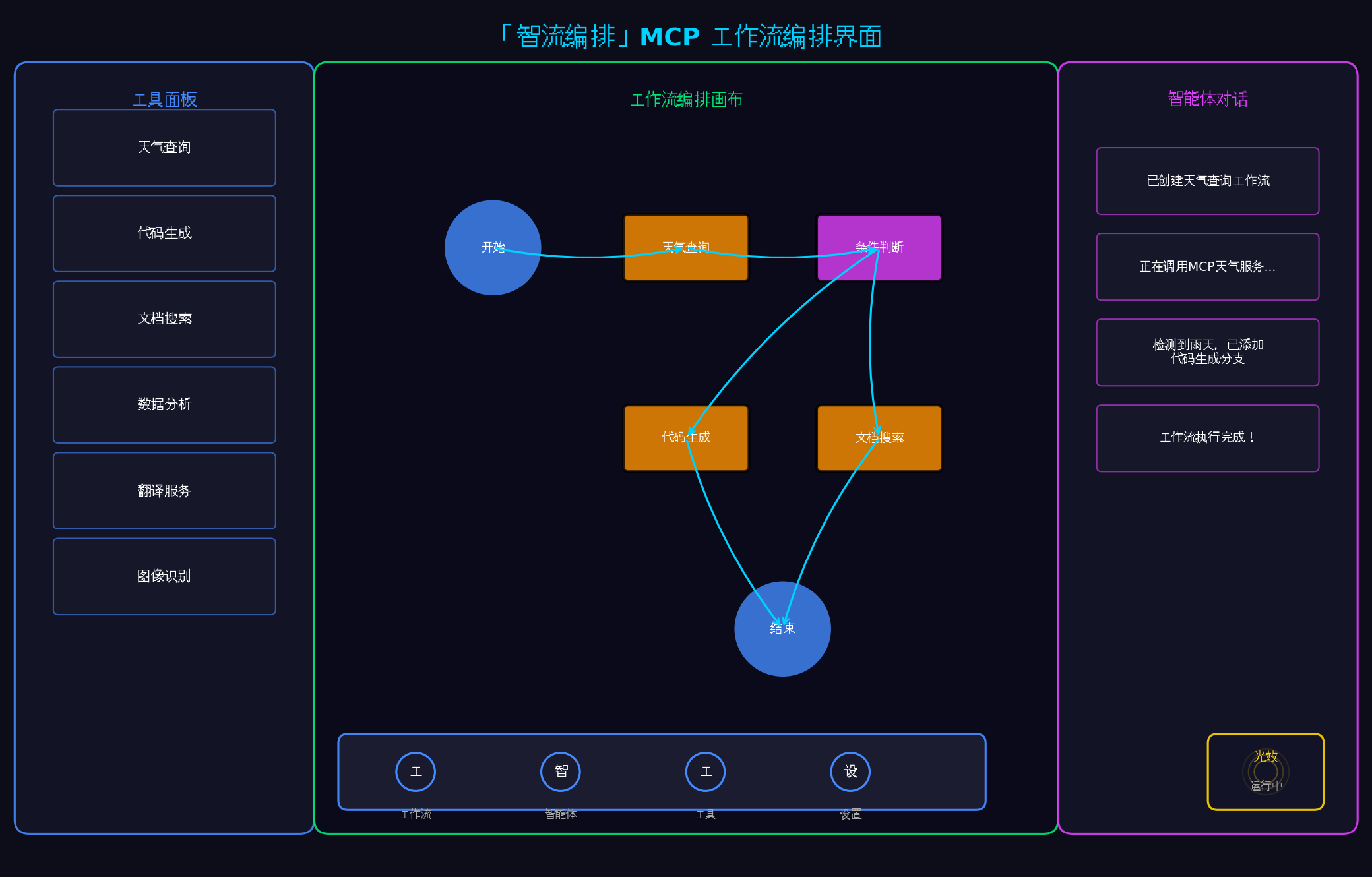
左侧:工具面板,列出所有可用的MCP工具
中间:工作流编排画布,支持可视化拖拽编辑
右侧:智能体对话面板,显示执行日志与交互
底部:悬浮导航栏,支持多智能体快速切换
右下角:光效状态指示器,实时反馈工作流状态
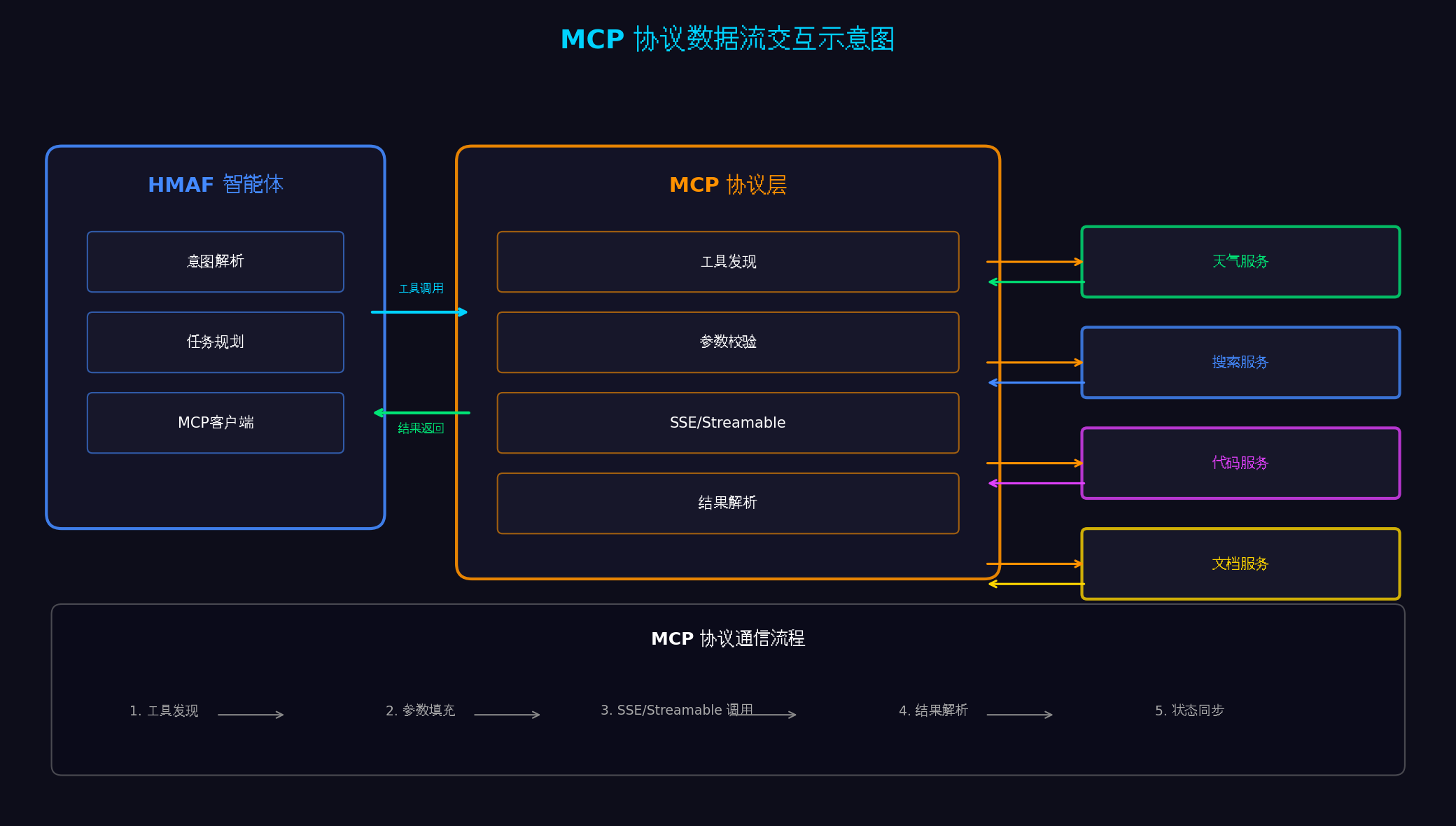
左侧:HMAF智能体(意图解析、任务规划、MCP客户端)
中间:MCP协议层(工具发现、参数校验、SSE/Streamable通信、结果解析)
右侧:多个MCP Server(天气、搜索、代码、文档服务)
底部:五步通信流程(工具发现→参数填充→SSE调用→结果解析→状态同步)
八、总结与展望
本文基于HarmonyOS 6(API 23)的HMAF框架与MCP协议,完整实战了一款面向PC端的多智能体工作流协同平台。核心创新点总结:
MCP协议标准化集成 :通过HMAF内置的MCP客户端适配层,统一接入天气、搜索、代码、文档等第三方服务,实现"一次适配,多处复用"
多智能体工作流编排 :可视化拖拽构建复杂工作流,支持串行、并行、条件分支三种执行模式,通过中央协调器实现智能体间的任务分发与结果聚合
悬浮导航智能体切换 :将 HdsTabs 改造为智能体切换器,支持单击切换、长按展开工具、双击执行工作流三种交互方式
沉浸光效状态反馈 :工作流执行状态实时映射为系统光效,五种状态对应五种色彩心理学配色,实现"状态即氛围"
PC三栏布局 :左侧工具面板 + 中间工作流画布 + 右侧智能体对话面板,充分利用PC大屏优势
分布式智能体协同 :通过NearLink 2.0实现手机、PC、平板多设备智能体协同,手机负责感知、PC负责计算、平板负责展示
鸿蒙PC专属优化 :利用PC键盘快捷键、鼠标右键菜单、多显示器扩展等桌面特性
MCP生态扩展 :接入更多第三方MCP服务(如数据库、CRM、ERP等),构建企业级智能体平台
AI自动生成工作流 :基于自然语言描述,自动生成可视化工作流并执行
转载声明:本文为转载整理,原文版权归原作者及原站点所有。
原文来源:CSDN HarmonyOS
原创地址:https://blog.csdn.net/u014727709/article/details/162385824
原文作者:进哥聊编程;如有侵权,请联系管理员删除。

