HTML石头剪刀布代码(按钮版)分享
整个游戏主要是由样式,界面,点击事件功能代码组成
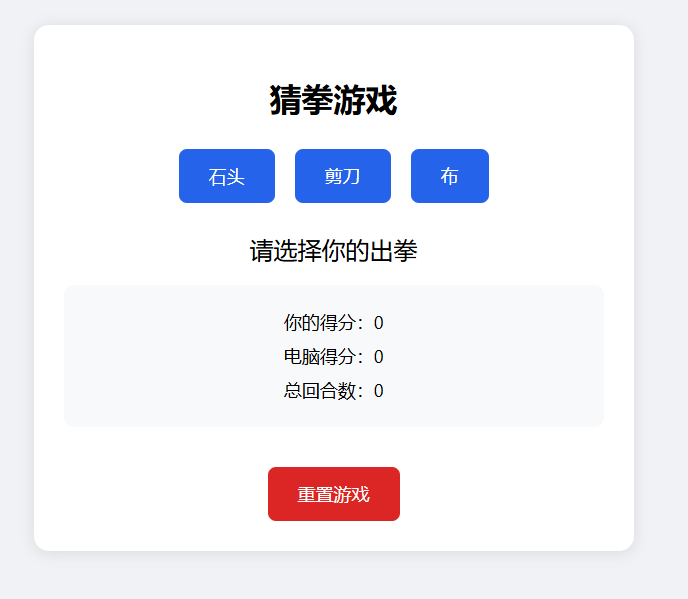
界面样式
 <style>
        body {
            font-family: 'Segoe UI', sans-serif;
            max-width: 600px;
            margin: 20px auto;
            padding: 20px;
            text-align: center;
            background-color: #f0f2f5;
        }
        .game-container {
            background: white;
            padding: 30px;
            border-radius: 15px;
            box-shadow: 0 2px 15px rgba(0,0,0,0.1);
        }
        .choices {
            margin: 30px 0;
            display: flex;
            justify-content: center;
            gap: 20px;
        }
        button {
            padding: 15px 30px;
            font-size: 18px;
            border: none;
            border-radius: 8px;
            cursor: pointer;
            transition: all 0.3s;
            background-color: #2563eb;
            color: white;
        }
        button:hover {
            transform: translateY(-2px);
            box-shadow: 0 4px 10px rgba(37,99,235,0.3);
        }
        .result {
            font-size: 24px;
            margin: 20px 0;
            min-height: 30px;
        }
        .score-board {
            margin: 20px 0;
            padding: 15px;
            background-color: #f8f9fa;
            border-radius: 10px;
        }
        .score-item {
            font-size: 18px;
            margin: 10px 0;
        }
        #resetBtn {
            background-color: #dc2626;
            margin-top: 20px;
        }
    </style>
界面代码
  <div class="game-container">
        <h1>猜拳游戏</h1>
        <div class="choices">
            <button onclick="playGame('石头')">石头</button>
            <button onclick="playGame('剪刀')">剪刀</button>
            <button onclick="playGame('布')">布</button>
        </div>
        <div class="result" id="result">请选择你的出拳</div>
        <div class="score-board">
            <div class="score-item">你的得分:<span id="userScore">0</span></div>
            <div class="score-item">电脑得分:<span id="computerScore">0</span></div>
            <div class="score-item">总回合数:<span id="totalRounds">0</span></div>
        </div>
        <button id="resetBtn" onclick="resetGame()">重置游戏</button>
    </div>
点击事件代码
  <script>
        let userScore = 0;
        let computerScore = 0;
        let totalRounds = 0;
        function getComputerChoice() {
            const choices = ['石头', '剪刀', '布'];
            const randomIndex = Math.floor(Math.random() * 3);
            return choices[randomIndex];
        }
        function determineWinner(user, computer) {
            if (user === computer) return '平局!';
            if (
                (user === '石头' && computer === '剪刀') ||
                (user === '剪刀' && computer === '布') ||
                (user === '布' && computer === '石头')
            ) {
                userScore++;
                return '你赢了!';
            } else {
                computerScore++;
                return '电脑赢了!';
            }
        }
        function playGame(userChoice) {
            const computerChoice = getComputerChoice();
            const result = determineWinner(userChoice, computerChoice);
            totalRounds++;

            // 更新界面显示
            document.getElementById('result').textContent =
                `你出了 ${userChoice},电脑出了 ${computerChoice},${result}`;
            document.getElementById('userScore').textContent = userScore;
            document.getElementById('computerScore').textContent = computerScore;
            document.getElementById('totalRounds').textContent = totalRounds;
        }
        function resetGame() {
            userScore = 0;
            computerScore = 0;
            totalRounds = 0;
            document.getElementById('result').textContent = '请选择你的出拳';
            document.getElementById('userScore').textContent = 0;
            document.getElementById('computerScore').textContent = 0;
            document.getElementById('totalRounds').textContent = 0;
        }
    </script>
需要完整代码的可以联系博主。
来自 “ ITPUB博客 ” ,链接:https://blog.itpub.net/70046748/viewspace-3087624/ ,如需转载,请注明出处,否则将追究法律责任。
上一篇:
MySQL 卡死进程?这几招轻松解决
下一篇:
和小伙伴来一局激烈的井字棋吧

请登录后发表评论
登录
全部评论
