【每周一库】 confy-table用于在cli中构建表格
本期的每周一库带来的是cli下的table工具confy-table库
库的特性包含
动态根据表格中内容自动设置表格宽度 允许设置表格中内容的样式 丰富的预设帮助易于使用 表格组件的高度可定制化,包含但不限于:边缘,线条样式,边距,对齐方式 丰富的内容管理控制 多平台支持:Linux, macOS, Windows
库的相关链接
github: confy-table crates.io: confy-table
接下来我们来测试confy-table库的用法
测试环境
Windows 10 cargo --version: cargo 1.46.0-nightly (089cbb80b 2020-06-15)rustc --version: rustc 1.46.0-nightly (6bb3dbfc6 2020-06-22)
创建一个新的rust工程,在Cargo.toml文件中写入引用信息
[dependencies]
comfy-table = "1.2.0"
然后写入confy-table github中给出的例子的代码
use comfy_table::Table;

fn main() {
    let mut table = Table::new();
    table
        .set_header(vec!["Header1", "Header2", "Header3"])
        .add_row(vec![
            "This is a text",
            "This is another text",
            "This is the third text",
        ])
        .add_row(vec![
            "This is another text",
            "Now\nadd some\nmulti line stuff",
            "This is awesome",
        ]);

    println!("{}", table);
}
运行结果如下图:

接下来我们适当修改代码增加样式显示
use comfy_table::*;
use comfy_table::modifiers::UTF8_ROUND_CORNERS;

fn main() {
    let mut table = Table::new();
    table
        .apply_modifier(UTF8_ROUND_CORNERS)
        .set_content_arrangement(ContentArrangement::Dynamic)
        .set_table_width(40)
        .set_header(vec!["Header1", "Header2", "Header3"])
        .add_row(vec![
            Cell::new("Center aligned").set_alignment(CellAlignment::Center),
            Cell::new("This is another text"),
            Cell::new("This is the third text"),
        ])
        .add_row(vec![
            "This is another text",
            "Now\nadd some\nmulti line stuff",
            "This is awesome",
        ]);

    // Set the default alignment for the third column to right
    let column = table.get_column_mut(2).expect("Our table has three columns");
    column.set_cell_alignment(CellAlignment::Right);

    println!("{}", table);
}
增加了表格圆角显示和align-content属性的center, start, end配置,如下图:
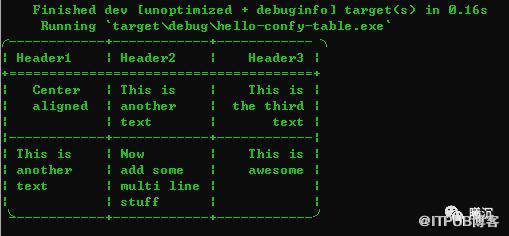
以上就是本期每周一库的全部内容。
原文作者:Rust语言中文社区;如有侵权,请联系管理员删除。

请登录后发表评论
登录
全部评论
