【Rust日报】2023-06-20 使用Quickwit、Jaeger和Grafana监控您的Rust应用程序
使用Quickwit、Jaeger和Grafana监控您的Rust应用程序
使用广泛认可的 Jaeger UI 分析跟踪,以获取有关应用程序行为的见解。 从这些跟踪数据中派生 RED(速率、错误和持续时间)指标,并在 Grafana 中监视它们。如果您想进一步了解,我们建议参考以下资源:Weaveworks 的 RED 方法和 Google SRE 书籍中有关监控分布式系统的部分。
为使用 Actix 构建的简单 Web API 进行测量。 将您的跟踪和指标数据推送到 Quickwit。 在 Jaeger UI 中检测、诊断和解决问题。 在 Grafana 中监视您的应用程序的 RED 指标(速率、错误、持续时间)。
Rust 1.68+Docker如果您仍在运行旧版本的 Docker,则需要安装 docker-compose。
构建并测量 Rust 应用
从 /posts 获取帖子。 获取每个帖子的评论 /posts/1/comments
rust-app-tracing 的新目录。在终端中切换到该目录,并运行以下命令初始化一个新的 Rust 项目。cargo new web-api
web-api/Cargo.toml 文件中拥有所需的依赖项。actix-web:用于在 Rust 中构建 Web 应用程序的快速 Web 框架。actix-web-opentelemetry:actix-web框架的 open-telemetry 扩展。opentelemetry:Rust 的核心 open-telemetry SDK,包括跟踪和指标。opentelemetry-otlp:提供各种 open-telemetry 导出器的 crate。reqwest:提供一个直观的 API 来进行 HTTP 请求。tokio:为我们的应用程序提供异步运行时。
Web API 应用程序代码
telemetry.rs 的文件来配置应用程序跟踪,我们将在其中处理所有跟踪配置。// telemetry.rs
...
const SERVICE_NAME: &'static str = "quickwit-jaeger-demo";
pub fn init_telemetry(exporter_endpoint: &str) {
// Create a gRPC exporter
let exporter = opentelemetry_otlp::new_exporter()
.tonic()
.with_endpoint(exporter_endpoint);
// Define a tracer
let tracer = opentelemetry_otlp::new_pipeline()
.tracing()
.with_exporter(exporter)
.with_trace_config(
trace::config().with_resource(Resource::new(vec![KeyValue::new(
opentelemetry_semantic_conventions::resource::SERVICE_NAME,
SERVICE_NAME.to_string(),
)])),
)
.install_batch(opentelemetry::runtime::Tokio)
.expect("Error: Failed to initialize the tracer.");
// Define a subscriber.
let subscriber = Registry::default();
// Level filter layer to filter traces based on level (trace, debug, info, warn, error).
let level_filter_layer = EnvFilter::try_from_default_env().unwrap_or(EnvFilter::new("INFO"));
// Layer for adding our configured tracer.
let tracing_layer = tracing_opentelemetry::layer().with_tracer(tracer);
// Layer for printing spans to stdout
let formatting_layer = BunyanFormattingLayer::new(
SERVICE_NAME.to_string(),
std::io::stdout,
);
global::set_text_map_propagator(TraceContextPropagator::new());
subscriber
.with(level_filter_layer)
.with(tracing_layer)
.with(JsonStorageLayer)
.with(formatting_layer)
.init()
}
post 和 comment 进行序列化和反序列化。//models.rs
...
#[derive(Debug, Serialize, Deserialize)]
#[serde(rename_all = "camelCase")]
pub struct Post {
pub user_id: i64,
pub id: i64,
pub title: String,
pub body: String,
#[serde(default)]
pub comments: Vec<Comment>,
}
#[derive(Debug, Serialize, Deserialize)]
#[serde(rename_all = "camelCase")]
pub struct Comment {
pub post_id: i64,
pub id: i64,
pub name: String,
pub email: String,
pub body: String,
}
instrument 属性。这是我们如何在处理程序函数和它用于执行任务的后续函数上启用跟踪的方法。// lib.rs
...
const BASE_API_URL: &'static str = "https://jsonplaceholder.typicode.com";
// The get_post handler
#[instrument(level = "info", name = "get_posts", skip_all)]
#[get("")]
async fn get_posts() -> Result<HttpResponse, Error> {
// Randomly simulate errors in request handling
let choices = [200, 400, 401, 200, 500, 501, 200, 500];
let mut rng = rand::thread_rng();
let choice = choices.choose(&mut rng)
.unwrap()
.clone();
match choice {
400..=401 => Ok(HttpResponse::new(StatusCode::from_u16(choice).unwrap())),
500..=501 => Ok(HttpResponse::new(StatusCode::from_u16(choice).unwrap())),
_ => {
let posts = fetch_posts(20)
.await
.map_err(actix_web::error::ErrorInternalServerError)?;
Ok(HttpResponse::Ok().json(posts))
}
}
}
// Fetching posts with a limit.
#[instrument(level = "info", name = "fetch_posts")]
async fn fetch_posts(limit: usize) -> anyhow::Result<Vec<Post>> {
let client = Client::new();
let url = format!("{}/posts", BASE_API_URL);
let mut posts: Vec<Post> = request_url(&client, &url).await?;
posts.truncate(limit);
let post_idx_to_ids: Vec<(usize, i64)> = posts.iter().enumerate().map(|(idx, post)| (idx, post.id)).collect();
// fetch post comments one after another.
for (index, post_id) in post_idx_to_ids {
let comments = fetch_comments(&client, post_id).await?;
posts[index].comments = comments
}
Ok(posts)
}
...
使用 Quickwit 收集跟踪数据
QW_ENABLE_OTLP_ENDPOINT:允许 Quickwit 接受和摄取跟踪和日志数据。SPAN_STORAGE_TYPE、GRPC_STORAGE_SERVER、QW_ENABLE_JAEGER_ENDPOINT:允许 Jaeger 从 Quickwit 拉取跟踪和日志以进行分析。GF_PLUGINS_ALLOW_LOADING_UNSIGNED_PLUGINS:允许我们在 Grafana 中加载特定的插件。
# docker-compose.yaml
version: '3'
services:
  quickwit:
    image: quickwit/quickwit:latest
command: run
    restart: always
    environment:
      QW_ENABLE_OTLP_ENDPOINT: true
      QW_ENABLE_JAEGER_ENDPOINT: true
    ports:
      - '7280:7280'
      - '7281:7281'
    volumes:
      - ./qwdata:/quickwit/qwdata

  jaeger:
    image: jaegertracing/jaeger-query:latest
    restart: always
    depends_on:
      - quickwit
    environment:
      SPAN_STORAGE_TYPE: 'grpc-plugin'
      GRPC_STORAGE_SERVER: 'quickwit:7281'
    ports:
      - '16686:16686'

  grafana:
    image: grafana/grafana-enterprise:latest
    restart: always
    user: root
    depends_on:
      - quickwit
    environment:
      GF_PLUGINS_ALLOW_LOADING_UNSIGNED_PLUGINS: 'quickwit-quickwit-datasource'
    ports:
      - '3000:3000'
    volumes:
      - ./grafana-storage:/var/lib/grafana
qwdata 目录以存储 Quickwit 数据。wget https://github.com/quickwit-oss/quickwit-datasource/releases/download/v0.2.0/quickwit-quickwit-datasource-0.2.0.zip \
&& mkdir -p grafana-storage/plugins \
&& unzip quickwit-quickwit-datasource-0.2.0.zip -d grafana-storage/plugins
curl -X GET http://localhost:9000/post
otel-traces-v0_6 索引来检查 Quickwit 是否已索引跟踪数据。curl -X POST http://localhost:7280/api/v1/otel-traces-v0_6/search -H 'Content-Type: application/json' -d '{ "query": "service_name:quickwit-jaeger-demo" }'
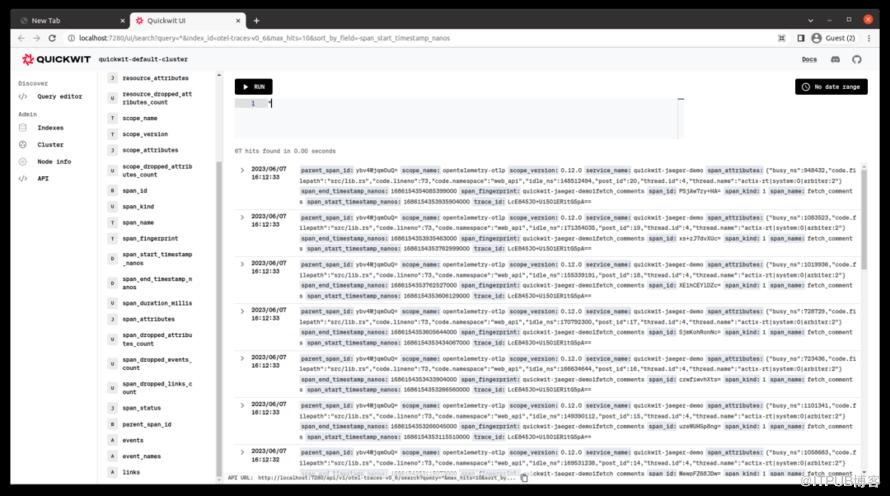
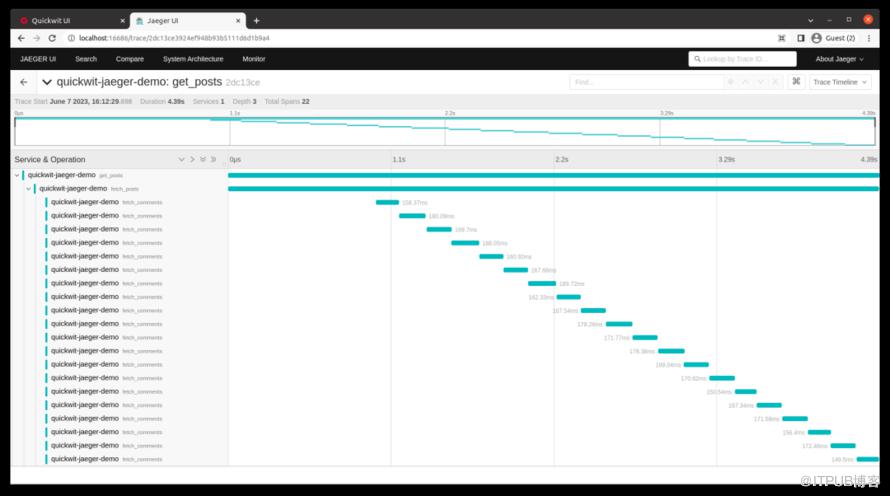
fetch_posts 函数,以批量并行运行请求,每次同时进行十个请求。这应该可以进一步加速事情。// Fetching posts with a limit.
#[instrument(level = "info", name = "fetch_posts")]
async fn fetch_posts(limit: usize) -> anyhow::Result<Vec<Post>> {
...
// fetch post comments concurrently.
let tasks: Vec<_> = post_idx_to_ids
.into_iter()
.map(|(index, post_id)| {
let moved_client = client.clone();
async move {
let comments_fetch_result = fetch_comments(&moved_client, post_id).await;
(index, comments_fetch_result)
}
})
.collect();
let mut stream = futures::stream::iter(tasks)
.buffer_unordered(10); // batch of 10 request at a time
while let Some((index, comments_fetch_result)) = stream.next().await {
let comments = comments_fetch_result?;
posts[index].comments = comments;
}
...
}
fetch_comments请求。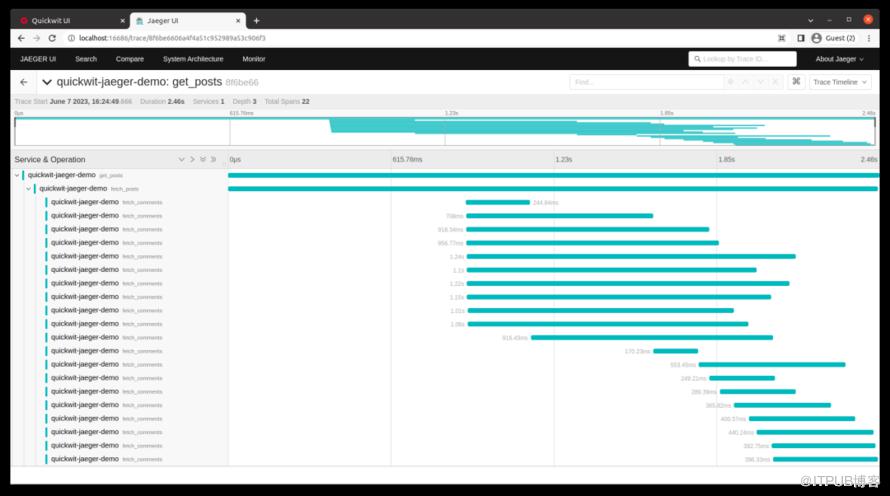
admin作为用户名和密码登录。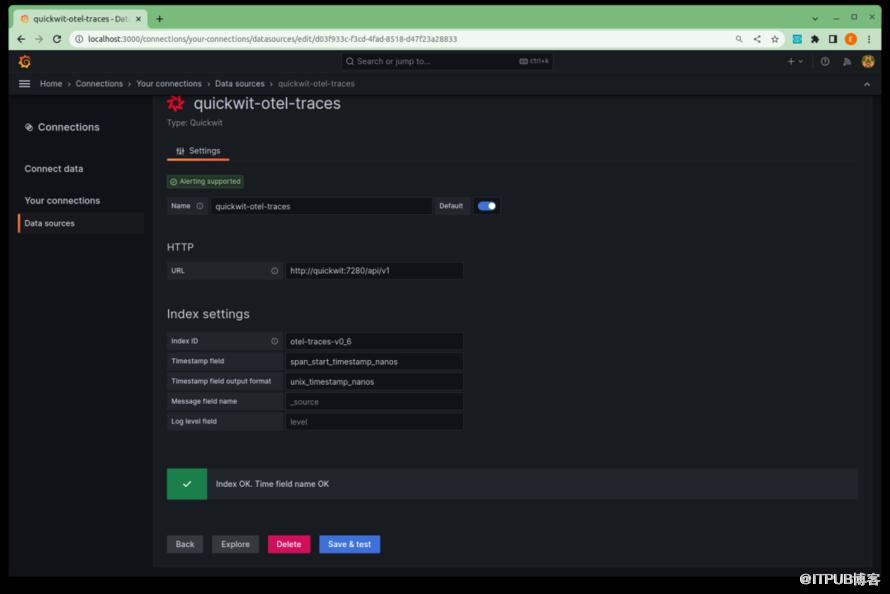
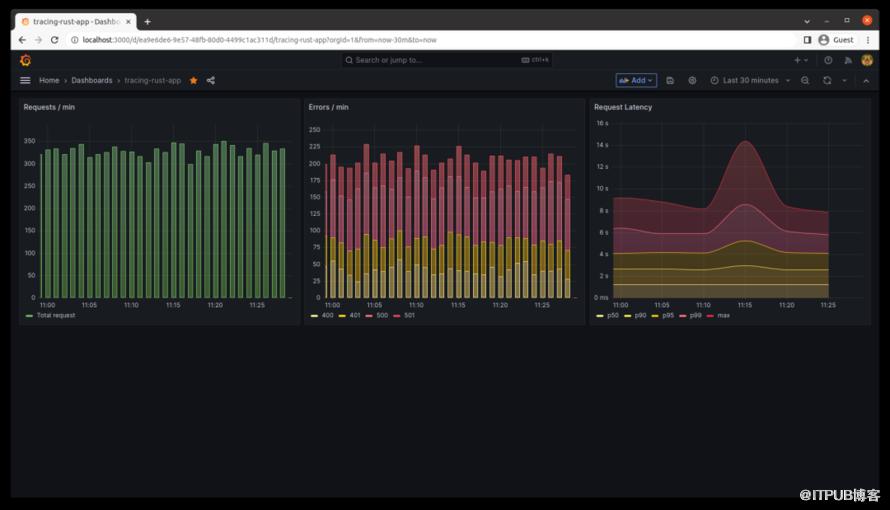
第一个面板显示每分钟的请求数量。 第二个面板显示每分钟的错误数量。 第三个面板呈现每分钟请求的持续时间百分位数。
更多阅读
快速入门指南。 使用 OTEL 收集器在 Quickwit 中发送跟踪。 将日志发送到 Quickwit。
Rustcc论坛: 支持rss 微信公众号:Rust语言中文社区

原文作者:Rust语言中文社区;如有侵权,请联系管理员删除。

请登录后发表评论
登录
全部评论
