背景
为了了解下jvm的JIT的热点探测,想了解下到底怎么判定是热点代码的逻辑,想着翻下jdk的代码,于是就有了这篇文章。
写在前面的几点说明:
在没有编译成功之前,不要使用clion打开,打开的时候,他会自己编译,会出现各种各样的问题;
当编译出现各种问题时,不要较真,换个环境,或虚拟机(同样的操作,一台电脑可以,一台不可以);
使用compiledb编译jdk源码(为了导入clion能识别出来,并链接,通过快捷键打开引用)
环境说明与准备
操作系统:macOs big Sur 11.1
Xcode_12.5.1 、Command_Line_Tools_for_Xcode_12.5.1
openjdk: https://github.com/openjdk/jdk8u
安装 jdk7或jdk8
homebrew安装
brew install freetype
brew install ccache
brew install binutils
brew install llvm
xcode 安装
xcode 有三种安装方式
直接appstore里搜索xcode安装,如果操作系统不是最低,无法安装
手动下载安装,可以选择自己需要的版本
xcode 安装(xcode要和对应的操作系统版本对应)
打开 https://developer.apple.com/download/all/ 搜索并下载对应的xcode 和Command_Line_Tools
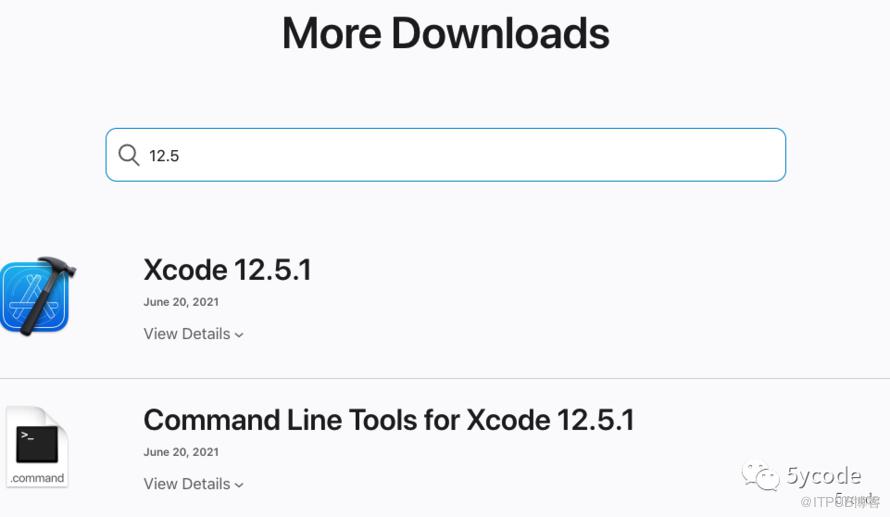
将Xcode_12.5.1.xip 解压拖入应用程序
双击安装 Command_Line_Tools_for_Xcode_12.5.1.dmg
注意:拖入应用程序以后,必须执行以下命令
sudo xcodebuild -license# 按照提示阅读文档(enter 空格)最后输入agree
常用的xcode-select命令
xcode-select -pxcode-select -vsudo xcode-select -rsudo xcode-select -switch /Applications/Xcode.app/Contents/Developer
源码下载
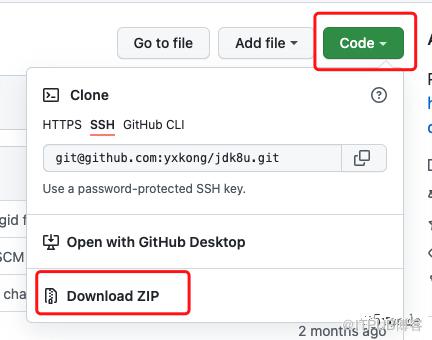
不要直接git clone 下载,太慢了,而且文件比较大(将近1g)。
直接https://github.com/openjdk/jdk8u download zip(只有138mb)
brew 安装
# freetype依赖brew install qt#安装freetype,它是一个用C语言实现的一个字体光栅化库brew install freetype==> Pouring freetype--2.11.1.big_sur.bottle.tar.gz🍺 /usr/local/Cellar/freetype/2.11.1: 66 files, 2.3MB#记住下安装路径/usr/local/Cellar/freetype/2.11.1#加速编译(可以不安装)brew install ccache# 为了解决Unable to find objcopy, cannot enable debug-symbolsbrew install binutils
设置环境变量
创建build.sh 脚本
# 设定语言选项,必须设置export LANG=C# Mac平台,C编译器不再是GCC,而是clangexport CC=clangexport CXX=clang++## 是否使用clang,如果使用的是GCC编译,该选项应该设置为falseexport USE_CLANG=true#export CC=gcc#export CXX=g++## 是否使用clang,如果使用的是GCC编译,该选项应该设置为false#export USE_CLANG=falseexport CXXFLAGS=-stdlib=libc++# 跳过clang的一些严格的语法检查,不然会将N多的警告作为Errorexport COMPILER_WARNINGS_FATAL=false# 链接时使用的参数export LFLAGS='-Xlinker -lstdc++'# 使用64位数据模型export LP64=1# 告诉编译平台是64位,不然会按照32位来编译export ARCH_DATA_MODEL=64# 允许自动下载依赖export ALLOW_DOWNLOADS=true# 并行编译的线程数,编译时长,为了不影响其他工作,可以选择2export HOTSPOT_BUILD_JOBS=4export PARALLEL_COMPILE_JOBS=4 #ALT_PARALLEL_COMPILE_JOBS=2# 是否跳过与先前版本的比较export SKIP_COMPARE_IMAGES=true# 是否使用预编译头文件,加快编译速度export USE_PRECOMPILED_HEADER=true# 是否使用增量编译export INCREMENTAL_BUILD=true# 编译内容export BUILD_LANGTOOL=trueexport BUILD_JAXP=trueexport BUILD_JAXWS=trueexport BUILD_CORBA=trueexport BUILD_HOTSPOT=trueexport BUILD_JDK=true# 编译版本export SKIP_DEBUG_BUILD=trueexport SKIP_FASTDEBUG_BULID=falseexport DEBUG_NAME=debug#解决部分编码异常export JAVA_TOOL_OPTIONS=-Dfile.encoding=UTF-8# 避开javaws和浏览器Java插件之类部分的buildexport BUILD_DEPLOY=falseexport BUILD_INSTALL=false# 最后需要干掉这两个环境变量(如果你配置过),不然会发生诡异的事件unset JAVA_HOMEunset CLASSPATH# 调试信息时需要的objcopy,加上这个,就不用在configure中添加了export OBJCOPY=gobjcopy
配置(可以放到build.sh中)
# 家里电脑配置jdk8sh ./configure --with-debug-level=fastdebug --enable-ccache OBJCOPY=gobjcopy --with-freetype-include=/usr/local/Cellar/freetype/2.11.1/include/freetype2 --with-freetype-lib=/usr/local/Cellar/freetype/2.11.1/lib/ --with-boot-jdk=/Library/Java/JavaVirtualMachines/jdk1.7.0_80.jdk/Contents/Home --enable-debug-symbols# 办公电脑sh ./configure --with-debug-level=slowdebug --enable-ccache OBJCOPY=gobjcopy --with-freetype-include=/usr/local/Cellar/freetype/2.11.0/include/freetype2 --with-freetype-lib=/usr/local/Cellar/freetype/2.11.0/lib/ --with-boot-jdk=/Library/Java/JavaVirtualMachines/jdk1.8.0_281.jdk/Contents/Home --enable-debug-symbols
--with-freetype-include、--with-freetype-lib 配置成自己安装的freetype路径
--with-boot-jdk 引导jdk的目录
--with-debug-level调试信息的级别,可选值有release,fastdebug,slowdebug
配置成功的结果:
====================================================A new configuration has been successfully created in/Users/yxk/work/git/source/jdk8u/build/macosx-x86_64-normal-server-slowdebugusing configure arguments '--with-debug-level=slowdebug --with-jvm-variants=server --enable-ccache OBJCOPY=gobjcopy --with-freetype-include=/usr/local/Cellar/freetype/2.11.1/include/freetype2 --with-freetype-lib=/usr/local/Cellar/freetype/2.11.1/lib/ --with-boot-jdk=/Library/Java/JavaVirtualMachines/jdk1.7.0_80.jdk/Contents/Home --enable-debug-symbols'.Configuration summary:* Debug level: slowdebug* JDK variant: normal* JVM variants: server* OpenJDK target: OS: macosx, CPU architecture: x86, address length: 64Tools summary:* Boot JDK: java version "1.7.0_80" Java(TM) SE Runtime Environment (build 1.7.0_80-b15) Java HotSpot(TM) 64-Bit Server VM (build 24.80-b11, mixed mode) (at /Library/Java/JavaVirtualMachines/jdk1.7.0_80.jdk/Contents/Home)* Toolchain: clang (clang/LLVM)* C Compiler: Version 12.0.5 (at /usr/bin/clang)* C++ Compiler: Version 12.0.5 (at /usr/bin/clang++)Build performance summary:* Cores to use: 5* Memory limit: 16384 MB* ccache status: disabled
编译
compiledb make CONF=macosx-x86_64-normal-server-slowdebug最终的结果:
## Finished jdk (build time 00:04:21)Build times -------Start 2022-03-30 14:11:49End 2022-03-30 14:20:2300:00:31 corba00:02:20 hotspot00:00:23 jaxp00:00:34 jaxws00:04:21 jdk00:00:25 langtools00:08:34 TOTAL-------------------------Finished building OpenJDK for target 'default'
验证编译结果
# 进入当前目录下的buildcd ./build/macosx-x86_64-normal-server-slowdebug/jdk/bin➜ bin ./java -versionopenjdk version "1.8.0-internal-debug"OpenJDK Runtime Environment (build 1.8.0-internal-debug-yxk_2022_03_30_14_08-b00)OpenJDK 64-Bit Server VM (build 25.71-b00-debug, mixed mode)
编译成功,会生成compile_commands.json
如果这些输出想保留可以通过 2>&1 输出到文件里
ps: 出错时,不要关注autoconf/generated-configure.sh: line 82: 5: Bad file descriptor,要关注上面那一行
#排查问题要观察这一行configure: error: Failed to determine Xcode version.#不要关注这一行,所有的报错都有这个/Users/yxk/work/git/source/jdk8u/common/autoconf/generated-configure.sh: line 82: 5: Bad file descriptor# 本地安装了xcode 则直接执行下面的命令 问题解决sudo xcode-select -s /Applications/Xcode.app/Contents/Developerchecking if we should generate debug symbols... configure: error: Unable to find objcopy, cannot enable debug-symbols/Users/yxk/work/git/source/jdk8u/common/autoconf/generated-configure.sh: line 82: 5: Bad file descriptor# 安装 binutilsbrew install binutils# configure 添加参数或者添加到shell脚本中OBJCOPY=gobjcopy
配置clion
open 选择对应的jdk目录,点击ok,等待建立索引
点击Clion的File | open...找到jdk8u 打开compile_commands.json,点击OK,等待Clion建立索引,会自己根据compile_commands.json导入工程
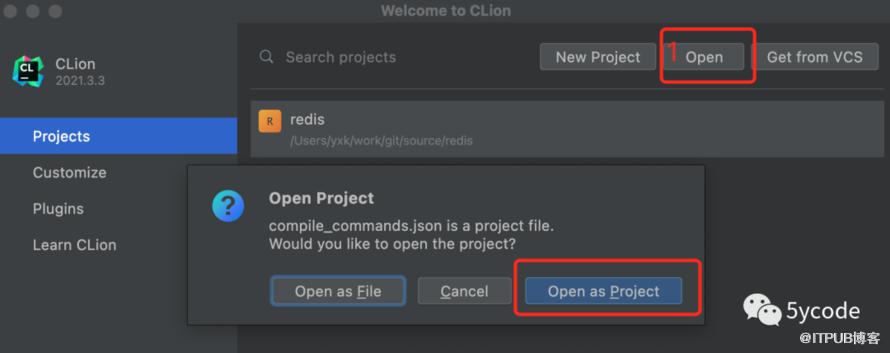
Compilation database project successfully imported
建立创建自定义Build Target,点击Clion | Preference... | Build, Execution, Deployment | Custom Build Targets
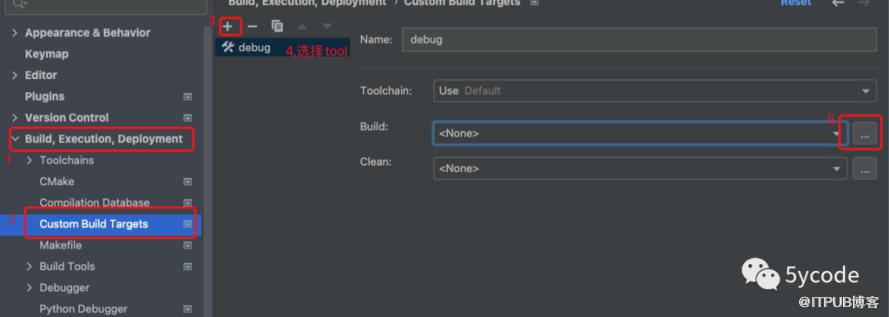
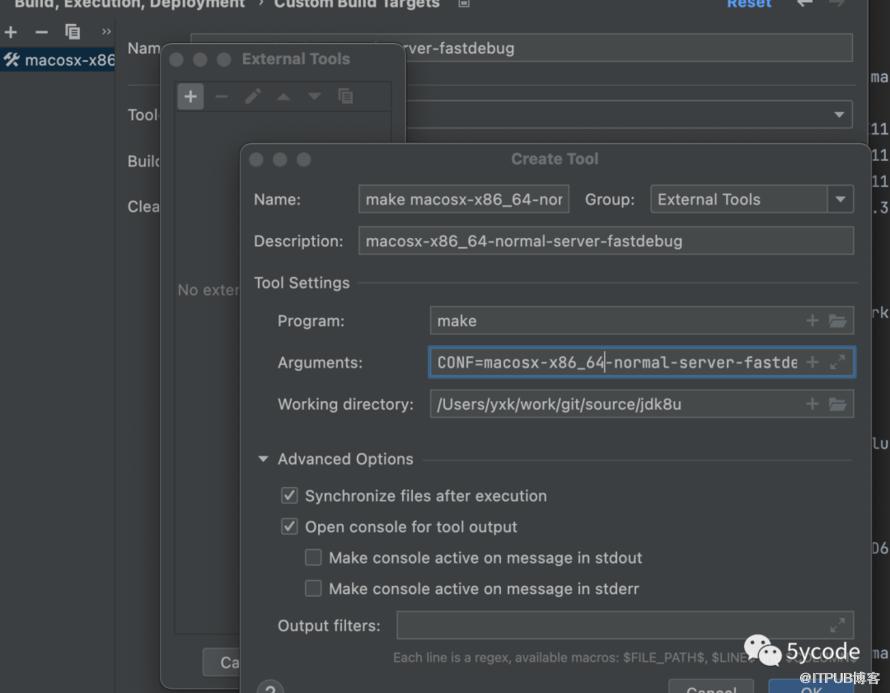
CONF=macosx-x86_64-normal-server-fastdebug (根据自己的build目录下生成的配置)
Working directory 可以直接 $ProjectFileDir$

CONF=macosx-x86_64-normal-server-fastdebug clean(根据自己build目录配置)
Working directory 可以直接 $ProjectFileDir$
配置编译的java

点击run
-versionopenjdk version "1.8.0-internal-fastdebug"OpenJDK Runtime Environment (build 1.8.0-internal-fastdebug-yxk_2022_04_02_14_15-b00)OpenJDK 64-Bit Server VM (build 25.71-b00-fastdebug, mixed mode)
debug会

在当前用户的目录下配置.lldbinit
break set -n main -C "process handle --pass true --stop false SIGSEGV" -C "process handle --pass true --stop false SIGBUS"最终达到的效果
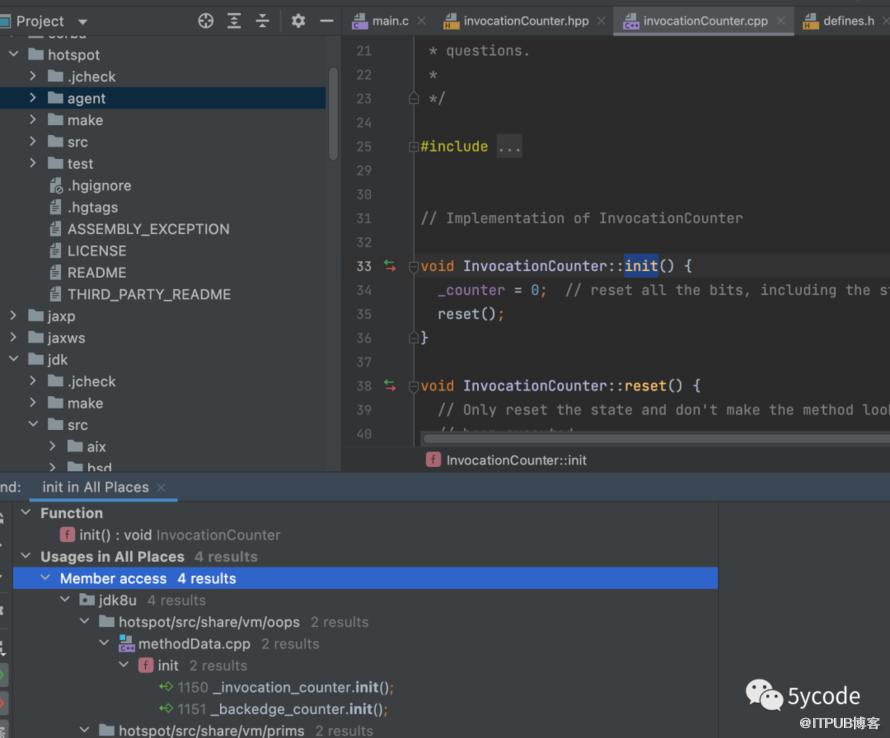
找到InvocationCounter::init()方法,查找到MethodData::init()里初始化了
参考文章
https://blog.jetbrains.com/clion/2020/03/openjdk-with-clion/
https://www.jetbrains.com/help/clion/compilation-database.html
https://www.cnblogs.com/dwtfukgv/p/14727290.html
https://blog.csdn.net/qq_37514135/article/details/123381718
https://blog.csdn.net/hilaryfrank/article/details/112859423
https://jiawanggjia.github.io/post/openjdk-bian-yi-zhi-nan/
https://blog.csdn.net/hilaryfrank/article/details/112969698
原文作者:5ycode;如有侵权,请联系管理员删除。

最新文章
- DeepSeek+ragflow构建企业知识库之工作流,突然觉的dify又香了
- dify1.0.0版本升级及新功能预览
- DeepSeek+ragflow构建企业知识库:突然觉的dify不香了(1)
- DeepSeek官方充值终于开放了,相关工具推荐
- 聊聊dify权限验证的三种方案及实现
- DeepSeek+dify 工作流应用,自然语言查询数据库信息并展示
- DeepSeek+dify知识库,查询数据库的两种方式(api+直连)
- DeepSeek+dify 本地知识库:高级应用Agent+工作流
- 腾讯有Dify团队吗?difySandbox成了腾讯Dify团队开源的
- Deepseek+Dify本地知识库相关问题汇总
