强化学习教程(一):Q-Learning原理与应用


强化学习作为机器学习的一个大家族,已经有了丰富的算法理论支撑,比如:
基于价值选取行为的算法:Q-Learning、Saras、DQN
直接选取行为的算法:PG(Policy Gradients)
... ...
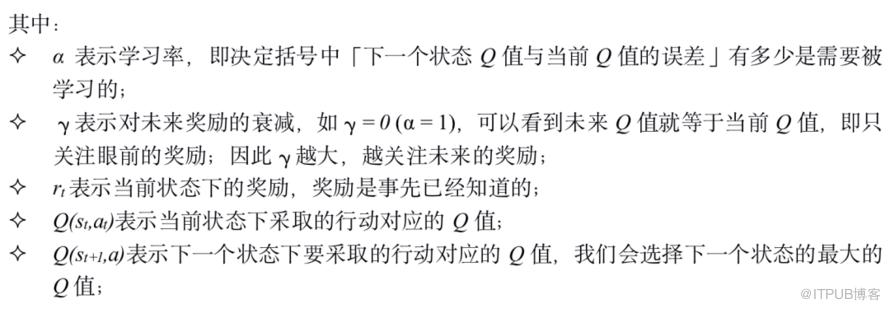
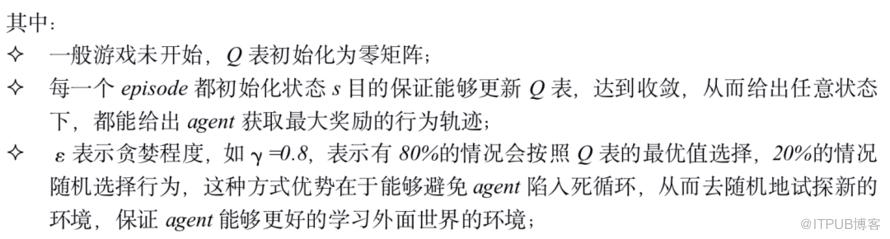
强化学习是基于一种无监督学习思想。对于Q-Learning而言,可以想象一个行为人(agent)在不知道目标标签是什么状态下,行为人(agent)在当前状态下(state)通过采取行动(action)获取一个(负)奖励(reward),在获取到奖励后,更新Q表中的Q值,经过所有轮次(episodes)迭代达到收敛后,更新完整个Q表,从而能够给出任意状态下,agent能够采取获得最大reward下的action的轨迹。

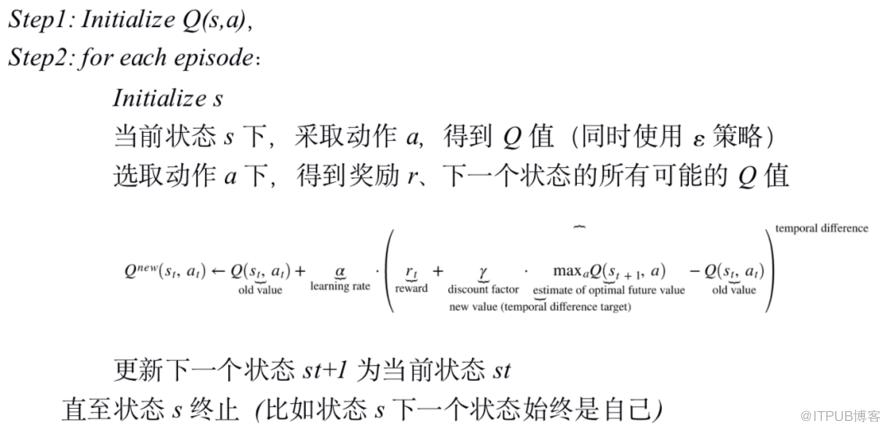
Q值的更新过程其实就是围绕下面的公式进行

Q-Learning算法流程

这里展示一个经典的小车爬坡的案例,需要用到tf_agent、OpenAI Gym等包,由于Gym目前在windows上不够友好,使用Colab作为这个游戏的展示。
安装环境包
1!sudo apt-get install -y xvfb ffmpeg x11-utils
2!pip install -q 'gym==0.10.11'
3!pip install -q 'imageio==2.4.0'
4!pip install -q PILLOW
5!pip install -q 'pyglet==1.3.2'
6!pip install -q pyvirtualdisplay
7!pip install -q tf-agents
可视化Mountain Car爬坡
 1import tf_agents
 2from tf_agents.environments import suite_gym
 3import PIL.Image
 4import pyvirtualdisplay
 5
 6display = pyvirtualdisplay.Display(visible=0, size=(1400, 900)).start()
 7
 8env_name = 'MountainCar-v0'
 9env = suite_gym.load(env_name)
10env.reset()
11PIL.Image.fromarray(env.render()) 1import gym
2from gym.wrappers import Monitor
3import glob
4import io
5import base64
6from IPython.display import HTML
7from pyvirtualdisplay import Display
8from IPython import display as ipythondisplay
9
10display = Display(visible=0, size=(1400, 900))
11display.start()
12
13"""
14Utility functions to enable video recording of gym environment
15and displaying it.
16To enable video, just do "env = wrap_env(env)""
17"""
18
19def show_video():
20 mp4list = glob.glob('video/*.mp4')
21 if len(mp4list) > 0:
22 mp4 = mp4list[0]
23 video = io.open(mp4, 'r+b').read()
24 encoded = base64.b64encode(video)
25 ipythondisplay.display(HTML(data='''<video alt="test" autoplay
26 loop controls style="height: 400px;">
27 <source src="data:video/mp4;base64,{0}" type="video/mp4" />
28 </video>'''.format(encoded.decode('ascii'))))
29 else:
30 print("Could not find video")
31
32
33def wrap_env(env):
34 env = Monitor(env, './video', force=True)
35 return env
小车爬坡环境提供了如下动作:
0-向左的力
1-无力
2-向右的力
山地车环境由以下连续值组成:
state[0] - 表示位置
state[1] - 表示速度
下面来看一下小车的位置和速度的变化(render用于环境的渲染):
 1import gym
 2env = wrap_env(gym.make("MountainCar-v0"))
 3env.reset()
 4done = False
 5
 6i = 0
 7while not done:
 8    i += 1
 9    state, reward, done, _ = env.step(2)
10    env.render()
11    print(f"Step {i}: State={state}, Reward={reward}")
12
13env.close()
位置、速度、奖励的部分轮次展示
 1Step 167: State=[-0.47331782  0.01239426], Reward=-1.0
 2Step 168: State=[-0.46029923  0.01301859], Reward=-1.0
 3Step 169: State=[-0.44675254  0.01354669], Reward=-1.0
 4Step 170: State=[-0.43277711  0.01397543], Reward=-1.0
 5Step 171: State=[-0.41847444  0.01430267], Reward=-1.0
 6Step 172: State=[-0.4039472   0.01452724], Reward=-1.0
 7Step 173: State=[-0.3892982  0.014649 ], Reward=-1.0
 8Step 174: State=[-0.37462943  0.01466878], Reward=-1.0
 9Step 175: State=[-0.3600411   0.01458833], Reward=-1.0
10Step 176: State=[-0.34563082  0.01441028], Reward=-1.0
11Step 177: State=[-0.33149278  0.01413803], Reward=-1.0
12Step 178: State=[-0.3177171   0.01377568], Reward=-1.0
13Step 179: State=[-0.30438921  0.01332789], Reward=-1.0
14Step 180: State=[-0.29158942  0.01279979], Reward=-1.0
15Step 181: State=[-0.27939257  0.01219685], Reward=-1.0
16Step 182: State=[-0.26786777  0.0115248 ], Reward=-1.0
17Step 183: State=[-0.25707826  0.01078951], Reward=-1.0
18Step 184: State=[-0.24708137  0.00999688], Reward=-1.0
19Step 185: State=[-0.23792856  0.00915281], Reward=-1.0
20Step 186: State=[-0.22966547  0.00826309], Reward=-1.0
21Step 187: State=[-0.2223321   0.00733338], Reward=-1.0
22Step 188: State=[-0.21596293  0.00636917], Reward=-1.0
23Step 189: State=[-0.21058716  0.00537577], Reward=-1.0
24Step 190: State=[-0.20622886  0.0043583 ], Reward=-1.0
25Step 191: State=[-0.20290716  0.0033217 ], Reward=-1.0
26Step 192: State=[-0.20063641  0.00227075], Reward=-1.0
27Step 193: State=[-0.19942631  0.00121011], Reward=-1.0
28Step 194: State=[-1.99281965e-01  1.44341652e-04], Reward=-1.0
29Step 195: State=[-0.200204   -0.00092203], Reward=-1.0
30Step 196: State=[-0.20218851 -0.00198451], Reward=-1.0
31Step 197: State=[-0.20522704 -0.00303853], Reward=-1.0
32Step 198: State=[-0.20930653 -0.00407949], Reward=-1.0
33Step 199: State=[-0.21440914 -0.00510261], Reward=-1.0
34Step 200: State=[-0.22051217 -0.00610302], Reward=-1.0
小车运动的动画展示
 1env = wrap_env(gym.make("MountainCar-v0"))
 2observation = env.reset()
 3while True:
 4    env.render()
 5    #your agent goes here
 6    action = env.action_space.sample()
 7    observation, reward, done, info = env.step(action)
 8    if done:
 9      break;
10env.close()
11show_video()
下面演示小车整个的运动过程,由于Q-Learning不能处理连续值,因此需要对浮点型状态转化为离散的状态,即对每个合适的状态范围划分桶。
 1import gym
 2import numpy as np
 3
 4# This function converts the floating point state values into
 5# discrete values. This is often called binning.  We divide
 6# the range that the state values might occupy and assign
 7# each region to a bucket.
 8def calc_discrete_state(state):
 9    discrete_state = (state - env.observation_space.low)/buckets
10    return tuple(discrete_state.astype(np.int))
创建一个运行游戏函数,提供一个q_table参数、是否应该更新q_table参数以及是否渲染小车动画。
 1def run_game(q_table, render, should_update):
 2    done = False
 3    discrete_state = calc_discrete_state(env.reset())
 4    success = False
 5
 6    while not done:
 7        # Exploit or explore
 8        if np.random.random() > epsilon:
 9            # Exploit - use q-table to take current best action
10            # (and probably refine)
11            action = np.argmax(q_table[discrete_state])
12        else:
13            # Explore - t
14            action = np.random.randint(0, env.action_space.n)
15
16        # Run simulation step
17        new_state, reward, done, _ = env.step(action)
18
19        # Convert continuous state to discrete
20        new_state_disc = calc_discrete_state(new_state)
21
22        # Have we reached the goal position (have we won?)?
23        if new_state[0] >= env.unwrapped.goal_position:
24            success = True
25
26        # Update q-table
27        if should_update:
28            max_future_q = np.max(q_table[new_state_disc])
29            current_q = q_table[discrete_state + (action,)]
30            new_q = (1 - LEARNING_RATE) * current_q + LEARNING_RATE * \
31              (reward + DISCOUNT * max_future_q)
32            q_table[discrete_state + (action,)] = new_q
33
34        discrete_state = new_state_disc
35
36        if render:
37            env.render()
38
39 return success 1LEARNING_RATE = 0.1
2DISCOUNT = 0.95
3EPISODES = 50000
4SHOW_EVERY = 1000
5
6DISCRETE_GRID_SIZE = [10, 10]
7START_EPSILON_DECAYING = 0.5
8END_EPSILON_DECAYING = EPISODES//10
9
10env = wrap_env(gym.make("MountainCar-v0"))
11
12epsilon = 1
13epsilon_change = epsilon/(END_EPSILON_DECAYING - START_EPSILON_DECAYING)
14buckets = (env.observation_space.high - env.observation_space.low) \
15 /DISCRETE_GRID_SIZE
16q_table = np.random.uniform(low=-3, high=0, size=(DISCRETE_GRID_SIZE \
17 + [env.action_space.n]))
18success = False 1success_count = 0
2
3# Loop through the required number of episodes
4while episode<EPISODES:
5 episode+=1
6 done = False
7
8 # Run the game. If we are local, display render animation at SHOW_EVERY
9 # intervals.
10 if episode % SHOW_EVERY == 0:
11 print(f"Current episode: {episode}, success: {success_count}" +\
12 " ({float(success_count)/SHOW_EVERY})")
13 success = run_game(q_table, True, False)
14 success_count = 0
15 else:
16 success = run_game(q_table, False, True)
17
18 # Count successes
19 if success:
20 success_count += 1
21
22 # Move epsilon towards its ending value, if it still needs to move
23 if END_EPSILON_DECAYING >= episode >= START_EPSILON_DECAYING:
24 epsilon = max(0, epsilon - epsilon_change)
25
26print(success)1run_game(q_table, True, False)
2show_video()
小车输出实例
 1Current episode: 1000, success: 0 (0.0)
 2Current episode: 2000, success: 0 (0.0)
 3Current episode: 3000, success: 0 (0.0)
 4Current episode: 4000, success: 29 (0.029)
 5Current episode: 5000, success: 345 (0.345)
 6Current episode: 6000, success: 834 (0.834)
 7Current episode: 7000, success: 797 (0.797)
 8Current episode: 8000, success: 679 (0.679)
 9Current episode: 9000, success: 600 (0.6)
10Current episode: 10000, success: 728 (0.728)
11Current episode: 11000, success: 205 (0.205)
12Current episode: 12000, success: 612 (0.612)
13Current episode: 13000, success: 733 (0.733)
14Current episode: 14000, success: 1000 (1.0)
15Current episode: 15000, success: 998 (0.998)
16... ...
17Current episode: 37000, success: 301 (0.301)
18Current episode: 38000, success: 322 (0.322)
19Current episode: 39000, success: 292 (0.292)
20Current episode: 40000, success: 299 (0.299)
21Current episode: 41000, success: 281 (0.281)
22Current episode: 42000, success: 233 (0.233)
23Current episode: 43000, success: 380 (0.38)
24Current episode: 44000, success: 598 (0.598)
25Current episode: 45000, success: 933 (0.933)
26Current episode: 46000, success: 986 (0.986)
27Current episode: 47000, success: 1000 (1.0)
28Current episode: 48000, success: 1000 (1.0)
29Current episode: 49000, success: 1000 (1.0)
30Current episode: 50000, success: 1000 (1.0)
31True
观察q_table的变化
1import pandas as pd
2
3df = pd.DataFrame(q_table.argmax(axis=2))
4
5df.columns = [f'v-{x}' for x in range(DISCRETE_GRID_SIZE[0])]
6df.index = [f'p-{x}' for x in range(DISCRETE_GRID_SIZE[1])]
7df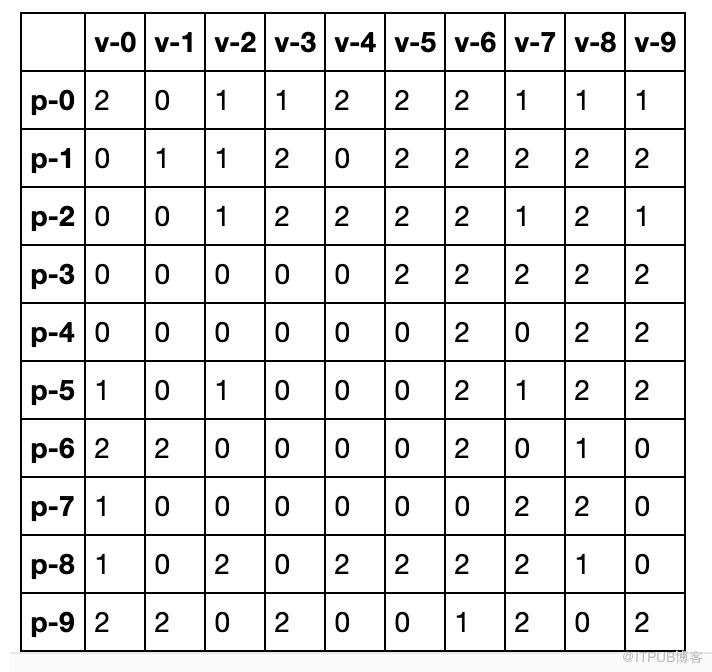

这个迷宫案例会更直观的看到奖励是如何给出,以及在每一个状态转移后,Q_table中Q值是如何更新的。
首先给出了一个房间0-4,5是行为人(agent)最终需要走的地方,即外面的世界。可以将0-5都看作agent的当前状态。
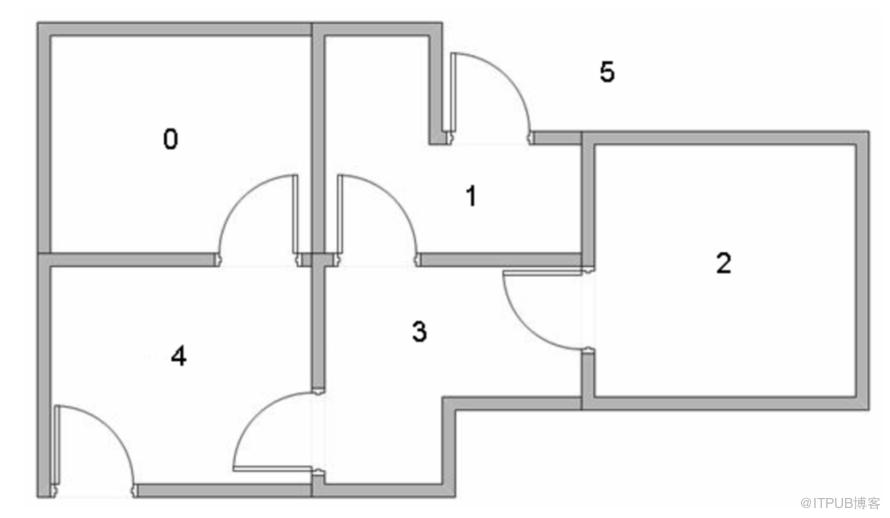
基于上述描述可以简化建模如下,其中箭头表示状态之间可以转移,即房间是互通的,而状态5转向自身,即agent已经达到目的,获得最大奖励,不需要进行状态转移,即状态可以终止,即收敛。
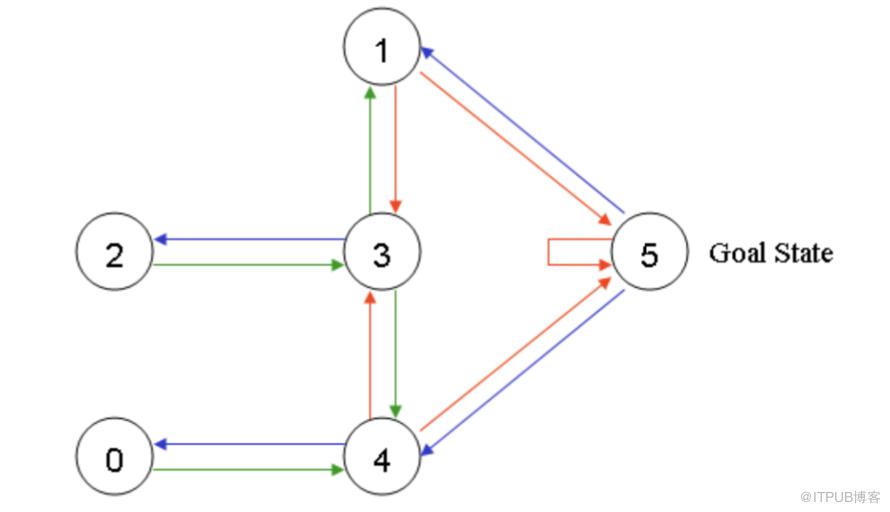
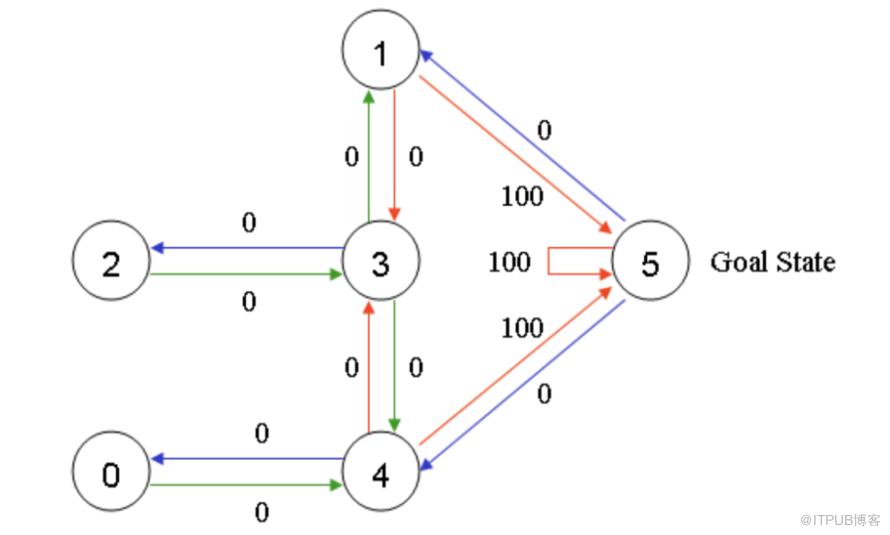
基于上述的简化建模,我们在初始化agent在某个状态下的时候,需要实现确定每个状态转移的奖励值。我们知道,达到状态5是最终目标,即可以给出最大奖励100,而房间0-4状态虽然能互相转移,但并没有达到目的,可以认为获得奖励为0,而房间不能互通的获得奖励为-1,得到奖励矩阵为:

同时,给出初始化的Q表,我们定义为零矩阵:

此时假设agent的初始状态1,即在房间1,在R矩阵第二行能够获取非负奖励的只有状态3或者状态5,随机地,转移至状态5(也可以叫采取的行动为5),那么状态1转移至下一个状态5,更新的Q(1,5)为:

此时agent更新的Q表为:
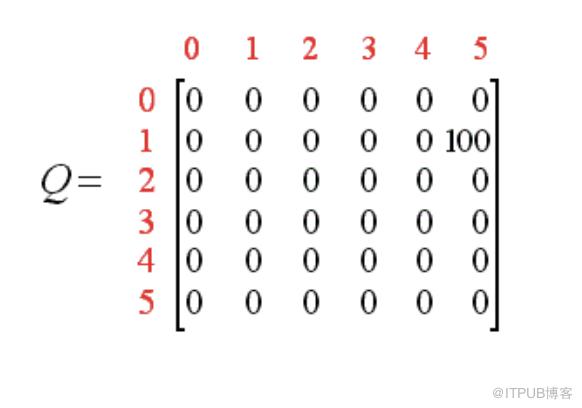
至此,我们称完成一个episode,下一个episode,需要重新更新初始化状态s,从而继续更新Q表。
最后,Q表能够收敛更新为:
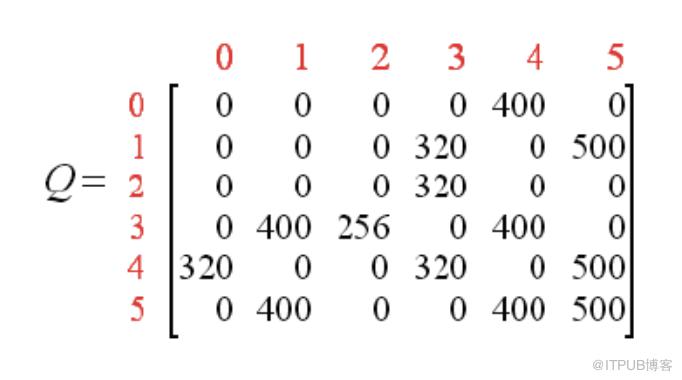
对Q表非0元素除以Q表最大元素值进行规范化处理(省略百分号):
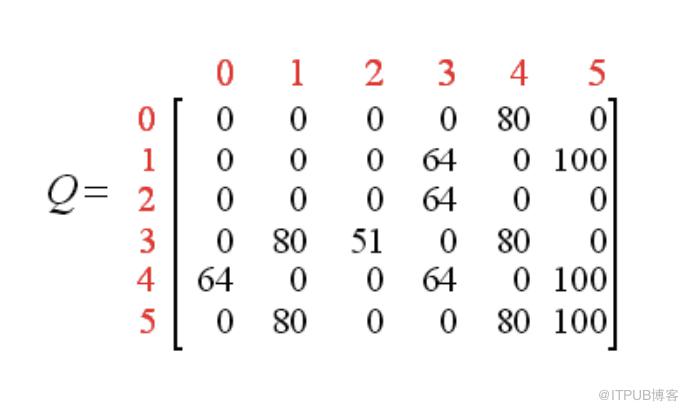
此时,给出任意状态s,都将会根据Q表给出获取最大奖励的行为轨迹,例如这里当agent在状态2下时,其行为轨迹就为2-3-1-5(由于贪婪策略也可能随机选择4)。


http://mnemstudio.org/path-finding-q-learning-tutorial.htm
https://mofanpy.com/tutorials/machine-learning/reinforcement-learning/intro-q-learning/
https://github.com/jeffheaton/t81_558_deep_learning
END
欢迎加入学习交流群

添加助手微信,可加入微信交流群



发现“在看”和“赞”了吗,戳我试试吧

原文作者:ChallengeHub;如有侵权,请联系管理员删除。

