【YashanDB 知识库】如何处理 no free block in dictionary cache
问题现象
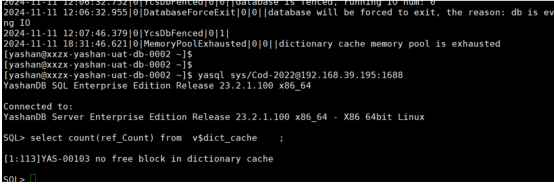
1 、共享集群中,创建用户卡住
2 、查询表或视图报错
问题的风险及影响
1 、共享集群中, create table 、 user 等,因为需要等其他节点返回消息,如果某个节点 dc 不够,则会卡住。
2 、查询创建等报错,影响业务使用。
问题影响的版本
23.2.7.100 及之前的所有版本
问题发生原因
dc pool 不足
解决方法及规避方式
1、如果是 sql pool 占用了 share pool 的剩余空间,可以先清理 share pool
alter system flush shared_pool;
如果有用,可以不重启。
2、如果条件允许,增大 share pool :
alter system set SHARE_POOL_SIZE=8G scope=spfile;
调整 dc 占比:
alter system set SQL_POOL_SIZE=xx(默认 50) scope=spfile;
alter system set DICTIONARY_CACHE_SIZE=xx(默认 25) scope=spfile;
需要重启。
问题分析和处理过程
1、查看 alert.log,发现报错

2、查看视图
v$share_poo l:
可以看到 share pool 中 DICTIONARY CACHE POOL 占用的空间,和剩余 SHARE POOL 的空间。
当 SQL POOL 和 DICTIONARY CACHE POOL 不够时,会用剩余的 SHARE POOL
v$global_mpoo l:
可以看到 SQL POOL 和 DICTIONARY CACHE POOL 的使用情况。
v$dict_cach e:
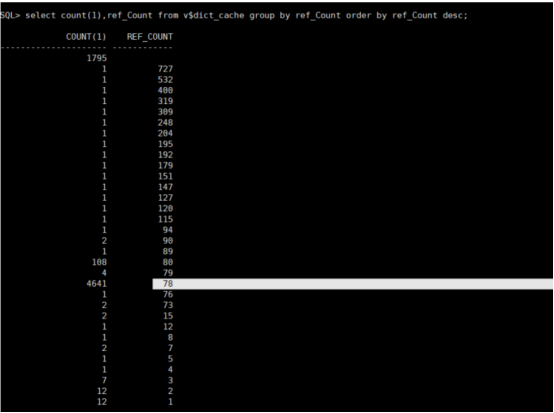
查看各个表 dc 的使用情况,通过查看这个视图,发现表的 dc 都被占用情况,之后再分析导致该情况的原因。
ref_Count 表示该表 dc 的引用次数,只有当 ref_Count=0 时,改表 dc 才可以淘汰使用。
memory_context_used 字段代表每个 dc 占用的空间大小,可以用该字段看到每张表的 dc 占用情况。
select count(*) from v$dict_cache where ref_Count= 0 ;
select count(*) from v$dict_cache where ref_Count > 0 ;
select sum(memory_context_used) from v$dict_cache where memory_context_used is not null
dba_tab_statistic s:
-- 查看上一次执行统计信息的时间
Select timestamp(LAST_ANALYZED) from dba_tab_statistics where LAST_ANALYZED is not null order by 1 desc limit 10;
3、查看 run.log
来自 “ ITPUB博客 ” ,链接:https://blog.itpub.net/70043300/viewspace-3073381/ ,如需转载,请注明出处,否则将追究法律责任。

