

简介:大家好,我是枫哥,🌟一线互联网的IT民工、📝资深面试官、🌹Java跳蚤网课堂创始人。拥有多年一线研发经验,曾就职过科大讯飞、美团网、平安等公司。在上海有自己小伙伴组建的副业团队,目前业余时间专注Java技术分享,春招/秋招/社招/跳槽,一对一学习辅助,项目接活开发。
🌟 欢迎关注 🌟 收藏 🌹在看 🌹
🍊🍊:文末送福利

相信很多人,刚经历过过年在家的七大姑八大姨的催婚潮,被安排了多场相亲,头都大!有的朋友甚至跟我说,为了躲避过年干脆说疫情要求就地过年,直接不回家了!
俗话说:“逃得了初一逃不了十五”,该来的总要来的,眼看情人节又要来了,有的小伙伴会问程序员怎么表白的呀,下面我给大家分享几个神器的代码,程序员表白神器!
神器一:
演示地址:www.javatiaocao.com/myheart 为了防止恶意攻击,加了登录注册功能,需要登录看。
当然嫌麻烦的话,下面我把代码也分享出来了,大家可以自己操作实现!
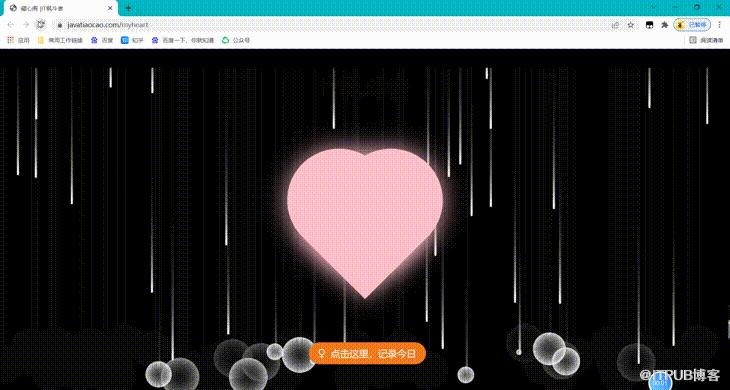
注意:上面要是配上表白文字效果会更好
于是乎帮人帮到底,我给大家把表白情话也准备好了,如下:
你的眼里映着星星,我听见神说在劫难逃。
我看过很多书,但都没有你好看。
“这个世界乱糟糟的,而你干干净净,可以悬在我的心上,作太阳和月亮。
你对我说的每一句话,都是沙漠里过的雨。
一定要爱着占什么它让我们变得
我从未想过爱你但是我爱了
你是我温暖的手套,冰冷的啤酒,带着阳光味道的衬衫,日复一日的梦想。
你是我的天下无双,我最后的念念不忘。
雨雾漫了山腰,你迷住了我。
你是我的洋地黄,治的了心衰,却治不了遇见你时的心律失常
废话不多说,直接进入正题,贴代码
<!DOCTYPE html><html><head><meta charset="UTF-8"><title>藏心阁 |IT枫斗者</title><meta http-equiv="X-UA-Compatible" content="IE=edge"><meta name="viewport" content="width=device-width, initial-scale=1"><meta http-equiv="Cache-Control" content="no-siteapp"/><meta name="keywords" content="Java,面试辅导,跳槽,面试官,面试题,涨薪,博客,学习,IT,个人,IT枫斗者,程序猿,找工作,学编程,友链"><meta name="description" content="关注求职、跳槽领域,专注java技术分享,java面试经验、java面试总结及面试资料,零基础培训,一对一培训。"><link rel="icon" type="image/x-icon" ><link href="https://lib.baomitu.com/amazeui/2.7.2/css/amazeui.min.css" rel="stylesheet"><link href="https://lib.baomitu.com/font-awesome/5.8.0/css/fontawesome.min.css" rel="stylesheet"><link rel="stylesheet" href="css/myheart.css"><script src="https://lib.baomitu.com/jquery/3.3.1/jquery.min.js"></script></head><body><div><canvas style="position: fixed"></canvas><div><h1>IT枫斗者</h1></div><div><div><div></div><div></div><div></div></div><div><button type="button" class="today am-btn am-btn-warning am-btn-xl"><i style="margin-right: 5px"></i>点击这里,记录今日</button></div></div></div><script src="js/rain.js"></script><script src="js/myheart.js"></script></body></html>(function(window,document,undefined){var hearts = [];window.requestAnimationFrame = (function(){return window.requestAnimationFrame ||window.webkitRequestAnimationFrame ||window.mozRequestAnimationFrame ||window.oRequestAnimationFrame ||window.msRequestAnimationFrame ||function (callback){setTimeout(callback,1000/60);}})();init();function init(){css(".heart{width: 10px;height: 10px;position: fixed;background: #f00;transform: rotate(45deg);-webkit-transform: rotate(45deg);-moz-transform: rotate(45deg);}.heart:after,.heart:before{content: '';width: inherit;height: inherit;background: inherit;border-radius: 50%;-webkit-border-radius: 50%;-moz-border-radius: 50%;position: absolute;}.heart:after{top: -5px;}.heart:before{left: -5px;}");attachEvent();gameloop();}function gameloop(){for(var i=0;i<hearts.length;i++){if(hearts[i].alpha <=0){document.body.removeChild(hearts[i].el);hearts.splice(i,1);continue;}hearts[i].y--;hearts[i].scale += 0.004;hearts[i].alpha -= 0.013;hearts[i].el.style.cssText = "left:"+hearts[i].x+"px;top:"+hearts[i].y+"px;opacity:"+hearts[i].alpha+";transform:scale("+hearts[i].scale+","+hearts[i].scale+") rotate(45deg);background:"+hearts[i].color;}requestAnimationFrame(gameloop);}function attachEvent(){var old = typeof window.onclick==="function" && window.onclick;window.onclick = function(event){old && old();createHeart(event);}}function createHeart(event){var d = document.createElement("div");d.className = "heart";hearts.push({el : d,x : event.clientX - 5,y : event.clientY - 5,scale : 1,alpha : 1,color : randomColor()});document.body.appendChild(d);}function css(css){var style = document.createElement("style");style.type="text/css";try{style.appendChild(document.createTextNode(css));}catch(ex){style.styleSheet.cssText = css;}document.getElementsByTagName('head')[0].appendChild(style);}function randomColor(){return "rgb("+(~~(Math.random()*255))+","+(~~(Math.random()*255))+","+(~~(Math.random()*255))+")";}})(window,document);
神器二:
原项目在codepen上,地址:
https://codepen.io/jakealbaugh/pen/PwLXXP
先看效果:

下面说说实现步骤:
1:安装nodejs,具体如何安装网上有很多案例可以看看。
2:npm install coffee.script
3:将其bin目录添加到环境变量
4:coffee -c coffee.script
废话不多说,直接上代码:
styles = """/*"a love letter💗" v5.2.1for every true lover*/body {: #1a1c24; color: #fff;: 1.0rem; line-height: 1.4;: subpixel-antialiased;}/*...hello?*亲爱的大美丽 ,好久不见!我是你可爱的枫哥~说是好久不见,其实我们昨天晚上才一起吃过饭嘻嘻嘻这就是"一日不见,如隔三秋"吧!我总是打开一个框框写代码,就像现在这样 ๑乛◡乛๑*/pre {position: fixed;top: 30px; bottom: 30px;transition: left 500ms;overflow: auto;: #313744; color: #a6c3d4;border: 1px solid rgba(0,0,0,0.2);padding: 24px 12px;: border-box;: 3px;: 0px 4px 0px 2px rgba(0,0,0,0.1);}之前你还问我屏幕上的代码为啥花花绿绿的(‧_‧?)那是代码高亮~你没发现上面👆的代码都是一个颜色嘛*/pre em:not(.comment) { font-style: normal; }{ color: #707e84; }{ color: #c66c75; }.key { color: #c66c75; }{ color: #c7ccd4; }{ color: #d5927b; }现在看起来舒服多了~不过我还是更习惯把代码框放在右边 →_→pre { left: 50%; width: 45%}昨晚吃饭时你还不停暗示我生怕我会忘了后天是你的生日一样,略略略~傻瓜~我怎么可能会忘记 ( ´・ω・)ノ(._.`)平时码代码的时候我心里都在想着你呢~不信你往下看*/#heart, #echo {position: fixed;width: 300px; height: 300px;top: calc(50% - 150px); left: calc(25% - 150px);: center;: scale(0.95);transform: scale(0.95);}#heart { z-index: 8; }#echo { z-index: 7; }#heart::before, #heart::after, #echo::before, #echo::after {content: '';position: absolute;top: 40px;width: 150px; height: 240px;background: #c66c75;: 150px 150px 0 0;: rotate(-45deg);transform: rotate(-45deg);: 0 100%;: 0 100%;}#heart::before, #echo::before {left: 150px;}#heart::after, #echo::after {left: 0;: rotate(45deg);transform: rotate(45deg);: 100% 100%;: 100% 100%;}你问我爱你有多深,代码代表我的心 (●′ω`●) */#heart::after {:inset -6px -6px 0px 6px rgba(255,255,255,0.1);}#heart::before {:inset 6px 6px 0px 6px rgba(255,255,255,0.1);}现在我的心属于你啦~ */#heart i::before {content: '大美丽';position: absolute;: 9;width: 100%;top: 35%; left: 0;: normal;color: rgba(255,255,255,0.8);: 100;: 30px;: -1px -1px 0px rgba(0,0,0,0.2);}虽然我们认识这么久但每次见到你,我的心还是会扑通~扑通~*/heartbeat {100% {: scale(0.95);transform: scale(0.95);}{: scale(1.00);transform: scale(1.00);}}heartbeat {100% { transform: scale(0.95); }{ transform: scale(1.00); }}echo {{opacity: 0.1;: scale(1);transform: scale(1);}{opacity: 0;: scale(1.4);transform: scale(1.4);}}echo {{opacity: 0.1;transform: scale(1);}{opacity: 0;transform: scale(1.4);}}什么?没听到我的心跳?你再靠近一点*/#heart, #echo {: 2000ms;: 2000ms;:0, 0, 1.74);:0, 0, 1.74);: 500ms;: 500ms;: infinite;: infinite;: paused;: paused;}#heart {: heartbeat;: heartbeat;}#echo {: echo;: echo;}你靠这么近干嘛~*/#heart, #echo {: running;: running;}我都脸红了~嘿嘿*/这颗小心心送你 `(*^﹏^*)′生日快乐🎂 ~亲爱哒~明晚下课你最喜欢的那家餐馆不见不散哦~*/"""openComment = falsewriteStyleChar = (which) -># begin wrapping open commentsif which == '/' && openComment == falseopenComment = truestyles = $('#style-text').html() + whichelse if which == '/' && openComment == trueopenComment = falsestyles = $('#style-text').html().replace(/(\/[^\/]*\*)$/, '<em>$1/</em>')# wrap style declarationelse if which == ':'styles = $('#style-text').html().replace(/([a-zA-Z- ^\n]*)$/, '<em>$1</em>:')# wrap style valueelse if which == ';'styles = $('#style-text').html().replace(/([^:]*)$/, '<em>$1</em>;')# wrap selectorelse if which == '{'styles = $('#style-text').html().replace(/(.*)$/, '<em>$1</em>{')elsestyles = $('#style-text').html() + whichstyleswhichwriteStyles = (message, index, interval) ->if index < message.lengthpre = document.getElementById 'style-text'= pre.scrollHeightwriteStyleChar message[index++]setTimeout (->writeStyles message, index, if openComment then 60 else 5interval# appending the tags I'll need."""<style></style><span></span><span><i></i></span><pre></pre>"""# faster typing in small iframe on codepen homepage# time = if window.innerWidth <= 578 then 4 else 16time = 60# starting it off0, time)###Changelog:: i exist!: heart instead of circle: including standard CSS3 transforms and animationswas only using `-webkit` to be less verbose (standard transforms dont work in safari)now works in FF: crossbrowser echonested `scale()` styles (scaled in scaled) only worked in chromemoved echo out of heart to fix: more efficient animations100% {}` instead of duplicated keyframes: overflwo fix: auto` on the `pre`###
原文作者:IT枫斗者;如有侵权,请联系管理员删除。

