如果我们把运行在 Kubernetes 上的 Prometheus 与能够进行 ChatGPT 对话的智能引擎,以及和 Slack 这样的 Sink 结合起来,会发生什么?
我们将可以得到一个用于 Kubernetes troubleshooting 的开源平台,我们称之为 Robusta。

在这篇文章中,我们将在 Prometheus 监控架构之上使用 Robusta,并展示警报发生的原因以及如何修复它们。
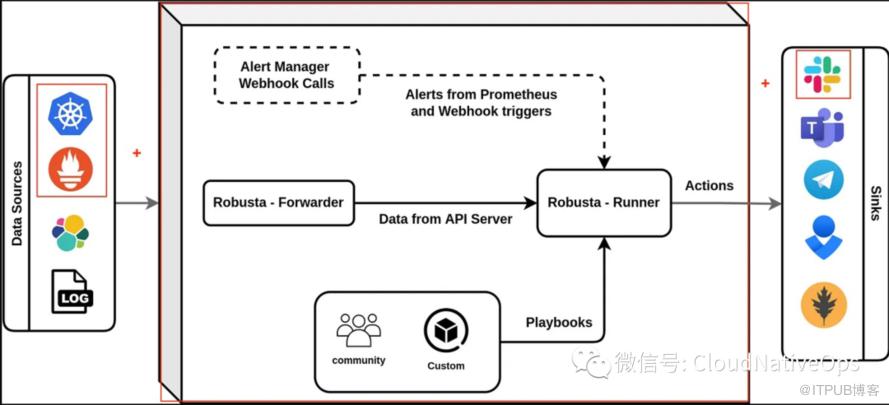
Robusta 是如何工作的
Robusta 会关注应用程序部署后发生的所有事情。
要实现这个目标,可以通过配置三个组件来实现。
-
1Triggers: 用来定义何时运行 (比如有告警时,日志异常时,存在变更时) -
2Actions: 用来定义去做什么(Robusta 内置了 50 多种行为),我们可以使用该操作通过 API-Key 将请求发送给 ChatGPT -
3Sinks: 用来定义将结果发往那里,比如 Slack,企业微信,钉钉,飞书等
你可以在 customPlaybooks 部分进行定义:
customPlaybooks:
# Add the 'Ask ChatGPT' button to all Prometheus alerts
- triggers:
  - on_prometheus_alert:
      alert_name: KubePodCrashLooping
  actions:
    - chat_gpt_enricher: {}
  sinks:
    - slack
下面这个动画展示了 Robusta 整个流程中都发生了啥。

如何在 K8S 集群中设置 Robusta**
1. 首先,必须在 python 上安装 robusta-cli。它可以为 helm chart 生成对应的 values
python3 -m pip install -U robusta-cli --no-cache
2. 为 Helm chart 生成 values file
在该阶段,将会根据指导进行 one by one 安装。
robusta gen-config
Robusta reports its findings to external destinations (we call them "sinks").
Well define some of them now.

Configure Slack integration? This is HIGHLY recommended. [Y/n]: Y
If your browser does not automatically launch, open the below url:
https://api.robusta.dev/integrations/slack?id=*****
Youve just connected Robusta to the Slack of: poc-chatgpt-kubernetes
Which slack channel should I send notifications to? # pocs
Configure MsTeams integration? [y/N]: n
Configure Robusta UI sink? This is HIGHLY recommended. [Y/n]: n


Robusta can use Prometheus as an alert source.
If you havent installed it yet, Robusta can install a pre-configured Prometheus.
Would you like to do so? [y/N]: y
Please read and approve our End User License Agreement: https://api.robusta.dev/eula.html
Do you accept our End User License Agreement? [y/N]: y
Last question! Would you like to help us improve Robusta by sending exception reports? [y/N]: y
Saved configuration to ./generated_values.yaml - save this file for future use!
Finish installing with Helm (see the Robusta docs). Then login to Robusta UI at https://platform.robusta.dev
之后,我们将得到一个相似的 yaml 输出:
clusterName: "aks-development"
globalConfig:
  signing_key: ea657a0b******
  account_id: 7935371f******
sinksConfig:
- slack_sink:
    name: main_slack_sink
    slack_channel: pocs
    api_key: xoxb******
enablePrometheusStack: true
enablePlatformPlaybooks: true
runner:
  sendAdditionalTelemetry: true
rsa:
  private: ******
  public: ******
注意: 在新版本中,会进行强制的 helm lint 校验,因此建议必须填入 clusterName
然后我们就可以修改 generated_values.yaml 文件去创建多个 trigger。
3. 使用 Helm 安装 Robusta
kubectl create ns robusta
helm repo add robusta https://robusta-charts.storage.googleapis.com && helm repo update
helm install robusta robusta/robusta -f ./generated_values.yaml
4. 运行一个简单的 Demo 来展示 Robusta 的整个工作流程 (trigger (Prometheus) + action (Logs-Enricher) + sink (Slack))
kubectl apply -f https://raw.githubusercontent.com/robusta-dev/kubernetes-demos/main/pending_pods/pending_pod.yaml

robusta playbooks trigger prometheus_alert alert_name=KubePodCrashLooping namespace=robusta pod_name=example-pod
你将看到如下输出:
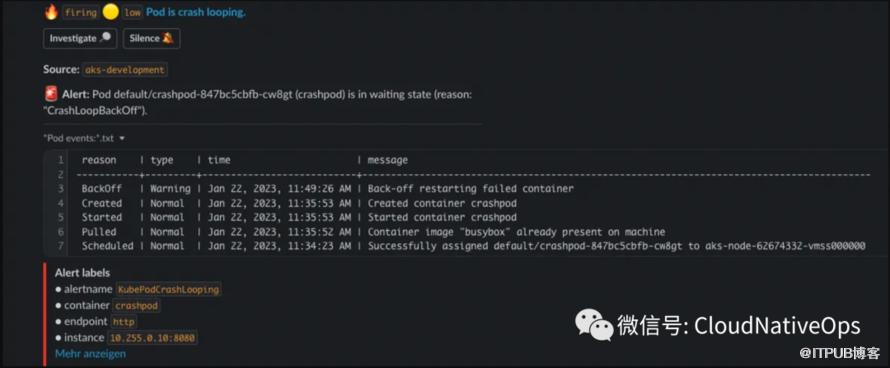
5. 配置 Trigger (Prometheus alert) + Action (ChatGPT) + Sink (Slack)
请通过 Product Hunt 产品搜索或发送到您最喜欢的时事通讯来支持这些步骤。
这里我们将使用 robusta-dev 开发的 kubernetes-chatgpt-bot 来进行测试,修改后的配置 generated_values.yaml 大概如下:
clusterName: "aks-development"
globalConfig:
  chat_gpt_token: sk-dw******
  signing_key: ea657a******
  account_id: 7935371f******
sinksConfig:
- slack_sink:
    name: main_slack_sink
    slack_channel: pocs
    api_key: xoxb******
- robusta_sink:
    name: robusta_ui_sink
    token: eyJhY2NvdW******
enablePrometheusStack: true
# This part is added to the default generated_values.yaml
enablePlatformPlaybooks: true
runner:
  sendAdditionalTelemetry: true
rsa:
  private: ******
  public: ******

# This part is added to the default generated_values.yaml
playbookRepos:
  chatgpt_robusta_actions:
    url: "https://github.com/robusta-dev/kubernetes-chatgpt-bot.git"

# This part is added to the default generated_values.yaml
customPlaybooks:
# Add the 'Ask ChatGPT' button to all Prometheus alerts
- triggers:
  - on_prometheus_alert: {}
  actions:
  - chat_gpt_enricher: {}
您不需要配置 sink ,因为它已经配置在了 sinksConfig 相关的信息里,并且我们将触发所有 Prometheus 警报。
6. 更新 Helm chart 包,用以支持 customPlaybooks
helm upgrade robusta robusta/robusta --values=generated_values.yaml
7. 再次运行 Demo,来观察 trigger (Prometheus) + action (ChatGPT) + sink (Slack) 是如何工作的
kubectl apply -f https://raw.githubusercontent.com/robusta-dev/kubernetes-demos/main/pending_pods/pending_pod.yaml

robusta playbooks trigger prometheus_alert alert_name=KubePodCrashLooping namespace=robusta pod_name=example-pod
现在你将在 Slack 中看到 "Ask ChatGPT" 按钮。
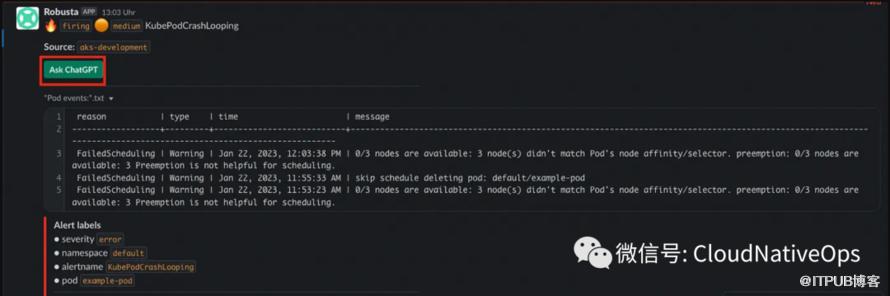
如果你现在问 ChatGPT,它会让你大吃一惊,你会得到这样的答案:
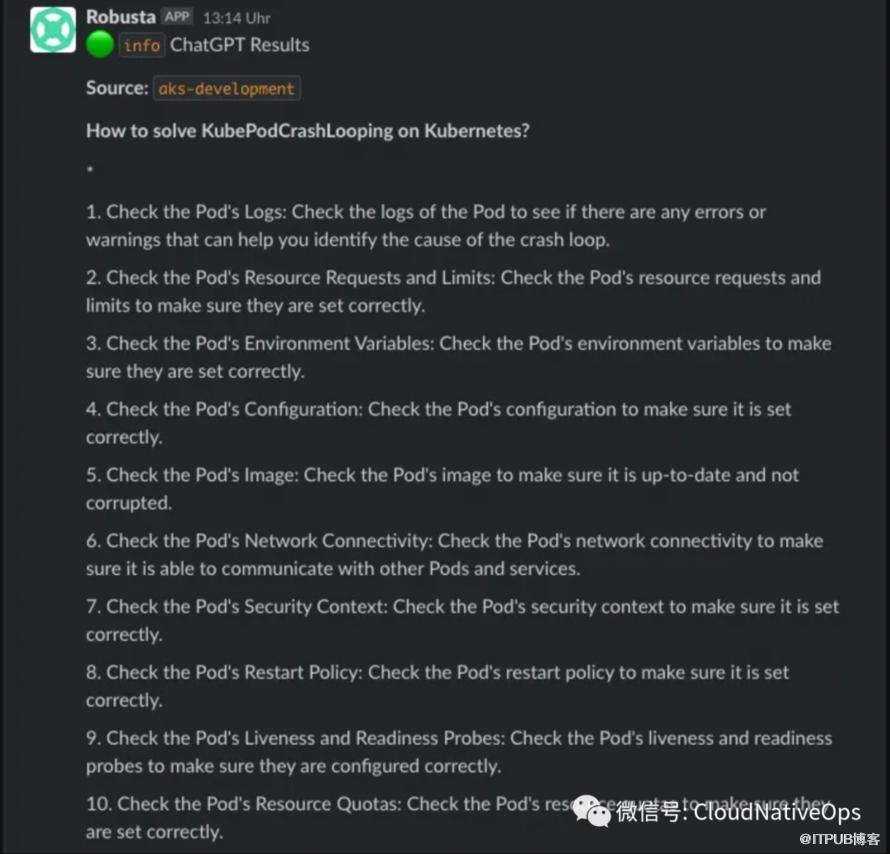
总结
所以我们可以把 Robusta 简单地认为是这样一个软件:
-
基于 k8s 的自动化引擎
-
内置自动化来丰富和修复常见警报
-
手动故障排除工具
原文作者:云原生运维技术;如有侵权,请联系管理员删除。

