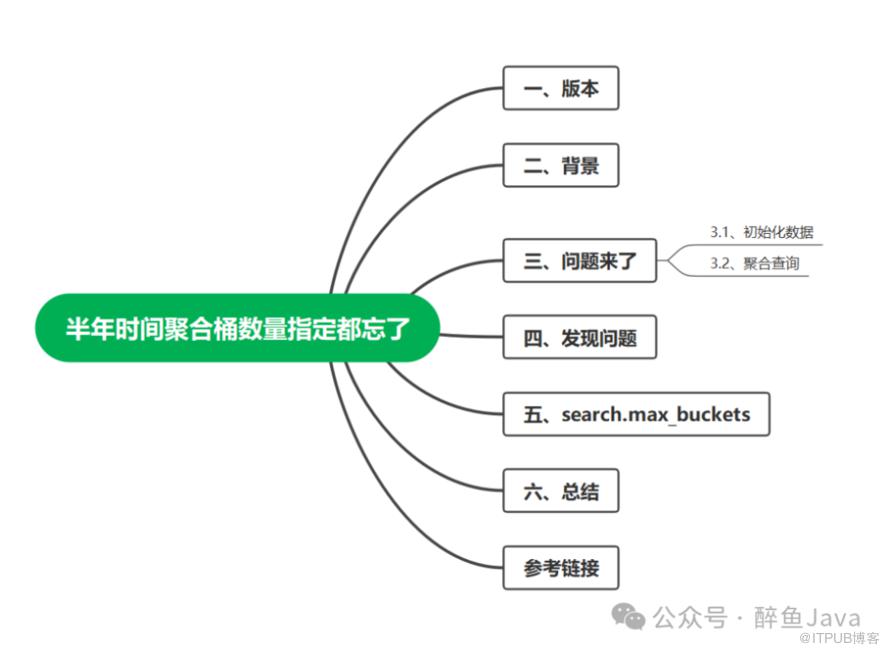
一、版本
elasticsearch 8.13
二、背景
最近接到一个需求,将 MySQL 中的数据迁移到 Elasticsearch 中,并且相关的业务接口全部切换为使用 Elasticsearch 实现。
其中有个统计的功能,先根据 group 进行分组,然后对每个组内对象的 type 值进行分组统计。
举个例子:对学生进行统计,相当于先按照班级分组,在统计每个班级里面男女生的人数。
我一想切换到 Elasticsearch 中,相当于嵌套子聚合,一个聚合查询就出来结果,半小时搞定这个接口。

三、问题来了
PUT zuiyu_index{"settings": {"number_of_replicas": 1,"number_of_shards": 1},"mappings": {"properties": {"group": {"type": "text","fields": {"keyword": {"type": "keyword","ignore_above": 256}}},"type": {"type": "long"}}}}
插入测试数据
POST _bulk{ "index" : { "_index" : "zuiyu_index", "_id" : "1" } }{ "group" : "1","type":1 ,"sort":1}{ "index" : { "_index" : "zuiyu_index", "_id" : "2" } }{ "group" : "1","type":2 ,"sort":1}{ "index" : { "_index" : "zuiyu_index", "_id" : "3" } }{ "group" : "1","type":3 ,"sort":1}{ "index" : { "_index" : "zuiyu_index", "_id" : "4" } }{ "group" : "2","type":1 ,"sort":1}{ "index" : { "_index" : "zuiyu_index", "_id" : "5" } }{ "group" : "2","type":1 ,"sort":1}{ "index" : { "_index" : "zuiyu_index", "_id" : "6" } }{ "group" : "2","type":1 ,"sort":1}{ "index" : { "_index" : "zuiyu_index", "_id" : "7" } }{ "group" : "3","type":2 ,"sort":1}{ "index" : { "_index" : "zuiyu_index", "_id" : "8" } }{ "group" : "4","type":1 ,"sort":1}{ "index" : { "_index" : "zuiyu_index", "_id" : "9" } }{ "group" : "5","type":1 ,"sort":1}{ "index" : { "_index" : "zuiyu_index", "_id" : "10" } }{ "group" : "6","type":1 ,"sort":1}{ "index" : { "_index" : "zuiyu_index", "_id" : "11" } }{ "group" : "7","type":1 ,"sort":1}{ "index" : { "_index" : "zuiyu_index", "_id" : "12" } }{ "group" : "8","type":1 ,"sort":1}{ "index" : { "_index" : "zuiyu_index", "_id" : "13" } }{ "group" : "9","type":1 ,"sort":1}{ "index" : { "_index" : "zuiyu_index", "_id" : "14" } }{ "group" : "10","type":1 ,"sort":1}{ "index" : { "_index" : "zuiyu_index", "_id" : "15" } }{ "group" : "10","type":2 ,"sort":1}{ "index" : { "_index" : "zuiyu_index", "_id" : "16" } }{ "group" : "11","type":1 ,"sort":1}{ "index" : { "_index" : "zuiyu_index", "_id" : "17" } }{ "group" : "11","type":3 ,"sort":1}
像这种简单的一条 sql 就出来结果的业务,我一般都是先写个 sql 语句,然后根据 sql 再写代码。所以这里我就先写了个DSL语句。
GET zuiyu_index/_search{"aggregations": {"agg_group": {"aggregations": {"agg_type": {"terms": {"field": "type"}}},"terms": {"field": "group.keyword"}}},"query": {"bool": {"must": [{"terms": {"group.keyword": ["1","2","3","4","5","6","7","8","9","10","11"]}}]}},"size":0}
同学们可以看一下上面的语句有问题吗,如果你能发现问题,那么这篇文章也希望你能看下去,也许会有意想不到的收获。
提示一下:就像标题所说,可以关心一下聚合桶的数量。
四、发现问题
上述 DSL 语句执行之后,大眼一看 ,结果 OK,是我想要的,那就按这个逻辑直接写 Java 代码。上述 DSL 语句中聚合操作对应的 Java 代码如下:
Aggregation aggType = Aggregation.of(agg -> agg.terms(t -> t.field("type")));Aggregation aggGroup = Aggregation.of(agg -> agg.terms(t -> t.field("group")).aggregations("agg_type", aggType));
做接口数据层的迁移,最简单的就是修改完业务代码之后直接对比返回结果,保持返回结果的一致,这样的修改对于前端来说没有影响。
所以,修改完代码之后直接拿接口的返回值与修改之前的版本进行比对,验证业务逻辑是否一致。直接 F12 控制台,找到该接口的返回值,复制,粘贴到对比工具中,进行对比。
此处使用的对比工具是 Beyond Compare 。
通过对比返回结果发现,聚合桶的数量少了一个。
上面的例子中,我们的预期结果是,最外层 group 的分组最少11个,排除 group 不存在的情况。这里 terms 中条件 group 在索引中都已存在。
然后我就赶紧再去执行了一遍上面 DSL 语句,一个一个的验证聚合桶,发现返回结果中竟然没有 group=9 的桶存在。
DSL 返回结果如下
{"took": 2,"timed_out": false,"_shards": {"total": 1,"successful": 1,"skipped": 0,"failed": 0},"hits": {"total": {"value": 17,"relation": "eq"},"max_score": null,"hits": []},"aggregations": {"agg_group": {"doc_count_error_upper_bound": 0,"sum_other_doc_count": 1,"buckets": [{"key": "1","doc_count": 3,"agg_type": {"doc_count_error_upper_bound": 0,"sum_other_doc_count": 0,"buckets": [{"key": 1,"doc_count": 1},{"key": 2,"doc_count": 1},{"key": 3,"doc_count": 1}]}},{"key": "2","doc_count": 3,"agg_type": {"doc_count_error_upper_bound": 0,"sum_other_doc_count": 0,"buckets": [{"key": 1,"doc_count": 3}]}},{"key": "10","doc_count": 2,"agg_type": {"doc_count_error_upper_bound": 0,"sum_other_doc_count": 0,"buckets": [{"key": 1,"doc_count": 1},{"key": 2,"doc_count": 1}]}},{"key": "11","doc_count": 2,"agg_type": {"doc_count_error_upper_bound": 0,"sum_other_doc_count": 0,"buckets": [{"key": 1,"doc_count": 1},{"key": 3,"doc_count": 1}]}},{"key": "3","doc_count": 1,"agg_type": {"doc_count_error_upper_bound": 0,"sum_other_doc_count": 0,"buckets": [{"key": 2,"doc_count": 1}]}},{"key": "4","doc_count": 1,"agg_type": {"doc_count_error_upper_bound": 0,"sum_other_doc_count": 0,"buckets": [{"key": 1,"doc_count": 1}]}},{"key": "5","doc_count": 1,"agg_type": {"doc_count_error_upper_bound": 0,"sum_other_doc_count": 0,"buckets": [{"key": 1,"doc_count": 1}]}},{"key": "6","doc_count": 1,"agg_type": {"doc_count_error_upper_bound": 0,"sum_other_doc_count": 0,"buckets": [{"key": 1,"doc_count": 1}]}},{"key": "7","doc_count": 1,"agg_type": {"doc_count_error_upper_bound": 0,"sum_other_doc_count": 0,"buckets": [{"key": 1,"doc_count": 1}]}},{"key": "8","doc_count": 1,"agg_type": {"doc_count_error_upper_bound": 0,"sum_other_doc_count": 0,"buckets": [{"key": 1,"doc_count": 1}]}}]}}}
到了这,其实我还没想到是什么原因造成的,然后看了好几遍的聚合语句,都没有发现问题。一度的自我怀疑,聚合不是这样用的吗,嵌套的聚合难道还有花样?
查阅官方文档
官方文档肯定是最权威的,所以去官方文档看看吧,是不是可以给自己点灵感,找到解决方案。
首先去的是如下地址:
https://www.elastic.co/guide/en/elasticsearch/reference/current/search-aggregations.html#run-sub-aggs

官方给的代码示例好简单,确实没毛病,对我没啥启发,告辞转下个网页。
还是这个网页,回到页面顶端,有一个 Bucket 字样的地方,点进去。

https://www.elastic.co/guide/en/elasticsearch/reference/current/search-aggregations-bucket.html
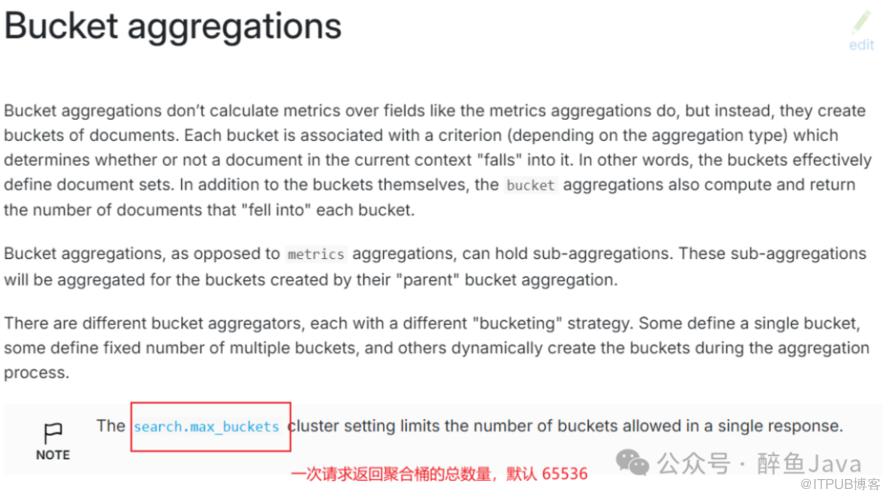
在这个页面,发现可以通过 search.max_buckets 设置请求返回聚合桶的总数,然后我脑海中那丢失的记忆回来了。
想起了在 Elasticsearch 聚合时,聚合桶的返回数量是可以指定的,但是怎么指定,参数是什么,我又忘了。

但是大方向肯定是这个了,我就开始找相关的资料,翻阅官网关于聚合的文档,终于在官方文档的嵌套聚合中找到了相关的说明。
https://www.elastic.co/guide/en/elasticsearch/reference/current/search-aggregations-bucket-composite-aggregation.html#_size
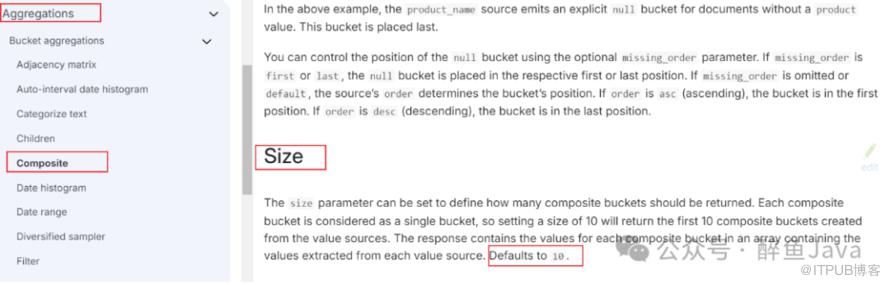
大体意思就是size参数可以控制返回聚合桶的数量,默认 10。
但是这里也没有给出示例,我还是不会用啊。
毕竟咱也是有点 ES 基础的,内心其实已经有了想法,大概知道怎么用了,只是还得需要确认下。
最后想起来之前写过关于聚合的文章,抱着试试看的态度,在回顾一下吧。
发文日期,2023年8月2日,真是老了,才半年多的时间都忘了,好了回到主题。
在这篇文档中,发现了 size 参数的使用,在这里终于确认,聚合桶数量需要指定,并且根据自己的查询条件进行设置,或直接设置一个最大值兼容自己所有的聚合请求。
所以修改之后的 DSL 语句如下:
GET zuiyu_index/_search{"aggregations": {"agg_group": {"aggregations": {"agg_type": {"terms": {"field": "type"}}},"terms": {"field": "group.keyword","size": 11}}},"query": {"bool": {"must": [{"terms": {"group.keyword": ["1","2","3","4","5","6","7","8","9","10","11"]}}]}},"size":0}
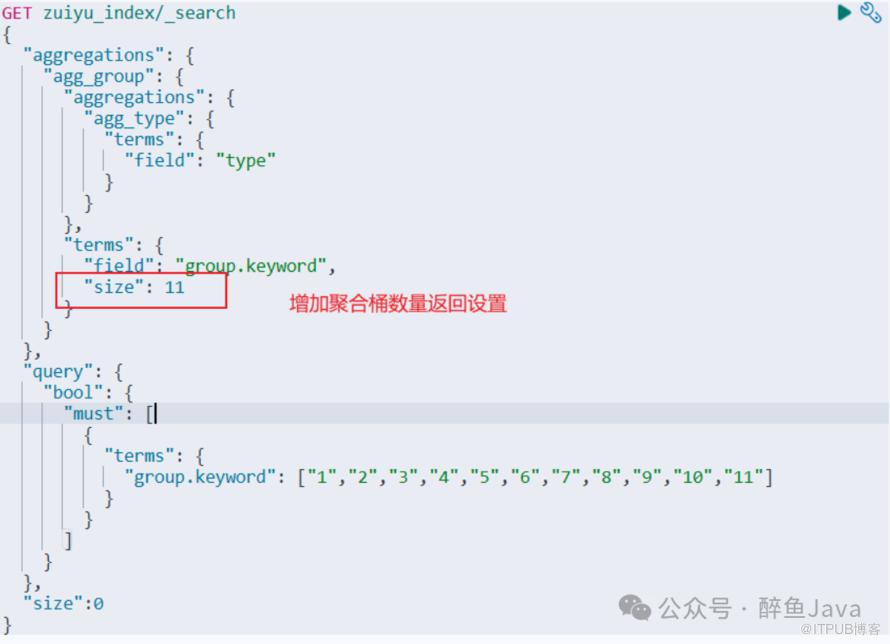
相对应的 Java 代码也修改:
Aggregation aggType = Aggregation.of(agg -> agg.terms(t -> t.field("type")));Aggregation aggGroup = Aggregation.of(agg -> agg.terms(t -> t.field("group").size(groupList.size()).aggregations("agg_type", aggType));
groupList.size() 为 terms 查询条件值的数量。
五、search.max_buckets
可以通过 _cluster 的 API 设置此参数。
PUT _cluster/settings{"transient": {"search.max_buckets":100}}
此处使用的是
transient,还可以使用persistent,他俩的区别就是transient的配置会在集群重启之后失效,persistent会持久化保存。其中这个参数在之前的索引分片分配策略一文中讲过了,还没看过的可以跳过去看一下,链接我放下面。
六、总结
本文通过 demo 示例,从发现聚合桶数量丢失,到排查产生丢失的问题,最后通过 size 参数解决聚合桶数量丢失问题的过程。
意外收获的是一次请求返回聚合桶数量的总数也是可以通过 search.max_buckets设置的。
日常的积累固然重要,熟悉官方文档中相关 API 的位置也是必不可少的。
工作中你遇到问题是如何排查的呢,会不会查阅官网文档呢?欢迎在评论区沟通交流,大家一起学习进步!
参考链接
https://www.elastic.co/guide/en/elasticsearch/reference/current/search-aggregations.html
https://www.elastic.co/guide/en/elasticsearch/reference/current/search-aggregations-bucket.html
https://www.elastic.co/guide/en/elasticsearch/reference/current/search-aggregations-bucket-composite-aggregation.html
https://mp.weixin.qq.com/s/18bz77nwgC_tF8l_jYD3CA
https://mp.weixin.qq.com/s/Rlu-GDNwnAUR3tzJYkm5Aw
👉推荐:
3、面试官:@Transactional与@Async可以同时使用吗

WX 搜索《醉鱼Java》,回复面试,获取2024面试资料。
如果这篇文章对您有所帮助或者启发,帮忙点个关注叭,您的支持是我坚持写作的最大动力。
求一键三连:点赞、转发、在看。
谢谢支持哟 (*^__^*)。
原文作者:醉鱼Java;如有侵权,请联系管理员删除。

