Flume安装及配置
Flume 提供了大量内置的 Source、Channel 和 Sink 类型。而且不同类型的 Source、Channel 和 Sink 可以自由组合—–组合方式基于配置文件的设置,非常灵活。比如:Channel 可以把事件暂存在内存里,也可以持久化到本地硬盘上。Sink 可以把日志写入 HDFS、HBase,甚至是另外一个 Source 等。
安装
下载源码包到
/usr/local/src目录下解压tar.gz包
修改配置文件,在
/usr/local/src/apache-flume-1.7.0-bin/conf目录下配置环境变量
核心配置
在
/usr/local/src/apache-flume-1.7.0-bin/conf目录下提供默认配置模板配置示例——NetCat Source:监听一个指定的网络端口,只要应用程序向这个端口里面写数据,这个 Source 组件就可以获取到数据。 其中 Sink:logger, Channel:memory 。
配置如下:
# Name the components on this agent
agent.sources = netcat
agent.channels = memoryChannel
agent.sinks = loggerSink

# configure the source
agent.sources.netcat.type = netcat
agent.sources.netcat.bind = 192.168.111.238
agent.sources.netcat.port = 8888

# Describe the sink
agent.sinks.loggerSink.type = logger

# Each channel's type is defined.
agent.channels.memoryChannel.type = memory
# It specifies the capacity of the memory channel
agent.channels.memoryChannel.capacity = 100

# Bind the source and sink to the channel
agent.sources.netcat.channels = memoryChannel
agent.sinks.loggerSink.channel = memoryChannel
运行测试
启动名字为 agent 的 Flume Agent 服务端进程
./bin/flume-ng agent -n agent -c ./conf -f ./conf/flume-netcat.properties -Dflume.root.logger=DEBUG,console
参数说明:
-n 指定 agent 名称(与配置文件中代理的名字相同)
-c 指定 Flume 中配置文件的目录
-f 指定配置文件
-Dflume.root.logger=DEBUG,console 设置日志等级
使用 telnet 发送数据
zhwye@ubuntu238:~$ telnet 192.168.111.238 8888
Trying 192.168.111.238...
Connected to 192.168.111.238.
Escape character is '^]'.
big data world
OK
服务端进程收集到的日志数据如下
...
2018-04-12 07:07:22,965 (netcat-handler-0) [DEBUG - org.apache.flume.source.NetcatSource$NetcatSocketHandler.run(NetcatSource.java:315)] Starting connection handler
2018-04-12 07:07:31,457 (netcat-handler-0) [DEBUG - org.apache.flume.source.NetcatSource$NetcatSocketHandler.run(NetcatSource.java:327)] Chars read = 16
2018-04-12 07:07:31,468 (netcat-handler-0) [DEBUG - org.apache.flume.source.NetcatSource$NetcatSocketHandler.run(NetcatSource.java:331)] Events processed = 1
2018-04-12 07:07:35,191 (SinkRunner-PollingRunner-DefaultSinkProcessor) [INFO - org.apache.flume.sink.LoggerSink.process(LoggerSink.java:95)] Event: { headers:{} body: 62 69 67 20 64 61 74 61 20 77 6F 72 6C 64 0D    big data world. }
常用配置模式
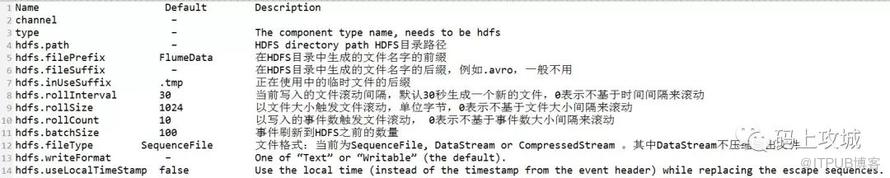
NetCat Source——HDFS Sink 配置
监听一个指定的网络端口,只要应用程序向这个端口里面写数据,这个 Source 组件就可以获取到数据。 其中 Sink:HDFS, Channel:file
配置文件
# Name the components on this agent
a1.sources = r1
a1.sinks = k1
a1.channels = c1

# Describe/configure the source
a1.sources.r1.type = netcat
a1.sources.r1.bind = 192.168.111.238
a1.sources.r1.port = 8888

# Describe the sink
a1.sinks.k1.type = hdfs
a1.sinks.k1.hdfs.path = hdfs://hadoop238:9000/dataoutput
a1.sinks.k1.hdfs.writeFormat = Text
a1.sinks.k1.hdfs.fileType = DataStream
a1.sinks.k1.hdfs.rollInterval = 10
a1.sinks.k1.hdfs.rollSize = 0
a1.sinks.k1.hdfs.rollCount = 0
a1.sinks.k1.hdfs.filePrefix = %Y-%m-%d-%H-%M-%S
a1.sinks.k1.hdfs.useLocalTimeStamp = true

# Use a channel which buffers events in file
a1.channels.c1.type = file
a1.channels.c1.checkpointDir = /usr/flume/checkpoint
a1.channels.c1.dataDirs = /usr/flume/data

# Bind the source and sink to the channel
a1.sources.r1.channels = c1
a1.sinks.k1.channel = c1
启动 Flume agent a1 服务端
flume-ng agent -n a1 -c ../conf -f ../conf/flume-hdfs.conf -Dflume.root.logger=DEBUG,console
使用 telnet 发送数据
zhwye@ubuntu238:~$ telnet 192.168.111.238 8888
Trying 192.168.111.238...
Connected to 192.168.111.238.
Escape character is '^]'.
big data world
OK
Spooling Directory Source——HDFS Sink 配置
监听一个指定的目录,只要应用程序向这个指定的目录中添加新的文件,Source 组件就可以获取到该o数据,并解析该文件的内容,然后写入到 Channle。写入完成后,标记该文件已完成或者删除该文件。 其中 Sink:HDFS, Channel:file
Property Name       Default      Description
channels              –
type                  –          The component type name, needs to be spooldir.
spoolDir              –          Spooling Directory Source监听的目录
fileSuffix         .COMPLETED    文件内容写入到channel之后,标记该文件
deletePolicy       never         文件内容写入到channel之后的删除策略: never or immediate
fileHeader         false         Whether to add a header storing the absolute path filename.
ignorePattern      ^$           Regular expression specifying which files to ignore (skip)
interceptors          –          指定传输中event的head(头信息),常用timestamp
配置文件
# Name the components on this agent
a1.sources = r1
a1.sinks = k1
a1.channels = c1

# Describe/configure the source
a1.sources.r1.type = spooldir
a1.sources.r1.spoolDir = /usr/local/datainput
a1.sources.r1.fileHeader = true
a1.sources.r1.interceptors = i1
a1.sources.r1.interceptors.i1.type = timestamp

# Describe the sink
# Describe the sink
a1.sinks.k1.type = hdfs
a1.sinks.k1.hdfs.path = hdfs://hadoop238:9000/dataoutput
a1.sinks.k1.hdfs.writeFormat = Text
a1.sinks.k1.hdfs.fileType = DataStream
a1.sinks.k1.hdfs.rollInterval = 10
a1.sinks.k1.hdfs.rollSize = 0
a1.sinks.k1.hdfs.rollCount = 0
a1.sinks.k1.hdfs.filePrefix = %Y-%m-%d-%H-%M-%S
a1.sinks.k1.hdfs.useLocalTimeStamp = true

# Use a channel which buffers events in file
a1.channels.c1.type = file
a1.channels.c1.checkpointDir = /usr/flume/checkpoint
a1.channels.c1.dataDirs = /usr/flume/data

# Bind the source and sink to the channel
a1.sources.r1.channels = c1
a1.sinks.k1.channel = c1
启动 Flume agent a1 服务端
flume-ng agent -n a1 -c ../conf -f ../conf/flume-spool-hdfs.conf -Dflume.root.logger=DEBUG,console
使用 cp 命令向 Spooling Directory 中发送数据
cp datafile /usr/local/datainput (注:datafile中的内容为:big data world!)
Spooling Directory Source的两个注意事项
1.拷贝到spool目录下的文件不可以再打开编辑
2.不能将具有相同文件名字的文件拷贝到这个目录下
Exec Source——HDFS Sink 配置
监听一个指定的命令,获取一条命令的结果作为它的数据源 常用的是
tail-F file指令,只要应用程序向日志(文件)里面写数据,Source 组件就可以获取到日志(文件)中最新的内容 。 其中 Sink:HDFS, Channel:file配置文件
# Name the components on this agent
a1.sources = r1
a1.sinks = k1
a1.channels = c1

# Describe/configure the source
a1.sources.r1.type = exec
a1.sources.r1.command = tail -F /usr/local/log.file

# Describe the sink
a1.sinks.k1.type = hdfs
a1.sinks.k1.hdfs.path = hdfs://hadoop238:9000/dataoutput
a1.sinks.k1.hdfs.writeFormat = Text
a1.sinks.k1.hdfs.fileType = DataStream
a1.sinks.k1.hdfs.rollInterval = 10
a1.sinks.k1.hdfs.rollSize = 0
a1.sinks.k1.hdfs.rollCount = 0
a1.sinks.k1.hdfs.filePrefix = %Y-%m-%d-%H-%M-%S
a1.sinks.k1.hdfs.useLocalTimeStamp = true

# Use a channel which buffers events in file
a1.channels.c1.type = file
a1.channels.c1.checkpointDir = /usr/flume/checkpoint
a1.channels.c1.dataDirs = /usr/flume/data

# Bind the source and sink to the channel
a1.sources.r1.channels = c1
a1.sinks.k1.channel = c1
启动 Flume agent a1 服务端
flume-ng agent -n a1 -c ../conf -f ../conf/flume-exec-hdfs.conf -Dflume.root.logger=DEBUG,console
使用 echo 命令向 /usr/local/datainput 中发送数据
echo big data > log.file
Avro Source——HDFS Sink 配置
监听一个指定的 Avro 端口,通过 Avro 端口可以获取到 Avro Client 发送过来的文件 。只要应用程序通过 Avro 端口发送文件,Source 组件就可以获取到该文件中的内容。 其中 Sink:HDFS,Channel:file (注:Avro 和 Thrift 都是一些序列化的网络端口–通过这些网络端口可以接受或者发送信息,Avro 可以发送一个给定的文件给 Flume,是 Agent 间的通信协议)
编写配置文件
# Name the components on this agent
a1.sources = r1
a1.sinks = k1
a1.channels = c1

# Describe/configure the source
a1.sources.r1.type = avro
a1.sources.r1.bind = 192.168.111.238
a1.sources.r1.port = 4141

# Describe the sink
a1.sinks.k1.type = hdfs
a1.sinks.k1.hdfs.path = hdfs://hadoop238:9000/dataoutput
a1.sinks.k1.hdfs.writeFormat = Text
a1.sinks.k1.hdfs.fileType = DataStream
a1.sinks.k1.hdfs.rollInterval = 10
a1.sinks.k1.hdfs.rollSize = 0
a1.sinks.k1.hdfs.rollCount = 0
a1.sinks.k1.hdfs.filePrefix = %Y-%m-%d-%H-%M-%S
a1.sinks.k1.hdfs.useLocalTimeStamp = true

# Use a channel which buffers events in file
a1.channels.c1.type = file
a1.channels.c1.checkpointDir = /usr/flume/checkpoint
a1.channels.c1.dataDirs = /usr/flume/data

# Bind the source and sink to the channel
a1.sources.r1.channels = c1
a1.sinks.k1.channel = c1
启动 Flume agent a1 服务端
flume-ng agent -n a1 -c ../conf -f ../conf/flume-avro-hdfs.conf -Dflume.root.logger=DEBUG,console
使用avro-client发送文件
flume-ng avro-client -c ../conf -H 192.168.111.238 -p 4141 -F /usr/local/log.file
总结
总结 Exec Source 和 Spooling Directory Source 是两种常用的日志采集的方式,其中 Exec Source 可以对日志的实时采集,但是当 Flume 不运行或者指令执行出错时,Exec Source 将无法收集到日志数据,日志会出现丢失,从而无法保证收集日志的完整性。而 Spooling Directory Source 在对日志的实时采集上有欠缺。

原文作者:HelloTech技术派;如有侵权,请联系管理员删除。

