pandas是python中常用的数据处理库,但是其输出的数据样式比较粗糙,本文介绍如何定制pandas导出的数据样式。
StyleFrame介绍
StyleFrame是一个强大的Python包,提供了在Excel中创建、编辑和格式化大型数据集的功能。它可以使数据在Excel表格中的呈现更加美观、易读,并提供了许多灵活的选项来满足用户的需求。
安装
pip install styleframe生成数据
from styleframe import StyleFrame, Styler, utils
import pandas as  pd
df1=pd.DataFrame({'col_a': range(20),
                 'col_b': [i for i in range(20000000,20000000+20)],
                 'col_c': range(20)
                })
sf=StyleFrame(df1)
设置式样
可以设置每一列的式样、表头的式样、列宽等。
#设置每一列的配置
sf.apply_style_by_indexes(
    indexes_to_style=sf[sf['col_a'] > 10],
    cols_to_style=['col_a'],
    styler_obj=Styler(
        bg_color=utils.colors.blue,
        bold=True,
        font_size=10
    )
)
sf.apply_style_by_indexes(
    indexes_to_style=sf[sf['col_b'] > 5],
    cols_to_style=['col_b'],
    styler_obj=Styler(
        bg_color=utils.colors.grey,
        bold=True,
        font_size=10
    )
)
sf.apply_style_by_indexes(
    indexes_to_style=sf[sf['col_c'] > 10],
    cols_to_style=['col_c'],
    styler_obj=Styler(
        bg_color=utils.colors.red,
        bold=False,
        font_size=10
    )
)
###设置列宽
sf.set_column_width_dict(
                {'col_a':10,
                 'col_b':30,
                 'col_c':10,
                })
###设置表头式样
header_style =Styler(bg_color="yellow", bold=True, font_size=10)
sf.apply_headers_style(header_style)
官方文档提供了API文档介绍这些函数。
 比如颜色配置,官方提供了很多颜色选项。
导出数据
ew = StyleFrame.ExcelWriter('my_excel.xlsx')
sf.to_excel(ew)
ew.close()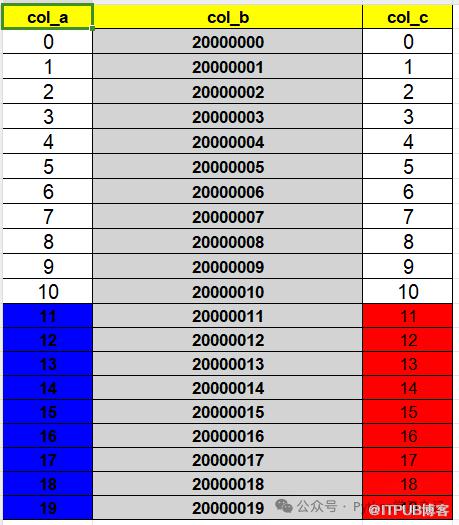
参考文档链接:
https://styleframe.readthedocs.io/en/latest/
原文作者:Python学习杂记;如有侵权,请联系管理员删除。

请登录后发表评论
登录
全部评论
