Docker in Action and Architecture
点击阅读原文可查看在线版 PPT 便于阅读
Intros
I’m Jintao Zhang
Linuxer/Vimer
And more …
Docker Overview
Why Containers
What is Docker
The history of Docker
First container
Docker in Action
Images (pull/create/build/push)
Layer
Containers (run/inspect etc.)
Dockerfile in Action
Dockerfile overview
How to use Dockerfile
Multi-stage build
Docker Architecture
Docker Internal
Docker Overview
Why Containers
Many different stacks:
languages
framworks
libs
Many different targets:
environments
dev, QA, staging, prod
Physical machine,cloud,hybrid
What is Docker
Docker provides a way to run applications securely isolated in a container, packaged with all its dependencies and libraries.
The history of Docker
2008, LXC
March 20, 2013, PyCon, dotCloud released the first version of Docker
The same year, dotCloud changes name to Docker
March, 2014, New default driver: libcontainer (Docker 0.9)
June, 2014, Docker 1.0
Mesos, Kubernetes etc
Standardization around the OCI
Docker CE 17.03 (after 1.13.1 at Feb, 2017))
First container
Hello World
In your shell, just run the command:
➜  ~ docker run hello-world

Hello from Docker!
This message shows that your installation appears to be working correctly.
...
Maybe you will see a few extra lines if your Docker install is brand new.
That was our first container
We use the
hello-worldimage.The container just say
Hello from Docker!
A more useful container
Let’s run a container
➜ ~ docker run --rm -i -t debian:9 root@51ca967672e8:/#This is a new container.
It runs a bare
Debiansystem version 9.--rmtells Docker that remove the container when it exits automatically.-itells Docker keep stdin open and connect us to the container’s stdin.-ttells Docker than we want a pseudo-TTY.
Do something in our container
Try to echo Hello and play fun with toilet command.
root@66fbe4fe71e1:/# echo Hello
Hello
root@66fbe4fe71e1:/# toilet
bash: toilet: command not found
Of course, we need to install it.
Package managemant in container
We need toilet, so let’s install it:
root@66fbe4fe71e1:/# apt update && apt install -y toilet
Get:1 http://security.debian.org/debian-security stretch/updates InRelease [94.3 kB]
...
One minute later, toilet is instaled.
Try to run toilet
The toilet takes a string as parameter. -f option to special font.
root@66fbe4fe71e1:/# toilet Docker -f mono9

 ▄▄▄▄                 █
 █   ▀▄  ▄▄▄    ▄▄▄   █   ▄   ▄▄▄    ▄ ▄▄
 █    █ █▀ ▀█  █▀  ▀  █ ▄▀   █▀  █   █▀  ▀
 █    █ █   █  █      █▀█    █▀▀▀▀   █
 █▄▄▄▀  ▀█▄█▀  ▀█▄▄▀  █  ▀▄  ▀█▄▄▀   █
It’s OK.
Compare the container and host
Enter
exitor^Dto exit our container.We can’t find
toiletcommand (if we never installed it on host).They have different, independent packages.
Where’s our container
It still exists on disk, but all compute resource have been freed up.
The container is now in a
stoppedstate.We can get back to the container.
Docker in Action
What is an Image?
Image is files.
These files form the root filesystem of our container.
Image contents
This is a debian:9‘s image.
(Tao) ➜  debian tree
.
├── 0783bfd2d1fc35d2dd7c457d9c7195ef2512acabe6ffa78fd035cece65292b0e
│   ├── json
│   ├── layer.tar
│   └── VERSION
├── 3bbb526d26083e7a65a7a112ed72e1ec58e81384412f2d3fcdbbd87d49fd588d.json
├── manifest.json
└── repositories

1 directory, 6 files
The read-write layer
+----------------------------------+
| read-write layer for container   |
|                                  |
|                                  |
+----------------------------------+
+----------------------------------+
|read only layer for image         |
|+-------------------------------+ |
|| 6bbb34566773         0 B      | |
||                               | |
|+-------------------------------+ |
|                                  |
|+-------------------------------+ |
|| 3bbb526d2608         101 M    | |
||                               | |
|+-------------------------------+ |
+----------------------------------+
Base on
debian:9docker image.Image is read only filesystem.
Images can share layers to optimize disk usage and more.
docker runstart a container from a given image.
Set of commands
Pull
(Tao) ➜  ~ docker pull debian:9
9: Pulling from library/debian
Digest: sha256:07fe888a6090482fc6e930c1282d1edf67998a39a09a0b339242fbfa2b602fff
Status: Image is up to date for debian:9
Run
(Tao) ➜  ~ docker run --rm -it --name debian debian:9
root@17bae8832e6f:/#
Build
(Tao) ➜  ~ docker commit debian local/debian:9
sha256:86fb2e51de2c8501c51d10f4839154464cba66afe69490da0723a0e0fecb2a35
Images namespaces
-
Official images
e.g.
debian,centos -
User images
e.g.
taobeier/vim,taobeier/docker -
Self-hosted images
e.g.
registry.corp.youdao.com/infraop/openjdk
Dockerfile in Action
Building images interactively
Create a container with
docker run.Do somethings, and run
docker committo commit our changes.Using
docker tagto set images namespaces and name.
Docker tracks filesystem changes
As explained before:
An image is read-only.
Every changes happen in a copy of the image.
We can use
docker diffto show difference between the image and its copy.For performance, Docker uses copy-on-write systems.
When we want to make other changes
Create a new container base on the exist image.
Do somethings and commit our changes.
We don’t know everything about it.
How can we improve this?
Automated process.
A
Dockerfileis a text document that contains all the commands a user could call on the command line to assemble an image.
Dockerfile in Action
Dockerfile overview
A
Dockerfileis a text document.It contains somethings about how an image is constructed.
We can use
docker buildcommand build an image fromDockerfile.
How to use it
A Dockerfile need to be a empty directory.
Create a new directory.
(Tao) ➜ ~ mkdir new-imageCreate a
Dockerfileinside this directory.
(Tao) ➜  ~ cd new-image
(Tao) ➜  new-image vim Dockerfile
The simplest usage
FROM debian:9

RUN apt update
RUN apt install -y toilet
A
Dockerfilemust start with aFROMinstruction.The
FROMinstruction specifies the Base Image from which you are building.The
RUNinstruction will execute any commands in a new layer on top of the current image and commit the results.
Build it
(Tao) ➜ new-image docker build -t local/toilet .-tindicates the tag to apply to the image..indicates the build location of the build context.
What happens
(Tao) ➜  new-image docker build -t local/toilet .
Sending build context to Docker daemon  2.048kB
Step 1/3 : FROM debian:9
 ---> f2aae6ff5d89
Step 2/3 : RUN apt update
 ---> Running in 677466dc02b1
...
Removing intermediate container 677466dc02b1
 ---> 49f7109e9c21
Step 3/3 : RUN apt install -y toilet
 ---> Running in 3d9dc635fd20
Setting up toilet (0.3-1.1) ...
...
Removing intermediate container 3d9dc635fd20
 ---> d8d2a8171e93
Successfully built d8d2a8171e93
Successfully tagged local/toilet:latestThe build cache system
If you run this build again, what happens?
(Tao) ➜  new-image docker build -t local/toilet .
Sending build context to Docker daemon  2.048kB
Step 1/3 : FROM debian:9
 ---> f2aae6ff5d89
Step 2/3 : RUN apt update
 ---> Using cache
 ---> 49f7109e9c21
Step 3/3 : RUN apt install -y toilet
 ---> Using cache
 ---> d8d2a8171e93
Successfully built d8d2a8171e93
Successfully tagged local/toilet:latest
History of image
(Tao) ➜  new-image docker history local/toilet:latest
IMAGE               CREATED             CREATED BY                                      SIZE                COMMENT
d8d2a8171e93        25 minutes ago      /bin/sh -c apt install -y toilet                4.36MB
49f7109e9c21        25 minutes ago      /bin/sh -c apt update                           16.2MB
f2aae6ff5d89        4 days ago          /bin/sh -c #(nop)  CMD ["bash"]                 0B
<missing>           4 days ago          /bin/sh -c #(nop) ADD file:58d5c21fcabcf1eec…   101MB
Two forms
RUN <command>(shell form, the command is run in a shell, which by default is/bin/sh -con Linux orcmd /S /Con Windows)RUN ["executable", "param1", "param2"](exec form)
Parser directives
escape
# escape=`

FROM microsoft/nanoserver
COPY testfile.txt c:\

RUN dir c:\
CMD and ENTRYPOINT
The CMD instruction has three forms:
CMD ["executable","param1","param2"](exec form, this is the preferred form)CMD ["param1","param2"](as default parameters to ENTRYPOINT)CMD command param1 param2(shell form)
There can only be one CMD instruction in a Dockerfile.
ENTRYPOINT has two forms:
ENTRYPOINT ["executable", "param1", "param2"](exec form, preferred)ENTRYPOINT command param1 param2(shell form)
The ENTRYPOINT same as CMD. Only the last one will take effect.
Multi-stage builds
Each stage is a separate image, and can copy files from previous stages.
Each stage is numbered, starting at 0.
FROM debian AS builder
LABEL maintainer="Jintao Zhang <zhangjintao9020@gmail.com>"
...

RUN ./configure \
       --with-compiledby="Jintao Zhang <zhangjintao9020@gmail.com>" \
    && make \
    && make install

FROM debian

COPY --from=builder /usr/local/bin/ /usr/local/bin
...

ENTRYPOINT [ "executable" ]
CMD [ "--help" ]
Docker Architecture
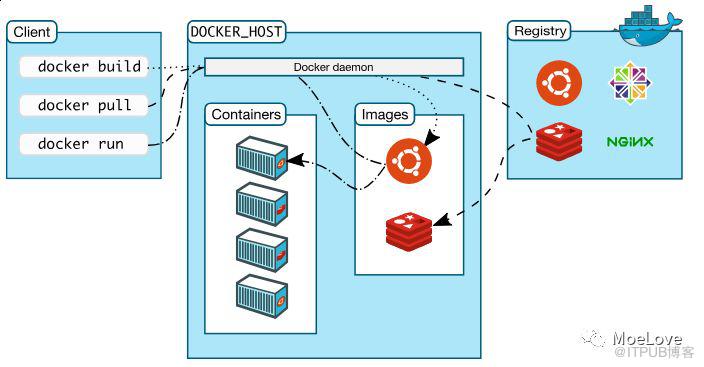
Docker Engine
—
Client - docker(CLI)
—
REST API - Over UNIX sockets or a network interface
—
Server - dockerd
docker version
(Tao) ➜  ~ docker version
Client:
 Version:      17.06.0-ce
 API version:  1.30
 Go version:   go1.8.3
 Git commit:   02c1d87
 Built:        Fri Jun 23 21:15:15 2017
 OS/Arch:      linux/amd64

Server:
 Version:      dev
 API version:  1.39 (minimum version 1.12)
 Go version:   go1.10.3
 Git commit:   e8cc5a0b3
 Built:        Tue Sep 11 02:09:53 2018
 OS/Arch:      linux/amd64
 Experimental: false
Docker Engine architecture
All tools
List all tools about docker.
(Tao) ➜  ~ ls /usr/bin |grep docker
docker  # docker clidocker-containerd
docker-containerd-ctr  # containerd clidocker-containerd-shim
dockerd
docker-init  # init injectsdocker-proxy
docker-runc
Docker Engine internal
                     +-------------------------+
                     |      dockerd            |
                     +-------------------------+
                                |
                     +-------------------------+
                     |      containerd         |
                     +-------------------------+
                         |                 |
               +---------------+     +---------------+
               |containerd-shim|     |containerd-shim|
               +---------------+     +---------------+
                       |                     |
               +---------------+     +---------------+
               |     runc      |     |     runc      |
               +---------------+     +---------------+
Q&A
可以通过下面二维码订阅我的文章公众号【MoeLove】

原文作者:MoeLove;如有侵权,请联系管理员删除。

