frida hook Windows程序
前言
最近在看frida的使用,就阅读了一下官方文档在此记录一下。此篇内容:https://frida.re/docs/functions/
内容讲的是用frida hook C语言编写的控制台程序,我用的C编译器Dev C++: https://wwx.lanzoui.com/iIEQlmddw7c
第一个例子:hello.exe
exe代码,将这个代码命名为hello.c用dev打开编译一下会生成hello.exe。打开让他一直运行,并记录打印的f函数地址
#include <stdio.h>
#include <unistd.h>

void f(int n)
{
  printf ("Number: %d\n", n);
}

int main(int argc, char * argv[])
{
  int i = 0;
  printf ("f() is at %p\n", f);
  while (1)
  {
    f (i++);
    sleep (1);
  }
}
hook 获取函数参数
也可以获取函数返回值,onEnter下面加个onLeave就行。将下面的代码命名为hooktest1.py
from __future__ import print_function
import frida
import sys

#device = frida.get_device_manager().enumerate_devices()
local = frida.get_local_device()
# a = local.get_process('hello.exe')
# print(a)
session = local.attach("hello.exe")
script = session.create_script("""
Interceptor.attach(ptr("%s"), {
    onEnter: function(args) {
        send(args[0].toInt32());
    }
});
""" % int(sys.argv[1], 16))
def on_message(message, data):
    print(message)
script.on('message', on_message)
script.load()
sys.stdin.read()
接着命令行运行python hooktest1.py f函数地址,f函数地址为hello.exe打印的函数地址。你会发现函数参数会被打印的终端,说明hook成功了。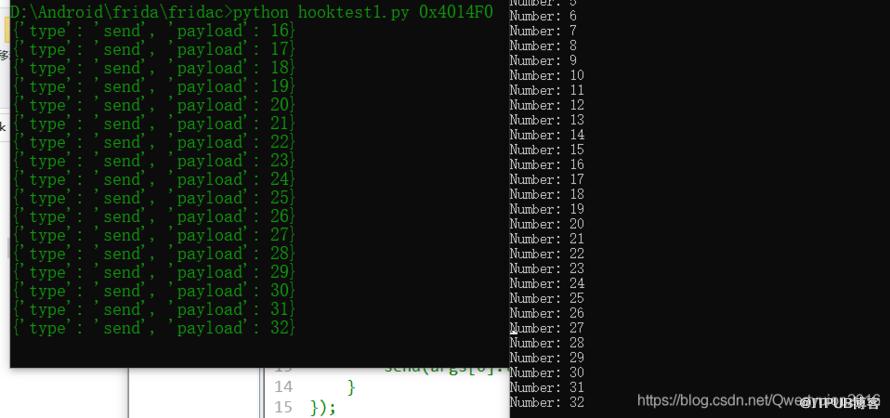
hook修改参数
modifytest1.py
import frida
import sys

session = frida.attach("hello.exe")
script = session.create_script("""
Interceptor.attach(ptr("%s"), {
    onEnter: function(args) {
        args[0] = ptr("1337");
    }
});
""" % int(sys.argv[1], 16))
script.load()
sys.stdin.read()
接着命令行运行python modifytest1.py f函数地址,你会发现hello.exe打印的内容变成了1337,不在的递增了。当你Ctrl+C停止py脚本的时候,打印的内容又是原来的内容。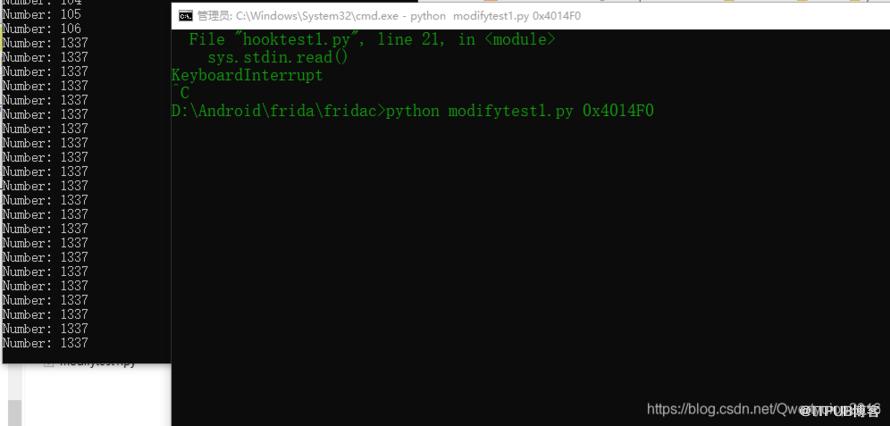
hook调用函数
calltest1.py
import frida
import sys

session = frida.attach("hello.exe")
script = session.create_script("""
var f = new NativeFunction(ptr("%s"), 'void', ['int']);
f(1911);
f(1911);
f(1911);
""" % int(sys.argv[1], 16))
script.load()
接着命令行运行python calltest1.py f函数地址,你会发现hello.exe多打印了三个1911。很明显NativeFunction这个对象就是调用其他程序的函数,第一个参数为函数地址,第二个参数为函数返回值,第三个参数为函数参数列表。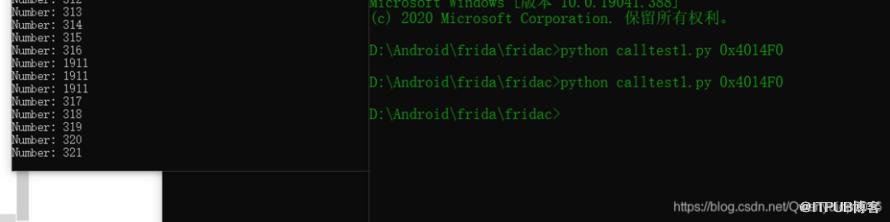
第二个例子:hi.exe
c语言代码,和第一个例子的唯一区别只是f函数的参数变成了字符串
#include <stdio.h>
#include <unistd.h>

int f(const char * s)
{
  printf ("String: %s\n", s);
  return 0;
}

int main(int argc, char * argv[])
{
  const char * s = "Testing!";

  printf ("f() is at %p\n", f);
  printf ("s is at %p\n", s);

  while (1)
  {
    f (s);
    sleep (1);
  }
}
hook修改字符串
from __future__ import print_function
import frida
import sys

session = frida.attach("hi.exe")
script = session.create_script("""
//创建字符串对象
var st = Memory.allocUtf8String("TESTMEPLZ!");
var f = new NativeFunction(ptr("%s"), 'int', ['pointer']);
//调用函数
f(st);
""" % int(sys.argv[1], 16))
def on_message(message, data):
    print(message)
script.on('message', on_message)
script.load()
和上面一样的运行,一样的效果,只是需要在js代码中自定义字符串对象。
其他
官网还有个例子是hook修改socket连接端口,不过给的C代码是运行在Linux系统的。我也不懂C,就无法测试了。
原文作者:Python成长路;如有侵权,请联系管理员删除。

