100行代码爬取招聘职位数据
一、背景
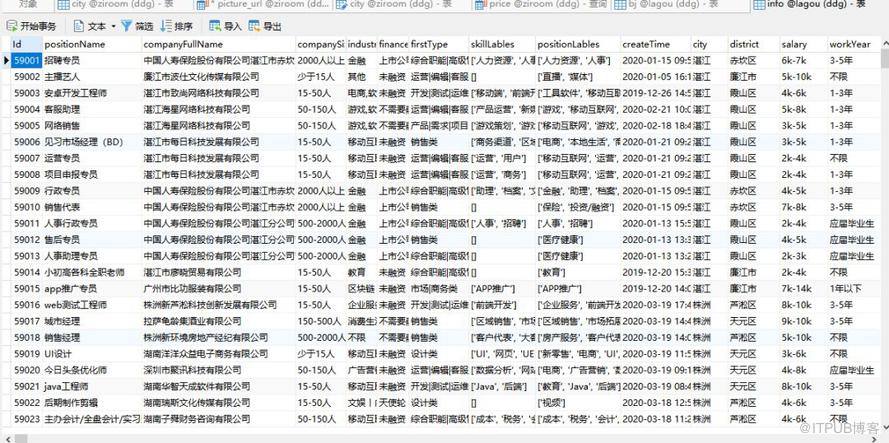
二、分析网页结构

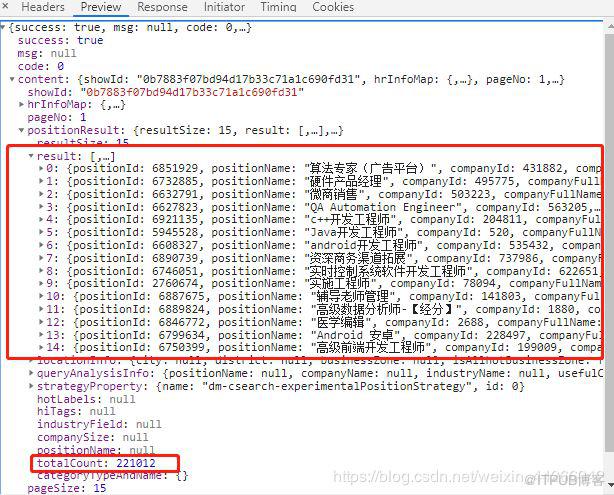
4. 点进去就能看到header信息
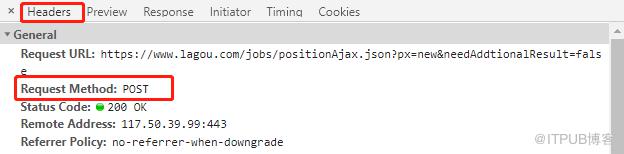

5. 可以发现是一个post。request_url, 就是请求 ajax 文件的 url。formdata中可以看到, 请求参数有 first 测试后发现保持默认即可,pn 是页码数,kd 是关键词,可以是城市,职位,公司。
6. 观察 Cookie

在 user_trace_token 中很容易看出 20200224125912 这部分是时间戳,后面的部分则是 UUID,所以拉勾的cookie 是不断变化的,不能直接复制浏览器中的 cookie。
我采用的方法是先请求这个URL:https://www.lagou.com/jobs/list_/p-city_0?px=new,携带返回的 cookie,再去请求请求 ajax 文件的 url
代码
def get_url(keyword,pn):# 浏览器地址栏显示的urlweb_url = "https://www.lagou.com/jobs/list_/p-city_0?px=new"# ajax 请求地址headers_url = "https://www.lagou.com/jobs/positionAjax.json?px=new&needAddtionalResult=false"headers = {"Accept": "application/json, text/javascript, */*; q=0.01","Referer": web_url,"User-Agent": "Mozilla/5.0 (Windows NT 10.0; WOW64) AppleWebKit/537.36 (KHTML, like Gecko) Chrome/74.0.3729.169 Safari/537.36"}form_data = {"first": "true","pn": "{}".format(pn),"kd": "{}".format(keyword)}# 创建 cookie 对象session = requests.Session()# 发送请求,获得cookiessession.get(url=web_url,headers=headers)# 传递 cookieresponse = session.post(url=headers_url, headers=headers, data=form_data)return response
到这里,爬拉勾的难点就已经没有了,接下来从 JSON 中提取我们需要的信息就ok了。
三、代码实现
1. 导入相关库
import requestsimport jsonfrom tqdm import trange # pip install trange 进度条import pymysqlfrom pymysql import cursor
2. 得到总页数
def total_Count(response):html = response.json()# print(page)total_count = html['content']['positionResult']['totalCount'] # totalCount为总个数pn_count = int(total_count)//15 + 1# 页数print('职位总数{},共{}页'.format(total_count,pn_count))return pn_count
3. 提取数据,并存入MySQL数据库
dbparams = {'host': '127.0.0.1','port': 3306,'user': 'root','password': '1234','database': 'lagou','charset': 'utf8','cursorclass': cursors.DictCursor}def parse_url(response):# 创建连接con= pymysql.connect(**dbparams)with con.cursor() as cursor:json_data = json.loads(response.text)results = json_data['content']['positionResult']['result']for result in results:info = {"positionName" : result["positionName"],"companyFullName" : result["companyFullName"],"companySize" : result["companySize"],"industryField" : result["industryField"],"financeStage" : result["financeStage"],"firstType" : result["firstType"],"skillLables" :str(result["skillLables"]),"positionLables" : str(result["positionLables"]),"createTime" : result["createTime"],"city" : result["city"],"district" : result["district"],"salary" : result["salary"],"workYear" : result["workYear"],"jobNature" : result["jobNature"],"education" :result["education"],"positionAdvantage" : result["positionAdvantage"]}sql = """INSERT INTO info(Id, positionName, companyFullName,companySize,industryField,financeStage,firstType,skillLables,positionLables,createTime,city,district,salary,workYear,jobNature,education,positionAdvantage)VALUES (null,%s, %s, %s, %s, %s,%s, %s, %s, %s, %s,%s, %s, %s, %s, %s,%s)"""cursor.execute(sql, (info['positionName'],info['companyFullName'],info['companySize'],info['industryField'],info['financeStage'],info['firstType'],info['skillLables'],info['positionLables'],info['createTime'],info['city'],info['district'],info['salary'],info['workYear'],info['jobNature'],info['education'],info['positionAdvantage']))con.commit()con.close()# 返回结果return results
3. 实现翻页
def main():# keyword = input('输入城市, 职位或公司, 如果为空,则代表全国各城市职位 \n') #输入搜索内容# 我将拉勾网包含的城市抓取下来,存在了city.txt文件中file = open("city.txt",encoding='utf8')for city in file.readlines(): # 读取城市, 也可以注释掉这行代码,用关键词输入keyword=city.strip('\n')print(keyword)response = get_url(keyword,pn=1)num = total_Count(response) # 获得数据总个数和页数for i in trange(1,int(num)+1): # 实现翻页效果response = get_url(keyword, pn=i)results = parse_url(response)# 测试的时候发现可以得到的总页数,但是最多只能抓取到200页# 所以判断如果结果为空就结束循环# print(results)if results == []:break
四、总结
网上说有封 IP 的现象,但是我没遇到,爬取的时候也没有设置延迟,只是一个关键词下的职位最多只能爬取200页。整个过程相对容易,我爬了拉钩网中所有城市,一共6w+数据。速度是有点慢,有兴趣的可以自己改成多线程,或者用 scrapy 实现。
项目总体介绍和结果展示在今天的第 1 条推送文章中。
获取完整代码,请在公众号(Crossin的编程教室)的回复关键字 房租
公众号:动物呓语

原文作者:Crossin的编程教室;如有侵权,请联系管理员删除。
上一篇:
scrapy 爬取网上租房信息

请登录后发表评论
登录
全部评论
